
SKMEI 2243
SKMEI Digital Sports Watch Model 2243 Instruction Manual
Your guide to operating and maintaining your SKMEI watch.
Introduction
Thank you for choosing the SKMEI Digital Sports Watch Model 2243. This watch combines analog and digital displays with multiple functions designed for active lifestyles. Please read this manual carefully to understand the features and proper operation of your new timepiece.

Image: Front view of the SKMEI Digital Sports Watch Model 2243, showcasing its analog and digital display.
Watch Components and Buttons
Familiarize yourself with the watch's buttons and their primary functions:
- Light Button (Top Left): Activates the EL backlight for illumination.
- Mode Button (Bottom Left): Cycles through different modes (Time, Chronograph, Alarm, Countdown, World Time).
- Start/Stop Button (Top Right): Used to start/stop functions in Chronograph mode, and adjust settings.
- Reset Button (Bottom Right): Used to reset functions in Chronograph mode, and adjust settings.

Image: Angled view of the watch highlighting the four control buttons on the sides of the case.

Image: Diagram illustrating the Start/Stop, Light, Mode, and Reset buttons on the watch case.
Setup
1. Initial Time and Date Setting
- In normal time mode, press the Mode Button repeatedly until the digital display shows the time setting interface (usually indicated by flashing digits).
- Use the Start/Stop Button to select the digit or setting you wish to adjust (e.g., seconds, hour, minute, year, month, day).
- Use the Reset Button to increase the value of the selected digit. Hold to rapidly advance.
- Once all settings are correct, press the Mode Button to exit the setting mode.
2. Analog Hand Adjustment
The analog hands are typically synchronized with the digital time. If they are out of sync:
- In normal time mode, press and hold the Mode Button for several seconds until the analog setting mode is activated (this may vary by model, refer to specific on-screen prompts).
- Use the Start/Stop Button or Reset Button to move the analog hands forward or backward until they match the digital time.
- Press the Mode Button to confirm and exit.
3. 12/24 Hour Format
In time setting mode, when the hour digits are flashing, press the Reset Button to toggle between 12-hour (with AM/PM indicator) and 24-hour formats.
Operating Instructions
1. Chronograph (Stopwatch)
- Press the Mode Button until 'STW' or 'CHRONO' appears on the digital display.
- Press the Start/Stop Button to start the stopwatch.
- Press the Start/Stop Button again to pause.
- Press the Reset Button to reset the stopwatch to zero.
2. Alarm Function (Up to 5 Alarms)
- Press the Mode Button until 'ALM' appears on the digital display.
- Press the Start/Stop Button to select the alarm number (AL1, AL2, etc.).
- Press and hold the Reset Button to enter alarm setting mode (digits will flash).
- Use the Start/Stop Button to select hours or minutes.
- Use the Reset Button to adjust the time.
- Press the Mode Button to exit setting mode.
- To turn an alarm ON/OFF, in alarm mode, press the Start/Stop Button to select the alarm, then press the Reset Button to toggle its status.
3. Countdown Timer
- Press the Mode Button until 'TMR' or 'CD' appears on the digital display.
- Press and hold the Reset Button to enter countdown setting mode.
- Use the Start/Stop Button to select hours, minutes, or seconds.
- Use the Reset Button to adjust the time.
- Press the Mode Button to exit setting mode.
- Press the Start/Stop Button to start or pause the countdown.
- When paused, press the Reset Button to reset the timer to its initial set time.
4. World Time
- Press the Mode Button until 'WT' or 'WORLD' appears on the digital display.
- Use the Start/Stop Button or Reset Button to cycle through different time zones.
5. EL Backlight
Press the Light Button (Top Left) to illuminate the digital display for a few seconds in low-light conditions.

Image: The watch display illuminated by the EL backlight, showing clear visibility in the dark.
Water Resistance
This watch is rated 50M water resistant. This means it is suitable for handwashing, rain, and short swimming sessions. It is not suitable for diving, snorkeling, or hot water activities (e.g., hot showers, saunas) as steam can penetrate the seals.
- Do not operate buttons while the watch is submerged in water.
- Ensure the crown (if present) is pushed in completely before exposure to water.

Image: The watch partially submerged in water, demonstrating its 50M water resistance capability.
Maintenance
1. Cleaning
Wipe the watch case and strap regularly with a soft, dry cloth. For silicone straps, a damp cloth with mild soap can be used, followed by thorough drying.
2. Battery Replacement
The watch uses a C battery (included). When the display dims or functions become erratic, it may be time for a battery replacement. It is recommended to have the battery replaced by a qualified watch technician to ensure proper sealing and maintain water resistance.
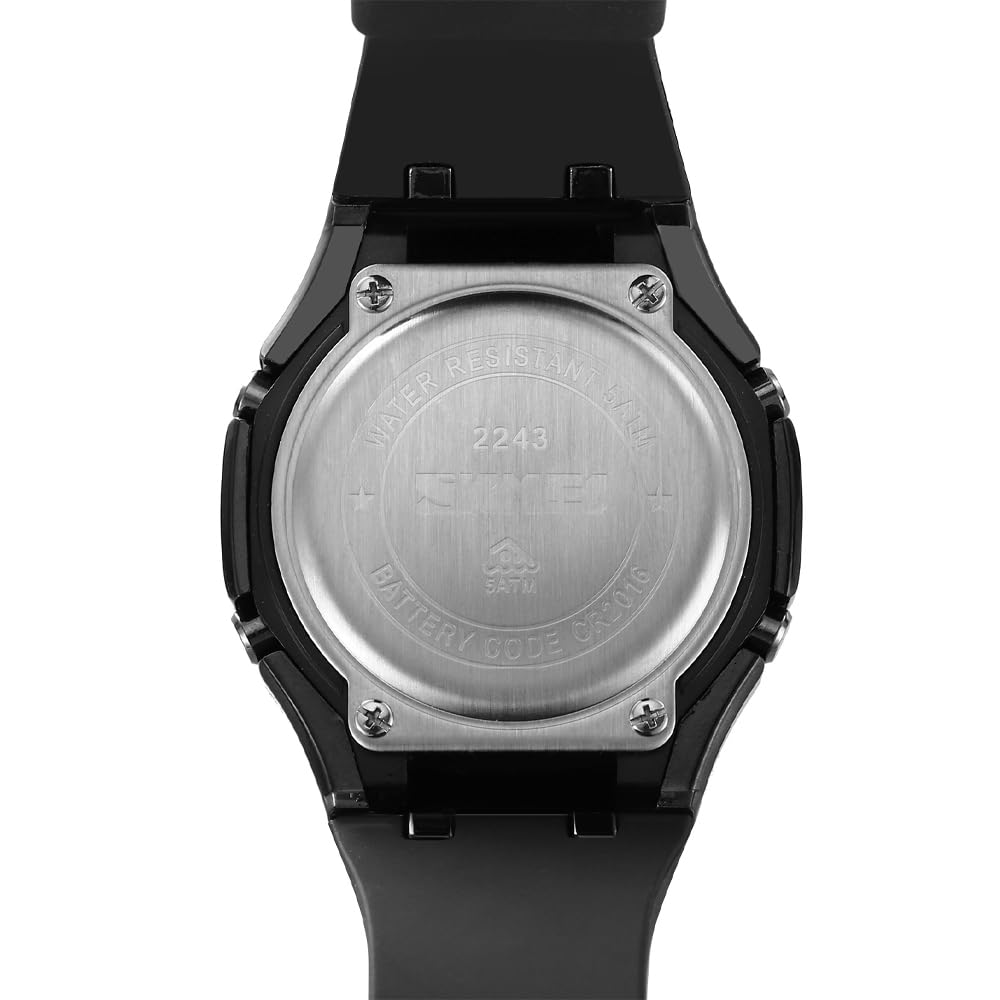
Image: The stainless steel back cover of the watch, indicating the battery code and water resistance rating.

Image: Detailed view of the watch's stainless steel back cover, emphasizing its quality and construction.
3. Storage
When not in use for extended periods, store the watch in a cool, dry place away from direct sunlight and extreme temperatures.
Troubleshooting
- Digital Display is Blank: Check battery. If new, ensure battery is correctly installed.
- Analog Hands Not Matching Digital Time: Follow the analog hand adjustment procedure in the Setup section.
- Buttons Unresponsive: A soft reset may be required. In some cases, removing and reinserting the battery can resolve this (seek professional help).
- Water Inside Watch: Immediately take the watch to a professional watch repair service. Do not attempt to dry it yourself.
Specifications
| Feature | Detail |
|---|---|
| Model Number | 2243 |
| Display Type | Analog-Digital |
| Case Material | ABS + Zinc Alloy |
| Strap Material | Silica Gel (Silicone) |
| Case Diameter | 44.7 mm |
| Case Thickness | 13.5 mm |
| Strap/Lug Width | 26 mm |
| Water Resistance | 50M (5 ATM) |
| Movement Type | Quartz |
| Battery Type | 1 C battery (included) |
| Item Weight | 76.2 g |

Image: Visual representation of the watch's dimensions, including case height, width, and strap width.

Image: Close-up of the watch face, emphasizing the scratch-proof hardness glass for clarity and protection.

Image: Close-up of the watch's secure and comfortable clasp mechanism.
Warranty and Support
Warranty Information
This SKMEI watch comes with a 6-month limited warranty from the date of purchase. The warranty covers manufacturing defects under normal use. It does not cover damage resulting from improper use, accidents, unauthorized repairs, or normal wear and tear.
Customer Support
For any questions, technical assistance, or warranty claims, please contact SKMEI customer support through the retailer where the watch was purchased or visit the official SKMEI website for contact information.
Ask a question about this manual
Ask about setup, troubleshooting, compatibility, parts, safety, or missing instructions. Manuals+ will review the question and use this page’s manual context to help answer it.