1. Introduction
This manual provides comprehensive instructions for the Podofo DAB/DAB+ Digital Radio Receiver Adapter. Designed for seamless integration with Android car radios, this device allows you to enjoy high-quality digital audio broadcasting (DAB/DAB+) in your vehicle. This guide covers product overview, setup, operation, maintenance, troubleshooting, and technical specifications to ensure optimal performance and user experience.
2. Product Overview
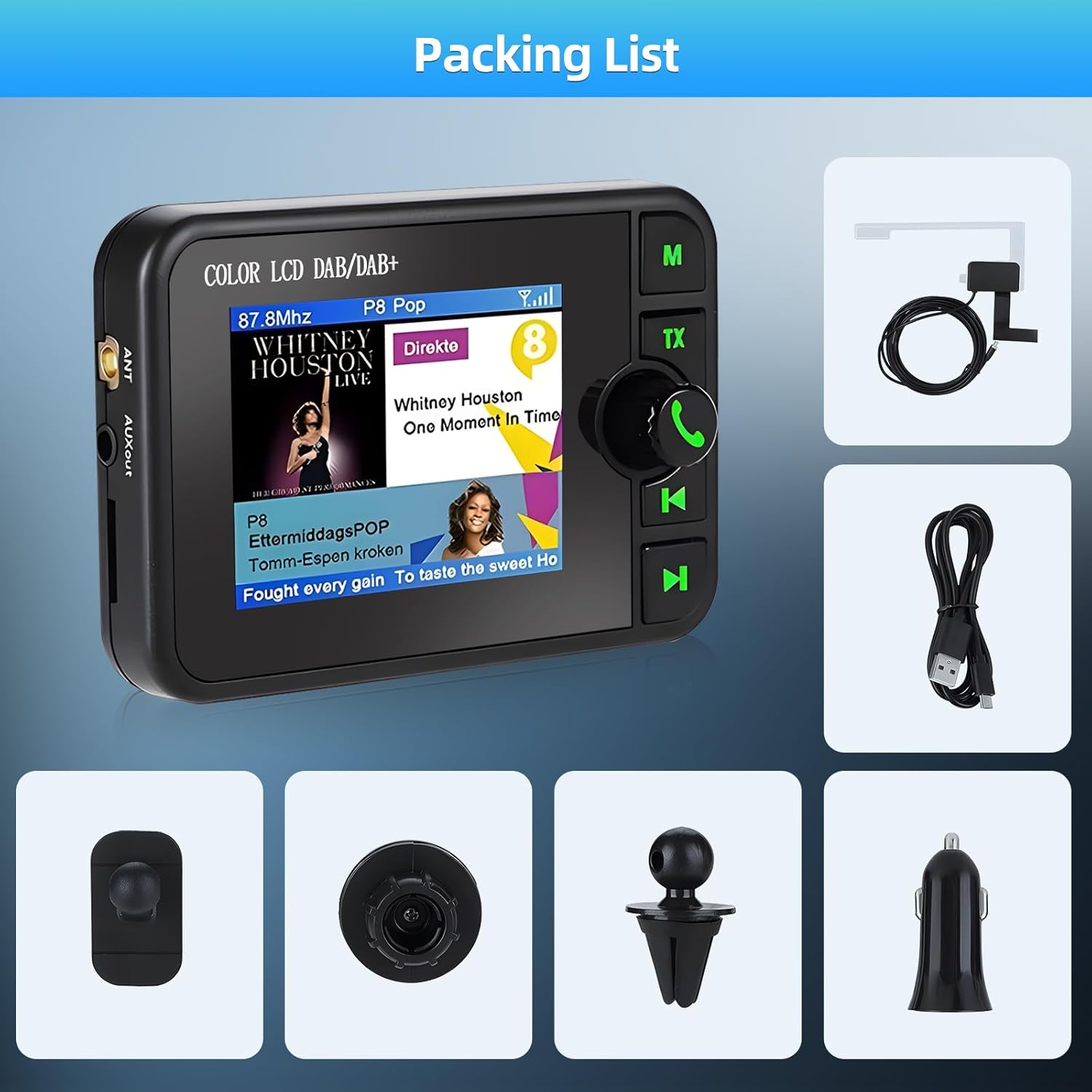
The Podofo DAB/DAB+ Adapter is a compact USB dongle that enables your Android car radio to receive DAB/DAB+ digital radio signals. It features a 2.4-inch TFT color touch screen for intuitive control and display of station information. The adapter supports multiple play modes including DAB+, Micro SD, Bluetooth, and Aux input, offering versatile audio options.
Key Features:
- Full compatibility with DAB ETSI 300 401 standard and DAB+ ETSI TS102 563.
- USB 2.0 interface for easy connection to Android car radios.
- 2.4-inch TFT color touch screen for clear display and control.
- Supports 4 play modes: DAB+, Micro SD, Bluetooth, and Aux.
- Integrated Bluetooth for hands-free calling.
- Compact design for discreet installation.


3. Setup and Installation
Proper installation is crucial for optimal performance. Follow these steps carefully:
3.1. DAB APK Drive Installation
Before using the DAB/DAB+ adapter, you must install the dedicated DAB APK (Android Package Kit) on your Android car radio. If your Podofo Android radio already has this app installed, you can skip this step.
- Copy the
dab_player.APKfile to an SD card or USB storage device. - Insert the SD card or USB storage into your Android car radio.
- Open the Android car radio's file manager, locate the APK file, and install it.
- Once installation is complete, a DAB icon will appear in the car radio's application menu.
3.2. Hardware Connection
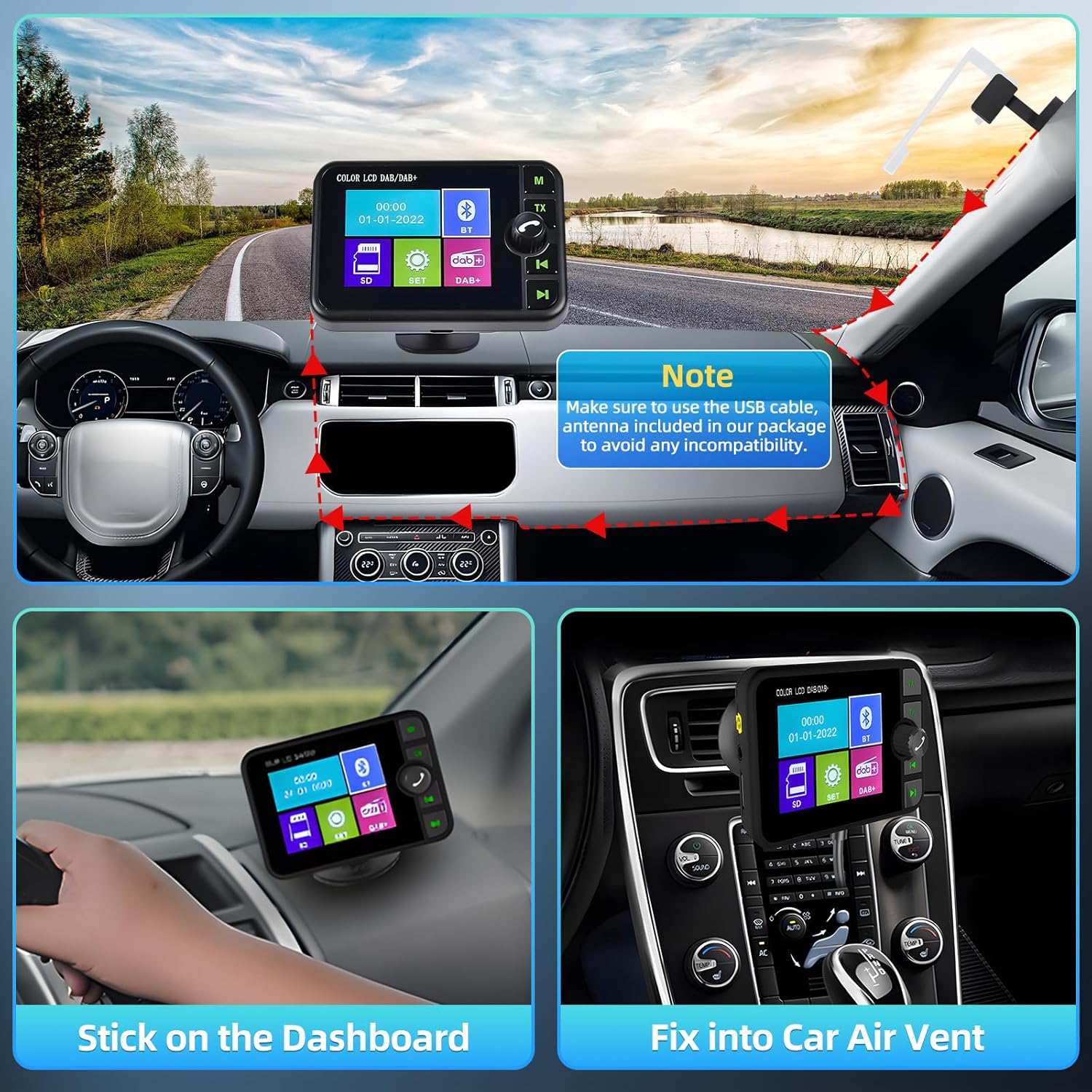
- Connect the provided antenna to the SMA antenna interface on the DAB/DAB+ adapter.
- Carefully route the antenna cable and secure the antenna film to a suitable location on your car's windshield or window.
- Connect the USB cable from the DAB/DAB+ adapter to an available USB port on your Android car radio.
- Ensure all connections are secure.
3.3. Antenna Installation Tips
For optimal signal reception, consider the following:
- Ensure the receiver unit and the transparent antenna film are not obstructed by the window frame or other metallic objects.
- Firmly attach the black film part of the antenna to the window frame for stable contact.
- Avoid placing the antenna near other electronic devices that may cause interference.
4. Operation
Once installed, operate the DAB/DAB+ adapter through your Android car radio's interface.
4.1. Accessing the DAB Application
After connecting the USB dongle, open the DAB icon from your car radio's application menu. This will launch the full-screen DAB application interface.
4.2. DAB/DAB+ Radio Functionality
- Station Search: The application allows you to scan for available DAB/DAB+ stations in your area.
- Favorites: Save your preferred radio stations for quick access.
- Display: Station names, program information, and images are displayed on the 2.4-inch screen.
4.3. Multiple Play Modes
The adapter supports four distinct play modes:
- DAB+: Digital Audio Broadcasting for high-quality radio.
- Micro SD: Play audio files directly from a Micro SD card inserted into the adapter.
- Bluetooth: Connect your smartphone via Bluetooth to stream music or make hands-free calls.
- Aux: Use the auxiliary input for connecting external audio devices.

4.4. Bluetooth Hands-Free Call
Pair your smartphone with the adapter via Bluetooth to enable hands-free calling, enhancing driving safety.

5. Maintenance and Care
To ensure the longevity and proper functioning of your DAB/DAB+ adapter, follow these care guidelines:
- Avoid Liquids: Do not expose the device to liquid or humid environments, as it is not waterproof.
- Cleaning: Do not use chemical solvents for cleaning, as they may damage the surface. Use a soft, dry cloth.
- Temperature: Avoid extreme temperatures (hot or cold). Operate and store the device at normal room temperature.
- Sharp Objects: Do not touch the device with sharp objects to prevent scratches or damage.
- Foreign Objects: Do not insert objects into the case to avoid damaging internal components.
- Disassembly: Do not attempt to disassemble the device. There are no user-serviceable parts inside.
- Storage: If not used for an extended period, store the device in a dry place, away from temperature fluctuations and dusty environments.
6. Troubleshooting
If you encounter issues with your DAB/DAB+ adapter, refer to the following common problems and solutions:
- No DAB/DAB+ Signal or Poor Reception:
- Check the antenna connection to ensure it is securely attached to the adapter.
- Verify that the antenna film is properly placed on the window and not obstructed.
- Confirm that DAB/DAB+ radio signals are available in your current geographical area. Signal strength can vary.
- Ensure the transparent film and receiver are not blocked by the window frame.
- DAB Application Not Found or Not Launching:
- Ensure the
dab_player.APKhas been correctly installed on your Android car radio. - If the app was not pre-installed or you are using a non-Podofo car radio, contact customer service for assistance with the APK file.
- Ensure the
- Device Not Recognized by Car Radio:
- Ensure the USB cable is securely connected to both the adapter and the car radio's USB port.
- Try a different USB port on your car radio, if available.
- Restart your car radio.
- Bluetooth Connection Issues:
- Ensure Bluetooth is enabled on both the adapter and your smartphone.
- Unpair and re-pair the devices.
- Ensure your smartphone is within range of the adapter.
7. Specifications
Detailed technical specifications for the Podofo DAB/DAB+ Digital Radio Receiver Adapter:
- Model Number: DAB
- DAB Frequency Range: 170-240 MHz
- FM Transmit Range: 87.5-108 MHz
- Receiver Sensitivity: -99 dBm
- Antenna Interface: SMA (5V output)
- Connectivity Technology: USB
- Controller Type: Android
- Compatible Devices: Smartphone (for Bluetooth), Android Car Radios
- Connector Type: USB Type A
- Audio Output Mode: Stereo
- Output Wattage: 5 Watts
- Product Dimensions: 20 x 6 x 13 cm
- Operating Temperature: 0℃ to 45℃ (32°F to 113°F)
- Storage Temperature: -20℃ to 70℃ (-4°F to 158°F)
- Operating Relative Humidity: Less than 80% (at 40℃)
- Storage Relative Humidity: Less than 95% (at 40℃)

8. Support
For further assistance, specific adaptability questions, or if you require the DAB APK file for your car radio, please contact Podofo customer service. Ensure you have your product model number (DAB) and purchase details ready when contacting support.


