
Introduction
This manual provides detailed instructions for the safe and efficient use of your Bstrip 25W Black 3000K Hanging Grow Light. Please read this manual thoroughly before installation and operation, and retain it for future reference.

Figure 1: Bstrip Hanging Grow Light (Model INW55660T652Jc)
Package Contents
Verify that all components are present in the package:
- 1 x LED Grow Light Bulb (25W, 3000K)
- 1 x 16.4 FT Power Cord with integrated timer switch
- 2 x Ceiling Clips
- 1 x Installation Manual (this document)
Safety Instructions
- Ensure the power supply is disconnected before installation or maintenance.
- This product is designed for indoor use only. Do not expose to water or high humidity.
- The light housing is made of aluminum for efficient heat dissipation. Do not touch the bulb housing during operation as it may be hot.
- Do not attempt to disassemble or modify the light. This may void the warranty and pose safety risks.
- Keep out of reach of children.
Setup and Installation
The Bstrip Hanging Grow Light is designed for flexible installation in various indoor environments.
- Identify Mounting Location: Choose a suitable indoor location above your plants, ensuring adequate clearance and a stable surface for the ceiling clips.
- Install Ceiling Clips: Securely attach the two provided ceiling clips to your chosen mounting surface. Ensure they are spaced appropriately to support the light fixture and allow for desired height adjustment.
- Hang the Grow Light: Thread the 16.4 ft power cord through the ceiling clips. Adjust the length of the cord to position the grow light at the desired height above your plants.
- Connect to Power: Plug the power cord into a standard electrical outlet.
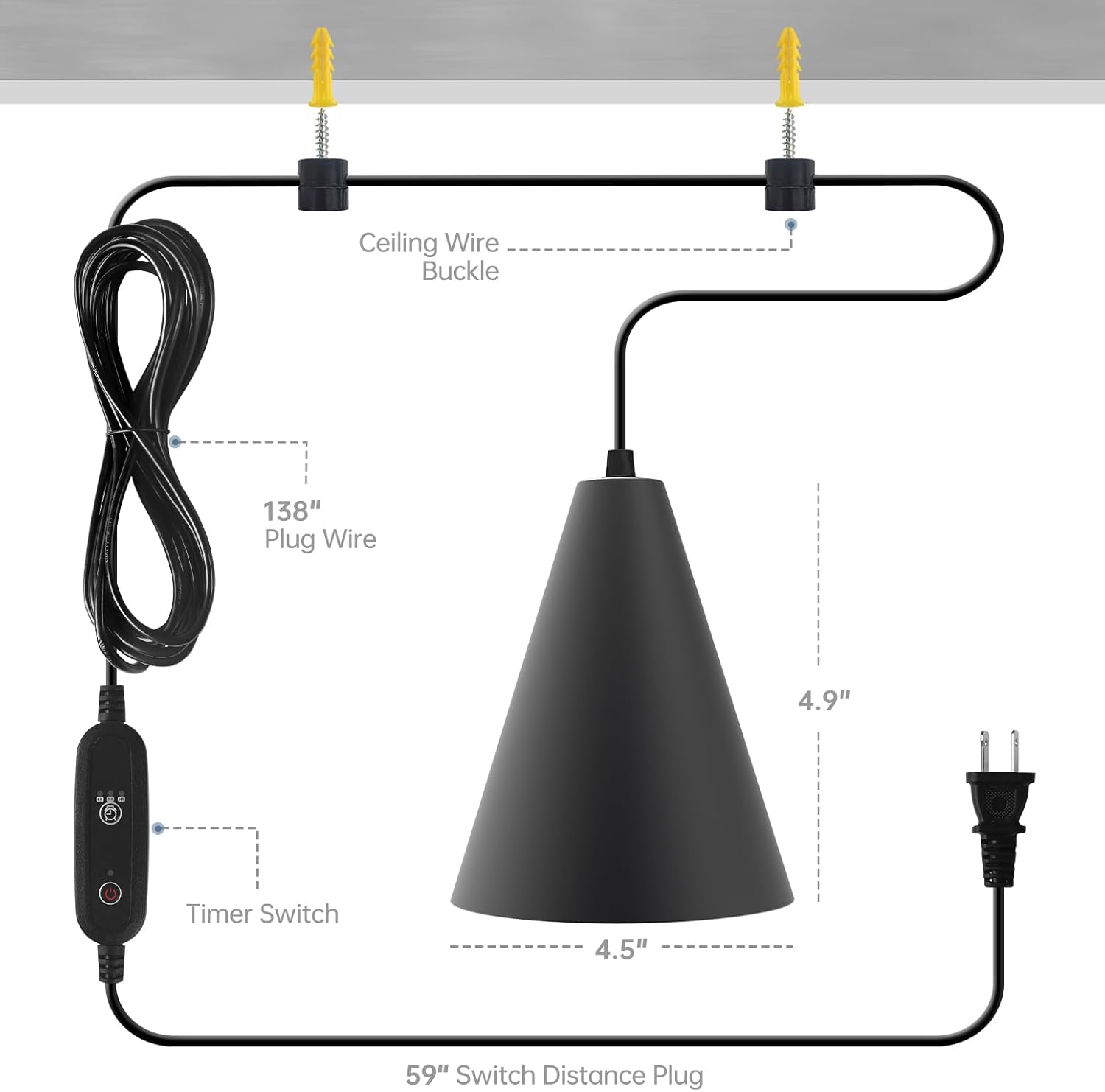
Figure 2: Installation Diagram
Recommended Light Height: The optimal distance between the grow light and your plants depends on the plant type and growth stage. Refer to the PAR value chart in the Operating section for guidance.
Operating Instructions
The Bstrip Hanging Grow Light features a full spectrum output and an integrated timer for automated operation.
Power On/Off
Press the power button on the inline switch to turn the light on or off. There may be a slight delay when powering on.
Timer Function
The integrated timer allows you to set automatic on/off cycles. Press the timer button on the inline switch to cycle through the available settings:
- 4 hours: Light on for 4 hours, then off for 20 hours.
- 9 hours: Light on for 9 hours, then off for 15 hours.
- 14 hours: Light on for 14 hours, then off for 10 hours.
Once a timer setting is selected, the light will automatically follow the chosen cycle daily.

Figure 3: Automatic Timing Function
Light Spectrum and Intensity
This grow light provides a full spectrum (400-780nm) designed to simulate natural sunlight, suitable for all stages of indoor plant growth. The 3000K color temperature offers a warm light appearance.

Figure 4: PAR Value at Various Heights
The Color Rendering Index (CRI) of 98+ ensures that plants appear natural and vibrant under this light.

Figure 5: Color Rendering Index (CRI 98+)
Maintenance
- Cleaning: Ensure the light is unplugged and cool before cleaning. Wipe the exterior with a soft, dry cloth. Do not use liquid cleaners or abrasive materials.
- Heat Management: The aluminum housing is designed for heat dissipation. Ensure adequate airflow around the fixture. Avoid placing the light in enclosed spaces without ventilation.
- Water Exposure: This product is not water resistant. Avoid splashing water on the light fixture or exposing it to high humidity environments where condensation may occur.
Troubleshooting
| Problem | Possible Cause | Solution |
|---|---|---|
| Light does not turn on. | No power, loose connection, or switch issue. |
|
| Light flickers or turns on intermittently. | Loose connection or internal component issue. |
|
| Timer function not working correctly. | Incorrect setting or power interruption. |
|
Specifications
| Feature | Detail |
|---|---|
| Brand | Bstrip |
| Model Name | LED Grow Light Bulb |
| Item Model Number | INW55660T652Jc |
| Color | Black Cover with 3000K Light |
| Material | Aluminum |
| Wattage | 25 Watts |
| Light Color | 3000K |
| Light Source Type | LED |
| Spectrum | Full Spectrum (400-780nm) |
| Brightness | 2500 Lumen |
| Color Rendering Index (CRI) | 98.00 |
| Product Dimensions | 4.5"L x 4.5"W x 4.9"H |
| Item Weight | 1.94 pounds |
| Power Source | Corded Electric |
| Special Feature | Timer (4/9/14 hours) |
| Control Method | Touch (Push Button Switch) |
| Indoor/Outdoor Usage | Indoor |
| Water Resistance Level | Not Water Resistant |
| Assembly Required | Yes |
Warranty Information
This Bstrip product comes with a Limited Warranty. Specific details regarding the duration and coverage of the warranty are typically provided with your purchase documentation or can be obtained by contacting Bstrip customer support. Please retain your proof of purchase for warranty claims.
Customer Support
For any questions, concerns, or assistance with your Bstrip Hanging Grow Light, please contact the Bstrip seller team.
You can visit the official Bstrip store for more information and contact options: Bstrip Store on Amazon.