
Shkalacar KQV9552174826410EE
Shkalacar Universal Car Keyless Entry System Instruction Manual
Model: KQV9552174826410EE
Brand: Shkalacar
1. Overview
The Shkalacar Universal Car Keyless Entry System provides convenient remote control functionality for your vehicle's central locking system. It enhances vehicle security and offers ease of access with features such as remote lock/unlock, trunk release, and car finding.
Key Features:
- Multi-level security arming for enhanced protection.
- High reliability and quality components.
- Universal compatibility with various car models.
- Remote door lock/unlock functionality.
- Light flashing output for visual confirmation.
2. Package Contents
Please verify that all the following items are included in your package:
- 1 x Main Control Unit
- 2 x Remote Controls
- 1 x Wiring Harness
- 1 x Instruction Manual
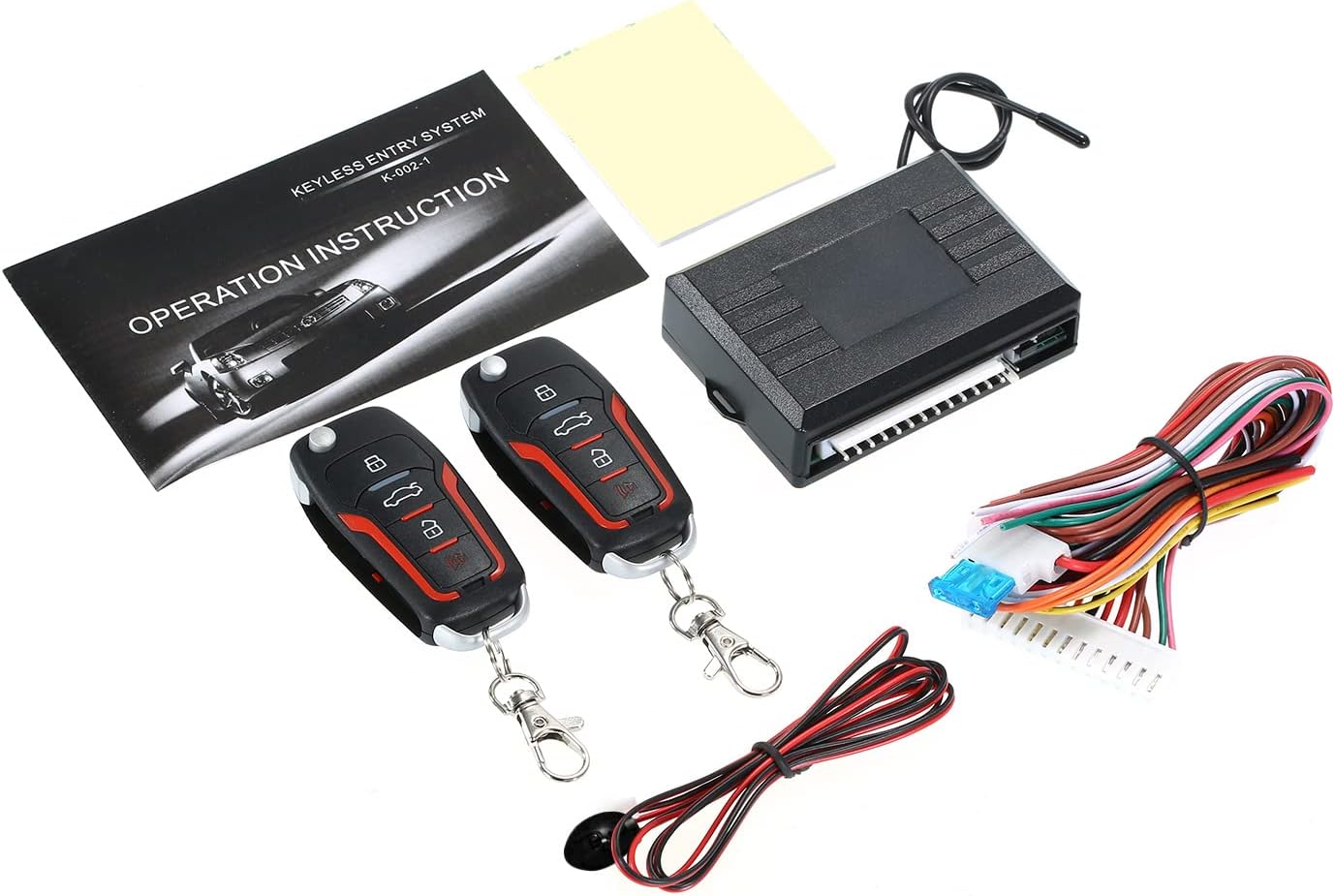
Image: Complete package contents of the keyless entry system.
3. Product Components
3.1 Main Control Unit
The main control unit is the central processing component of the keyless entry system. It receives signals from the remote controls and operates the vehicle's central locking and other integrated functions.

Image: Main control unit with wiring harness.
3.2 Remote Controls
Two remote controls are provided for convenient operation. Each remote features buttons for locking, unlocking, trunk release, and a car find/alarm function.

Image: Two remote controls.

Image: Front view of the remote control.

Image: Back view of the remote control.
4. Setup & Installation
Installation of the Shkalacar Universal Car Keyless Entry System requires knowledge of automotive electrical systems. It is highly recommended that installation be performed by a qualified professional to ensure proper functionality and avoid damage to your vehicle.
4.1 General Installation Guidelines:
- Power Connection: Connect the main control unit to a stable 12V DC power source in your vehicle. Ensure proper grounding.
- Central Locking Integration: The system integrates with your vehicle's existing central locking mechanism. Identify the lock and unlock wires in your vehicle's wiring harness.
- Signal Wires: Connect the appropriate signal wires from the system's harness to your vehicle's door lock actuators, turn signals, and other relevant components.
- Antenna Placement: Position the antenna wire for optimal signal reception from the remote controls.
- Secure Mounting: Mount the main control unit in a secure, dry location within the vehicle, away from excessive heat or moisture.
Refer to the detailed wiring diagram provided in the physical instruction manual for specific wire color codes and connection points relevant to your vehicle type.
5. Operation
The remote controls provide convenient access to your vehicle's central locking and security features.
5.1 Remote Control Functions:
- Lock Button: Press once to lock all vehicle doors. The turn signals will flash once to confirm.
- Unlock Button: Press once to unlock all vehicle doors. The turn signals will flash twice to confirm.
- Trunk Release Button: Press and hold to remotely open the vehicle's trunk (if supported by vehicle wiring).
- Car Find / Alarm Button: Press to activate the car find function, causing the vehicle lights to flash and/or horn to sound, helping you locate your vehicle in a parking area.

Image: Visual representation of keyless entry system functions.

Image: Hand operating the remote control.
6. Maintenance
6.1 Remote Battery Replacement
If the remote control's range decreases or it stops responding, the battery may need replacement. Typically, these remotes use a standard coin-cell battery (e.g., CR2032). To replace:
- Carefully open the remote control casing using a small screwdriver or prying tool.
- Remove the old battery, noting its orientation (+/-).
- Insert a new battery with the correct orientation.
- Close the remote control casing securely.
6.2 General Care
- Keep the main control unit and remote controls dry and away from extreme temperatures.
- Avoid dropping the remote controls or subjecting them to strong impacts.
- Clean the remote controls with a soft, dry cloth. Do not use harsh chemicals.
7. Troubleshooting
If you encounter issues with your keyless entry system, refer to the table below for common problems and solutions.
| Problem | Possible Cause | Solution |
|---|---|---|
| Remote control not working or has reduced range. | Low or dead battery in the remote. Interference. | Replace the remote battery. Move away from sources of strong electromagnetic interference. |
| Doors do not lock/unlock. | Incorrect wiring connections. Faulty actuator. System not receiving power. | Check all wiring connections, especially to the central locking system. Verify the main unit is receiving 12V power. Consult a professional for diagnosis. |
| Lights do not flash upon lock/unlock. | Incorrect wiring to turn signals. Blown fuse. | Inspect the wiring connections to the vehicle's turn signals. Check the system's fuse. |
| System constantly triggers or behaves erratically. | Wiring short circuit or incorrect connection. Faulty main unit. | Immediately disconnect power. Re-check all wiring for shorts or incorrect connections. Professional inspection is recommended. |
8. Specifications
| Feature | Detail |
|---|---|
| Manufacturer | Shkalacar |
| Model Number | KQV9552174826410EE |
| Item Weight | 1.44 pounds |
| Package Dimensions | 6.69 x 3.54 x 2.36 inches |
| Compatible Devices | Various car models |
| Noise Level (Alarm) | 75 Decibels |
| Remote Control Included | Yes (2 units) |
9. Warranty & Support
For warranty information or technical support, please refer to the documentation included with your purchase or contact the seller directly. Keep your proof of purchase for any warranty claims.