
Introduction
Thank you for choosing the Kalence T10 Left Ski Helmet Speakers. These wireless Bluetooth 5.0 speakers are designed to provide high-quality audio for your outdoor activities, including skiing, snowboarding, cycling, and motorcycling. Featuring a glove-friendly button system, HDR audio technology, and long battery life, the T10 Left speakers ensure an immersive and convenient audio experience while on the go. This manual provides essential information for setup, operation, maintenance, and troubleshooting to help you get the most out of your new speakers.
What's in the Box
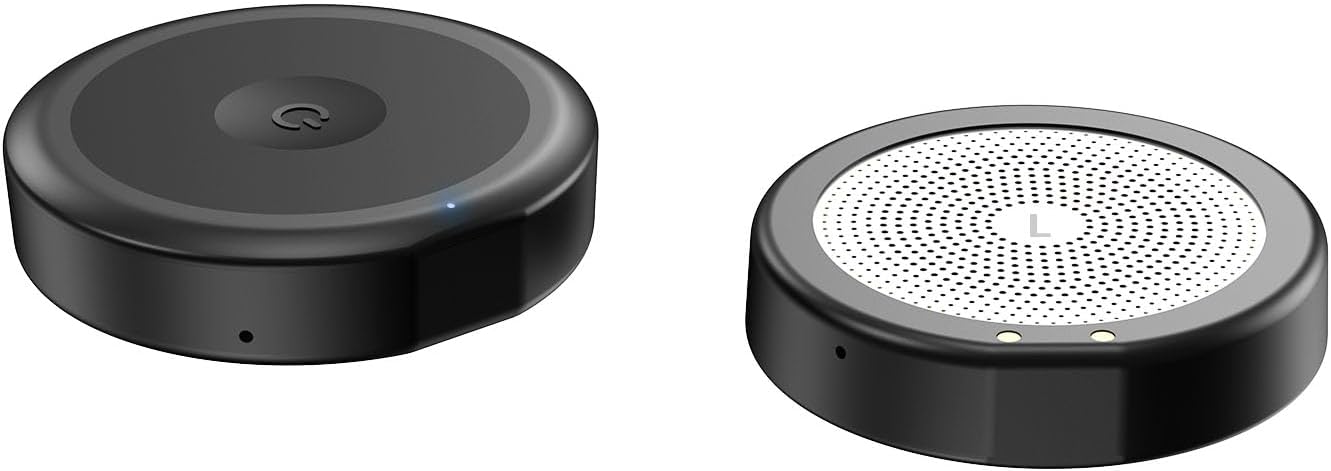
- Kalence T10 Left Ski Helmet Speaker (Left unit only)
- Charging Cable
- Wireless Charging Case
Setup
1. Charging the Speakers
Before first use, fully charge the speaker and its wireless charging case. Place the speaker into the charging case. Connect the provided charging cable to the charging case and a USB power source. The indicator light on the charging case will show charging status. A full charge provides approximately 10 hours of playback for the speaker and the charging case holds enough power for multiple recharges.
2. Pairing with Your Device
- Ensure the speaker is charged and powered off.
- Press and hold the power button on the speaker until the indicator light flashes, indicating pairing mode.
- On your mobile device, enable Bluetooth and search for available devices.
- Select "Kalence T10 Left" from the list of devices.
- Once connected, the indicator light on the speaker will turn solid blue or off, depending on the model's specific behavior.
The speakers utilize Bluetooth 5.0 for a stable connection up to 10 meters (approximately 33 feet).
3. Helmet Installation
The Kalence T10 Left speaker is designed to fit effortlessly into helmets with audio insert slots. Ensure your helmet is audio compatible. Compatible helmet brands include Bern, Giro, Smith, Anon, Pro-TEC, Bolle, and more. Simply slide the speaker into the designated audio slot in the left ear pad of your helmet.
Operating Instructions
The speaker features a glove-friendly button system for easy control without removing your device from your helmet.
- Power On/Off: Press and hold the main button for approximately 3 seconds.
- Play/Pause Music: Short press the main button.
- Next Track: Double-press the main button.
- Previous Track: Triple-press the main button.
- Answer/End Call: Short press the main button during an incoming call.
- Reject Call: Press and hold the main button for 2 seconds during an incoming call.
- Activate Voice Control (Siri/Google Assistant): Press and hold the main button for 2 seconds when not on a call.
- Volume Control: Volume is controlled via your connected device. The speakers are designed to provide surprisingly loud volume to help reduce wind noise.
Maintenance
- Cleaning: Wipe the speakers and charging case with a soft, dry cloth. Do not use harsh chemicals or abrasive cleaners.
- Water Resistance: The speakers are water repellent. Avoid submerging them in water. Dry them thoroughly if they get wet.
- Storage: Store the speakers and charging case in a cool, dry place when not in use. Avoid extreme temperatures.
- Battery Care: For optimal battery life, avoid fully discharging the battery frequently. Charge regularly, even if not used for extended periods.
Troubleshooting
| Problem | Possible Cause | Solution |
|---|---|---|
| No sound from speaker | Speaker not powered on; Not paired; Low battery; Volume too low. | Ensure speaker is on; Pair with device; Charge speaker; Increase volume on device. |
| Cannot pair with device | Speaker not in pairing mode; Device Bluetooth off; Too far from device. | Put speaker in pairing mode; Enable Bluetooth on device; Move speaker closer to device (within 10m). |
| Short battery life | Not fully charged; Old battery. | Ensure full charge; Battery life naturally degrades over time. |
| Sound distortion | Volume too high; Interference. | Reduce volume; Move away from sources of strong electromagnetic interference. |
Specifications
| Feature | Detail |
|---|---|
| Model Name | Kalence T10 Left |
| Connectivity Technology | Bluetooth, Wireless |
| Bluetooth Version | 5.3 |
| Bluetooth Range | 15 Meters |
| Control Type | Button |
| Water Resistance Level | Water Repellent |
| Speaker Playback Time | Up to 10 hours (on a full battery) |
| Charging Case Battery Life | 50 Hours (additional charge) |
| Charging Case Battery Capacity | 2000 Milliamp Hours |
| Charging Case Charging Time | 4 Hours |
| Item Weight | 0.4 Pounds (approx. 6.4 ounces) |
| Material | Acrylonitrile Butadiene Styrene (ABS), Polyurethane (PU) |
| Recommended Uses | Climbing, Cycling, Motorcycling, Skiing, Snowboarding |
Warranty and Support
Kalence offers a 365-day 100% satisfaction guarantee for this product. If you have any inquiries or experience any issues with your Kalence T10 Left Ski Helmet Speakers, please do not hesitate to contact the Kalence customer service team. We are committed to responding to your queries within 24 hours to ensure your complete satisfaction.
For support, please refer to the contact information provided with your purchase or visit the official Kalence website.