
1. Introduction
This manual provides essential information for the installation, operation, and maintenance of your CHROX PDC (Park Distance Control) Parking Sensor. This sensor is designed to assist drivers in parking maneuvers by detecting obstacles in the vehicle's path. Please read these instructions carefully before proceeding with installation or use.
2. Product Overview
The CHROX PDC Parking Sensor is an aftermarket component designed to meet strict OEM requirements for reliability and performance. It features high-sensitivity pins to accurately measure the distance between your vehicle and nearby obstacles.
Key Features:
- Premium Material: Crafted with top-notch materials for durability and reliability.
- High Sensitivity: Equipped with 3 high-sensitivity pins for accurate distance measurement.
- Direct Replacement: Designed as a direct replacement for the original equipment sensor.
- OE-Matching: Manufactured to match original equipment specifications.

Figure 2.1: A single CHROX PDC Parking Sensor, showing its main body and connector.

Figure 2.2: A set of four CHROX PDC Parking Sensors, as typically supplied for a vehicle.
3. Specifications
| Specification | Detail |
|---|---|
| Condition | 100% brand new aftermarket product |
| Material | Plastic, Metal, Rubber |
| Color | Black |
| OE Part Numbers | 89341-33260, 8934133260, 1884009310 |
| Manufacturer | CHROX |
4. Compatibility and Fitment
This PDC Parking Sensor is compatible with specific Toyota Camry models. Please verify your vehicle's model and the OE part number before purchase to ensure proper fitment.
Applicable Models:
- For 08/2011-08/2014 ASV50L-AETNKX JPP, RUS, LHD, 2ARFE, ATM, 6FC
- For 11/2014- ASV50L-RETNKX RUP, RUS, LHD, 2ARFE, ATM, 6FC
- For 08/2011-08/2014 ASV50R-AETNKW JPP, EUR, RHD, 2ARFE, ATM, 6FC
- For 03/2015- ASV51L-RETNHX RUP, RUS, LHD, 6ARFSE, ATM, 6FC
- For 08/2011-08/2014 AVV50L-AEXNBW JPP, EUR, LHD, 2ARFXE, ATM, CVFC
- For 08/2011-08/2014 AVV50R-AEXNBW JPP, EUR, RHD, 2ARFXE, ATM, CVFC
- For 09/2014- GSV50L-AETGKW JPP, EUR, LHD, 2GRFE, ATM, 6FC
- For 08/2011-08/2014 GSV50L-AETGKX JPP, RUS, LHD, 2GRFE, ATM, 6FC
- For 11/2011-10/2014 GSV50L-RETGKX RUP, RUS, LHD, 2GRFE, ATM, 6FC
It is crucial to compare the provided OE numbers (89341-33260, 8934133260, 1884009310) with your existing sensor's part number to confirm compatibility.
5. Installation (Setup)
Installation of a PDC parking sensor typically involves working with vehicle electrical systems and bumper components. Professional installation is highly recommended to ensure correct functionality and avoid damage to the vehicle or the sensor.
General Installation Steps (Consult a professional or vehicle service manual for detailed instructions):
- Safety First: Ensure the vehicle is turned off, the parking brake is engaged, and the battery is disconnected before beginning any work.
- Access the Sensor Location: This usually requires removing the vehicle's bumper or specific trim panels to access the sensor housing.
- Disconnect Old Sensor: Carefully disconnect the electrical connector from the existing PDC sensor.
- Remove Old Sensor: Unclip or unmount the old sensor from its housing.
- Install New Sensor: Insert the new CHROX PDC sensor into the housing, ensuring it clicks securely into place.
- Connect Electrical Connector: Reconnect the electrical connector to the new sensor. Ensure a firm and secure connection.
- Reassemble: Reinstall any removed bumper components or trim panels.
- Test Functionality: Reconnect the battery and test the parking assist system according to your vehicle's manufacturer guidelines.

Figure 5.1: Rear view of the sensor, displaying the OE part numbers 89341-33260 and 188400-9310.
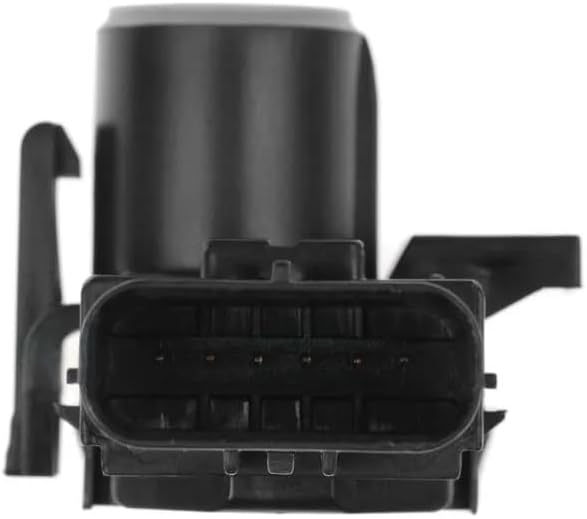
Figure 5.2: Detailed view of the sensor's electrical connector, showing the pin configuration.
6. Operation
Once installed, the PDC parking sensor operates automatically when the vehicle is in reverse gear or at low speeds, depending on the vehicle's specific system. The sensors emit ultrasonic waves that bounce off obstacles and return to the sensor. The system then calculates the distance to the obstacle and provides an audible warning (beeps) or visual display (on the dashboard or infotainment screen) to the driver. The frequency of the beeps typically increases as the vehicle gets closer to an obstacle.
7. Maintenance
To ensure optimal performance and longevity of your PDC parking sensors, consider the following maintenance tips:
- Keep Sensors Clean: Regularly clean the sensor surfaces on your bumper. Dirt, mud, ice, or snow can obstruct the sensors and impair their functionality. Use a soft cloth and mild soap and water. Avoid abrasive cleaners or high-pressure washers directly on the sensors.
- Inspect for Damage: Periodically check the sensors for any visible damage, such as cracks, dents, or loose connections. Physical damage can affect performance.
- Avoid Painting: Do not paint over the sensors unless specifically designed for it and using a very thin, compatible paint layer. Thick paint can interfere with ultrasonic wave transmission.
8. Troubleshooting
If you experience issues with your PDC parking sensors, consider the following common problems and solutions:
- Sensor Not Working / No Detection:
- Check for Obstructions: Ensure the sensor surface is clean and free from dirt, ice, or debris.
- Check Connections: Verify that the electrical connector is securely attached to the sensor.
- System Fault: A diagnostic scan tool may be required to identify specific fault codes related to the parking assist system.
- False Alarms / Constant Beeping:
- Clean Sensors: Obstructions like mud or heavy rain can sometimes cause false readings.
- Environmental Factors: Heavy rain, snow, or certain types of reflective surfaces can sometimes interfere with sensor operation.
- Sensor Malfunction: If the issue persists after cleaning and inspection, the sensor itself may be faulty and require replacement.
- Intermittent Operation:
- Loose Connection: Check the electrical connection for looseness or corrosion.
- Wiring Damage: Inspect the wiring harness leading to the sensor for any signs of damage.
For complex issues or if troubleshooting steps do not resolve the problem, it is recommended to consult a qualified automotive technician.
9. Important Notes and Disclaimer
- This product is a high-quality aftermarket component and is not a genuine OEM part.
- Always confirm the fitment and replacing OE number before ordering to ensure this item is perfectly suitable for your vehicle.
- The PDC system is an aid to parking and should not replace the driver's direct observation and judgment. Always be aware of your surroundings.