
OKPRO O-1152BM
OKPRO 8000W Solar Street Light Instruction Manual
Brand: OKPRO | Model: O-1152BM
Introduction
The OKPRO 8000W Solar Street Light is designed to provide powerful, energy-efficient outdoor illumination. Featuring advanced solar technology and multiple operating modes, it offers reliable lighting for various outdoor spaces without electricity costs. This manual provides essential information for setup, operation, and maintenance to ensure optimal performance and longevity of your solar street light.
What's in the Box
- Solar street lights outdoor
- Remote Control
- Mounting accessory
- Instruction Manual

Figure 1: All components included in the product package.
Specifications
| Feature | Detail |
|---|---|
| Brand | OKPRO |
| Model Number | O-1152BM |
| Light Source Type | LED (1152 pcs 5730 type beads) |
| Brightness | 450,000 LM |
| Color Temperature | 7000K (Cool White) |
| Illumination Angle | 240 degrees |
| Illumination Area | Up to 1,615 sq ft |
| Battery Capacity | 48000mAh Lithium Ion |
| Charging Time | 4-6 hours (full sunlight) |
| Water Resistance | IP66 Waterproof |
| Material | ABS Plastic, Die-cast Aluminium |
| Product Dimensions | 29.13"L x 21.25"W x 6.69"H |
| Item Weight | 11.88 pounds |
Setup & Installation
The OKPRO Solar Street Light offers versatile installation options, including wall-mounted and pole-mounted setups. Ensure the chosen location receives direct sunlight for optimal charging.
Mounting Options:
- Pole Mount: Recommended for lamp posts with diameters from 1.5 inches to 4 inches. Ideal mounting height is 16-26 feet for wide area illumination.
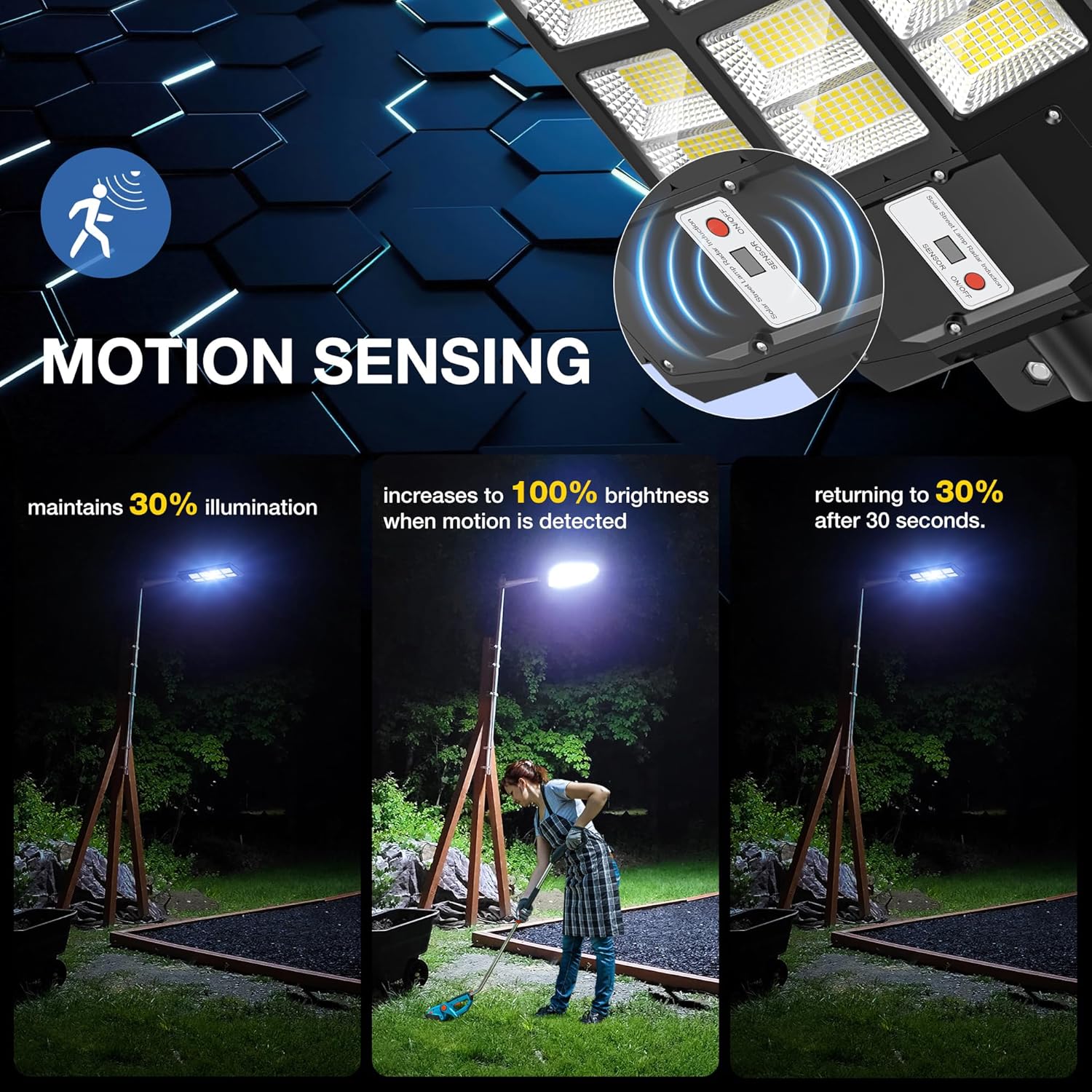
Figure 2: Pole-mounted installation of the solar street light.
- Wall Mount: Can be installed on walls, trees, or balconies using the provided mounting accessories.

Figure 3: Wall-mounted installation of the solar street light.
Installation Steps:
- Select a location with direct sunlight and no obstacles to ensure efficient charging of the solar panel.
- Attach the mounting arm to your chosen pole or wall using the appropriate screws and anchors from the mounting accessory kit.
- Slide the solar street light onto the mounting arm. Ensure it is securely fastened.
- Before final tightening, ensure the light is oriented correctly to maximize solar exposure and desired illumination area.
- Press the ON/OFF button on the light unit to activate it. The indicator light will illuminate when charging.
- For the first use, cover the solar panel with an obstruction to activate the light, as it features a light-sensing function that prevents it from turning on in daylight.
Installation Video Guide:
Video 1: Official OKPRO guide demonstrating the installation process for the solar street light.
Operating Instructions
The solar street light features intelligent operating modes controlled via the included remote control.
Working Modes:
- Mode 1: Dusk to Dawn: The light automatically charges during the day and illuminates at night. This mode provides continuous lighting throughout the night.

Figure 4: Dusk to Dawn operation, automatic lighting from sunset to sunrise.
- Mode 2: Motion Sensor: The light maintains 30% illumination. When motion is detected, it increases to 100% brightness, returning to 30% after 30 seconds of no motion.

Figure 5: Motion sensor functionality, adjusting brightness based on detected movement.
- Mode 3: Brightness Adjustment: Offers 25%, 50%, 75%, and 100% brightness levels.
- Mode 4: Timer Setting: Provides different timing settings of 2H, 3H, 5H, 6H, or 8H. After the set time expires, the light will automatically enter motion sensing mode.
Remote Control Functions:
The remote control allows for convenient adjustment of the light's settings.
- ON/OFF: Turns the light on or off.
- 25%/50%/75%/100%: Adjusts the brightness level.
- Motion Sensor Icon: Activates or deactivates the motion sensor mode.
- 2H/3H/5H/6H/8H: Sets the timer for continuous illumination before switching to motion sensor mode.
Maintenance
Regular maintenance ensures the longevity and optimal performance of your solar street light.
- Solar Panel Cleaning: Regularly check for dust, dirt, or debris covering the solar panel. Clean it promptly with a soft, damp cloth to maintain charging efficiency.
- Durability: The light is designed with an IP66 waterproof rating and made from high-quality ABS frame and die-cast aluminium bracket, protecting internal components from various weather conditions including rain, snowstorms, and high temperatures.
- Battery Care: The 48000mAh large capacity battery is designed for long-term use. Ensure the light receives sufficient sunlight daily for proper charging to maximize battery lifespan.
Troubleshooting
If you encounter issues with your solar street light, refer to the following common problems and solutions:
- Light Not Turning On at Night:
- Ensure the ON/OFF button on the light unit is pressed to the ON position.
- Verify the solar panel is receiving direct sunlight for 4-6 hours daily. Obstructions (trees, buildings) can prevent full charging.
- Clean the solar panel surface if it's covered in dust or debris.
- For first-time use, cover the solar panel to activate the light's sensor.
- Light Not Staying Bright All Night:
- Check if the solar panel is clean and free from obstructions, ensuring maximum sunlight absorption.
- Ensure the light is not set to a low brightness percentage or a short timer duration if continuous bright light is desired.
- Consider the weather conditions; prolonged cloudy or rainy days can reduce charging efficiency.
- Remote Control Not Working:
- Ensure the remote control batteries are correctly inserted and not depleted. (Remote requires 2 AAA batteries, not included).
- Point the remote directly at the light's sensor.
Warranty & Support
OKPRO solar lights are FCC, CE, and RoHS certified, ensuring product quality and safety.
- Warranty: The product comes with a 24-month after-sales service.
- Support: If you encounter any problems or are dissatisfied for any reason, please contact the professional service team through the Amazon message window. They are committed to providing satisfactory solutions within 24 hours.
Ask a question about this manual
Ask about setup, troubleshooting, compatibility, parts, safety, or missing instructions. Manuals+ will review the question and use this page’s manual context to help answer it.