
BT201
BT201 Dual Mode Bluetooth Audio Amplifier Module User Manual
Model: BT201
1. Introduction
The BT201 5.0 Bluetooth-compatible module is a versatile 4-in-1 single chip solution supporting Bluetooth audio, USB flash drive, and TF card playback. This module is designed for lossless music playback and features simple, clear serial port control, along with BLE and SPP pass-through functions. It significantly simplifies the development of embedded Bluetooth solutions in various products.
This manual provides detailed instructions for the setup, operation, maintenance, and troubleshooting of your BT201 module.
2. Key Features
- Supports Bluetooth-compatible audio, BLE data transmission, U disk playback, TF card playback, and SPIFLASH.
- Decodes MP3, WAV, FLAC, and APE audio formats.
- Serial port AT command control for modifying baud rate, Bluetooth name, specifying device playback, and mobile phone data passthrough.
- Supports BLE and SPP dual-mode data transmission simultaneously with Bluetooth-compatible audio playback without conflict.
- Supports Bluetooth-compatible call functions and multi-button control (previous/next music, play/pause, volume adjustment).
- Ability to retrieve full file names for serial port specified path playback, with loop or single play options.
- 128KBS recording function to TF card or U disk, including recording deletion and playback.
- Designed with super simple peripherals, requiring only 5 capacitors for completion.
- Easy integration with existing applications or development of new mobile phone control applications.
- Flexible functional firmware, with options for communication and development for specific needs.
3. Setup and Installation
This section guides you through the initial setup of your BT201 module.
3.1. Component Overview
Familiarize yourself with the various components and connection points on the BT201 module.
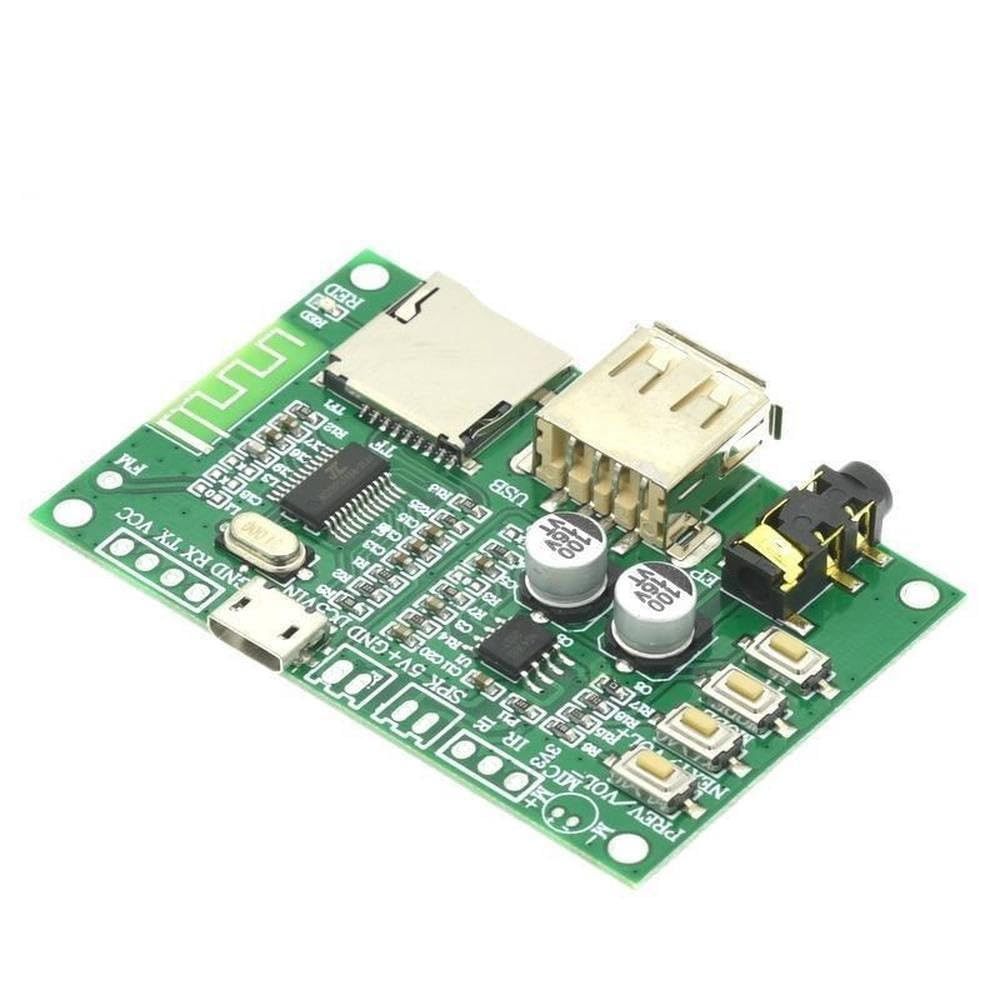
Figure 3.1: Top view of the BT201 module. This image displays the main components including the USB port, TF card slot, audio jack, and control buttons. Key connection pins for power, ground, and data are also visible.

Figure 3.2: Angled view of the BT201 module. This perspective provides a clearer look at the USB host port and the TF card slot, essential for media playback.

Figure 3.3: Bottom view of the BT201 module. This image shows the printed circuit board (PCB) traces and the model designation "BT201 KTI025" printed on the board.

Figure 3.4: BT201 module with accessories. This image displays the module along with the included pin headers for easy integration and an infrared (IR) receiver component.
3.2. Power Supply
The BT201 module typically operates on a 5V DC power supply. Connect the power source to the designated VCC and GND pins. Ensure correct polarity to prevent damage to the module.
3.3. Audio Output
Connect your audio output device (e.g., speakers, headphones) to the 3.5mm audio jack or the designated SPK+ and SPK- pins for direct speaker connection. The module supports 16-bit stereo audio output.
3.4. Data Interfaces
- USB Port: Insert a USB flash drive for audio playback.
- TF Card Slot: Insert a TF (microSD) card for audio playback or recording.
- Serial Port (UART): Use the TX and RX pins for AT command control and data passthrough. Connect to a microcontroller or PC via a UART-to-USB converter.
4. Operating Instructions
This section details the operation of the BT201 module for various functions.
4.1. Bluetooth Audio Playback
- Power on the BT201 module.
- On your Bluetooth-enabled device (e.g., smartphone), search for available Bluetooth devices.
- Select "BT201" (or the customized Bluetooth name) from the list to pair.
- Once paired, audio from your device will be streamed to the BT201 module.
4.2. USB/TF Card Playback
- Insert a USB flash drive or TF card containing MP3, WAV, FLAC, or APE audio files into the respective slot.
- The module will automatically detect the storage device and begin playback.
- Use the onboard buttons (PREV, NEXT, VOL+, VOL-, PLAY/PAUSE) or serial AT commands to control playback.
4.3. Serial AT Command Control
The BT201 module supports AT commands for advanced control and configuration. Connect the module's TX/RX pins to a serial terminal (e.g., via Arduino, USB-to-UART converter).
- Baud Rate: Default baud rate is typically 9600 or 115200. Refer to the module's documentation for specific default and configurable rates.
- Example Commands:
AT+NAME=NewBTName: Change Bluetooth name.AT+PLAY: Start playback.AT+PAUSE: Pause playback.AT+VOL=XX: Set volume (XX is a value).
- For a comprehensive list of AT commands, refer to the detailed technical documentation provided by the manufacturer.
4.4. Recording Function
The module supports 128KBS recording to TF card or U disk.
- Ensure a TF card or U disk with sufficient free space is inserted.
- Initiate recording via specific AT commands or dedicated control pins if available.
- Recordings can be played back or deleted using appropriate commands.
5. Maintenance
Proper maintenance ensures the longevity and optimal performance of your BT201 module.
- Cleaning: Use a soft, dry cloth to clean the module. Avoid using liquids or abrasive cleaners.
- Storage: Store the module in a cool, dry place away from direct sunlight and extreme temperatures.
- Handling: Handle the module by its edges to avoid touching sensitive electronic components. Static electricity can damage the module; use anti-static precautions when handling.
- Power Supply: Always use a stable and regulated 5V DC power supply. Fluctuations or incorrect voltage can damage the module.
6. Troubleshooting
If you encounter issues with your BT201 module, refer to the following common problems and solutions.
| Problem | Possible Cause | Solution |
|---|---|---|
| Module does not power on. | Incorrect power connection or insufficient power supply. | Verify power supply voltage (5V DC) and polarity. Ensure connections are secure. |
| Cannot pair via Bluetooth. | Module not in pairing mode, or interference. | Ensure the module is powered on. Try restarting both the module and the pairing device. Reduce distance between devices. |
| No audio output. | Incorrect audio connection, low volume, or unsupported audio format. | Check audio cable connections. Increase volume on both the module and the playback device. Ensure audio files are in supported formats (MP3, WAV, FLAC, APE). |
| USB/TF card not recognized. | Improperly formatted storage, corrupted files, or incompatible device. | Ensure the storage device is formatted to FAT32. Check for corrupted files. Try a different USB drive or TF card. |
| AT commands not responding. | Incorrect serial port settings (baud rate, parity, stop bits) or wiring. | Verify TX/RX connections. Confirm baud rate and other serial settings match the module's requirements. |
7. Specifications
| Feature | Detail |
|---|---|
| Model Number | BT201 |
| Bluetooth Version | 5.0 (Dual Mode) |
| Supported Audio Formats | MP3, WAV, FLAC, APE |
| Storage Support | USB Flash Drive, TF Card |
| Data Transmission | BLE, SPP (Serial Port Profile) |
| Control Interface | Serial AT Commands |
| Audio Output | 16-bit Stereo DA |
| Recording Function | 128KBS to TF card or U disk |
| Mounting Type | Surface Mount |
| Number of Channels | 2 |
8. Warranty Information
This product is sold by a third-party seller. For specific warranty details, please refer to the seller's return policy or contact the seller directly. Standard return policy for this product is 30 days for refund/replacement.
Note: Warranty terms may vary based on the seller and region. Please retain your proof of purchase.
9. Support and Contact
For technical support, additional documentation, or inquiries regarding the BT201 module, please contact the seller directly through the platform where the product was purchased.
Seller: LiLeiTrade
Rich use information, reference PCB, use video tutorial, mobile phone passthrough video tutorial, serial port AT video tutorial are mentioned in the product description. Please refer to the product listing for links to these resources if available.
Related Documents - BT201
 |
Jiewei JWBT-NA-201 Bluetooth Audio Module Technical Specification Detailed technical specifications, hardware details, electrical characteristics, and integration guidelines for the Jiewei JWBT-NA-201 Bluetooth Audio Module by Jiewei Intelligent Internet of Things Technology. |
 |
Roykaw BT201 Outdoor Waterproof Bluetooth Speaker User Manual Comprehensive user manual for the Roykaw BT201 outdoor waterproof Bluetooth speaker, detailing its features, functions, connectivity options, specifications, and troubleshooting tips. |
 |
Wildhorn Alta Bluetooth Audio Helmet Headphones User Manual User manual for Wildhorn Alta Bluetooth Audio Helmet Headphones, covering features, functions, installation, warranty, and FCC compliance. Enjoy premium audio and hands-free connectivity for your adventures. |
 |
Escali BT201 Digital Body Thermometer: Instructions and Specifications User manual and specifications for the Escali BT201 Digital Body Thermometer, covering normal temperature, measurement methods, battery replacement, cleaning, and general care. |
 |
Quick Start Guide: BT201 Wireless Intelligent Automotive Diagnostic Scanner Comprehensive setup, installation, and troubleshooting guide for the BT201 Wireless Intelligent Automotive Diagnostic Scanner and the Dollarfix app. |
 |
FCC ID Label Information for BT201 Bluetooth Speaker Official FCC ID label information for the BT201 Bluetooth speaker, detailing the location of the FCC ID label and providing model and FCC ID numbers (Model: BT201, FCC ID: Q8W-BT201). |
Ask a question about this manual
Ask about setup, troubleshooting, compatibility, parts, safety, or missing instructions. Manuals+ will review the question and use this page’s manual context to help answer it.