
TOOLIOM TL-MCT520
TOOLIOM TL-MCT520 Multiprocess Welding Machine
User Instruction Manual
1. Introduction
The TOOLIOM TL-MCT520 is a versatile 5-in-1 multiprocess welding machine designed for a wide range of welding and cutting applications. It supports MIG, TIG, CUT (Plasma Cutting), and Stick welding, offering dual voltage compatibility (110V/220V) for enhanced flexibility. This manual provides essential information for safe and effective operation, setup, maintenance, and troubleshooting.
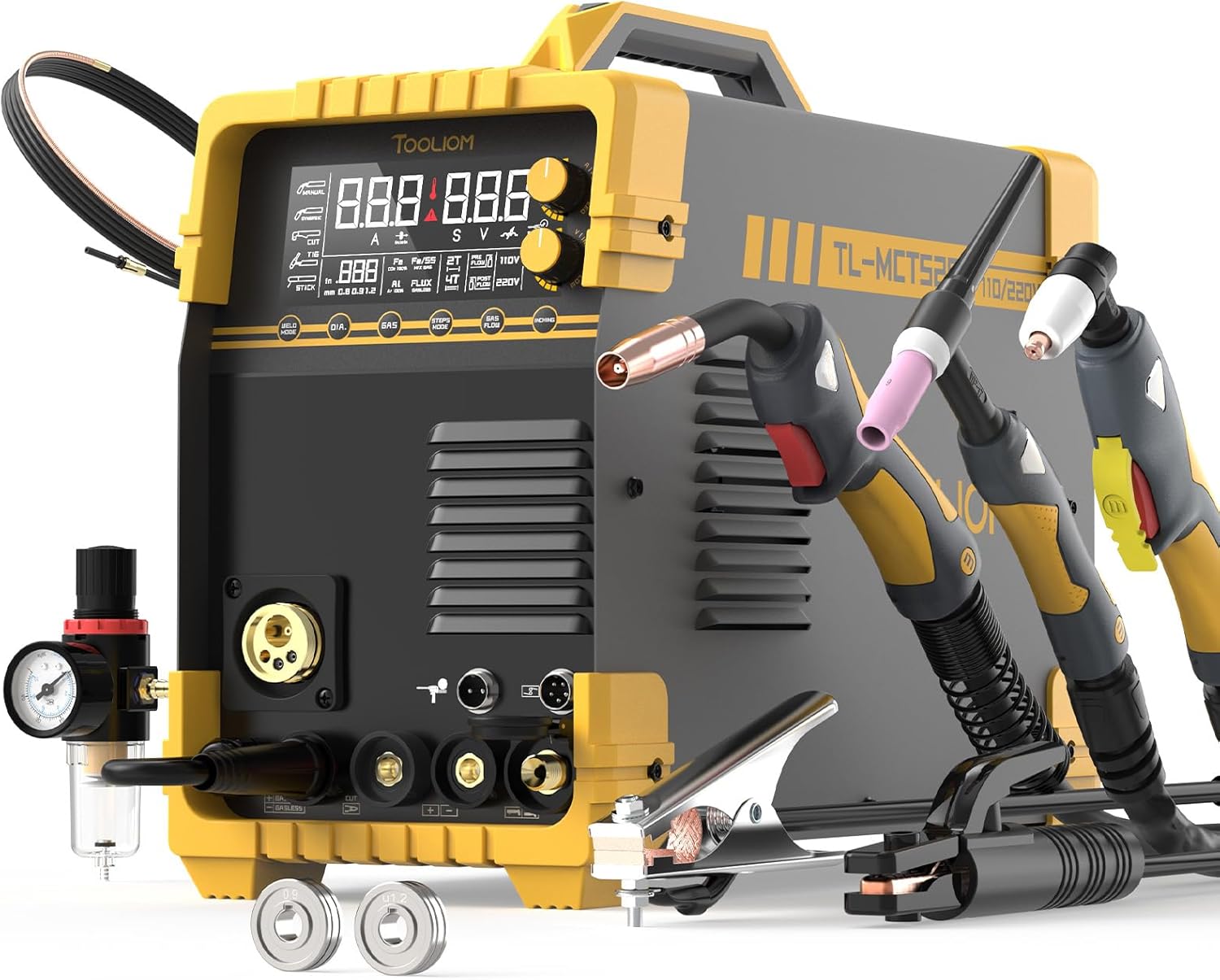
Figure 1: TOOLIOM TL-MCT520 Multiprocess Welding Machine and included accessories.
2. Safety Information
WARNING: Always read and understand all safety precautions before operating this machine. Failure to follow safety guidelines can result in serious injury or death.
- Eye Protection: Always wear a welding helmet with appropriate shade lenses and safety glasses with side shields.
- Body Protection: Wear flame-resistant clothing, welding gloves, and protective footwear.
- Ventilation: Ensure adequate ventilation to remove welding fumes and gases. Work in a well-ventilated area or use a fume extractor.
- Electrical Safety: Ensure the machine is properly grounded. Do not operate in wet conditions. Inspect cables and connections for damage before each use.
- Fire Prevention: Keep flammable materials away from the welding area. Have a fire extinguisher readily available.
- Hot Surfaces: Welding equipment and workpieces become extremely hot. Allow them to cool before handling.
3. Product Overview
3.1 Key Features
- 5-in-1 Multiprocess: 200A MIG Welder, 50A Plasma Cutter, 200A TIG Welder, 200A Stick Welder.
- Dual Voltage: Operates on both 110V and 220V power supplies.
- Large LCD Panel: Clear display of welding functions and parameters.
- Aluminum Welding Capability: Compatible with spool gun (sold separately) or MIG gun with graphite wire feed tube.
- MIG Synergic & Manual Settings: Suitable for both beginners and professionals.
- Versatile Wire Compatibility: Supports .045" solid/flux/aluminum, .035" solid/flux/aluminum, and .030" solid/flux welding wires.
3.2 Included Components
The TL-MCT520 package typically includes:
- Welding Machine
- MIG Gun
- TIG Torch
- Cutting Torch
- Work Clamp
- Electrode Holder
- Air Filter Regulator
- Power Adapter Cord
- Graphene Liner

Figure 2: Standard accessories included with the TL-MCT520.
3.3 Control Panel Description
The front panel features an intuitive LCD display and various buttons and knobs for mode selection and parameter adjustment.

Figure 3: Detailed view of the control panel and button functions.
- WELD MODE Switch: Selects between MIG, TIG, CUT, and Stick welding modes.
- DIA. (Wire Diameter) Switch: Adjusts for different wire diameters.
- GAS (Welding Material) Switch: Selects gas type (CO2, MAG, Flux, Normal, AL).
- STEPS MODE Switch: Toggles between 2T and 4T trigger modes.
- GAS FLOW Switch: Controls gas pre-flow and post-flow.
- INCHING (Wire Inching) Switch: Feeds wire without activating the arc.
- Wire Speed/Current Knob: Adjusts wire feed speed for MIG/TIG/Stick current.
- Voltage/Inductance/Flow Time Knob: Adjusts voltage for MIG, inductance, or gas flow time.
4. Setup
4.1 Power Connection
The TL-MCT520 supports dual voltage input. Ensure the correct power cord is used and connected to a compatible outlet (110V or 220V). The machine automatically detects the input voltage.
4.2 Connecting Welding Accessories
Connect the appropriate torch/gun and work clamp according to the desired welding process. Ensure all connections are secure.
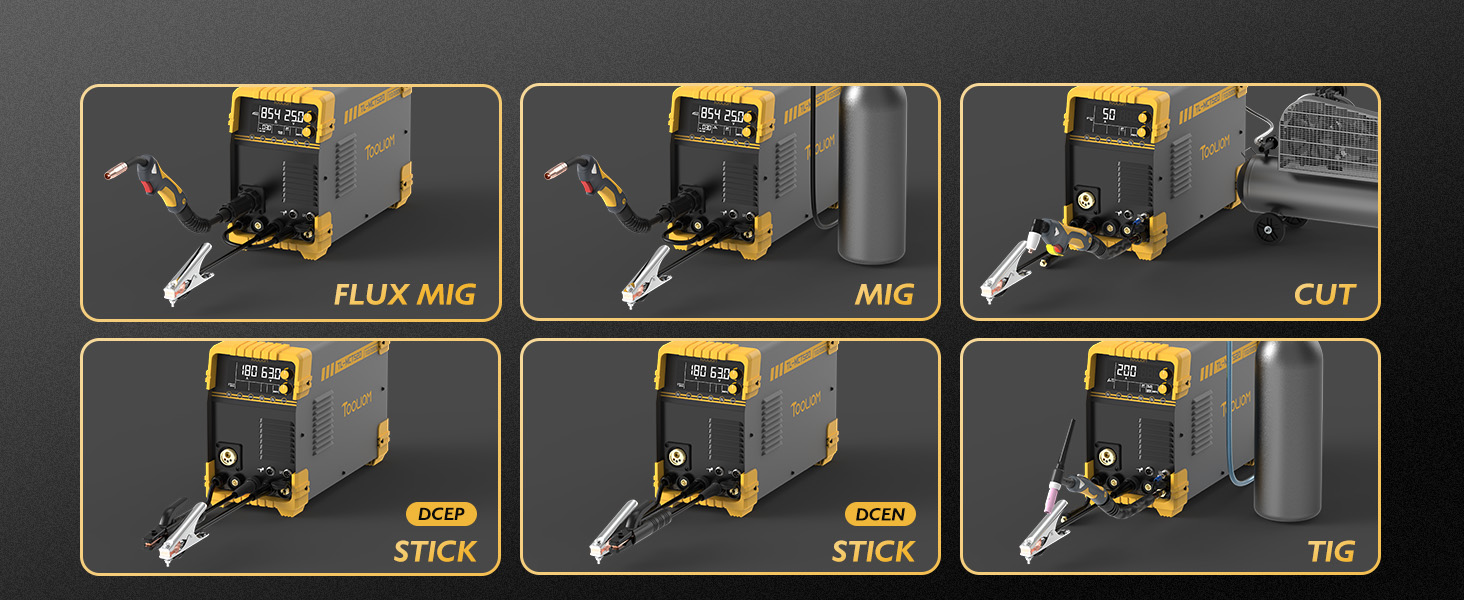
Figure 4: Connection diagrams for Flux MIG, MIG, CUT, and Stick welding modes.
4.3 Gas Connection (for MIG/TIG)
For MIG (with gas) and TIG welding, connect the gas hose from your shielding gas cylinder (e.g., CO2, Argon, Argon/CO2 mix) to the gas inlet on the machine. Ensure the gas regulator is properly installed and set to the recommended flow rate for your application.
4.4 Wire Installation (for MIG)
Open the wire feed compartment. Install the appropriate wire spool and thread the wire through the drive rolls and into the MIG gun liner. Ensure the correct drive rolls are installed for your wire type (V-groove for solid, U-groove for aluminum, Knurled for flux-cored).

Figure 5: Different drive roll types for Solid, Aluminum, and Flux wires.
Use the Wire Inching function to feed the wire through the gun until it exits the contact tip. Trim any excess wire.
5. Operating Modes
5.1 MIG Welding (GMAW)
Select MIG mode on the control panel. Choose between Synergic MIG (automatic parameter setting based on wire type and material) or Manual MIG (for experienced users to fine-tune settings). Adjust wire speed and voltage according to your material thickness and desired weld characteristics.
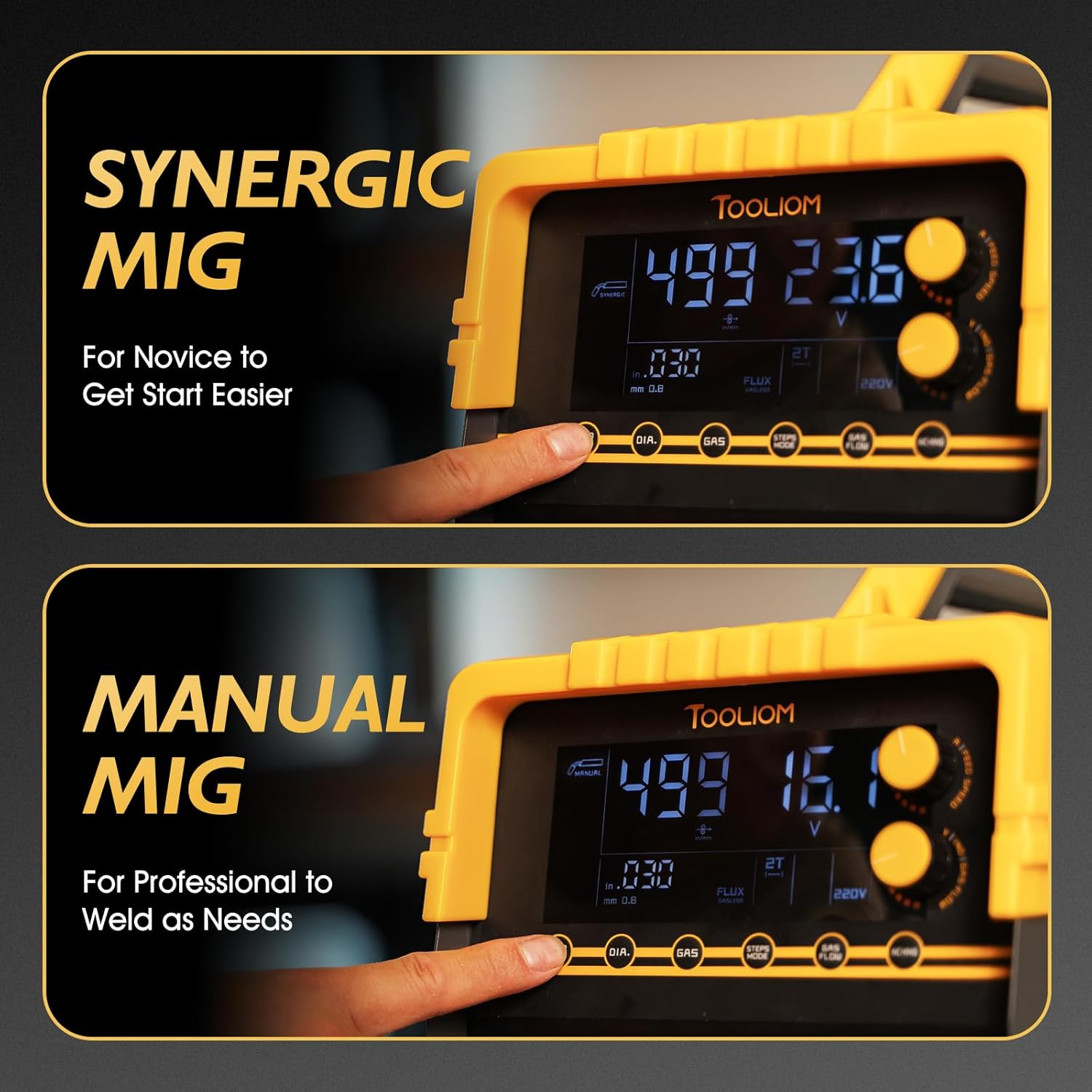
Figure 6: Synergic MIG for ease of use and Manual MIG for precise control.
5.2 TIG Welding (GTAW)
Select TIG mode. Connect the TIG torch and work clamp. This machine features High Frequency (HF) TIG start for non-touch arc initiation, ensuring stable performance. Adjust current and gas flow as needed for your TIG application.

Figure 7: High Frequency TIG ensures reliable ignition and stable arc.
5.3 Plasma Cutting (CUT)
Select CUT mode. Connect the plasma cutting torch and air compressor (if external). Adjust the cutting current (up to 50A) based on material thickness. The machine can achieve a clean cut of 3/8" (10mm) and a maximum severance cut of 1/2" (12mm).

Figure 8: Cutting capabilities at 110V (up to 1/3" max) and 220V (up to 1/2" max).
5.4 Stick Welding (MMA)
Select Stick mode. Connect the electrode holder and work clamp. Choose the appropriate electrode and adjust the current for your specific rod and material.
5.5 2T/4T Function
The 2T/4T function allows for different trigger control methods. 2T (Two-Touch) is standard for short welds, requiring the trigger to be held down. 4T (Four-Touch) is ideal for long, continuous welds, allowing the operator to release the trigger after initiating the arc, reducing hand fatigue.

Figure 9: 2T mode for skilled workers and 4T mode for long-term continuous welding.
5.6 Wire Inching
The Wire Inching function allows you to feed the welding wire through the MIG gun without activating the arc. This is useful for initial wire setup or clearing jams. The inching speed ranges from 85-780 inches/minute.

Figure 10: Wire Inching function for easy wire feeding.
6. Operating Demonstration Video
Video 1: A detailed demonstration of the TOOLIOM TL-135M (similar model) welder, showcasing its use for cutting and welding various metal pieces, including the construction of a hydraulic press. The video highlights the machine's capabilities and the quality of welds achieved.
7. Maintenance
Regular maintenance ensures the longevity and optimal performance of your welding machine.
- Cleaning: Regularly clean the machine's exterior, control panel, and air vents to prevent dust and debris buildup. Use compressed air to clear internal components.
- Cable Inspection: Inspect all welding cables, torches, and guns for cuts, abrasions, or loose connections. Replace damaged components immediately.
- Contact Tip & Nozzle: For MIG, regularly clean or replace the contact tip and nozzle to ensure proper wire feed and gas shielding.
- Drive Rolls: Clean the drive rolls and ensure they are free of debris. Verify proper tension for consistent wire feeding.
- Air Filter Regulator: For plasma cutting, regularly drain moisture from the air filter regulator and replace the filter element if necessary.
8. Troubleshooting
If you encounter issues with your TL-MCT520, refer to the following common troubleshooting steps:
- No Power: Check the power cord connection, circuit breaker, and ensure the machine is switched ON. Verify input voltage matches machine requirements.
- No Arc: Ensure the work clamp is securely attached to the workpiece. Check for proper connection of the torch/gun. Verify correct welding mode and parameters are selected.
- Poor Weld Quality: Adjust wire feed speed, voltage, or current. Ensure proper gas flow (if applicable) and correct wire type/diameter. Clean the contact tip and nozzle.
- Wire Feeding Issues (MIG): Check drive roll tension, ensure the wire spool is not tangled, and inspect the MIG gun liner for blockages.
- Plasma Cutting Issues: Verify air pressure and flow. Check consumables (electrode, nozzle, shield cup) for wear and replace if necessary.
For persistent issues, contact TOOLIOM customer support or a qualified technician.
9. Specifications
| Specification | Value |
|---|---|
| Model Number | TL-MCT520 |
| Manufacturer | TOOLIOM |
| Item Weight | 45.7 pounds |
| Package Dimensions | 21.5 x 17.5 x 15.5 inches |
| Style | MIG & TIG & CUT & Stick Welder |
| Power Source | AC (110V/220V Dual Voltage) |
| MIG Output | 200A |
| TIG Output | 200A |
| CUT Output | 50A |
| Stick Output | 200A |
| Max Severance Cut (CUT) | 1/2" (12 mm) |
| Ideal Clean Cut (CUT) | 3/8" (10 mm) |
| Spool Gun Compatible | Yes (Spool gun not included) |
10. Warranty and Support
This TOOLIOM welding machine is covered by the manufacturer's standard warranty. For specific warranty details, claims, or technical support, please refer to the warranty card included with your product or visit the official TOOLIOM website. Keep your purchase receipt as proof of purchase.
For additional information and products, visit the TOOLIOM Store on Amazon.
Related Documents - TL-MCT520
 |
Tooliom TL-135M PRO User's Manual: MIG, Stick, and Lift TIG Welding Comprehensive user manual for the Tooliom TL-135M PRO 3-in-1 welder, covering setup, operation, safety precautions, and troubleshooting for Flux MIG, Stick, and Lift TIG welding processes. |
 |
TOOLIOM TL-250M Multi-Process Welder User Manual Comprehensive user manual for the TOOLIOM TL-250M multi-process welder, detailing setup, operation, safety precautions, specifications, and troubleshooting for MIG, Stick, and TIG welding. |
 |
TOOLIOM TL-250M PRO User's Manual - MIG, Stick, and Lift TIG Welder Comprehensive user manual for the TOOLIOM TL-250M PRO welder, detailing specifications, safety guidelines, installation procedures, operational instructions, and troubleshooting tips for MIG, Stick, and Lift TIG welding applications. |
 |
TOOLIOM TL-1955 Welder User Manual: Operation, Safety, and Troubleshooting Comprehensive user manual for the TOOLIOM TL-1955 welder. Learn about specifications, setup, operation, safety precautions, and troubleshooting for stick welding. |
 |
LONGEVITY ProMTS 252i 250 Amp Multiprocess Welder Operating Manual Comprehensive operating manual for the LONGEVITY ProMTS 252i 250 Amp Multiprocess Welder. Covers safety, specifications, MIG, TIG, and STICK welding operations, tips, and troubleshooting. |
 |
BOSSWELD MST 248X Multiprocess DC Inverter Welder Manual Explore the capabilities of the BOSSWELD MST 248X Multiprocess DC Inverter Welder with this comprehensive manual. Learn about setup, operation, safety, and troubleshooting for MIG, Stick, and TIG welding. Features advanced IGBT technology for high-quality welds. |
Ask a question about this manual
Ask about setup, troubleshooting, compatibility, parts, safety, or missing instructions. Manuals+ will review the question and use this page’s manual context to help answer it.