
Zeelink KM-20
Zeelink Karaoke Machine KM-20 User Manual
Model: KM-20
Introduction
Thank you for choosing the Zeelink Karaoke Machine KM-20. This powerful and portable entertainment system is designed to provide crystal-clear audio and a vibrant visual experience for all your gatherings. Featuring a robust 60W speaker, dual wireless microphones, advanced DSP technology, and dazzling LED lights, it's perfect for family fun, parties, and more. This manual will guide you through the setup, operation, and maintenance of your new karaoke machine.
What's Included
Please check the package contents to ensure all items are present:
- 1 x Zeelink KM-20 Karaoke Machine
- 2 x Wireless Microphones
- 1 x Type-C Charging Cable
- 1 x Auxiliary Cable
- 1 x Carrying Strap
- 1 x User Manual (this document)

Image: Contents of the Zeelink KM-20 package, including the karaoke machine, two wireless microphones, charging cable, auxiliary cable, and carrying strap.
Product Overview

Image: Detailed view of the top control panel, showing buttons for Power, Mode/TWS, Microphone Volume, Reverb, Play/Pause, and Volume controls.
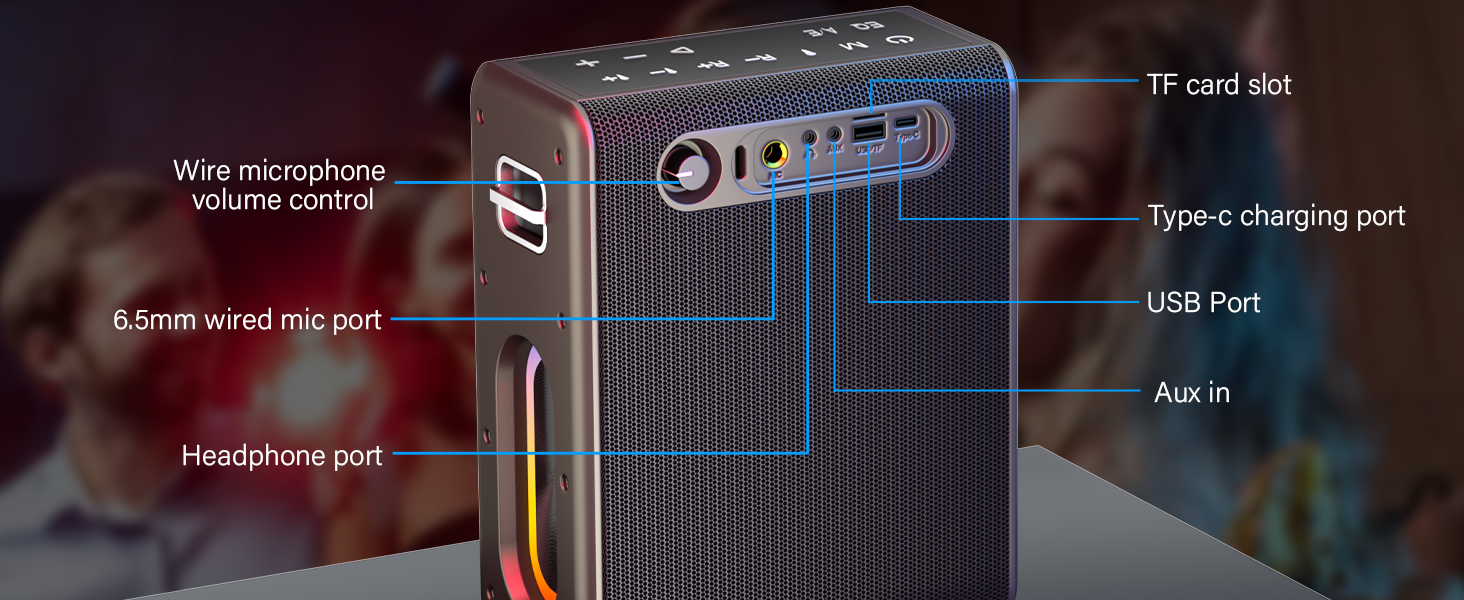
Image: Detailed view of the side panel, indicating the TF card slot, Type-C charging port, USB port, AUX input, and headphone port.
Setup
1. Charging the Karaoke Machine
Before first use, fully charge the karaoke machine. Connect the provided Type-C cable to the charging port on the side of the machine and the other end to a USB power adapter (not included). The charging indicator lights will show the charging status.
2. Charging the Wireless Microphones
The wireless microphones are rechargeable. Use the Type-C cable to charge them. A full charge provides over 8 hours of use, with a charging time of 3-4 hours.

Image: Illustration of the dual UHF rechargeable microphones, highlighting their internal battery and charging port.
Operating Instructions
1. Power On/Off
Press and hold the Power button () on the top panel to turn the machine on or off.
2. Connecting Microphones
The wireless microphones automatically pair with the karaoke machine when both are powered on. Ensure the microphones are charged and turned on.
3. Playback Modes
Press the Mode button (M) to switch between different input modes:
- Bluetooth (BT) Mode: The machine will enter pairing mode. Search for "Zeelink KM-20" on your device's Bluetooth settings and connect.
- AUX Mode: Connect your device using the provided auxiliary cable to the AUX input port.
- USB Mode: Insert a USB drive with audio files into the USB port.
- TF Card Mode: Insert a TF (microSD) card with audio files into the TF card slot.

Image: Visual representation of the various connectivity options, including Bluetooth, AUX, USB, and TF card.
4. TWS (True Wireless Stereo) Function
To achieve True Wireless Stereo sound, you can pair two Zeelink KM-20 machines:
- Ensure both machines are powered on and not connected to any Bluetooth device.
- On one machine, press and hold the Mode/TWS button until you hear a prompt indicating TWS pairing.
- The two machines will automatically connect to each other.
- Once paired, connect your device via Bluetooth to one of the machines. Audio will now play through both speakers in stereo.
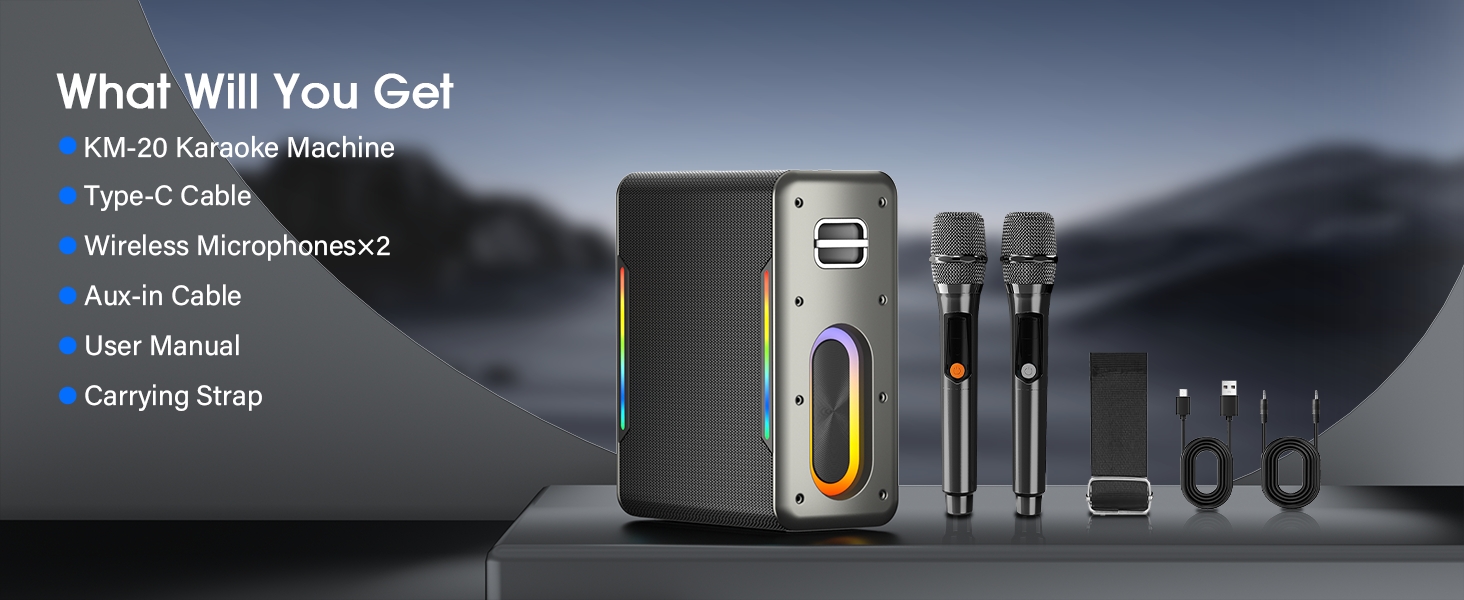
Image: Diagram illustrating how two Zeelink karaoke machines connect wirelessly using TWS technology for stereo sound.
5. Audio Controls
- Volume Control: Use the - and + buttons to adjust the main speaker volume.
- Microphone Volume: Use the Mic - and Mic + buttons to adjust the microphone volume independently.
- Reverb Control: Use the R- and R+ buttons to adjust the reverb effect on the microphones.
- Play/Pause: Press the Play/Pause button () to play or pause music.
- Previous/Next Song: Use the Previous () and Next () buttons to navigate tracks.
- Vocal Sound Elimination (A/E): Press the A/E button to reduce or eliminate vocals from a song, making it suitable for karaoke.
- EQ/Power Saving: Press the EQ button to cycle through equalizer presets or activate power-saving mode.
6. LED Lights
The machine features vibrant LED lights that sync with the music. There are three different lighting modes. Press the Light button (likely integrated with another button or a dedicated light button not explicitly labeled in the provided image but implied by "Dazzling Visuals with LED Lights" feature bullet) to cycle through the modes or turn them off.
Image: Examples of the three different LED lighting modes, showing various color patterns and effects.
Maintenance
- Cleaning: Use a soft, dry cloth to clean the surface of the machine. Do not use abrasive cleaners or solvents.
- Storage: Store the machine in a cool, dry place away from direct sunlight and extreme temperatures.
- Battery Care: To prolong battery life, fully charge the machine and microphones before long periods of storage. Recharge them at least once every three months if not in use.
- Avoid Water: This device is not waterproof. Keep it away from water and high humidity.
Troubleshooting
| Problem | Possible Cause | Solution |
|---|---|---|
| No power/Doesn't turn on | Battery is low or depleted. | Charge the karaoke machine and microphones fully. |
| No sound from speaker | Volume is too low; incorrect input mode; device not connected properly. | Increase volume; switch to correct input mode (BT/AUX/USB/TF); ensure device is paired/connected. |
| Microphones not working | Microphones are off or uncharged; not paired. | Ensure microphones are charged and powered on. They should automatically pair. |
| Bluetooth connection unstable | Device is too far from the speaker; interference. | Move device closer to the speaker (within 33 feet/10 meters); avoid obstacles; disconnect and reconnect Bluetooth. |
| Sound distortion | Volume too high; audio source quality is poor. | Reduce volume; try a different audio source or file. |
Specifications
- Model: KM-20
- Product Dimensions: 7.4 x 3.7 x 8.7 inches
- Item Weight: 5.6 pounds
- Speaker Output: 60W
- Battery Capacity: 6000mAh (Karaoke Machine), 1500mAh (Microphones)
- Playtime: 6-8 hours (Karaoke Machine), 8+ hours (Microphones)
- Connectivity: Bluetooth 5.0, AUX, USB, TF Card
- Microphone Type: Dual UHF Rechargeable Wireless Microphones
- Special Features: DSP Chip, LED Lights (3 modes), TWS Function, Vocal Sound Elimination
- Color: Black

Image: Infographic detailing the 60W powerful output, 6000mAh battery capacity, 2x 2.2-inch tweeters, and 5-inch subwoofers of the Zeelink KM-20.
Warranty and Support
For warranty information or technical support, please refer to the contact details provided on the product packaging or visit the official Zeelink website. Keep your purchase receipt for warranty claims.
Ask a question about this manual
Ask about setup, troubleshooting, compatibility, parts, safety, or missing instructions. Manuals+ will review the question and use this page’s manual context to help answer it.