
Introduction
This user manual provides detailed instructions for the setup, operation, and maintenance of your SOGUYI Smart WiFi Irrigation Controller. Designed for efficient garden watering, this device offers remote control via a user-friendly app, smart weather-based adjustments, and flexible programming options to optimize water usage and maintain a healthy garden.

The SOGUYI Smart WiFi Irrigation Controller and its accompanying mobile application.
Product Features
- Remote Control via App: Manage your irrigation system from anywhere using the dedicated app (compatible with 2.4GHz WiFi only).
- Smart Weather-Based Watering: Automatically skips watering on rainy days based on real-time local forecasts. Manual rain delay (1 to 7 days) is also available.
- Two Modes & Two Frequency Options: Offers Irrigation mode (up to 5 programs per outlet, 1s-59min59s duration) and Spray mode (flexible running durations and intervals). Both support single time or Mon-Sun cycle frequency.
- Advanced Irrigation System: The SOGUYI WiFi hub supports pairing with up to 128 WiFi sprinkler timers, enabling multiple watering zones.
- Waterproof & Durable Design: Features a waterproof rubber ring on the battery cover and built-in metal filter gaskets to prevent sediment, ensuring reliable outdoor use.
Package Contents
Please ensure all items are present before proceeding with installation:
- SOGUYI Smart WiFi Irrigation Controller (2-outlet)
- WiFi Gateway Hub
- User Manual
- Required Batteries (if included, otherwise purchase separately as specified)
Setup
1. Physical Installation
- Insert the specified batteries into the controller's battery compartment. Ensure the waterproof rubber ring is properly seated.
- Attach the SOGUYI Smart WiFi Irrigation Controller to your outdoor faucet. Ensure a tight, leak-free connection.
- Connect your garden hoses to the two outlets (Zone A and Zone B) on the controller.
2. App Download and Connection
Download the SOGUYI app from your device's app store (Android/iOS). Follow the in-app instructions to pair the WiFi Gateway Hub and then connect your irrigation controller. The system operates on 2.4GHz WiFi.
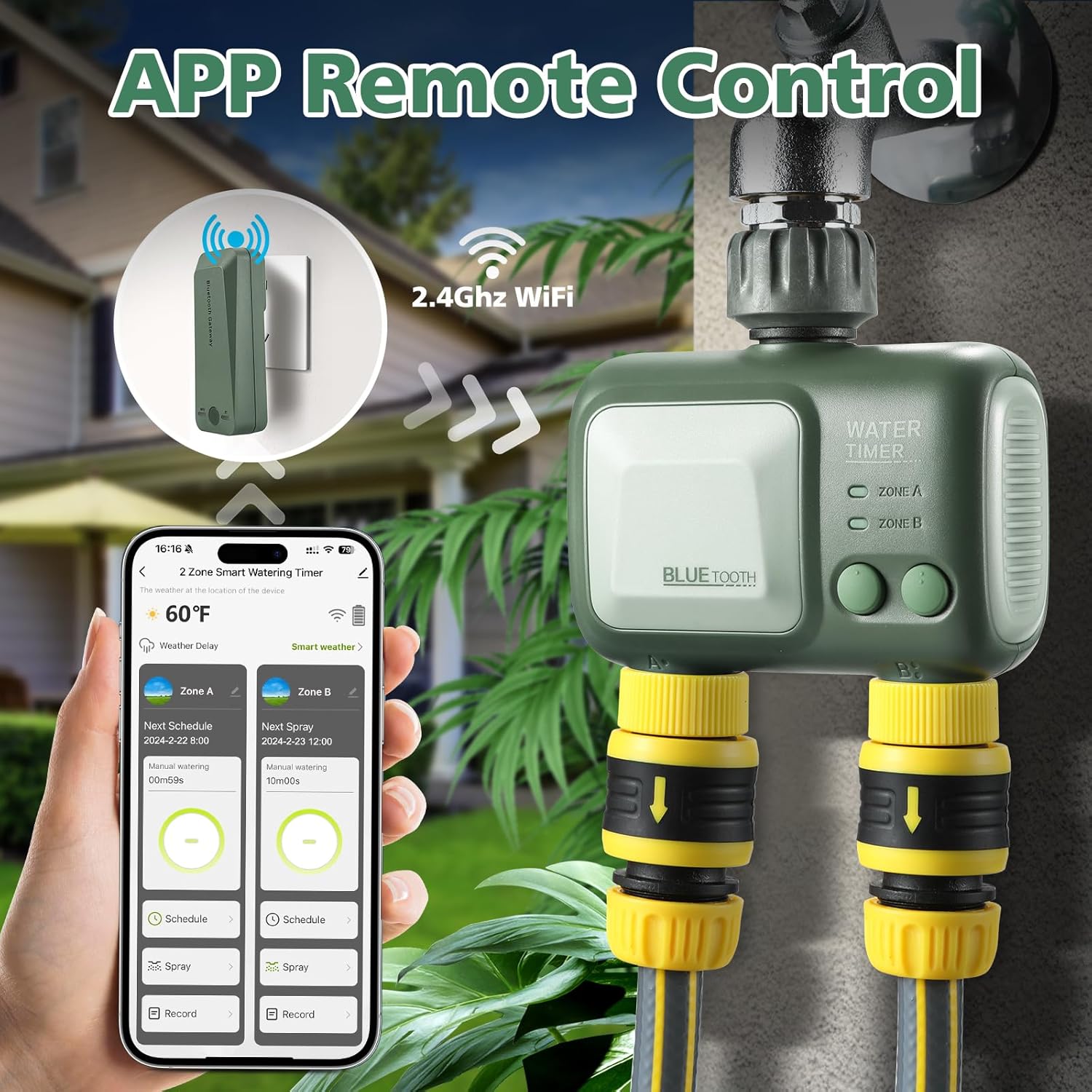
The mobile app interface showing device pairing and remote control options.
3. Initial Pairing and Configuration
Once the gateway is connected, the app will guide you through adding the water timer. This typically involves putting the timer into pairing mode (refer to the device's specific button sequence if needed) and confirming the connection within the app. After successful pairing, you can begin configuring your watering schedules.
Official product video demonstrating the Smart Sprinkler Timer Hose Timer WiFi Irrigation Controller's features and connectivity.
Operating Instructions
1. Remote Control via App
The SOGUYI app provides full control over your irrigation system. You can:
- Set Watering Schedules: Create up to 5 custom watering programs for each outlet (Zone A and Zone B). Define start times, durations (1 second to 59 minutes 59 seconds), and frequency (single time or specific days of the week).
- Manual Watering: Initiate immediate watering sessions for a specified duration directly from the app.
- View Status: Check the current status of each zone, including upcoming schedules and manual watering progress.
2. Smart Weather-Based Watering
Leverage the smart weather delay feature to conserve water. The controller can automatically skip scheduled watering if rain is detected in your local forecast. You can also manually set a rain delay for 1 to 7 days to prevent overwatering.

Illustration of water savings achieved with weather-based watering compared to traditional timers.
3. Watering Modes and Frequency
The controller supports two primary watering modes:
- Irrigation Mode: Ideal for general watering of lawns and gardens. Set specific start times and durations.
- Spray Mode: Suitable for misting, cooling, or specific plant needs. Allows for flexible running durations and intervals between sprays.
Both modes offer frequency options for single-time watering or recurring schedules on specific days (Monday-Sunday).

Visual representation of setting up cycle time and single time watering frequencies.
4. Multi-Zone Management
The SOGUYI WiFi hub can seamlessly pair with up to 128 WiFi sprinkler timers, allowing you to create and manage multiple independent watering zones across your property. This provides ultimate convenience and efficiency for larger gardens or complex irrigation needs.

Example of setting up distinct watering schedules for two separate zones.
5. Smart Voice Control
Integrate your SOGUYI controller with voice assistants like Alexa for hands-free control. Simply use voice commands to start, stop, or adjust your watering schedules.

A user interacting with Alexa to control the SOGUYI water timer.
6. Monitoring Irrigation Records
The app allows you to track and review past watering sessions for each zone. This feature helps you monitor water usage, ensure proper hydration for your plants, and make informed adjustments to your schedules.

A user reviewing the detailed irrigation records within the SOGUYI app.
7. Garden Management and Sharing
The app supports multi-user, multi-role sharing, allowing family members or garden caretakers to access and manage the irrigation system. This ensures seamless coordination and control over your garden's watering needs.

The app's feature for sharing garden management with multiple users.
Maintenance
- Cleaning: Periodically inspect the filter gaskets at the inlet to prevent sediment buildup. Clean as needed by rinsing under running water.
- Battery Replacement: Replace batteries when the low battery indicator appears on the device or in the app to ensure continuous operation.
- Winterization: In freezing climates, disconnect the controller from the faucet and hoses before the first frost. Store it indoors in a dry, protected area to prevent damage from freezing water.
Troubleshooting
| Problem | Possible Cause | Solution |
|---|---|---|
| Controller not connecting to app/WiFi. | Incorrect WiFi band (not 2.4GHz), weak signal, pairing mode not active, gateway issue. | Ensure your WiFi is 2.4GHz. Move gateway closer to router/controller. Re-enter pairing mode. Check gateway power. |
| Watering schedule not running. | Incorrect schedule settings, low battery, rain delay active, manual override. | Verify schedule times and days in app. Check battery level. Disable rain delay if active. Ensure no manual watering is active. |
| Water leakage from connections. | Loose connection, worn washer. | Tighten connections. Check and replace rubber washers if damaged. |
| Inaccurate water usage tracking. | App synchronization issue. | Ensure app is updated. Refresh data in the app. Check internet connection. |
Specifications
| Attribute | Detail |
|---|---|
| Brand | SOGUYI |
| Model | B0CP5J779H |
| Color | Green |
| Material | Metal, Rubber |
| Product Dimensions | 6.65"D x 2.68"W x 6.65"H |
| Item Weight | 0.53 Kilograms (1.17 pounds) |
| Number of Settings | 12 (programs) |
| Connectivity | 2.4GHz WiFi (via Gateway) |
| Gateway Capacity | Supports up to 128 WiFi sprinkler timers |
Warranty and Support
SOGUYI products are designed for durability and performance. For specific warranty information, please refer to the product packaging or contact SOGUYI customer support directly. If you encounter any issues or have questions not covered in this manual, please reach out to our support team for assistance.