
1. Important Safety Instructions
Please read all instructions carefully before using this appliance. Retain this manual for future reference.
- This appliance is for household use only. Do not use outdoors or on wet surfaces.
- Do not allow children to operate the vacuum cleaner. Close supervision is necessary when used near children.
- Do not pick up flammable or combustible liquids, such as gasoline, or use in areas where they may be present.
- Do not pick up anything that is burning or smoking, such as cigarettes, matches, or hot ashes.
- Do not use without dust cup and filters in place.
- Turn off the appliance before connecting or disconnecting the motorized brush, charging, or performing any maintenance.
- Use only Voweek recommended attachments.
- Do not handle the charger or appliance with wet hands.
- If the charging cable is damaged, it must be replaced by the manufacturer, its service agent, or similarly qualified persons to avoid a hazard.
2. Product Overview
The Voweek 250W Cordless Vacuum Cleaner is designed for efficient cleaning of various surfaces. It features a powerful motor, multiple operating modes, and a comprehensive filtration system.
Key Features:
- 250W Brushless Motor: Provides up to 25,000Pa suction in MAX mode.
- 3 Operation Modes: MAX (25,000Pa), MID (18,000Pa), and MIN (12,000Pa).
- LED Display: Shows suction level, battery level, brush roller status, and air channel blockage alerts.
- Detachable Li-ion Battery: 7*2200mAh capacity, offering up to 40 minutes runtime in MIN mode.
- Efficient Filtration System: Captures micro-dust particles as small as 0.1 microns with 99.99% efficiency. Includes 3 HEPA filters (2 pre-installed, 1 extra).
- Versatile Cleaning: 2-in-1 floor brush with flexible LED head for various floor types and dark areas. Converts to a handheld vacuum for detailed cleaning with included tools.
Included Components:
- Main Motor Unit
- LED Roller Brush
- Flexible Tube
- Battery Pack
- Power Adapter
- Crevice Nozzle
- 2-in-1 Brush Tool
- Cleaning Brush
- HEPA Filters (3 total: 2 installed, 1 extra)
- Wall Mounted Dock with Screws & Anchors
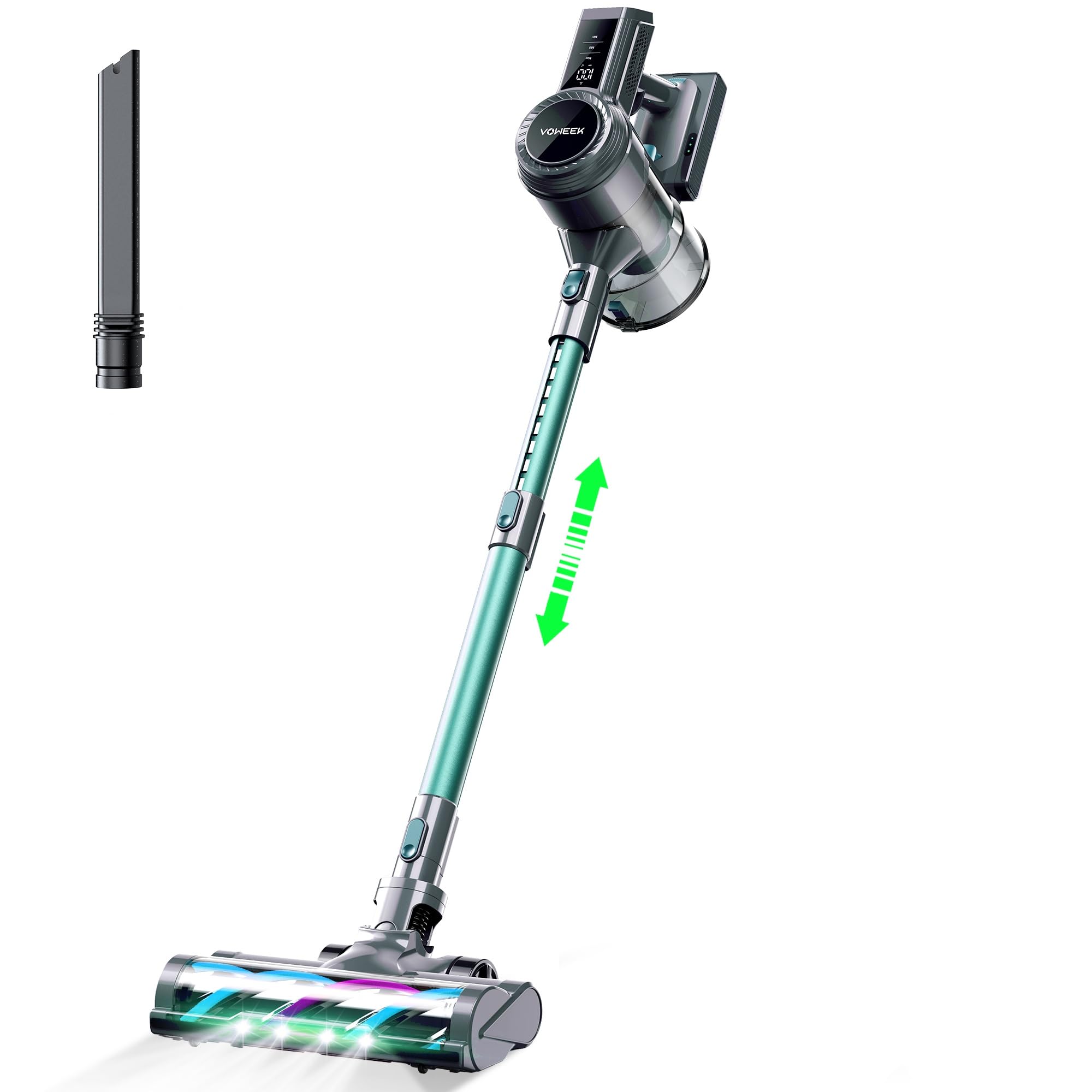
An image showing the Voweek 250W Cordless Vacuum Cleaner in its assembled stick configuration, alongside its various attachments including the LED roller brush, crevice nozzle, and 2-in-1 brush tool.
3. Setup and Assembly
3.1 Initial Charging
- Before first use, fully charge the battery pack. Connect the power adapter to the battery pack and plug it into a wall outlet.
- The LED display will indicate charging status. A full charge typically takes 4-5 hours.
- The battery can be charged while installed in the main unit or separately.
3.2 Assembling the Vacuum Cleaner
- Attach the Flexible Tube: Insert the flexible tube into the main motor unit until it clicks securely.
- Attach the LED Roller Brush: Connect the LED roller brush to the other end of the flexible tube until it clicks.
- Install Battery Pack: Slide the charged battery pack into the slot on the main motor unit until it locks into place.
- Handheld Configuration: For handheld use, detach the flexible tube and LED roller brush. Attach the crevice nozzle or 2-in-1 brush tool directly to the main motor unit.
3.3 Wall Mounted Dock Installation
- Choose a suitable location near a power outlet for convenient charging and storage.
- Mark the drilling points on the wall using the dock as a template.
- Drill holes and insert the wall anchors.
- Secure the wall mounted dock with the provided screws.
- Hang the vacuum cleaner on the dock for storage and charging.
4. Operating Instructions
4.1 Power On/Off and Mode Selection
- Power On: Press the power button on the main unit to start the vacuum cleaner. It will typically start in MIN mode.
- Change Suction Mode: Press the mode selection button to cycle through MIN, MID, and MAX suction modes. The current mode will be displayed on the LED screen.
- Power Off: Press the power button again to turn off the vacuum cleaner.
4.2 LED Display Indicators
The LED display provides real-time information about the vacuum's status:
- Suction Level: Indicates the current operating mode (MIN, MID, MAX).
- Battery Level: Shows the remaining battery charge.
- Brush Roller Status: Alerts if the brush roller is jammed or requires cleaning.
- Air Channel Blockage: Indicates if there is a blockage in the air path, requiring inspection and clearing.
4.3 Using Attachments
- LED Roller Brush: Ideal for hard floors, tiles, and carpets. The integrated LED lights illuminate dust in dark areas.
- Crevice Nozzle: Use for narrow gaps, corners, and tight spaces, such as between sofa cushions or car seats.
- 2-in-1 Brush Tool: Can be used as a brush for delicate surfaces like curtains or keyboards, or as an upholstery tool for furniture.
5. Maintenance
Regular maintenance ensures optimal performance and extends the lifespan of your vacuum cleaner.
5.1 Emptying the Dust Cup
- Ensure the vacuum is turned off.
- Press the dust cup release button to detach the dust cup from the main unit.
- Hold the dust cup over a trash bin and press the bottom release latch to empty the contents.
- Reattach the dust cup until it clicks into place.
5.2 Cleaning Filters
The vacuum includes multiple HEPA filters. It is recommended to clean them regularly (e.g., monthly, depending on usage) and replace them every 3-6 months.
- Turn off the vacuum and remove the dust cup.
- Twist and pull out the filter assembly from the dust cup.
- Separate the HEPA filter from the mesh filter.
- Tap the filters gently to remove loose dust. For a deeper clean, rinse the filters under cold running water. Do not use detergent.
- Allow all filter components to air dry completely for at least 24 hours before reassembling and placing back into the vacuum. Ensure they are completely dry to prevent damage and mold growth.
5.3 Cleaning the Roller Brush
- Ensure the vacuum is off and disconnected from the power adapter.
- Press the release button on the side of the LED roller brush head to remove the brush bar.
- Use the provided cleaning brush or scissors to remove any tangled hair, threads, or debris from the roller brush.
- Clean the brush head housing as well.
- Reinsert the roller brush until it clicks into place.
6. Troubleshooting
If you encounter issues with your Voweek Cordless Vacuum Cleaner, refer to the following common problems and solutions:
| Problem | Possible Cause | Solution |
|---|---|---|
| Vacuum does not turn on | Battery is not charged or not properly installed. | Ensure the battery is fully charged and correctly inserted into the main unit. |
| Low suction power | Dust cup is full. Filters are clogged. Air channel is blocked. Roller brush is jammed. | Empty the dust cup. Clean or replace filters. Check for blockages in the flexible tube or brush head. Clean the roller brush. |
| Battery not charging | Power adapter not connected properly. Outlet has no power. Battery is faulty. | Ensure the power adapter is securely connected to both the battery and a working power outlet. Contact customer support if the issue persists. |
| LED display shows an alert | Brush roller jammed or air channel blocked. | Refer to the LED display for the specific alert (e.g., brush roller icon, blockage icon) and perform the corresponding maintenance (clean brush, clear blockage). |
If the problem persists after trying these solutions, please contact Voweek customer support.
7. Specifications
| Feature | Specification |
|---|---|
| Model Name | VW-VC10 |
| Motor Power | 250W Brushless |
| Suction Power | MIN: 12,000Pa, MID: 18,000Pa, MAX: 25,000Pa |
| Battery Type | 7*2200mAh Li-ion |
| Runtime | MIN: Up to 40 mins, MID: Up to 25 mins, MAX: Up to 15 mins |
| Filtration System | Multi-stage with HEPA filters (99.99% efficiency) |
| Dust Cup Capacity | Not specified in input, typical for stick vacuums. |
| Material | ABS |
| Color | Purple |
| Item Weight | 3 kg 690 g |
| Item Dimensions (LxWxH) | 44 x 27 x 19 Centimeters |
| Recommended Use | Indoor |
8. Warranty and Support
Voweek products are manufactured to high-quality standards. For information regarding warranty coverage, please refer to the warranty card included with your purchase or visit the official Voweek website.
If you require technical assistance, have questions about your product, or need to report a defect, please contact Voweek customer support through the contact information provided on the official website or your purchase documentation. Please have your model number (VW-VC10) and purchase date available when contacting support.