
1. Introduction
Thank you for choosing the Milanix Small AM/FM Portable Radio. This compact and user-friendly radio is designed for reliable reception and portability, making it ideal for various indoor and outdoor activities, including emergency situations. Please read this manual carefully to ensure proper use and to maximize your listening experience.
Safety Information
- Do not expose the unit to extreme temperatures, direct sunlight, dust, or humidity.
- Keep the unit away from water or other liquids.
- Do not attempt to disassemble or modify the unit. Refer all servicing to qualified personnel.
- Dispose of batteries properly according to local regulations.
2. Package Contents
- Milanix Small AM/FM Portable Radio
- Owner's Manual
3. Product Overview
Familiarize yourself with the key components of your Milanix portable radio:

Image 1: Front view of the Milanix Small AM/FM Portable Radio, highlighting the speaker, tuning dial, and power indicator.
- Tuning Dial: Used to select AM or FM radio frequencies.
- AM/FM Switch: Toggles between AM and FM bands.
- Power & Volume Knob: Turns the radio on/off and adjusts the sound level.
- Telescopic Antenna: Extends for improved radio signal reception.
- Headphone Jack (3.5mm): For private listening with earphones (not included).
- Hand Strap: For convenient carrying.
- Battery Compartment: Located on the back for AA batteries.
4. Setup
4.1 Battery Installation
The Milanix radio requires 2 x AA batteries (not included) for operation.
- Locate the battery compartment cover on the back of the radio.
- Slide the cover open.
- Insert 2 AA batteries, ensuring the correct polarity (+ and -) as indicated inside the compartment.
- Close the battery compartment cover securely.
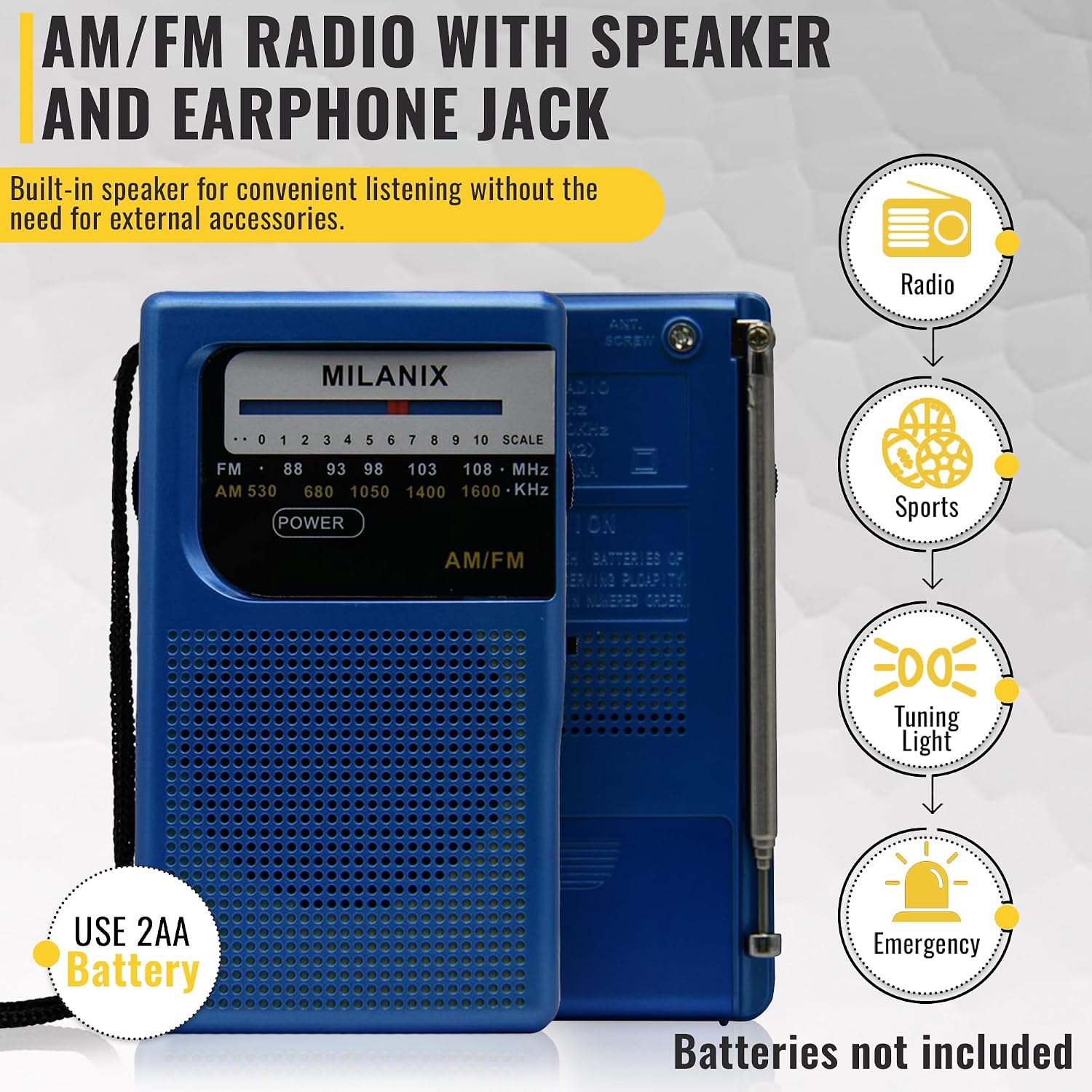
Image 2: Rear view of the radio with the battery compartment open, showing where to insert 2 AA batteries.
4.2 Antenna Extension
For optimal reception, especially for FM stations, extend the telescopic antenna fully. For AM reception, the radio has a built-in AM antenna, and the telescopic antenna may not be necessary.
5. Operation
5.1 Power On/Off and Volume Adjustment
- Rotate the Power & Volume Knob clockwise to turn the radio on. You will hear a click.
- Continue rotating the knob clockwise to increase the volume, and counter-clockwise to decrease it.
- To turn the radio off, rotate the Power & Volume Knob counter-clockwise until you hear a click.
5.2 Selecting Radio Band (AM/FM)
Use the AM/FM Switch located on the side of the radio to select your desired frequency band:
- Slide the switch to 'FM' for Frequency Modulation stations.
- Slide the switch to 'AM' for Amplitude Modulation stations.
5.3 Tuning Stations
- Once the radio is on and the band is selected, slowly rotate the Tuning Dial to scan through available stations.
- A red tuning light will illuminate when a strong signal is detected, indicating optimal reception for the selected station.
5.4 Using the Headphone Jack
For private listening, plug any standard 3.5mm earphones or headphones into the Headphone Jack located on the side of the radio. The internal speaker will automatically mute when headphones are connected.
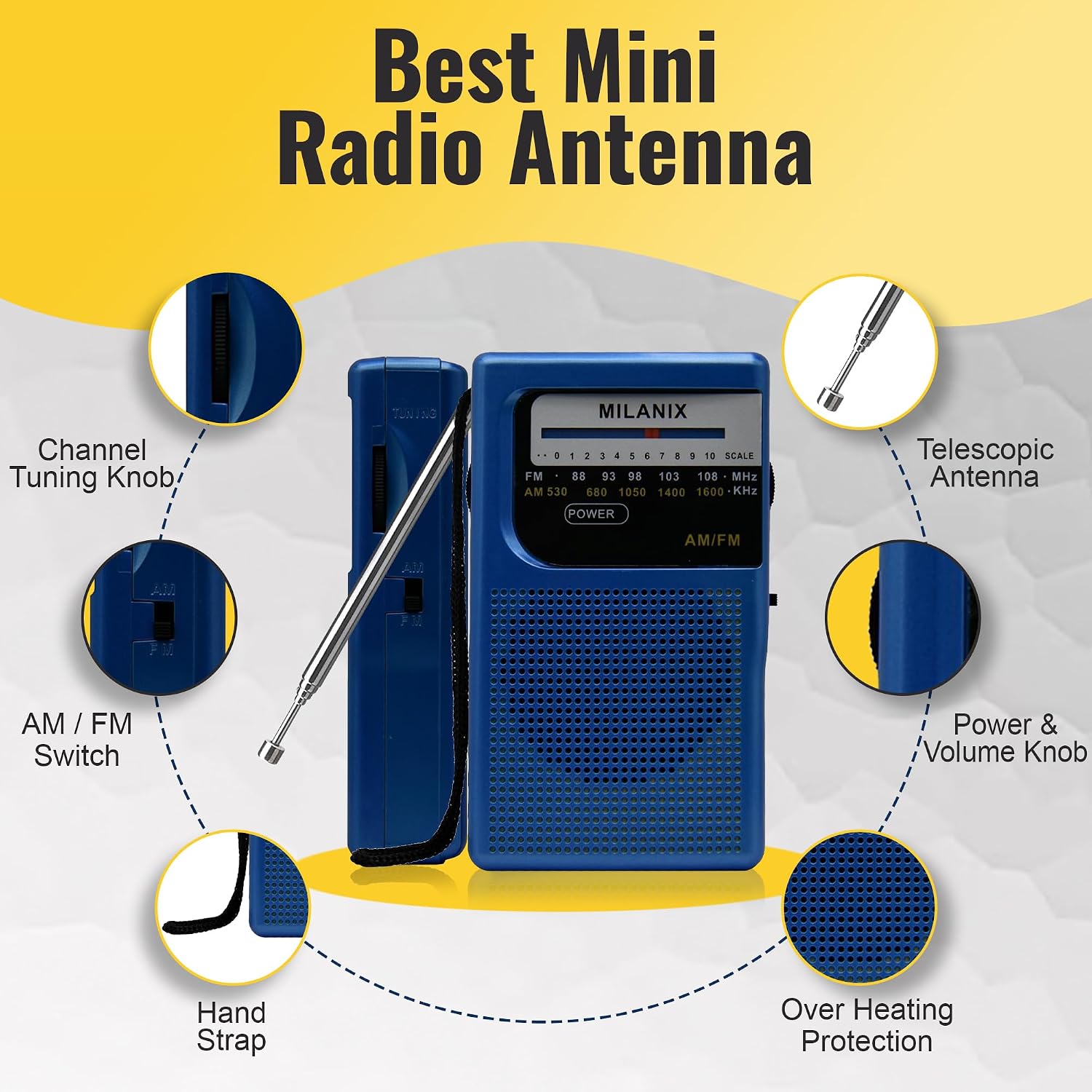
Image 3: Side view of the Milanix radio, showing the 3.5mm headphone jack.
6. Tips for Best Reception
- FM Reception: Fully extend the telescopic antenna and adjust its direction for the clearest signal. Moving the radio to different locations can also improve reception.
- AM Reception: The radio uses a built-in ferrite bar antenna for AM. Rotate the entire radio unit to find the best signal. The telescopic antenna is generally not needed for AM.
- Avoid placing the radio near electronic devices that may cause interference, such as computers, TVs, or fluorescent lights.
7. Care and Maintenance
- Clean the radio with a soft, dry cloth. Do not use abrasive cleaners or solvents.
- If the radio will not be used for an extended period, remove the batteries to prevent leakage and damage.
- Store the radio in a cool, dry place.
8. Troubleshooting
- No Power: Ensure batteries are inserted correctly with the right polarity and are not depleted. Replace with fresh batteries if necessary.
- Poor Reception/Static: Extend and adjust the telescopic antenna (for FM). Rotate the radio (for AM). Move away from potential sources of interference.
- No Sound: Check the volume level. If headphones are plugged in, ensure they are working correctly.
9. Specifications

Image 4: Diagram showing the dimensions of the Milanix Small AM/FM Portable Radio.
| Feature | Detail |
|---|---|
| Brand | MILANIX |
| Model Number | B0CP4FM7V6 |
| Product Dimensions | 1 x 4.06 x 2.07 inches |
| Item Weight | 4.2 ounces |
| Color | Blue Coral |
| Power Source | Battery Powered (2 AA batteries required) |
| Tuner Technology | AM/FM |
| Radio Bands Supported | AM/FM Radio |
| Special Feature | Built-In AM Antenna |
| Connectivity Technology | Auxiliary (3.5mm Headphone Jack) |
10. Warranty and Support
For warranty information or technical support, please refer to the contact details provided with your purchase or visit the official Milanix website. Please retain your proof of purchase for any warranty claims.