
1. Introduction
Thank you for choosing the TYEMUI AM-110V Electric Hot Plate Single Burner. This portable countertop appliance is designed to provide efficient and versatile cooking capabilities for various settings, including kitchens, RVs, camping, and outdoor events. Featuring a 2200-watt glass ceramic cooktop with touch and knob controls, it offers rapid and even heating for a wide range of culinary tasks. Please read this manual thoroughly before use to ensure safe and optimal operation.

Image: The TYEMUI AM-110V Electric Hot Plate, a sleek black glass ceramic cooktop with silver handles and digital controls.
2. Important Safety Instructions
WARNING: To reduce the risk of fire, electric shock, injury to persons, or damage to the appliance, basic safety precautions should always be followed.
- Read all instructions before using the appliance.
- Do not touch hot surfaces. Use handles or knobs.
- To protect against electrical hazards, do not immerse cord, plugs, or the appliance in water or other liquid.
- Close supervision is necessary when any appliance is used by or near children.
- Unplug from outlet when not in use and before cleaning. Allow to cool before putting on or taking off parts.
- Do not operate any appliance with a damaged cord or plug, or after the appliance malfunctions or has been damaged in any manner.
- The use of accessory attachments not recommended by the appliance manufacturer may cause injuries.
- Do not use outdoors.
- Do not let cord hang over edge of table or counter, or touch hot surfaces.
- Do not place on or near a hot gas or electric burner, or in a heated oven.
- Extreme caution must be used when moving an appliance containing hot oil or other hot liquids.
- Always attach plug to appliance first, then plug cord into the wall outlet. To disconnect, turn any control to "off", then remove plug from wall outlet.
- Do not use appliance for other than intended use.
- Ensure proper ventilation around the hot plate during operation.
- Do not place flammable materials near the hot plate.
3. Product Features
- Rapid & Even Heating: Equipped with 2200-watt infrared heating technology for quick and consistent heat distribution.
- Dual Control Mastery: Features 11 power levels for both temperature and wattage, controlled via a rotary knob and touch interface with a large LCD display for precise adjustments.
- Universal Cookware Compatibility: The 7.88-inch heating element accommodates various flat-bottomed cookware materials, including stainless steel, glass, ceramic, aluminum, cast iron, and copper.
- Durable Glass Ceramic Surface: Constructed with advanced microcrystalline technology, making the surface tough, anti-cracking, and easy to clean.
- Safety Features: Includes overheat protection and a 3-hour timer for enhanced safety during cooking.
- Portable Design: Compact and lightweight with integrated handles for easy transportation and storage.

Image: The hot plate displaying '550' degrees Fahrenheit, indicating adjustable temperature and wattage settings, with a frying pan cooking eggs.
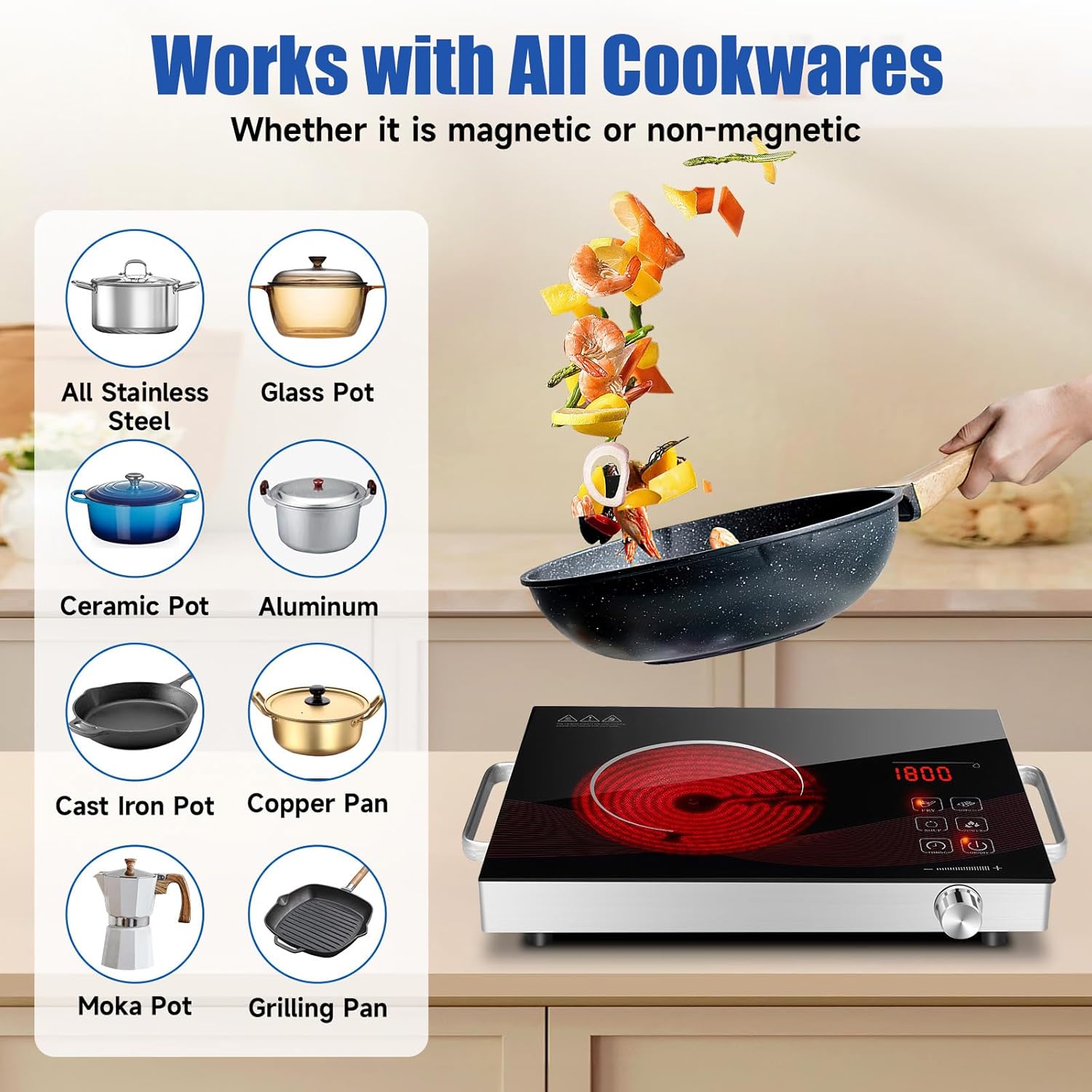
Image: The hot plate shown with various types of cookware, including stainless steel, glass, ceramic, aluminum, cast iron, copper, moka pot, and grilling pan, highlighting its universal compatibility.
4. Setup
- Unpack: Carefully remove the hot plate from its packaging. Retain packaging for future storage or transport.
- Inspect: Check the appliance for any signs of damage. Do not use if damaged.
- Placement: Place the hot plate on a stable, flat, heat-resistant surface. Ensure there is adequate clearance (at least 4 inches) around all sides for proper ventilation. Do not place on tablecloths or other flammable materials.
- Power Connection: Plug the power cord into a standard 110V electrical outlet. Ensure the outlet is properly grounded.
- First Use Cleaning: Before first use, wipe the glass ceramic surface with a damp cloth to remove any dust or residue from manufacturing. Ensure it is completely dry before plugging in.
5. Operating Instructions
The TYEMUI hot plate offers both touch controls and a rotary knob for precise adjustments. It also includes preset cooking modes for convenience.
Basic Operation:
- Power On: Place your desired flat-bottomed cookware on the heating zone. Plug in the hot plate. Press the ON/OFF button to turn on the appliance. The display will show 'ON'.
- Select Mode/Adjust Power:
- Preset Modes: Press the FRY, BARBECUE, SOUP, or POWER buttons to select a pre-programmed cooking mode. Each mode has a default wattage/temperature setting.
- Manual Adjustment: If you select a preset mode or the 'POWER' mode, you can fine-tune the wattage or temperature using the rotary knob. Turn the knob clockwise to increase and counter-clockwise to decrease the setting. The LCD display will show the current wattage or temperature.
- Set Timer (Optional): Press the TIMING button. Use the rotary knob to set the desired cooking time (up to 3 hours). The timer will count down, and the hot plate will automatically turn off when the time expires.
- Power Off: After cooking, press the ON/OFF button to turn off the hot plate. The display may show 'HOT' until the surface has cooled down sufficiently.

Image: The hot plate's control panel showing the large LCD display, touch buttons for Fry, Barbecue, Soup, Power, Timing, On/Off, and the rotary knob for precise control.
Video Demonstrations:
Review of TYEMUI Electric Single Hot Plate
Video Description: A user demonstrates the TYEMUI Electric Hot Plate, highlighting its compact design, portability, ease of use, and various functions including power adjustment and preset modes. The video shows the hot plate heating up quickly and its handles for easy transport.
Portable Infrared Hot Plate in Use
Video Description: This video showcases the TYEMUI Portable Infrared Hot Plate in action, demonstrating how to use the preset buttons and timer functions while boiling water. It also shows the 'HOT' indicator when the unit is turned off but still warm.
6. Maintenance and Cleaning
Regular cleaning and maintenance will ensure the longevity and optimal performance of your hot plate.
- Always Unplug: Before cleaning, always unplug the hot plate from the power outlet and allow it to cool completely. The 'HOT' indicator will turn off when it's safe to touch.
- Surface Cleaning: Wipe the glass ceramic surface with a soft, damp cloth and mild detergent. For stubborn stains, a non-abrasive ceramic cooktop cleaner can be used. Avoid abrasive pads or harsh chemicals that could scratch the surface.
- Base Cleaning: Wipe the exterior base with a damp cloth. Do not immerse the hot plate in water or any other liquid.
- Drying: Ensure all parts are thoroughly dry before plugging the appliance back in or storing it.
- Storage: Store the hot plate in a cool, dry place when not in use. Its compact size and handles make it easy to store.

Image: A hand wiping the glass ceramic surface of the hot plate with a cloth, demonstrating its easy-to-clean design.
7. Troubleshooting
If you encounter issues with your TYEMUI hot plate, please refer to the following common problems and solutions:
| Problem | Possible Cause | Solution |
|---|---|---|
| Hot plate does not turn on. | Not plugged in; power outage; faulty outlet; ON/OFF button not pressed. | Ensure the unit is securely plugged into a working outlet. Check circuit breaker. Press the ON/OFF button. |
| No heat or uneven heating. | Incorrect power/temperature setting; cookware not flat-bottomed or too small/large. | Adjust power/temperature using the knob or preset buttons. Ensure cookware has a flat bottom and is appropriately sized for the heating zone. |
| Display shows 'HOT' after turning off. | Normal operation; residual heat on the ceramic surface. | This is a safety indicator. Do not touch the surface until the 'HOT' indicator disappears. |
| Timer not working. | Timer not set correctly. | Ensure the TIMING button is pressed and the rotary knob is used to set a duration. |
| Unit makes unusual noises. | Cooling fan operating; internal components expanding/contracting. | A low hum from the cooling fan is normal. If noises are loud or unusual, discontinue use and contact support. |
If the problem persists after attempting these solutions, please contact TYEMUI customer support.
8. Specifications
| Feature | Detail |
|---|---|
| Brand | TYEMUI |
| Model Number | AM-110V |
| Color | Thinner Black |
| Material | Ceramic Glass |
| Special Feature | Temperature Control |
| Heating Elements | 1 |
| Product Dimensions | 18"D x 13"W x 3.5"H |
| Wattage | 2200 watts |
| Controls Type | Knob, Digital Touch |
| Voltage | 110 Volts |
| Burner Type | Radiant |
| Power Source | Electric |
| Item Weight | 5.69 pounds |
9. Warranty and Support
The TYEMUI AM-110V Electric Hot Plate Single Burner comes with a 12-month warranty from the date of purchase. This warranty covers manufacturing defects and issues arising from normal use.
For warranty claims, technical support, or any questions regarding your product, please contact TYEMUI customer service through the retailer where you purchased the item or visit the official TYEMUI website for contact information.
Please retain your proof of purchase for warranty validation.