
1. Product Overview
This product includes a set of replacement air filters designed for various Samsung vacuum cleaner models. The set typically contains a blue sponge filter and a dust HEPA filter, crucial for maintaining optimal vacuum performance and air quality.

Image 1.1: Overview of the EtliN Dust HEPA and Blue Sponge Filter set, including additional black sponge filters.
The filters are manufactured from high-quality materials to ensure durability and effective filtration of dust and allergens.
2. Compatibility
These replacement filters are compatible with a wide range of Samsung vacuum cleaner models, including but not limited to:
- Samsung DJ97-01040C, DJ63-00669A, VCA-VM 45P
- SC43, SC44, SC45, SC46, SC47 Series (e.g., SC4310, SC4320, SC4330, SC4340, SC4350, SC4360, SC4370, SC4380, SC4390, SC4520, SC4530, SC4540, SC4550, SC4570, SC4580, SC4590, SC4710, SC4720, SC4740, SC4750, SC4760, SC4770, SC4780, SC4790)
- VC-9625, VC-B600T, VC-B601T, VC-B610W, VC-B620U, VC-B620W, VC-B715U, VC-B716U, VC-B720U, VC-B750U, VC-B751U, VC-B752U
- VC-BK600M, VC-BK601M, VC-BK620B, VC-BK621B, VC-BK650M
- VC-BM600, VC-BM601, VC-BM602, VC-BM603B, VC-BM620, VC-BM621, VC-BM622, VC-BM623
- VCC4310H14/XAX, VCDC08QH, VCDC08QV, VCDC08SH, VCDC12QH, VCDC15QH, VCDC15RH, VCDC15SV, VCDC20AH, VCDC20AV, VCDC20BH, VCDC20CH, VCDC20CV, VCDC20DV, VCDC20EH
- VC-MB705T, VC-MB706T, VC-MB707T, VC-MB708T, VC-MB71AW, VC-MB71BW, VC-MB755T, VC-MB755W, VC-MB756T, VC-MB756W
- VC-SB810U, SC47E0, VCDC08RH, SC45W0, SC45W1, SC47T0, VC15QVNDCNC/EU, VCDC15SH, VCDC15TH
Please refer to your vacuum cleaner's manual to confirm the exact filter type required for your specific model.
3. Installation Instructions
Replacing your vacuum cleaner's filters is a straightforward process. Follow these steps to ensure proper installation:
- Power Off and Unplug: Before beginning, always ensure your vacuum cleaner is turned off and unplugged from the power outlet to prevent accidental activation.
- Locate Filter Compartment: Identify the filter compartment on your Samsung vacuum cleaner. This is typically located near the dustbin or exhaust vent. Consult your vacuum's user manual if you are unsure.
- Remove Old Filters: Open the filter compartment. Carefully remove the old blue sponge filter and the dust HEPA filter. Note their orientation for correct placement of the new filters.
- Insert New Filters: Place the new EtliN blue sponge filter and dust HEPA filter into their respective slots. Ensure they fit snugly and are oriented correctly, matching the way the old filters were installed.
- Close Compartment: Securely close the filter compartment. Ensure it latches properly.
- Test: Plug in and turn on your vacuum cleaner to confirm proper operation.
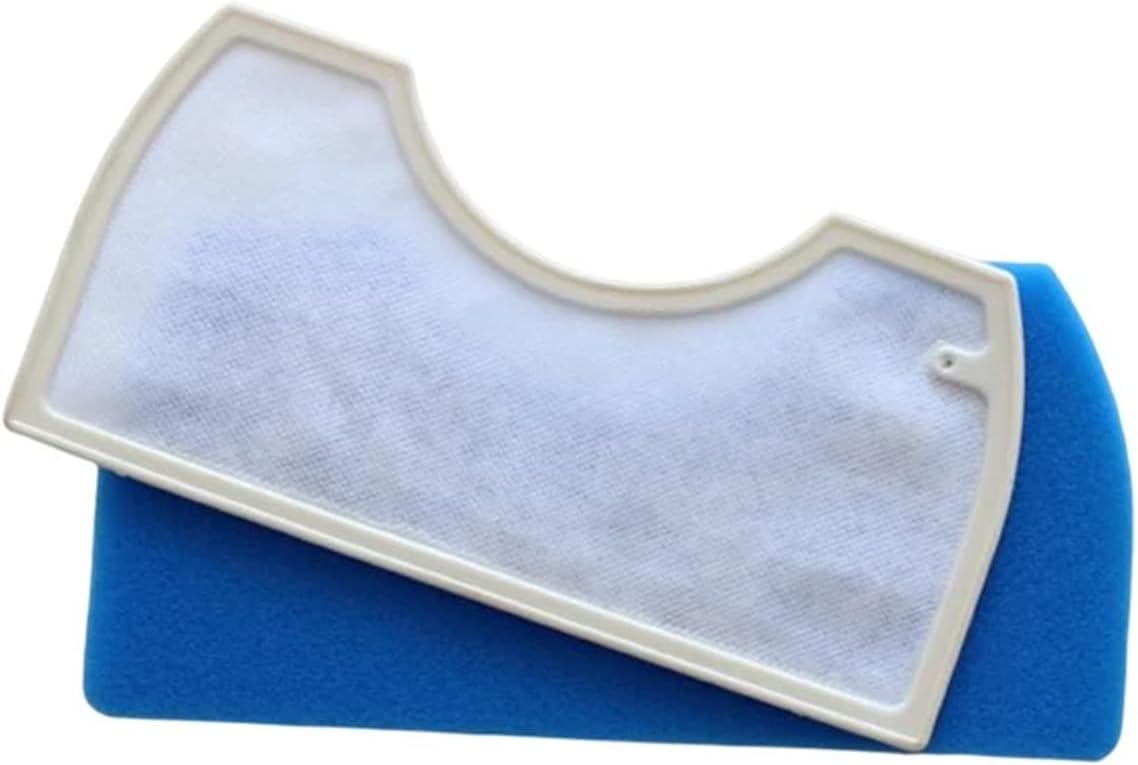
Image 3.1: The blue sponge filter with its white frame, ready for installation.
4. Maintenance
Regular maintenance of your filters is essential for optimal vacuum cleaner performance and longevity. While these are replacement filters, some components may benefit from periodic cleaning.
- Inspection: Periodically inspect the blue sponge filter for excessive dirt or debris buildup.
- Cleaning (Sponge Filter Only): The blue sponge filter may be gently rinsed with water if heavily soiled. Ensure it is completely dry before re-installing it into the vacuum cleaner. Do not wash the HEPA filter.
- Replacement Schedule: It is recommended to replace both the blue sponge filter and the dust HEPA filter every 2 to 3 months, depending on usage frequency and household dust levels. Regular replacement ensures consistent filtration efficiency and prevents strain on the vacuum motor.
5. Troubleshooting
If you experience issues after replacing your filters, consider the following:
- Reduced Suction: Ensure both filters are correctly seated and the filter compartment is securely closed. A misaligned or improperly installed filter can lead to air leaks and reduced suction power.
- Unusual Noises: Check that the filters are not obstructing any moving parts and are installed without bending or forcing.
- Persistent Odors: If odors persist after filter replacement, it may indicate a need for deeper cleaning of the vacuum's dustbin or other components, or that the new filters are not fully effective against the specific odor source.
If problems persist, consult your vacuum cleaner's original user manual or contact the vacuum cleaner manufacturer's support.
6. Specifications
| Component | Dimensions (Approximate) | Material |
|---|---|---|
| Blue Sponge Filter | 150 mm x 75 mm x 25 mm | Sponge |
| Dust HEPA Filter | 125 mm x 110 mm x 20 mm | HEPA material |

Image 6.1: Detailed dimensions of the blue sponge filter.
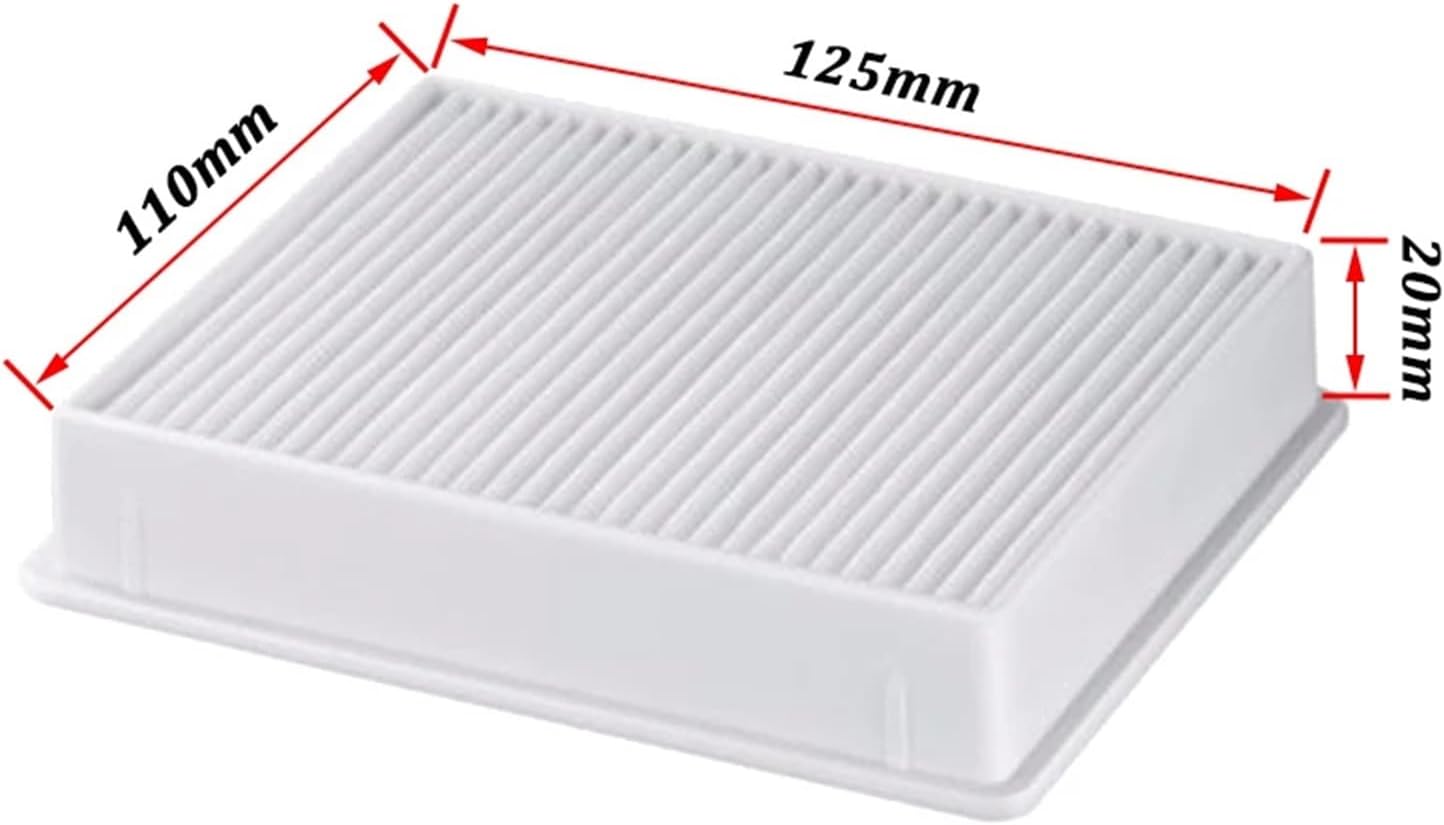
Image 6.2: Detailed dimensions of the dust HEPA filter.
Brand: EtliN
Item Weight: 50 Grams (total package)
Number of Pieces: 1 Set (typically includes one blue sponge filter and one dust HEPA filter, and potentially additional black sponge filters as shown in product images).
7. Warranty and Support
Information regarding product warranty or specific customer support for EtliN filters is not provided in the available product data. For any issues or inquiries, please refer to the seller's return policy or contact the retailer directly where the product was purchased.