
Product Overview
The FREEFISH Retro Bluetooth Speaker (Model AS31) is a portable and versatile audio device designed to deliver high-quality sound with a vintage aesthetic. It combines modern connectivity options such as Bluetooth 5.3, USB, TF card, and AUX input with traditional FM radio functionality. Its compact and rechargeable design makes it suitable for various indoor and outdoor environments.

Image: The FREEFISH Retro Bluetooth Speaker AS31 shown alongside its product packaging, highlighting its compact size and vintage design.
Package Contents
Please verify that all items are present in the package:
- Retro Radio Speaker x1
- User Manual x1
- Micro USB Charging Cable x1
- AUX Cable x1
Setup Guide
1. Initial Charging
Before first use, fully charge the speaker. Connect the provided Micro USB charging cable to the speaker's DC 5V input port and the other end to a USB power adapter (not included) or a computer's USB port. The charging indicator light will typically show charging status and turn off or change color when fully charged.
The speaker is equipped with an 1800mAh battery, providing up to 6 hours of playback and requiring approximately 2-3 hours for a full charge.

Image: Illustration of the speaker's battery life and charging time, indicating a large capacity battery for extended playtime.
2. Physical Placement
Place the speaker on a stable, flat surface. For optimal FM radio reception, extend the antenna fully.
Operating Instructions
Controls Overview
The speaker features intuitive controls, primarily centered around the vintage-style spin button and adjacent function buttons.
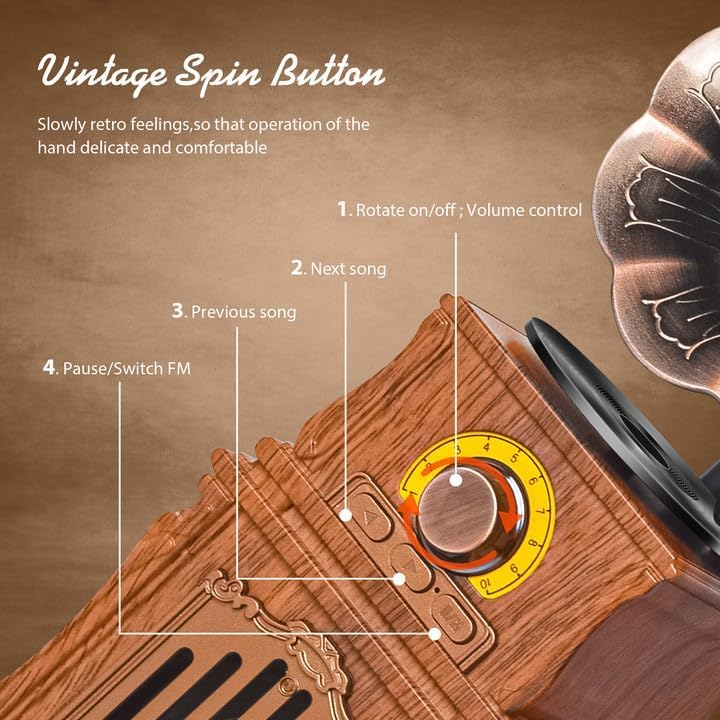
Image: Detailed view of the speaker's control panel, showing the main rotary knob and the three push buttons for navigation and mode switching.
- Rotary Knob:
- Rotate clockwise to turn on and increase volume.
- Rotate counter-clockwise to decrease volume and turn off.
- Next Song Button: Press to skip to the next track (in Bluetooth/USB/TF modes).
- Previous Song Button: Press to go back to the previous track (in Bluetooth/USB/TF modes).
- Pause/Switch FM Button:
- Short press to play/pause music.
- Long press to switch between FM radio mode and other input modes (Bluetooth, USB, TF, AUX).
1. Bluetooth Mode
To connect your device via Bluetooth:
- Turn on the speaker by rotating the knob clockwise.
- Long press the "Pause/Switch FM" button until you hear an audible prompt indicating Bluetooth mode.
- On your smartphone, tablet, or other Bluetooth-enabled device, go to Bluetooth settings and search for available devices.
- Select "AS31" from the list to pair. A confirmation sound will indicate successful pairing.
- Once connected, you can play audio from your device through the speaker.

Image: A visual representation of the one-click Bluetooth connection process, showing a smartphone successfully paired with the AS31 speaker.
2. FM Radio Mode
To listen to FM radio:
- Turn on the speaker.
- Long press the "Pause/Switch FM" button until you hear an audible prompt indicating FM radio mode.
- Extend the antenna for better reception.
- Rotate the main knob to tune to your desired FM station. The speaker will automatically scan and lock onto available frequencies.

Image: A hand demonstrating the adjustment of the rotary knob for tuning FM radio stations, emphasizing the manual tuning capability.
3. USB Drive / TF Card / AUX Input Modes
The speaker supports multiple playback options:
- USB Drive: Insert a USB flash drive containing audio files into the USB port. The speaker will automatically switch to USB mode and begin playback.
- TF Card: Insert a TF (MicroSD) card containing audio files into the TF card slot. The speaker will automatically switch to TF card mode and begin playback.
- AUX Input: Connect an external audio device (e.g., MP3 player, computer) using the provided AUX cable to the "LINE IN" port. The speaker will automatically switch to AUX mode.

Image: A detailed view of the speaker's rear input panel, showing the AUX, USB, TF card, and DC 5V charging ports, illustrating the various connectivity options.
4. USB Power Output (Charging Electronic Products)
The USB port on the speaker can also function as a 5V power output to charge small electronic devices such as phones, headphones, or watches. Simply connect your device's charging cable to the speaker's USB port.
Maintenance
Cleaning
To maintain the appearance and functionality of your speaker:
- Wipe the exterior with a soft, dry cloth.
- Do not use abrasive cleaners, waxes, or solvents.
- Avoid exposing the speaker to excessive moisture or direct sunlight.
Battery Care
- Charge the speaker regularly, even if not in frequent use, to prolong battery life.
- Avoid fully discharging the battery frequently.
- Store the speaker in a cool, dry place when not in use for extended periods.
Troubleshooting
If you encounter issues with your FREEFISH Retro Bluetooth Speaker, please refer to the following common problems and solutions:
| Problem | Possible Cause | Solution |
|---|---|---|
| Speaker does not turn on. | Battery is depleted. | Connect the speaker to a power source using the Micro USB cable and charge it fully. |
| No sound or low volume. | Volume is too low; incorrect mode; device not connected properly. | Increase the speaker's volume using the rotary knob. Ensure the correct input mode is selected. For Bluetooth, check device volume. For AUX, ensure cable is fully inserted. |
| Bluetooth pairing fails. | Speaker not in pairing mode; device too far; interference. | Ensure the speaker is in Bluetooth pairing mode (long press Pause/Switch FM button). Move your device closer to the speaker. Turn off other Bluetooth devices nearby. Try unpairing and re-pairing. |
| Poor FM radio reception. | Antenna not extended; weak signal; interference. | Fully extend the antenna. Try repositioning the speaker to find a stronger signal. Avoid placing near other electronic devices that may cause interference. |
| USB/TF card not playing. | Incorrect file format; card/drive not inserted correctly; corrupted files. | Ensure audio files are in a compatible format (e.g., MP3). Reinsert the USB drive or TF card firmly. Try with a different USB drive or TF card. |
Specifications
| Feature | Detail |
|---|---|
| Model Name | AS31 |
| Brand | FREEFISH |
| Connectivity Technology | Bluetooth, USB |
| Wireless Communication Technology | Bluetooth 5.3 |
| Speaker Type | Portable Bluetooth Speaker |
| Special Features | AUX Input, Bluetooth Speaker, FM Radio, TF Card, USB Drive |
| Power Source | Corded Electric, Battery Powered |
| Battery Capacity | 1800mAh (approx. 6 hours playback, 2-3 hours charge time) |
| Speaker Maximum Output Power | 8 Watts |
| Frequency Response | 20Hz-18KHz |
| Control Method | Rotary Knob, Push Buttons |
| Material | Acrylonitrile Butadiene Styrene (ABS) |
| Product Dimensions | 3"D x 3"W x 10"H (approx. 3.74"L x 3.15"W x 10.63"H) |
| Item Weight | 0.71 Kilograms (1.57 pounds) |
| Color | Wood |
| Water Resistance Level | Not Water Resistant |
Warranty and Support
The FREEFISH Retro Bluetooth Speaker comes with a Limited Warranty. FREEFISH offers a one-year quality safeguard for this product.
For any questions, technical assistance, or warranty claims, please contact FREEFISH customer support. Customer questions are answered online 24 hours a day.
For more information, visit the official FREEFISH store on Amazon: FREEFISH Store