1. Introduction
This manual provides detailed instructions for the installation, operation, and maintenance of your Generic 5m LED Strip Light 5050. Please read this manual thoroughly before use to ensure proper function and safety.
The Generic 5m LED Strip Light 5050 is a versatile lighting solution featuring RGB color options, suitable for various indoor decorative applications. It includes a remote control for easy color and mode adjustments.
2. Package Contents
Verify that all items listed below are present in your package:
- 5m LED Strip Light (Model 5050)
- Power Adapter (Corded Electric)
- RGB Control Box
- Remote Control
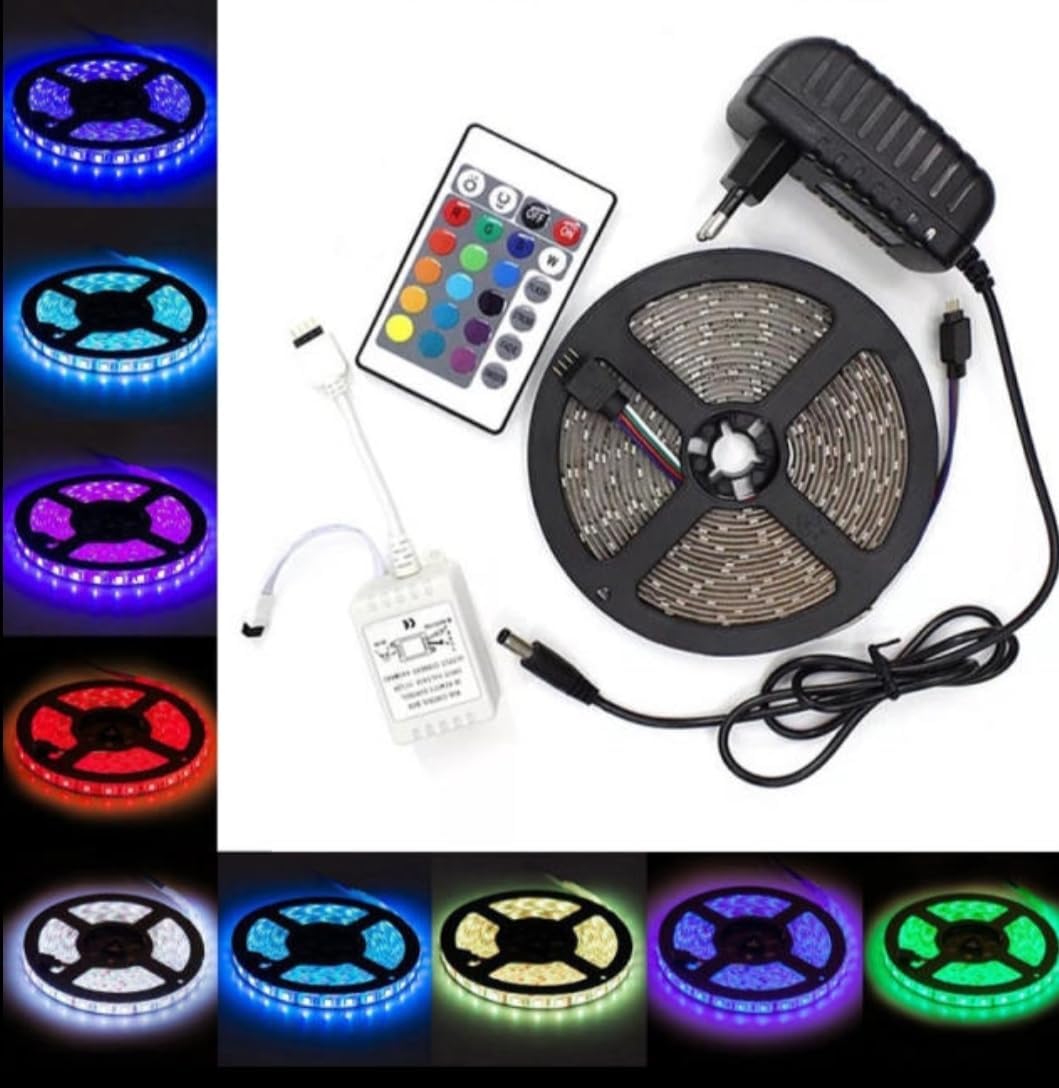
Image 1: Overview of the Generic 5m LED Strip Light 5050 components, showing the LED strip on a reel, the power adapter, the RGB control box, and the remote control.

Image 2: The Generic 5m LED Strip Light 5050 kit as packaged, displaying the LED strip, remote, and power supply within clear plastic.
3. Safety Information
- This product is designed for indoor use only. Avoid exposure to water or high humidity.
- Ensure the power supply voltage matches the product's requirements (12 Volts DC).
- Do not cut or modify the LED strip unless specifically instructed, as this may damage the product and void the warranty.
- Keep out of reach of children.
- Unplug the power adapter from the wall outlet before cleaning or when not in use for extended periods.
- Do not cover the LED strip or power adapter with flammable materials during operation.
4. Setup Instructions
- Prepare the Surface: Choose a clean, dry, and smooth surface for installation. Ensure the surface is free of dust, oil, or moisture.
- Connect the Components:
- Connect the 4-pin connector from the LED strip to the RGB control box. Ensure the arrows on both connectors align.
- Connect the DC plug from the power adapter to the RGB control box.

Image 3: Detailed view of the DC plug connection to the control box and the 4-pin connector for the LED strip. Also shows the remote control and the protective plastic sheet to be removed.
- Remove Remote Battery Tab: Before using the remote control, pull out the clear plastic battery isolation tab from the remote's battery compartment.
- Mount the LED Strip: Peel off the adhesive backing from the LED strip and carefully press it onto the desired surface. Apply firm, even pressure along the entire length of the strip to ensure good adhesion.
- Connect to Power: Plug the power adapter into a standard electrical outlet.
5. Operating Instructions
Use the provided remote control to operate your LED strip light.
Remote Control Functions:
- ON/OFF: Power the LED strip on or off.
- Color Buttons: Select from various preset static colors (e.g., Red, Green, Blue, White, Purple, Yellow, Cyan).
- Brightness Adjustment: Increase or decrease the brightness of the selected color or mode.
- Mode Buttons (e.g., FLASH, FADE, JUMP): Select different dynamic lighting effects.
- Speed Adjustment: Adjust the speed of dynamic lighting effects.

Image 4: The LED strip light illuminated in a vibrant purple color, demonstrating one of its many color options.

Image 5: The LED strip light illuminated in a bright red color, showcasing another available static color.

Image 6: The LED strip light illuminated in a vivid green color, illustrating its multi-color capabilities.
6. Maintenance
- Cleaning: Disconnect the power before cleaning. Use a soft, dry cloth to gently wipe the LED strip and control box. Do not use liquid cleaners or abrasive materials.
- Storage: If storing the LED strip for an extended period, ensure it is clean and dry. Store it in a cool, dry place away from direct sunlight.
- Remote Control Battery: If the remote control stops responding, the battery may need replacement. Refer to the remote control's specific instructions for battery type and replacement procedure.
7. Troubleshooting
| Problem | Possible Cause | Solution |
|---|---|---|
| LED strip does not light up. |
|
|
| Remote control is unresponsive. |
|
|
| Colors are incorrect or inconsistent. |
|
|
8. Specifications
| Model | 5050 |
| Item Model Number | egeyguygdguxhg |
| Brand | Generic |
| Length | 5 meters |
| Light Source Type | LED |
| Light Color | Multicolor (RGB) |
| Voltage | 12 Volts (DC) |
| Wattage | 4.80 Watts |
| Power Source | Corded Electric |
| Control Method | Remote Control |
| Indoor/Outdoor Usage | Indoor Use Only |
| Item Weight | 9 ounces |
| Package Dimensions | 9 x 7 x 2 inches |
9. Warranty and Support
For warranty information or technical support, please refer to the retailer or manufacturer's contact details provided at the point of purchase. Keep your purchase receipt as proof of purchase.


