
1. Product Overview
This manual provides detailed instructions for the assembly, operation, and maintenance of your HOMCOM 71" Tall Storage Cabinet. Designed for versatile use, this cabinet features adjustable shelving and soft-close doors, making it suitable for various rooms such as living rooms, dining rooms, or kitchens.

Image 1.1: Front view of the HOMCOM 71" Tall Storage Cabinet in white.
Key features include:
- Versatile Storage: Adaptable for use as a pantry, sideboard, or general storage in various home environments.
- Adjustable Shelves: Three shelves are adjustable to three positions, spaced 2.5 inches apart, allowing for customized storage configurations.
- Soft-Close Doors: Equipped with mechanisms that ensure doors close gently and quietly, preventing slamming and protecting contents.
- Robust Construction: Crafted from melamine-coated particleboard for durability, and includes an anti-tipping design for enhanced safety.
2. Safety Information
Please read all instructions carefully before assembly and use. Failure to follow these instructions may result in injury or damage to the product.
- Keep all packaging materials away from children.
- Assemble the unit on a soft, clean surface to prevent scratches.
- Ensure all parts are present and undamaged before beginning assembly.
- Do not overtighten screws, as this may damage the material.
- Always use the provided anti-tipping hardware to secure the cabinet to a wall. This is crucial for preventing accidents, especially in households with children or pets.
- Do not allow children to climb on or play with the cabinet.
- Distribute weight evenly on shelves to maintain stability.
- Maximum weight capacity: 110 lbs (total), 22 lbs (movable shelf), 33 lbs (fixed shelf). Do not exceed these limits.

Image 2.1: Illustration of the anti-tipping mechanism and a warning against climbing on the cabinet.
3. Package Contents
Before assembly, verify that all components are present and undamaged. If any parts are missing or damaged, please contact customer support.
Typical package contents include:
- Cabinet panels (side panels, top, bottom, back panels, shelves)
- Doors
- Hardware pack (screws, dowels, cam locks, hinges, handles, shelf pins, anti-tipping kit)
- Instruction manual (this document)
4. Assembly Instructions
Assembly typically requires two adults. Please follow the step-by-step diagrams provided in the separate assembly guide included with your product. The general steps are outlined below:
- Prepare the Area: Clear a spacious, clean, and soft area for assembly to prevent damage to components.
- Identify Parts: Lay out all panels and hardware, matching them with the parts list in your assembly guide.
- Assemble Base and Side Panels: Attach the base to the side panels using the specified hardware.
- Install Fixed Shelves: Secure any fixed shelves into their designated positions.
- Attach Back Panel: Carefully align and attach the back panel to the cabinet frame. Ensure it is square to prevent wobbling.
- Install Adjustable Shelves: Insert shelf pins into the desired holes for the adjustable shelves. Place the shelves on the pins.
- Attach Doors: Mount the soft-close hinges to the doors and then attach the doors to the cabinet frame. Adjust hinges as needed for proper door alignment.
- Install Handles: Attach the handles to the doors.
- Secure Anti-Tipping Device: Position the cabinet in its final location. Using the provided hardware, secure the anti-tipping strap or bracket to a wall stud. This step is critical for safety.

Image 4.1: Interior view of the cabinet showing shelves and potential storage arrangement.
5. Operating Instructions
5.1. Adjustable Shelving
The cabinet features three adjustable shelves. To change a shelf's height:
- Empty the shelf of all contents.
- Carefully lift the shelf and remove the four shelf pins from their current holes.
- Insert the shelf pins into the desired new set of holes. Each set of holes is spaced 2.5 inches apart.
- Place the shelf back onto the pins, ensuring it is level and securely seated.

Image 5.1: Illustration demonstrating the adjustable shelf feature and available height settings.
5.2. Soft-Close Doors
The cabinet doors are equipped with soft-close hinges. This mechanism allows the doors to close slowly and silently, preventing abrupt impacts. Simply push the door gently to close it, and the soft-close feature will engage automatically.

Image 5.2: Detail of the soft-close hinge, illustrating its function.
6. Maintenance
- Cleaning: Wipe surfaces with a soft, damp cloth. Avoid harsh chemicals or abrasive cleaners, as these can damage the melamine finish.
- Dusting: Regularly dust with a dry, soft cloth.
- Spills: Clean up spills immediately to prevent staining or damage to the wood.
- Hardware Check: Periodically check all screws and fasteners to ensure they are tight. Retighten if necessary, but do not overtighten.
- Anti-Tipping Device: Regularly inspect the anti-tipping device to ensure it remains securely attached to both the cabinet and the wall.
7. Troubleshooting
| Problem | Possible Cause | Solution |
|---|---|---|
| Cabinet is wobbly or unstable. |
|
|
| Doors do not close properly or are misaligned. |
|
|
| Difficulty inserting or removing shelf brackets/pins. |
|
|
| Soft-close feature not working. |
|
|
8. Specifications
| Brand | HOMCOM |
| Model Number | 838-430V80WT |
| Overall Dimensions (W x D x H) | 30.75" x 15.75" x 70.75" |
| Color | White |
| Material | Melamine-coated Particleboard (Engineered Wood) |
| Total Weight Capacity | 110 lbs |
| Movable Shelf Weight Capacity | 22 lbs per shelf |
| Fixed Shelf Weight Capacity | 33 lbs per shelf |
| Number of Shelves | 6 (including fixed and adjustable) |
| Adjustable Shelf Spacing | 2.5 inches (3 positions) |
| Assembly Required | Yes |
| Special Features | Adjustable Shelf, Anti-Tipping, Soft-Close Doors |
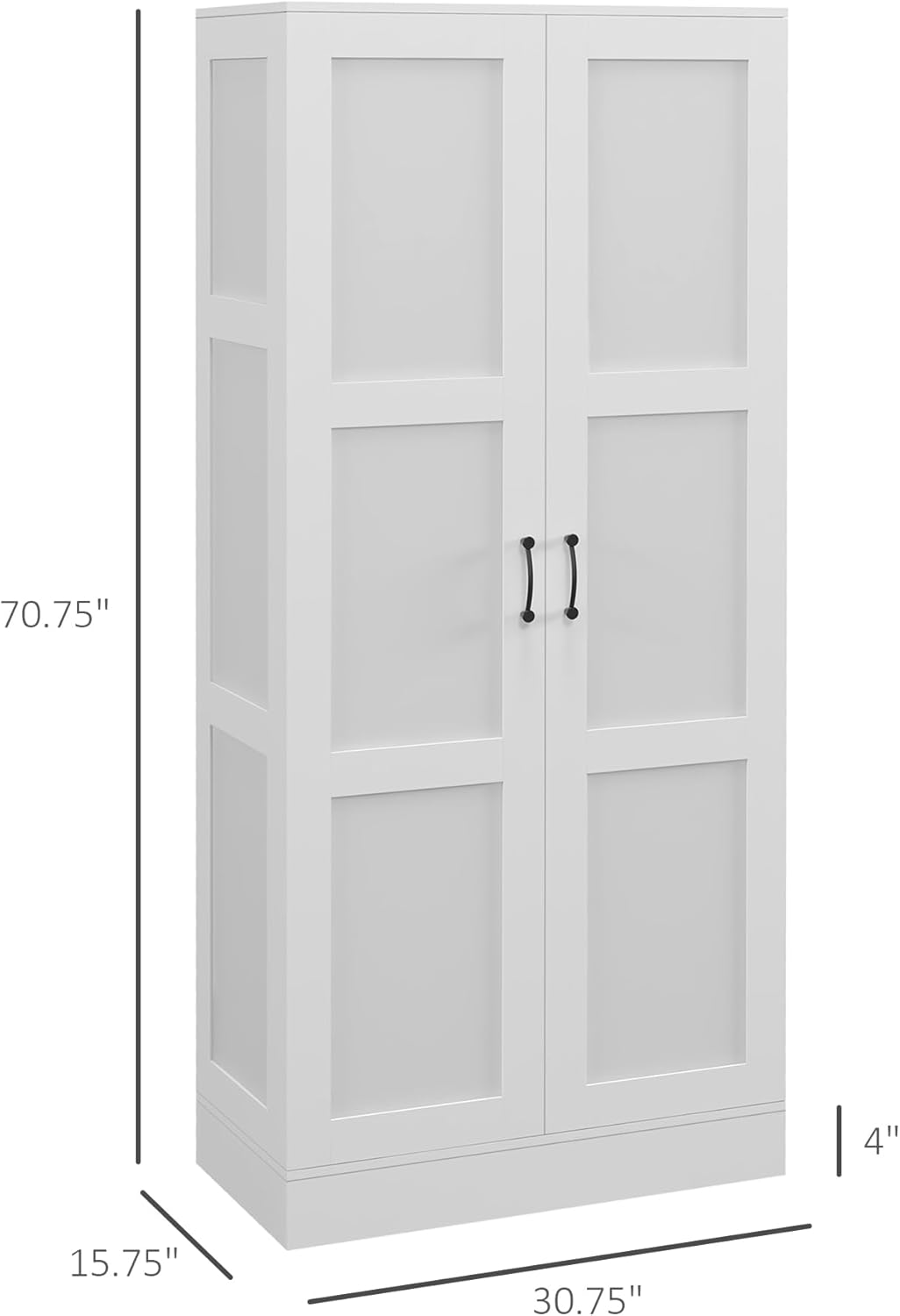
Image 8.1: Dimensional drawing of the cabinet, indicating height, width, and depth.
9. Warranty and Customer Support
For warranty information, missing parts, or assistance with assembly and troubleshooting, please contact HOMCOM customer support. Refer to your purchase documentation for specific warranty terms and contact details.
Manufacturer: Aosom LLC

Image 9.1: Customer support team ready to assist with inquiries.