1. Introduction
Thank you for choosing the Sxhlseller 61 Key Mechanical Keyboard. This compact keyboard is designed for an enhanced typing experience with durable blue switches and customizable lighting effects. This manual provides detailed instructions for setup, operation, and maintenance to ensure optimal performance and longevity of your device.
2. Package Contents
Please verify that all items are present in the package:
- Sxhlseller 61 Key Mechanical Keyboard
- USB Data Cable (Type-C)
- Instruction Manual
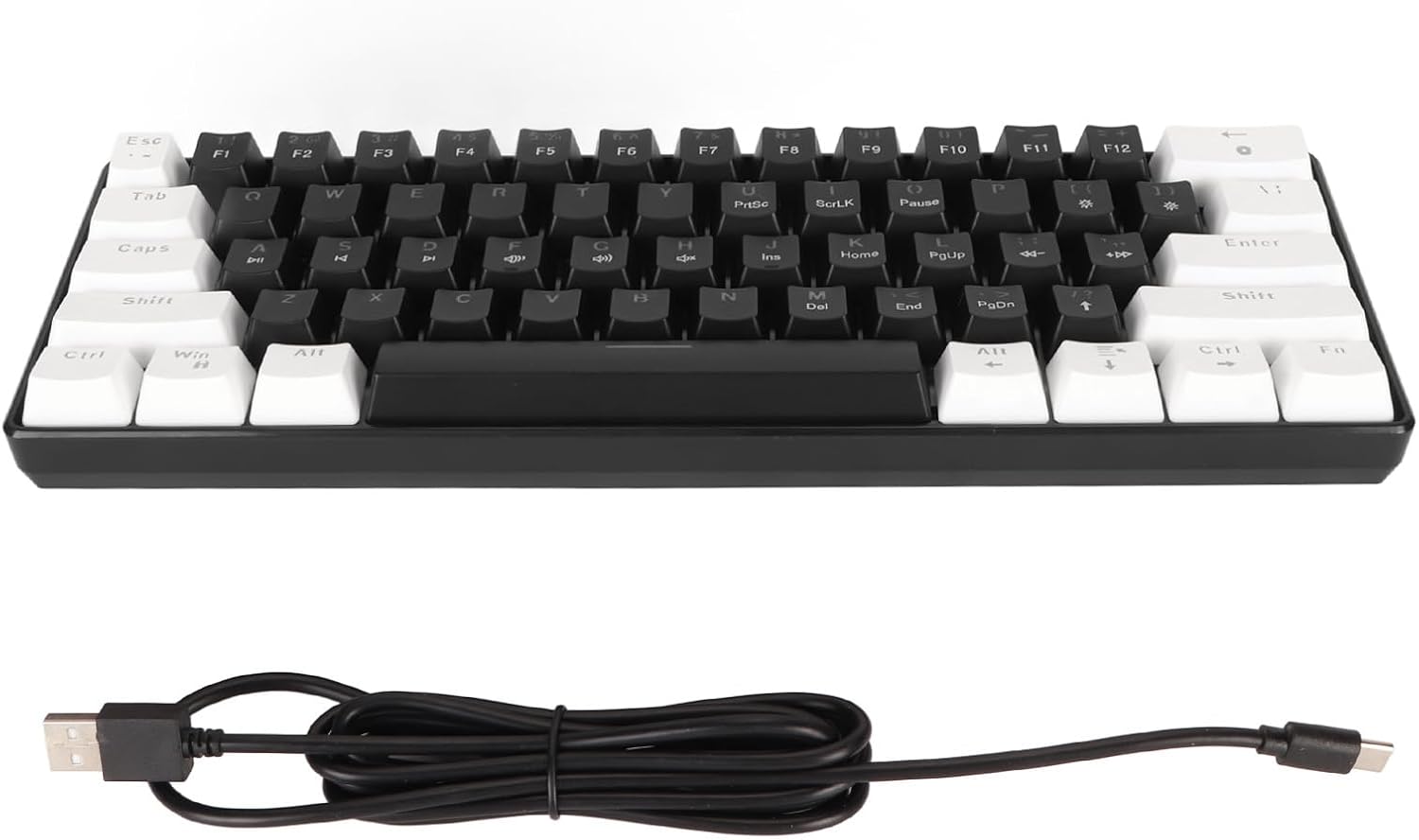
Image: The Sxhlseller 61 Key Mechanical Keyboard shown alongside its detachable USB Type-C cable, illustrating the main components included in the package.
3. Product Features
The Sxhlseller 61 Key Mechanical Keyboard offers a range of features designed for performance and user comfort:
- Blue Switches: Provides a tactile and audible click for a satisfying typing experience with clear paragraph separation.
- Durable Design: Switches have a lifespan of up to 20 million clicks, ensuring long-term reliability.
- Compact 61-Key Layout: Space-saving design that is easy to transport and occupies minimal desktop space.
- Multiple Lighting Modes: Features an icy blue backlight with 19 different lighting modes for customization.
- Wide Compatibility: Compatible with various operating systems including OS X and other latest systems.
- Ergonomic Construction: Made with ABS material and two-color injection keycaps for comfortable use and fade resistance.
- Detachable Type-C Cable: For convenient wired connection and portability.

Image: A close-up of the 61-key mechanical keyboard, with icons illustrating its key features: Cyan axis mixed light, a variety of cool lights, mechanical switch, Type-C detachable power cord, and comfortable fit for hands.
4. Setup Instructions
Follow these steps to set up your Sxhlseller 61 Key Mechanical Keyboard:
- Unpack the keyboard and the USB data cable from the packaging.
- Connect the Type-C end of the USB data cable to the port on the back of the keyboard.
- Connect the standard USB-A end of the data cable to an available USB port on your computer (desktop PC, laptop, or all-in-one machine).
- The keyboard is plug-and-play. Your operating system should automatically detect and install the necessary drivers.
- Once connected, the keyboard's backlight will illuminate, indicating it is ready for use.
The keyboard is compatible with various systems, including OS X and other modern operating systems.

Image: The 61-key mechanical keyboard displayed with icons representing its compatibility with a notebook, desktop PC, and an all-in-one computer, demonstrating its versatility across different setups.
5. Operating Instructions
5.1 Basic Usage
Once connected, the keyboard functions as a standard QWERTY layout keyboard. Simply begin typing. The blue mechanical switches provide tactile feedback with each key press.
5.2 Lighting Control
The keyboard features an icy blue backlight with multiple lighting modes. Use the Function (Fn) key in combination with other keys to adjust the lighting effects:
- Fn + ` (tilde key): Switch between different lighting effects/modes.
- Fn + [{: Decrease the brightness of the backlight.
- Fn + ]}: Increase the brightness of the backlight.
- Fn + ;:: Slow down the light effect speed.
- Fn + '"': Speed up the light effect.
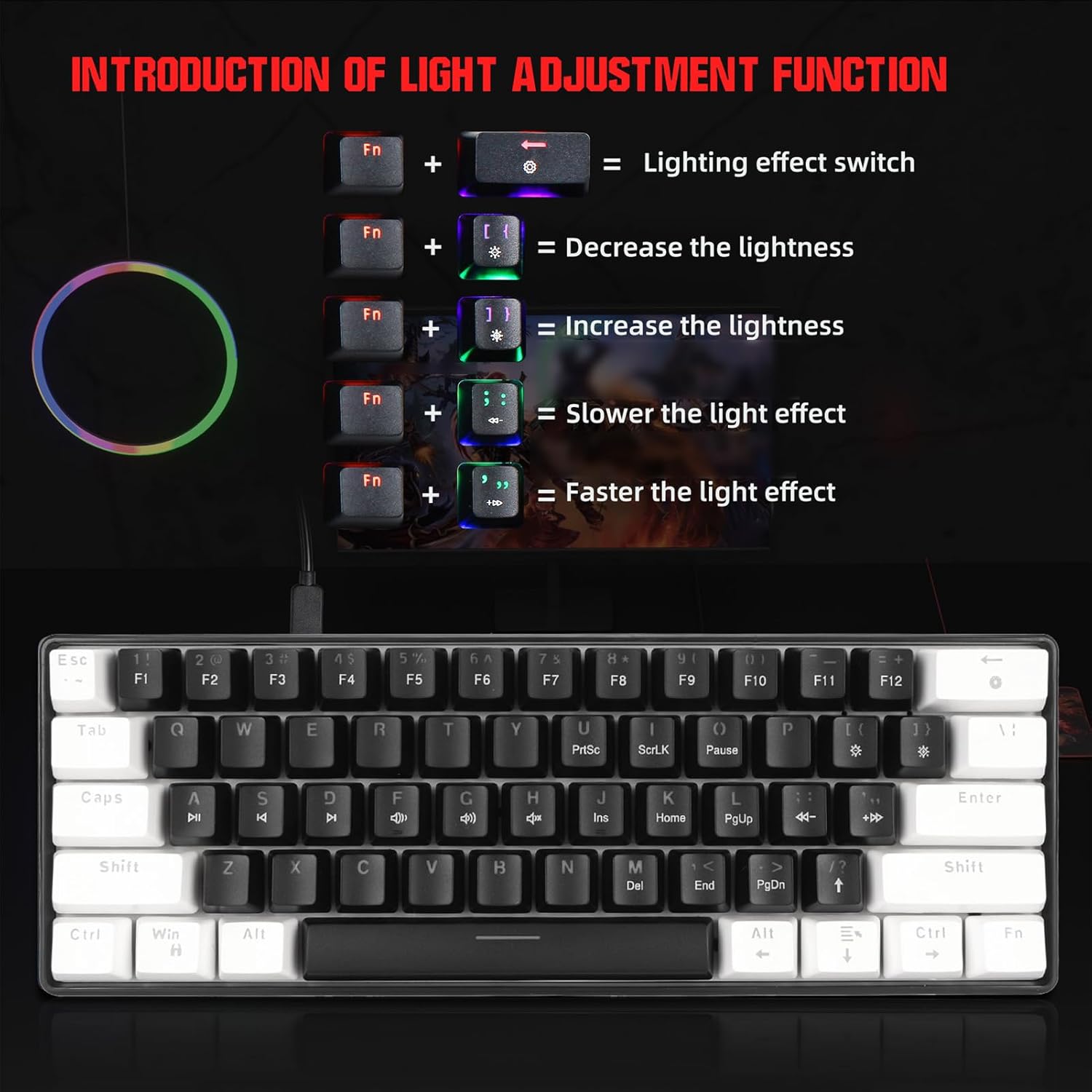
Image: A visual guide demonstrating the key combinations for adjusting the keyboard's lighting effects, including switching modes, changing brightness, and adjusting animation speed, using the Fn key.
5.3 Multimedia Functions
The keyboard supports multimedia functions. Specific key combinations for these functions are typically printed on the keycaps or can be accessed via the Fn key. Refer to the keycap legends for multimedia controls such as volume adjustment, play/pause, and track skipping.
6. Maintenance
To ensure the longevity and optimal performance of your keyboard, follow these maintenance guidelines:
- Cleaning: Regularly clean the keyboard with a soft, dry cloth. For deeper cleaning, use compressed air to remove dust and debris from between the keycaps. For stubborn dirt, a slightly damp cloth with a mild cleaning solution can be used, ensuring no liquid enters the keyboard.
- Avoid Liquids: Do not spill liquids on the keyboard. While it supports waterproof functionality, excessive liquid exposure can still cause damage.
- Storage: Store the keyboard in a cool, dry place away from direct sunlight and extreme temperatures.
- Handling: Avoid dropping the keyboard or subjecting it to strong impacts.
7. Troubleshooting
If you encounter issues with your keyboard, refer to the following common troubleshooting steps:
- Keyboard Not Responding:
- Ensure the USB cable is securely connected to both the keyboard and the computer.
- Try connecting the keyboard to a different USB port on your computer.
- Test the keyboard on another computer to determine if the issue is with the keyboard or the computer's port/drivers.
- Backlight Not Working:
- Check if the backlight is turned off or set to minimum brightness using the Fn key combinations (Fn + ` for mode, Fn + [{ for brightness).
- Ensure the keyboard is properly powered via the USB connection.
- Keys Not Registering:
- Clean the affected key(s) to remove any debris that might be obstructing the switch.
- If the issue persists, contact customer support.
8. Specifications
Detailed technical specifications for the Sxhlseller 61 Key Mechanical Keyboard:
| Feature | Specification |
|---|---|
| Model Name | Sxhlsellerq0bwp87g15-12 |
| Connection Type | Wired (USB Type-C, Key Line Separation Design) |
| Number of Keys | 61 Keys (All Keys Without Conflict) |
| Key Switch Type | Blue Mechanical Switches |
| Keycap Technology | Two-Color Injection Molding |
| Switch Lifespan | 20 Million Clicks or More |
| Backlight Effect | Ice Blue Light Design (19 Different Light Modes) |
| Material | ABS (Acrylonitrile Butadiene Styrene) |
| Waterproof Function | Support Waterproof |
| Keyboard Layout | QWERTY |
| Item Weight | 1.42 pounds |
| Package Dimensions | 12.6 x 5.12 x 1.97 inches |

Image: The underside of the Sxhlseller 61 Key Mechanical Keyboard, displaying a label with technical details such as interface, voltage, current, switch life, and model number V900.
9. Warranty and Support
This product comes with a standard manufacturer's warranty. For specific warranty terms and conditions, please refer to the documentation provided at the time of purchase or contact your retailer. If you experience any issues or require technical assistance, please contact Sxhlseller customer support through your purchase platform or the official brand website.