
1. Product Overview
This remote control is designed as a replacement for specific Okin electric adjustable base bed models. It provides essential functions for adjusting your bed's position and features.

Figure 1: Front view of the replacement remote control, showing various function buttons for bed adjustments, memory settings, and sleep enhancement.
Key Features:
- Infrared (IR) replacement remote, designed to match the appearance and functionality of the original.
- Controls various bed positions, including head and foot adjustments, zero gravity, and flat positions.
- Includes sleep enhancement features and memory settings.
- Requires 1 AAA battery (not included).
2. Important Compatibility Information
This remote control is NOT universal. To ensure compatibility, it is crucial to verify that your existing control box is an OKIN brand and that your old remote control matches the models listed (RF.31.18.03, RF.31.18.02, RF.31.18.11).

Figure 2: Visual guide emphasizing the importance of verifying your control box and old remote for compatibility. It suggests sending clear pictures of your control box and old remote (front & back) to ensure the correct replacement is provided.

Figure 3: Important notes for compatibility. This image highlights that dip switches are not compatible with 'Pair' button models, the need to check if your old remote uses a Dip switch or Pair button, and that the remote needs to be paired before use.
Key Compatibility Notes:
- Model Verification: If your bed's model number is not explicitly listed in the product title, please contact the seller with your exact model number and clear photos of your old remote (front and back) and control box.
- Dip Switches vs. Pair Button: This remote may not be compatible with systems that use dip switches if your original remote had a 'Pair' button. Carefully inspect your old remote and control box.
- Pairing Required: This remote requires pairing with your adjustable bed's control box before first use. The specific pairing method is typically found in the original user manual for your adjustable bed.
3. Setup
3.1. Battery Installation
- Locate the battery compartment on the back of the remote control.
- Slide the battery cover downwards or outwards to open it.
- Insert 1 AAA battery, ensuring the positive (+) and negative (-) terminals align correctly with the indicators inside the compartment.
- Replace the battery cover by sliding it back into place until it clicks securely.

Figure 4: Back of the remote control with the battery cover open, illustrating the correct orientation for AAA battery insertion.
3.2. Pairing the Remote Control
This remote control must be paired with your adjustable bed's control box before it can be used. The exact pairing procedure varies by bed model and manufacturer. Please refer to the original user manual that came with your adjustable bed for detailed pairing instructions.
General Pairing Steps (Consult your bed's manual for specifics):
- Ensure the bed is plugged into a power outlet.
- Locate the pairing button on your bed's control box (often a small button labeled 'Pair' or 'Learn').
- Press and hold the pairing button on the control box for a few seconds until an indicator light flashes or a sound is heard.
- Within a short timeframe (usually 5-10 seconds), press and hold a specific button on the new remote control (e.g., 'Flat' or 'Head Up' button) until the bed responds or the indicator light on the control box changes.
- Test the remote's functions to confirm successful pairing.
4. Operating Instructions
Once paired, the remote control allows you to operate your adjustable bed. The buttons are typically labeled with intuitive icons or text indicating their function.
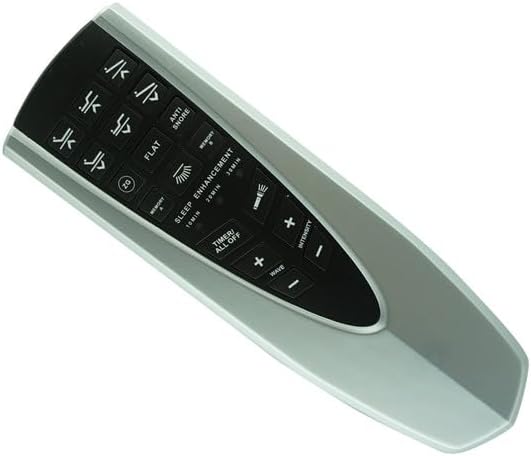
Figure 5: Angled view of the remote control, providing a clearer look at the button layout and their respective functions.
Common Button Functions:
- Head Up/Down: Adjusts the head section of the bed.
- Foot Up/Down: Adjusts the foot section of the bed.
- Flat: Returns the bed to a completely flat position.
- Zero G / ZG: Moves the bed to a 'zero gravity' position, often elevating the head and feet slightly to relieve pressure.
- Anti Snore: Adjusts the head section to a position that may help reduce snoring.
- Memory 1 / Memory 2: Saves and recalls your preferred bed positions. Consult your bed's manual for programming these.
- Sleep Enhancement / Wave / Intensity: Controls massage functions if your bed is equipped with them.
- Timer / All Off: May control a timer for massage functions or turn off all active features.
Press and hold the desired button until the bed reaches the desired position or function activates. Release the button to stop the movement.
5. Maintenance
5.1. Battery Replacement
When the remote control's range decreases or buttons become unresponsive, it is likely time to replace the battery. Follow the battery installation steps in Section 3.1.
Battery Type: 1 x AAA battery.
5.2. Cleaning
To clean the remote control, gently wipe its surface with a soft, dry cloth. For stubborn dirt, a slightly damp cloth with mild soap can be used, followed by immediate drying. Do not use abrasive cleaners, solvents, or immerse the remote in water.
6. Troubleshooting
If you experience issues with your remote control, try the following troubleshooting steps:
| Problem | Possible Solution |
|---|---|
| Remote not responding. |
|
| Remote functions intermittently. |
|
| Cannot pair the remote. |
|
If the problem persists after attempting these solutions, please contact the seller or manufacturer for further assistance.
7. Specifications
| Feature | Detail |
|---|---|
| Model Numbers | RF.31.18.03, RF.31.18.02, RF.31.18.11 (Okin Compatible) |
| Compatible Devices | Electric Adjustable Base Bed (Okin brand control box required) |
| Max Number of Supported Devices | 1 |
| Color | Black / Silver |
| Battery Type | 1 AAA battery (not included) |
| Manufacturer | Easytry |
| First Available | November 27, 2023 |
8. Warranty and Support
For any questions, technical support, or warranty inquiries regarding this replacement remote control, please contact the seller directly through the platform where the purchase was made. Provide your order details and a clear description of the issue for prompt assistance.
Please note that this is a replacement remote and may not have all the exact same functions as your original remote if your original was a different model or brand. Always refer to your adjustable bed's original manual for comprehensive information on its features and pairing procedures.
