Product Overview
The GameSir T4 Cyclone Pro is a versatile wireless controller designed for a wide range of gaming platforms. It features advanced Hall Effect joysticks and triggers for precise control and durability, programmable back buttons, and multi-mode connectivity options including Bluetooth, 2.4G wireless, and wired USB-C. This manual provides detailed instructions for setting up, operating, and maintaining your controller.

Figure 1: GameSir T4 Cyclone Pro Wireless Controller (Pink) and 2.4G Wireless Dongle.
Package Contents
- GameSir T4 Cyclone Pro Wireless Controller
- 2.4G Wireless Dongle
- USB-C Charging/Data Cable
- User Manual (this document)
Controller Layout and Features
Familiarize yourself with the various buttons and features of your GameSir T4 Cyclone Pro controller.
Key Components:
- A/B/X/Y Buttons: Standard action buttons.
- D-Pad: Directional input.
- Left/Right Analog Sticks: Hall Effect joysticks for precise, drift-free control.
- L1/R1 (Shoulder Buttons): Top-mounted buttons.
- L2/R2 (Trigger Buttons): Hall Effect analog triggers with adjustable modes.
- M Button: Multi-function button for quick settings adjustments.
- L4/R4 Buttons: Programmable back buttons for custom macros or single button assignments.
- Home Button: Power on/off and system menu access.
- Select/Start Buttons: Standard menu navigation.
- USB-C Port: For wired connection and charging.
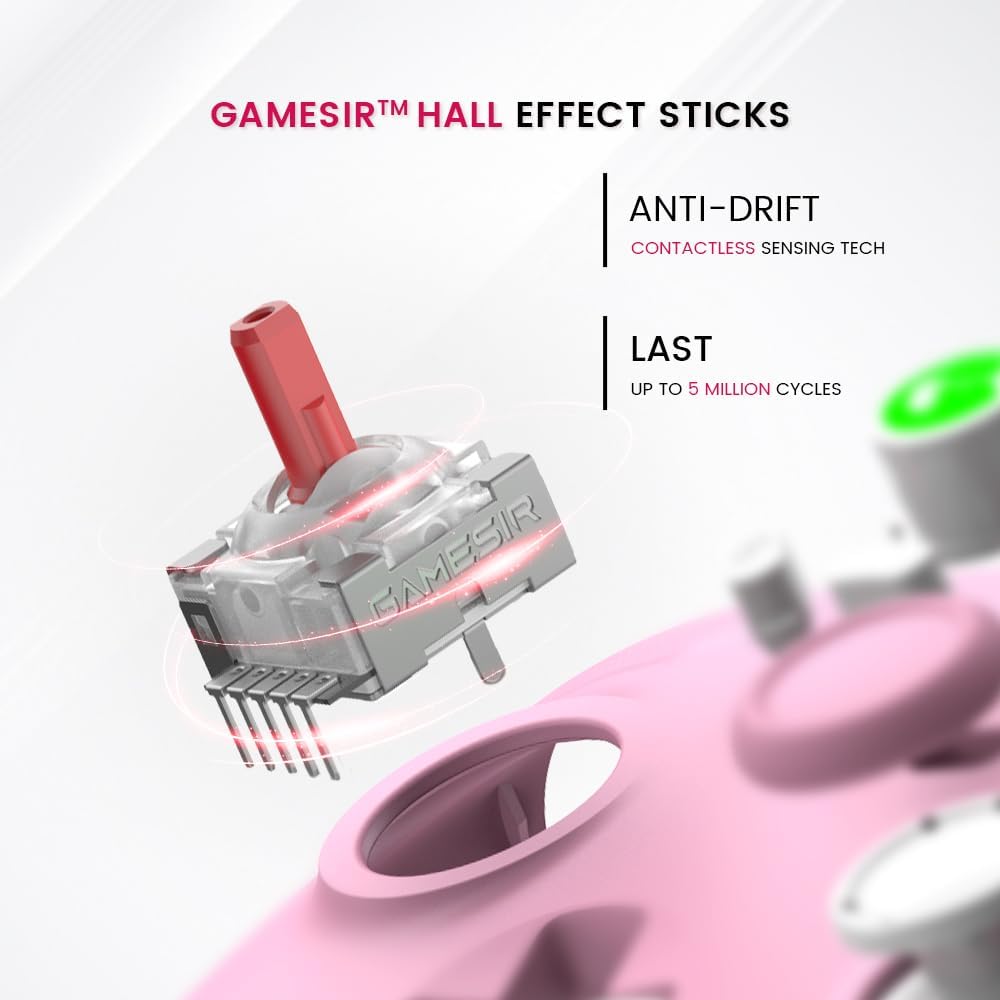
Figure 2: GameSir Hall Effect Sticks provide anti-drift performance and a lifespan of up to 5 million cycles.

Figure 3: Hall Effect Analog Triggers offer precise input with 0.1mm accuracy.

Figure 4: Two Programmable Macro Back Buttons (L4 and R4) for custom assignments.

Figure 5: Hyper-Realistic Quad Motor Structure provides immersive haptic feedback. Trigger vibration is supported in Bluetooth XInput mode.
Setup
1. Charging the Controller
Before first use, fully charge the controller using the provided USB-C cable. Connect the USB-C end to the controller's port and the USB-A end to a power source (e.g., PC, USB wall adapter). The indicator light will show charging status and turn off when fully charged.

Figure 6: The controller features an 860mAh battery, providing up to 25 hours of playing time.
2. Connecting to Devices
The GameSir T4 Cyclone Pro supports three connectivity modes: 2.4G Wireless, Bluetooth, and Wired USB-C.

Figure 7: Tri-Mode Connectivity for versatile gaming across platforms.
Figure 8: Multi-platform compatibility including Switch, PC, iOS, Android, and Steam Deck.
2.1. 2.4G Wireless Connection (PC, Steam Deck)
- Insert the 2.4G wireless dongle into an available USB port on your PC or Steam Deck.
- Press and hold the Home button on the controller for 3 seconds to power it on.
- The controller will automatically connect to the dongle. The indicator light will become solid when connected.
2.2. Bluetooth Connection (Switch, PC, Android, iOS)
- Ensure the controller is powered off.
- For Nintendo Switch: Go to "Controllers" > "Change Grip/Order" on your Switch. Press and hold the Home + Y buttons on the controller until the indicator lights flash rapidly. The controller will pair with the Switch.
- For PC (Bluetooth): Ensure your PC has Bluetooth enabled. Press and hold the Home + X buttons on the controller until the indicator lights flash rapidly. On your PC, go to Bluetooth settings and select "GameSir-T4 Cyclone Pro" to pair.
- For Android/iOS: Press and hold the Home + A buttons (for Android) or Home + B buttons (for iOS) on the controller until the indicator lights flash rapidly. On your mobile device, go to Bluetooth settings and select "GameSir-T4 Cyclone Pro" to pair.
- The indicator light will become solid when connected.
2.3. Wired USB-C Connection (PC)
- Connect the USB-C end of the cable to the controller and the USB-A end to your PC.
- The controller will be automatically recognized by your PC as a wired gamepad.
Operating Instructions
1. Power On/Off
- Power On: Press the Home button.
- Power Off: Press and hold the Home button for 5 seconds. The controller will also automatically power off after 10 minutes of inactivity.
2. Customization with GameSir App
For advanced customization, download the GameSir App from the official GameSir website or your device's app store. The app allows you to:
- Customize button mappings.
- Adjust stick deadzones.
- Set trigger travel distance.
- Modify vibration intensity.
- Change ABXY layout (e.g., between Xbox and Switch layouts).
3. Multi-function M Button
The 'M' button allows for quick adjustments without the app:
- M + LT/RT: Switch between Hair Trigger and Analog Trigger modes.
- M + Left Stick/Right Stick (LS/RS): Adjust stick deadzone mode.
- M + D-Pad Up/Down: Adjust grips' vibration intensity.
- M + A Button: Toggle ABXY layout.

Figure 9: Multi-function M Button for convenient control and quick adjustments.
4. Programmable Back Buttons (L4/R4)
The L4 and R4 back buttons can be programmed for single button assignments or complex macros. Refer to the GameSir App for detailed programming instructions, or use the controller's built-in macro recording function (details in the app or quick start guide).

Figure 10: Program Back Buttons to assign button functions and macros.
5. Motion Control (Nintendo Switch)
The controller supports motion controls for compatible Nintendo Switch games. Tilt, shake, or rotate the controller to interact with your games.

Figure 11: Motion Control for immersive gameplay on compatible platforms.
Maintenance
- Cleaning: Use a soft, dry cloth to clean the controller. Do not use harsh chemicals or abrasive materials.
- Storage: Store the controller in a cool, dry place away from direct sunlight and extreme temperatures.
- Battery Care: To prolong battery life, avoid fully discharging the controller frequently. Charge it regularly, even if not in use for extended periods.
Troubleshooting
| Issue | Possible Solution |
|---|---|
| Controller does not power on. | Ensure the controller is charged. Connect it to a power source using the USB-C cable. |
| Controller does not connect wirelessly. |
|
| Input lag or unresponsive controls. |
|
| Buttons or sticks are not responding correctly. |
|
Specifications
| Feature | Detail |
|---|---|
| Brand | GameSir |
| Model Name | T4 Cyclone Pro |
| Connectivity Technology | Wireless (Bluetooth, 2.4G), Wired (USB-C) |
| Compatible Devices | PC (Windows 10/11), Nintendo Switch, macOS, Android (6.0+), iOS (13.0+), Steam Deck |
| Controller Type | Gamepad |
| Joysticks | Hall Effect (Anti-drift, No Dead Zone) |
| Triggers | Hall Effect Analog Triggers |
| Vibration | Dual Rumble Motors in grips, 2 Motors in triggers (Bluetooth XInput mode only) |
| Programmable Buttons | 2 Macro Back Buttons (L4/R4) |
| Battery Capacity | 860 mAh |
| Playing Time | Up to 25 hours |
| Product Dimensions | 6.14 x 4.06 x 2.48 inches |
| Item Weight | 13.7 ounces |
Warranty and Support
For warranty information, technical support, or further assistance, please visit the official GameSir website or contact their customer service. Keep your purchase receipt for warranty claims.
Official GameSir Website: www.gamesir.hk


