
Introduction
Thank you for choosing the AANTAR HTC AT-179 Head, Body & Beard Trimmer. This device is designed for precise and efficient grooming of head, body, and beard hair. Featuring a full metal body, lithium-ion battery, and stainless steel blades, it offers a cordless operation with up to 90 minutes of run time. Please read this manual thoroughly before first use to ensure safe and optimal performance of your trimmer.
Important Safety Instructions
When using electrical appliances, especially when children are present, basic safety precautions should always be followed, including the following:
- Read all instructions before using this appliance.
- Keep the appliance away from water. Do not use it near bathtubs, showers, basins, or other vessels containing water.
- Unplug the appliance immediately after use and before cleaning.
- Do not reach for an appliance that has fallen into water; unplug it immediately.
- This appliance is not intended for use by persons (including children) with reduced physical, sensory, or mental capabilities, or lack of experience and knowledge, unless they have been given supervision or instruction concerning use of the appliance by a person responsible for their safety.
- Children should be supervised to ensure that they do not play with the appliance.
- Use this appliance only for its intended use as described in this manual. Do not use attachments not recommended by the manufacturer.
- Never operate this appliance if it has a damaged cord or plug, if it is not working properly, or if it has been dropped or damaged.
- Keep the cord away from heated surfaces.
- Never drop or insert any object into any opening.
- Do not use outdoors or operate where aerosol (spray) products are being used or where oxygen is being administered.
- Always attach plug to appliance first, then to outlet. To disconnect, turn all controls to OFF, then remove plug from outlet.
- This trimmer has high precision blades. Use it gently without applying too much pressure on the skin, especially when operating without a comb attachment.
Package Contents
Verify that all items are present in the package:
- AANTAR HTC AT-179 Trimmer
- USB Charging Cable
- Adjustment Clips (1mm, 2mm, 3mm)
- Cleaning Brush
- Lubricating Oil (small bottle)

Product Overview
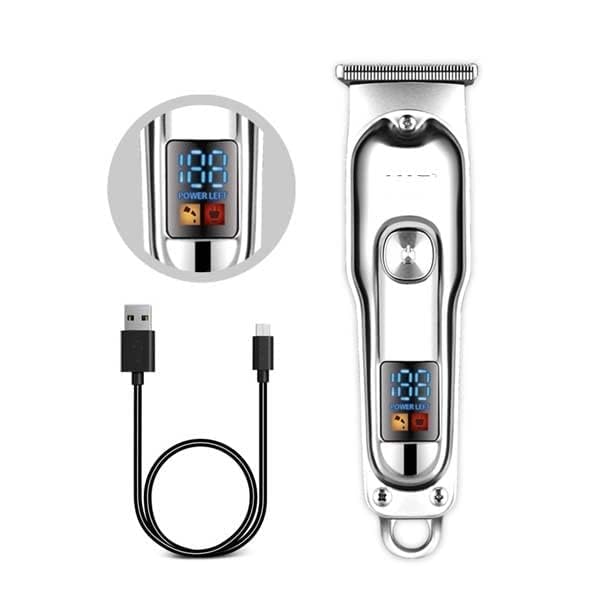
The AANTAR HTC AT-179 Trimmer features a durable full metal body and a precise stainless steel blade system. It includes a digital display for power indication and is designed for comfortable handling.
- Stainless Steel Blade: High-precision, self-sharpening T-blade for efficient cutting.
- R-Angle Blade Design: Ensures safe cutting and prevents skin irritation. The cutter head is resistant to corrosion and rust.
- Digital Display: Shows the remaining battery percentage.
- Power Button: For turning the trimmer on and off.
- Charging Port: USB-compatible for convenient charging.

Setup
Charging the Trimmer
- Ensure the trimmer is turned off before charging.
- Connect the USB charging cable to the trimmer's charging port.
- Plug the other end of the USB cable into a compatible USB power adapter (not included) or a computer USB port.
- The digital display will indicate charging status. A full charge provides approximately 90 minutes of cordless run time.
- The trimmer can only be charged using the provided charging cable.
Attaching and Detaching Comb Attachments
The trimmer comes with 1mm, 2mm, and 3mm adjustment clips for varying hair lengths.
- To attach a comb: Align the comb attachment with the trimmer blade and push it firmly until it clicks into place.
- To detach a comb: Gently pull the comb attachment upwards and away from the blade.
Operating Instructions
Basic Operation
- Ensure the trimmer is fully charged.
- Press the power button to turn the trimmer on. The digital display will illuminate.
- Press the power button again to turn the trimmer off.
Trimming Techniques
For best results, ensure hair is clean and dry before trimming.
- Beard Trimming: Choose the desired comb attachment (1mm, 2mm, or 3mm). Start with a longer comb if unsure. Hold the trimmer with the blade flat against the skin and move it against the direction of hair growth. For detailing, remove the comb attachment and use the bare blade carefully.
- Body Hair Trimming: Attach a comb for desired length. Move the trimmer smoothly over the skin, ensuring even contact. Be extra gentle on sensitive areas.
- Head Hair Trimming: For short styles, use a comb attachment. Move the trimmer slowly and steadily against the direction of hair growth. For outlining or detailing around ears and neckline, use the bare blade with caution.
- Always use gentle pressure. The high-precision blades cut effectively without excessive force.
Maintenance
Cleaning the Trimmer
Regular cleaning ensures optimal performance and extends the life of your trimmer.
- Turn off the trimmer and unplug it from the charging cable.
- Remove any comb attachments.
- Use the provided cleaning brush to brush away loose hairs from the blade and trimmer body.
- The blade is washable. You can rinse the blade head under running water. Ensure the trimmer body does not get wet if it is not specified as fully waterproof.
- Allow the blade to air dry completely before reattaching or storing.
Lubricating the Blades
To maintain blade sharpness and smooth operation, lubricate the blades regularly.
- After cleaning and drying the blades, apply 1-2 drops of the lubricating oil (or a similar light machine oil) onto the blades.
- Turn the trimmer on for a few seconds to allow the oil to distribute evenly.
- Wipe off any excess oil with a soft cloth.
Storage
Store the trimmer in a cool, dry place, away from direct sunlight and out of reach of children.
Troubleshooting
| Problem | Possible Cause | Solution |
|---|---|---|
| Trimmer does not turn on. | Battery is depleted. | Charge the trimmer fully using the USB cable. |
| Poor cutting performance or pulling hair. | Blades are dull, dirty, or not lubricated. Hair buildup. | Clean the blades thoroughly and apply lubricating oil. Ensure hair is dry before trimming. |
| Trimmer makes unusual noise. | Blades require lubrication. | Apply lubricating oil to the blades. |
| Trimmer gets hot during use. | Extended use. Lack of lubrication. | Allow the trimmer to cool down. Ensure blades are clean and lubricated. |
Specifications
- Model: AT-179
- Power Source: Battery Powered (Lithium-ion)
- Run Time: Approximately 90 minutes
- Charging: USB Cable
- Blade Material: Stainless Steel
- Body Material: Metal
- Included Components: Trimmer, USB Cable, Adjustment Clips (1mm, 2mm, 3mm), Cleaning Brush, Lubricating Oil
- Product Dimensions: 7 x 4 x 2 cm
- Item Weight: 199 g
Warranty and Support
For warranty information or technical support, please refer to the contact details provided with your purchase documentation or contact the retailer. Keep your purchase receipt as proof of purchase.