
1. Introduction
Thank you for choosing the AANTAR HTC AT-509 Rechargeable Hair and Beard Trimmer. This device is designed for precise hair and beard trimming, featuring an ergonomic design and skin-friendly stainless steel blades. It offers multiple length settings for versatile styling. Please read this manual thoroughly before first use to ensure safe and optimal performance.
2. Important Safety Instructions
- Always ensure the trimmer is switched off before cleaning or maintenance.
- Do not immerse the trimmer in water. The attachments are washable, but the main unit is not.
- Keep the appliance away from water sources when charging.
- Do not use the trimmer if the blades are damaged, as this may cause injury.
- This appliance is not intended for use by persons with reduced physical, sensory or mental capabilities, or lack of experience and knowledge, unless they have been given supervision or instruction concerning use of the appliance by a person responsible for their safety.
- Keep out of reach of children.
- Use only the charging cable provided with the device.
3. Package Contents
Verify that all items listed below are included in your package:
- AANTAR HTC AT-509 Trimmer Unit
- Adjustment Clips (Comb Guides)
- USB Charging Cable
- Cleaning Brush
- Travel Pouch
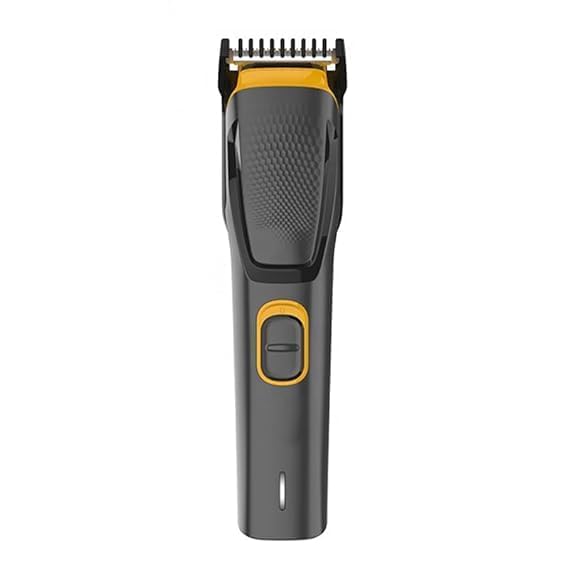
Image: The AANTAR HTC AT-509 Trimmer unit with its included accessories, such as comb guides, charging cable, and cleaning brush.
4. Product Overview
The AANTAR HTC AT-509 Trimmer features a robust design with key components for effective grooming.

Image: An internal diagram of the trimmer highlighting the power adapt sensor, which measures beard density 125 times per second for consistent performance.
- Precision Blades: High-grade stainless steel blades for a smooth and clean trim.
- Ergonomic Design: Lightweight and comfortable to handle for extended use.
- Rechargeable Battery: Provides cordless operation for convenience.
- Length Settings: Multiple comb guides for various hair lengths (0.5mm, 1mm, 5mm, 7mm, 8mm).
- LED Charge Indicator: Displays charging status.
5. Setup and Initial Charging
5.1 Initial Charging
- Before first use, fully charge the trimmer for approximately 8 hours.
- Connect the USB charging cable to the trimmer and a suitable USB power adapter (not included).
- The LED charge indicator will illuminate to show that the device is charging.
- Once fully charged, the trimmer provides up to 30 minutes of cordless use.

Image: An overview of smart features, including the 8-hour charging time for 30 minutes of cordless use and the LED charge indicator.
5.2 Attaching Comb Guides
- Ensure the trimmer is switched off.
- Select the desired adjustment clip (comb guide) for your preferred hair length.
- Align the comb guide with the trimmer head and push it firmly until it clicks into place.
- To remove, gently pull the comb guide away from the trimmer head.
6. Operating Instructions
6.1 Basic Trimming
- Ensure your hair or beard is clean and dry before trimming.
- Attach the appropriate comb guide for your desired length. For a very close trim (0.15mm), you may use the trimmer without a comb guide, but exercise caution.
- Switch on the trimmer using the power button.
- Hold the trimmer with the blades facing upwards and move it against the direction of hair growth.
- Use smooth, even strokes. Do not apply excessive pressure.

Image: A close-up of the trimmer's power button, which also functions as a turbo button for extra power when needed for thicker hair.
6.2 Using the Turbo Function
For thicker hair or faster trimming, press the power button again to activate the turbo function, providing extra power to the motor.
6.3 Stubble and Length Settings
The trimmer supports various length settings using the provided comb guides, allowing you to maintain stubble or longer beard styles:
- 0.15 mm (without comb guide)
- 0.5 mm
- 1 mm
- 5 mm
- 7 mm
- 8 mm
7. Maintenance and Cleaning
7.1 Cleaning the Blades
- Ensure the trimmer is switched off and unplugged from the charger.
- Remove the comb guide.
- Use the provided cleaning brush to remove any loose hairs from the blades and the trimmer head.
- The blades are washable. You can rinse the blade assembly under running water. Ensure the main trimmer body does not get wet.
- Allow the blades to air dry completely before reattaching or storing the trimmer.

Image: A hand demonstrating how to rinse the detachable trimmer blades under running water for easy cleaning.
7.2 Blade Sharpening
The AANTAR HTC AT-509 Trimmer features self-sharpening stainless steel blades, designed to maintain their sharpness over time with regular use. No manual sharpening is required.

Image: A visual representation of the self-sharpening mechanism of the stainless steel blades, ensuring long-lasting performance.
8. Troubleshooting
| Problem | Possible Cause | Solution |
|---|---|---|
| Trimmer does not turn on. | Battery is depleted. | Charge the trimmer for at least 8 hours. |
| Trimmer pulls hair or cuts poorly. | Blades are clogged with hair or dull. | Clean the blades thoroughly. Ensure hair is dry before trimming. |
| Trimmer makes unusual noise. | Foreign object caught in blades or internal issue. | Switch off and clean blades. If problem persists, contact customer support. |
9. Specifications
| Model Number | AT-509 |
| Brand | AANTAR |
| Blade Material | Stainless Steel |
| Power Source | Battery Powered (Rechargeable) |
| Product Dimensions | 7L x 5W Centimeters |
| Item Weight | 199 g |
| Included Components | Adjustment Clips, Brush, USB Cable |
| Manufacturer | China Electronic |
10. Warranty and Support
10.1 Warranty Information
The AANTAR HTC AT-509 Trimmer comes with a One Year Warranty from the date of purchase. This warranty covers manufacturing defects under normal use. It does not cover damage caused by misuse, accidents, unauthorized modifications, or normal wear and tear. Please retain your proof of purchase for warranty claims.
10.2 Customer Support
For any questions, troubleshooting assistance, or warranty claims, please contact our customer support:
- Email: antarjain01@gmail.com
- Phone: 9892692078


