
1. Introduction
The Jiofi JMR541 is a portable WiFi router designed to provide high-speed 4G/5G internet connectivity. It allows multiple devices to connect wirelessly, offering a convenient solution for internet access on the go. This manual provides essential information for setting up, operating, and maintaining your device.

Image 1.1: Front view of the Jiofi JMR541 Portable WiFi Router, showing indicator lights for battery, signal, and WiFi.
2. Package Contents
Please verify that all items listed below are included in your package:
- Jiofi JMR541 Device
- 2600 mAh Battery
- USB Data Cable
- Power Adapter/Charger

Image 2.1: The Jiofi JMR541 device, along with its power adapter and USB cable, as typically found in the product packaging.
3. Setup
Follow these steps for the initial setup of your Jiofi JMR541 device:
- Insert SIM Card: Carefully remove the back cover of the Jiofi device. Locate the SIM card slot and insert a Jio 4G/5G SIM card. Ensure the SIM card is correctly oriented according to the diagram near the slot.
- Insert Battery: Place the provided 2600 mAh battery into its compartment, ensuring the contacts align properly.
- Replace Cover: Securely reattach the back cover.
- Power On: Press and hold the power button, located on the side of the device, until the indicator lights illuminate. The device will take a moment to boot up and establish a network connection.
- Initial Connection: On your Wi-Fi enabled device (smartphone, laptop, tablet), search for available Wi-Fi networks. Select the network name (SSID) corresponding to your Jiofi device. The default SSID and password are usually printed on a sticker inside the battery compartment or on the device itself. Enter the password to connect.

Image 3.1: Side view of the Jiofi JMR541, highlighting the power button and WPS button for easy setup and connection.
4. Operating Instructions
Once your Jiofi JMR541 is set up and powered on, you can begin using it to access the internet.
- Connecting Devices: The Jiofi JMR541 supports connecting up to 10 Wi-Fi enabled devices simultaneously. This includes smartphones, laptops, tablets, and smart TVs. Ensure your devices are within the Wi-Fi range of the Jiofi.
- Jio4GVoice App: For making video calls, HD voice calls, and sending SMS messages, download and install the Jio4GVoice app on your Android smartphone. This app integrates with your Jio SIM card in the Jiofi device.
- Battery Life: The integrated 2600 mAh battery provides approximately 6 hours of continuous running time, allowing for extended use without a power source.
- External Memory: The device supports external memory cards up to 64 GB, which can be used for storage if a slot is available.

Image 4.1: A visual representation of the Jiofi JMR541 acting as a central hub, providing internet connectivity to various devices such as smartphones, tablets, laptops, and smart TVs.
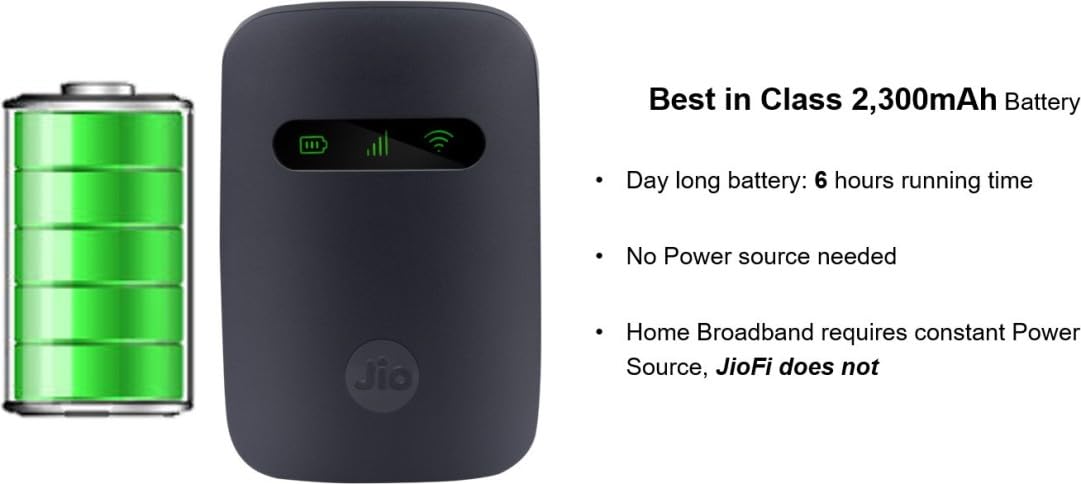
Image 4.2: The Jiofi JMR541 device alongside a battery icon, illustrating its 2600mAh battery capacity and approximately 6 hours of running time on a single charge.
5. Maintenance
Proper maintenance ensures the longevity and optimal performance of your Jiofi JMR541.
- Charging: Use only the provided charger and USB cable. A full charge typically takes approximately 3 hours and 30 minutes. Avoid overcharging the device.
- Storage: Store the device in a cool, dry place away from direct sunlight, extreme temperatures, and high humidity.
- Cleaning: Use a soft, dry, lint-free cloth to clean the exterior of the device. Do not use liquid cleaners, aerosols, or solvents, as these can damage the device.
- Battery Care: To prolong battery life, avoid completely draining the battery frequently. If storing the device for an extended period, ensure the battery is partially charged (around 50%).
- Software Updates: Periodically check for firmware updates from the official Jio website or through the device's administration interface to ensure optimal performance, security, and access to new features.
6. Troubleshooting
If you encounter issues with your Jiofi JMR541, refer to the following common problems and solutions:
- No Internet Connection:
- Ensure the Jio SIM card is properly inserted and active.
- Check the signal strength indicator on the Jiofi device. If the signal is weak or absent, move to an area with better network coverage.
- Restart the Jiofi device and your connected device.
- Verify that the Wi-Fi password entered on your connecting device is correct.
- Slow Internet Speed:
- Reduce the number of devices connected to the Jiofi.
- Move the Jiofi to an open area, away from obstructions or other electronic devices that might cause interference.
- Restart the device.
- Device Not Powering On:
- Ensure the battery is charged. Connect the device to the charger for at least 30 minutes.
- Check if the battery is correctly inserted into its compartment.
- If the issue persists, try using a different charging cable or adapter (if compatible).
- Wi-Fi Signal Drops Frequently:
- Ensure the Jiofi is not too far from the connected devices.
- Check for potential sources of interference (e.g., microwaves, cordless phones).
- Restart the Jiofi device.
7. Specifications
| Feature | Description |
|---|---|
| Brand | Jiofi (Generic) |
| Model | JIOFI JMR541 |
| Battery | 2600 mAh |
| Running Time | Up to 6 hours |
| Standby Time | 260 hours |
| Charging Time | Approximately 3 hours 30 minutes |
| Processor | Qualcomm MDM9207 |
| Network Support | FDD - Band 3, Band 5; TDD - Band 40 (Jio 4G/5G SIM cards only) |
| Connectivity | Wi-Fi (up to 10 devices), USB |
| External Memory | Supports up to 64 GB |
| Compatible Devices | Smartphone, Tablet, Laptop, Smart TV |
| Call Support | Via Jio4GVoice App on Android smartphones |
| Hardware Interface | USB |
| Operating System | Android (for app compatibility) |
8. Warranty and Support
Your Jiofi JMR541 device comes with a 1-year manufacturer warranty from the date of purchase.
- Warranty Coverage: The warranty covers manufacturing defects and malfunctions under normal use. It does not cover damage caused by misuse, accidents, unauthorized repairs, or natural disasters.
- Claiming Warranty: To claim warranty service, please retain your purchase receipt and contact Reliance Jio India Pvt Ltd customer support.
- Technical Support: For technical assistance, troubleshooting, or any queries regarding your device, please visit the official Jio website or contact their customer service helpline.

Image 8.1: The Jiofi JMR541 device accompanied by a badge indicating a 1-year warranty, assuring product quality and support.