
1. Introduction
This manual provides detailed instructions for the EBUYFIRE Smartwatch, model VC-T51F. Please read this manual carefully before using the device to ensure proper operation and to maximize its features. Keep this manual for future reference.
2. Product Overview
2.1 Key Features
- Bluetooth Calling: Make and receive calls directly from the watch.
- Health Monitoring: Continuous heart rate, SpO2 (blood oxygen), and sleep tracking. Includes alerts for very low/high heart rate.
- Activity Tracking: Over 100 multi-sport modes for various activities.
- Notifications: Synchronizes SMS and app messages (e.g., WhatsApp, Facebook).
- Customizable Watch Faces: Choose from over 100 watch faces.
- Voice Assistant: Integrated voice assistant functionality.
- Water Resistance: IP68 rating.
- Display: 1.38-inch full-touch screen.
- Battery: 280 mAh capacity, offering 5-7 days of typical use and over 20 days standby.
2.2 Package Contents
Upon opening the package, verify that all items are present:
- EBUYFIRE Smartwatch (VC-T51F)
- Charging Cable
- User Manual
- Additional Strap (if included in your specific model variant)
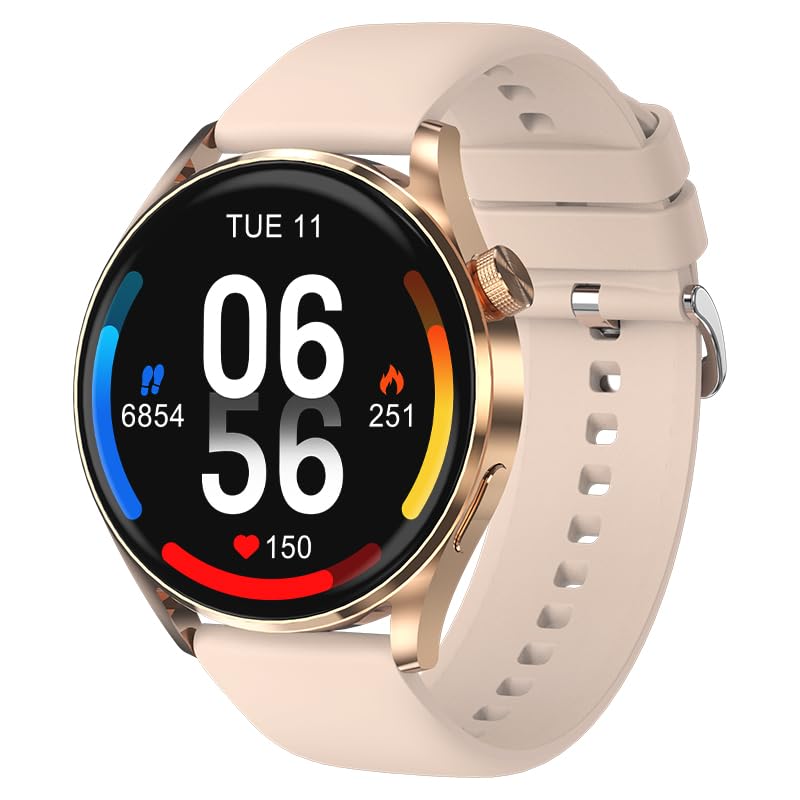
Image: EBUYFIRE Smartwatch VC-T51F. This image displays the smartwatch with its default strap, showcasing its round display and general design.
3. Setup
3.1 Charging the Smartwatch
- Connect the magnetic charging cable to the charging contacts on the back of the smartwatch.
- Plug the USB end of the charging cable into a standard USB power adapter (5V/1A recommended) or a computer's USB port.
- The watch display will show a charging indicator. A full charge typically takes about 2 hours.
Ensure the charging contacts are clean and dry before charging to prevent corrosion.
3.2 App Installation
The EBUYFIRE Smartwatch uses the Gloryfit application for full functionality. You can download the app from:
- Apple App Store (for iOS devices)
- Google Play Store (for Android devices)
- Scan the QR code provided in the quick start guide (if available) or on the watch itself.
The app is compatible with Android 4.0+ and iOS 8.0+ devices.
3.3 Device Pairing
- Ensure your smartwatch is charged and powered on.
- Enable Bluetooth on your smartphone.
- Open the Gloryfit app on your smartphone.
- Follow the in-app instructions to add a new device. The app will search for available Bluetooth devices.
- Select "VC-T51F" or a similar device name from the list to pair.
- Confirm the pairing request on both your smartphone and the smartwatch if prompted.
After successful pairing, the watch will synchronize data with the app, and you can customize settings.
4. Operating Instructions
4.1 Basic Navigation
- Swipe Up/Down: Navigate through menus and notifications.
- Swipe Left/Right: Access quick functions or widgets.
- Tap: Select an item or confirm an action.
- Side Button: Press to return to the home screen or wake the display. Long press for power options.
4.2 Bluetooth Calling
Once paired, the smartwatch can make and receive calls:
- Making Calls: Access the dial pad or contact list on the watch. You can synchronize up to 100 contacts via the Gloryfit app.
- Receiving Calls: When a call comes in, the watch will display the caller ID. Tap the green icon to answer or the red icon to reject.
The watch features a built-in microphone and Hi-Fi speaker for clear communication.
4.3 Notifications
To receive SMS and app notifications (e.g., WhatsApp, Facebook, Instagram):
- Ensure the watch is connected to your smartphone via Bluetooth.
- Open the Gloryfit app and navigate to the "Notifications" or "Message Push" settings.
- Enable notifications for the desired applications.
- Grant necessary permissions to the Gloryfit app on your smartphone for notification access.
Notifications will appear on the watch screen, and you can swipe to view them.
4.4 Health Monitoring
- Heart Rate: The watch continuously monitors your heart rate. View real-time data on the watch or detailed trends in the Gloryfit app. Alerts for very low or high heart rates can be set in the app.
- SpO2 (Blood Oxygen): Measure your blood oxygen levels. Follow on-screen instructions for accurate readings.
- Sleep Tracking: The watch automatically tracks your sleep patterns, including deep sleep, light sleep, and wake times. Review your sleep analysis in the Gloryfit app.
Note: This device is not a medical device. Health data is for reference only and should not be used for medical diagnosis or treatment.
4.5 Sports Modes
The smartwatch supports over 100 multi-sport modes, including running, cycling, walking, and more. To use a sports mode:
- Navigate to the "Sports" or "Workout" menu on the watch.
- Select your desired activity.
- Tap to start the activity. The watch will record data such as duration, distance, heart rate, and calories burned.
- Tap to pause or long-press to end the activity.
Detailed workout summaries are available in the Gloryfit app.
4.6 Other Functions
- Music Control: Control music playback on your smartphone (play, pause, skip tracks).
- Camera Remote: Use the watch as a remote shutter for your smartphone camera.
- Weather Forecast: View current weather and forecasts (requires app synchronization).
- Alarm Clock: Set alarms via the Gloryfit app.
- Stopwatch/Timer: Basic timekeeping functions.
- Find Phone: Locate your paired smartphone by making it ring.
- Voice Assistant: Activate your smartphone's voice assistant directly from the watch.
5. Maintenance
5.1 Cleaning
- Wipe the watch screen and body with a soft, lint-free cloth.
- For stubborn stains, dampen the cloth slightly with water. Avoid using harsh chemicals or abrasive materials.
- Clean the charging contacts regularly to ensure proper charging.
5.2 Water Resistance (IP68)
The EBUYFIRE Smartwatch is IP68 water-resistant, meaning it is protected against dust ingress and can withstand immersion in water up to 1.5 meters for up to 30 minutes. It is suitable for daily use, such as hand washing, rain, and light swimming.
Important: Avoid using the watch in hot water, saunas, or steam rooms, as steam can penetrate the seals and cause damage. Do not press buttons underwater.
6. Troubleshooting
- Watch not turning on: Ensure the watch is fully charged. Connect it to the charger for at least 10 minutes.
- Cannot pair with smartphone:
- Ensure Bluetooth is enabled on your smartphone.
- Make sure the watch is within Bluetooth range (typically 10 meters).
- Restart both the watch and your smartphone.
- Clear Bluetooth cache on your phone (if applicable) or try unpairing and re-pairing.
- Notifications not received:
- Check if notifications are enabled in the Gloryfit app for specific applications.
- Ensure the Gloryfit app has all necessary notification permissions on your smartphone.
- Verify that the watch is connected to the app.
- Inaccurate health data: Ensure the watch is worn snugly on your wrist, not too tight or too loose. Keep the sensor clean.
- Short battery life: Reduce screen brightness, disable unnecessary features, or check for background app activity.
If issues persist, consult the Gloryfit app's help section or contact EBUYFIRE customer support.
7. Specifications
| Feature | Detail |
|---|---|
| Model Name | VC-T51F |
| Brand | EBUYFIRE |
| Screen Size | 1.38 Inches |
| Operating System | Android (compatible with Android 4.0+ and iOS 8.0+) |
| Connectivity | Bluetooth BT5.2 |
| Water Resistance | IP68 |
| Battery Capacity | 280 mAh Lithium-Polymer |
| Battery Life | 5-7 days (typical use), >20 days (standby) |
| Charging Time | Approx. 2 hours |
| App Name | Gloryfit |
| Special Features | Calendar, Notifications, Calorie Tracking, GPS (integrated) |
| Product Material | Zinc alloy middle frame, plastic back case |
8. Warranty and Support
For warranty information, please refer to the documentation included with your purchase or contact your retailer. EBUYFIRE products typically come with a limited warranty covering manufacturing defects.
For technical support, troubleshooting assistance, or inquiries about your EBUYFIRE Smartwatch, please visit the official EBUYFIRE website or contact their customer service department. Contact details are usually available on the product packaging or the official website.