
1. Important Safety Information
Please read all instructions carefully before using the NUAKENE 7-Color Neck and Face Massager Tool. Retain this manual for future reference.
- Do not use if you have sensitive skin, skin conditions, or open wounds.
- Consult a physician before use if you are pregnant, have a pacemaker, or any serious medical conditions.
- Keep out of reach of children.
- Do not immerse the device in water. Clean with a damp cloth only.
- Do not use while charging.
- Discontinue use if you experience any discomfort or adverse reactions.
- Use only the provided USB cable for charging.
2. Package Contents
- 1 x NUAKENE Neck and Face Massager Tool
- 1 x USB Charging Cable
- 1 x User Manual (this document)
3. Product Overview
The NUAKENE 7-Color Neck and Face Massager Tool is designed for at-home skin care, offering multiple functions including 7 LED light colors, 3 massage modes, thermal therapy, and vibration. Its ergonomic 'dolphin' design allows for comfortable application on the face, neck, and other body areas.
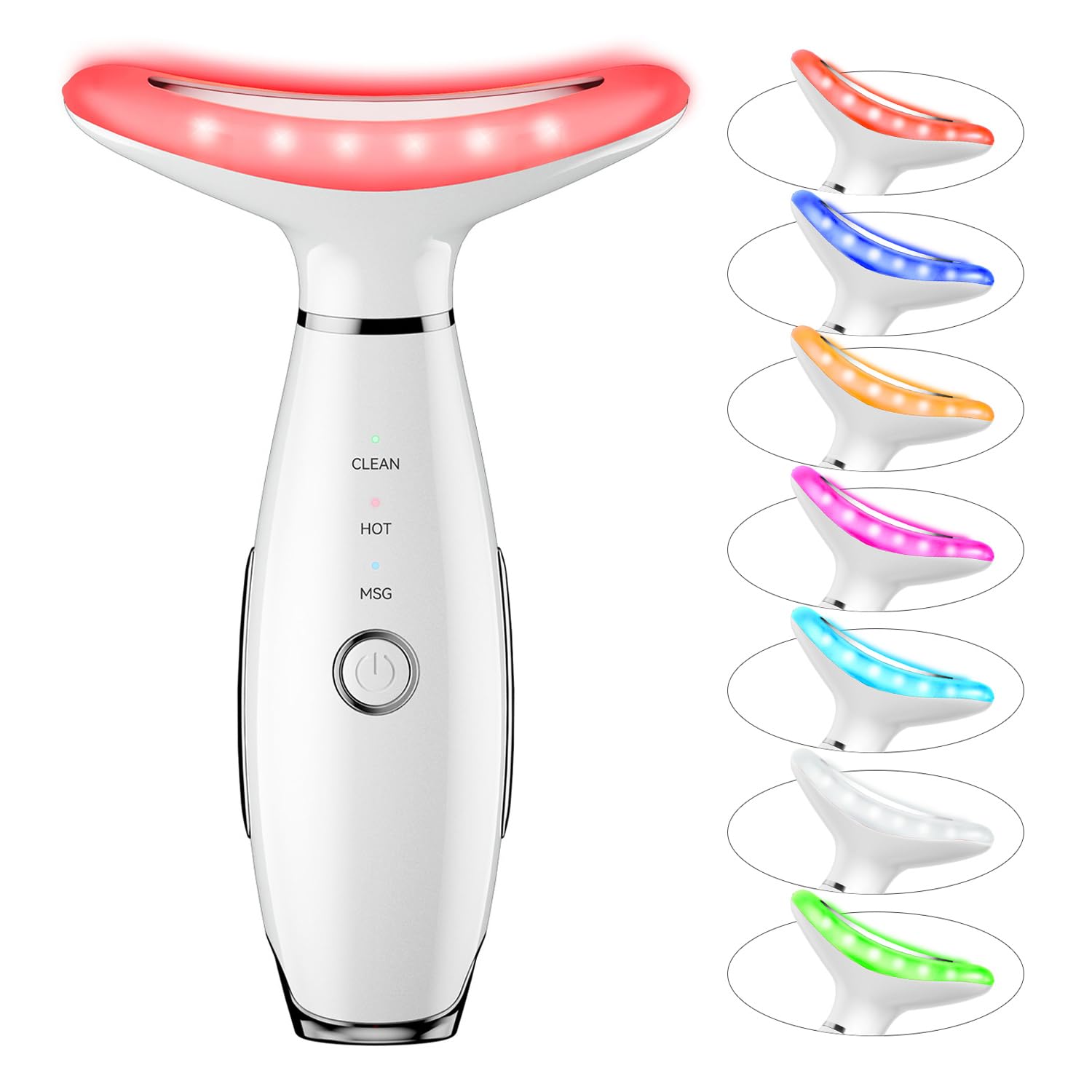
Figure 3.1: The NUAKENE 7-Color Neck and Face Massager Tool, showcasing its sleek design and illuminated massage head.

Figure 3.2: Labeled diagram of the massager tool, indicating the massage head, mode display, ON/OFF key, gear switch key, sensor, and USB Type-C charge port.
4. Charging the Device
Before first use, fully charge the device. The device does not operate while charging.
- Connect the provided USB Type-C charging cable to the charging port at the base of the device.
- Plug the other end of the USB cable into a compatible USB power adapter (not included) or a computer USB port.
- The indicator lights will show charging status. Once fully charged, the lights will indicate completion (refer to device for specific light behavior).
- A full charge typically takes approximately 2-3 hours.
5. Operating Instructions
Follow these steps for effective use of your NUAKENE massager:
- Preparation: Ensure the device is charged. Cleanse your skin thoroughly. Apply your preferred lotion, serum, or essence to the areas you intend to treat (face, neck, shoulders, arms).
- Power On: Press and hold the ON/OFF key (power button) located on the front of the device for a few seconds to turn it on.
- Select Mode: Briefly press the ON/OFF key to cycle through the available massage modes. The mode display lights will indicate the selected mode (e.g., CLEAN, HOT, MSG).
- Activate Vibration: For the device to vibrate, your hand must touch the sensor rings on both sides of the product's grip while the massage head is in contact with your skin.
- Application: Gently glide the massage head over the desired areas. For the neck, move upwards from the collarbone towards the jawline. For the face, move outwards and upwards.
- Thermal Function: If a mode with thermal function is selected, allow a few moments for the massage head to warm up to approximately 45℃ before applying to the skin.
- Power Off: Press and hold the ON/OFF key for a few seconds to turn off the device after use.

Figure 5.1: Pressing the power button to select the desired massage mode.

Figure 5.2: Proper grip, ensuring the hand touches the sensor while the massage head contacts the skin to activate vibration.
6. Modes and LED Light Colors
The device features 3 massage modes and 7 LED light colors, each designed to address different skin care needs.
6.1. Massage Modes
- CLEAN Mode: Typically combines vibration with a specific LED color for deep cleansing.
- HOT Mode: Integrates thermal therapy (approx. 45℃) with vibration and LED light to promote absorption of skincare products.
- MSG Mode: Focuses on massage and vibration, often with specific LED colors, for relaxation and skin revitalization.
6.2. LED Light Colors
The device offers 7 distinct LED light colors, each with a specific wavelength and intended benefit:

Figure 6.1: Visual representation of the 7 LED light colors (Red, Blue, Yellow, Green, Purple, Cyan, White Mix) and their corresponding wavelengths.
- Red Light (630nm): Supports skin rejuvenation and elasticity.
- Blue Light (415nm): Targets skin impurities and promotes a clearer complexion.
- Yellow Light (590nm): Helps to brighten skin tone and reduce dullness.
- Green Light (525nm): Aids in balancing skin tone and calming the skin.
- Purple Light (390nm): A combination of red and blue light benefits.
- Cyan Light (490nm): A combination of blue and green light benefits.
- White Mix Light: Combines all light spectrums for comprehensive skin care.

Figure 6.2: Overview of the device's multifunctional capabilities, including vibration massage, 7 colors, cleaning, 3 modes, and hot compress.
7. Maintenance and Care
Proper maintenance ensures the longevity and optimal performance of your device.
- Cleaning: After each use, wipe the massage head and body of the device with a soft, damp cloth. Do not use abrasive cleaners or immerse the device in water.
- Storage: Store the device in a cool, dry place, away from direct sunlight and extreme temperatures. Keep it in its original packaging or a protective pouch when not in use.
- Battery Care: To maintain battery health, avoid fully discharging the device frequently. Charge it regularly, even if not used for extended periods.
8. Troubleshooting
If you encounter any issues with your NUAKENE massager, please refer to the following common problems and solutions:
| Problem | Possible Cause | Solution |
|---|---|---|
| Device does not turn on. | Low battery or not charged. | Charge the device fully using the provided USB cable. Ensure the charging cable is securely connected. |
| Device does not vibrate. | Sensor not activated or not in contact with skin. | Ensure your hand is touching the sensor rings on both sides of the device's grip, and the massage head is firmly in contact with your skin. |
| Device not charging. | Faulty cable or power source. | Try using a different USB port or power adapter. Ensure the charging cable is not damaged. If the issue persists, contact customer service. |
| No heat from thermal function. | Incorrect mode selected or insufficient warm-up time. | Ensure a mode with thermal function (e.g., HOT mode) is selected. Allow a few moments for the device to reach its operating temperature (approx. 45℃). |
9. Specifications
| Feature | Detail |
|---|---|
| Brand | NUAKENE |
| Model Name | Neck Face Beauty Device |
| Item Model Number | NUAKENE |
| Dimensions | 6.18 x 4.17 x 2.32 inches |
| Item Weight | 0.19 Kilograms (6.53 ounces) |
| Color | White |
| Power Source | USB Rechargeable |
| Functions | 7 LED Colors, 3 Massage Modes, Thermal (approx. 45℃), Vibration |
10. Warranty and Customer Support
NUAKENE is committed to providing quality products. If you have any questions, concerns, or require assistance with your device, please do not hesitate to contact our customer service team. Refer to your purchase documentation for specific warranty details and contact information.
For prompt support, please provide your product model number (NUAKENE) and purchase date when contacting customer service.