
1. Introduction
The Haibro 20-Amp Smart Automatic Battery Charger is designed for efficient and safe charging and maintenance of various 12V and 24V batteries. This 7-stage charger supports Lead-Acid (including AGM, GEL, SLA, Flooded types) and LiFePO4 batteries, making it suitable for cars, trucks, SUVs, motorcycles, lawnmowers, marine applications, and more. It features automatic temperature compensation, pulse repair function, and multiple protection mechanisms to ensure optimal battery health and user safety.

Figure 1: The Haibro charger is compatible with Lead-Acid, AGM/GEL/WET, and LiFePO4 battery types.

Figure 2: The charger is suitable for a wide range of vehicles, including cars, trucks, and boats.
2. Safety Information
Please read and understand all safety instructions before using the charger. Failure to follow these instructions may result in electric shock, fire, or serious injury.
- Ventilation: Use the charger in a well-ventilated area. Do not operate in explosive atmospheres, such as in the presence of flammable liquids, gases, or dust.
- Eye and Skin Protection: Always wear eye protection and protective clothing when working near batteries. Batteries can produce explosive gases.
- Sparks and Flames: Avoid creating sparks or flames near the battery or charger. Do not smoke.
- Connections: Ensure correct polarity when connecting the charger to the battery. Connect the positive (+) clamp to the positive terminal and the negative (-) clamp to the negative terminal.
- Disconnecting: Always disconnect the AC power from the charger before disconnecting the battery clamps.
- Damaged Equipment: Do not operate the charger if it has been dropped, damaged, or is not functioning properly. Contact support for assistance.
- Children: Keep the charger and batteries out of reach of children.
- Battery Type: This charger is designed for 12V and 24V Lead-Acid (AGM, GEL, SLA, Flooded) and LiFePO4 batteries only. Do not attempt to charge other battery types.
- Overcharging: The charger has built-in overcharge protection, but it is recommended to monitor the charging process.
- Temperature: Avoid exposing the charger to extreme temperatures or direct sunlight for prolonged periods.

Figure 3: The charger incorporates multiple intelligent protection features for safe operation.
3. Product Overview
The Haibro battery charger features a robust design with an intuitive LED digital display and heavy-duty alligator clips for secure connections.

Figure 4: Front view of the Haibro Smart Battery Charger.
Key Components:
- LED Digital Display: Shows charging status, voltage, current, temperature, and selected mode.
- Mode Selection Button: Used to cycle through different charging modes (Car, AGM/LiFePO4, Moto, Repair).
- Positive (+) Alligator Clamp (Red): Connects to the positive terminal of the battery.
- Negative (-) Alligator Clamp (Black): Connects to the negative terminal of the battery.
- AC Power Cord: Connects the charger to a standard wall outlet.
- Foldable Handle: For easy carrying and storage.
- Cable Organizer: Integrated clips on both sides for neat cable management.
4. Setup Instructions
- Prepare the Battery: Ensure the battery terminals are clean and free of corrosion. If necessary, clean them with a wire brush and baking soda solution.
- Connect to Battery:
- Connect the RED positive (+) alligator clamp to the POSITIVE (+) battery terminal.
- Connect the BLACK negative (-) alligator clamp to the NEGATIVE (-) battery terminal.
- Ensure connections are secure.
- Connect to Power: Plug the AC power cord into a standard 100-240V AC wall outlet. The charger will power on and display the current battery voltage.
- Select Mode: Press the "Mode" button to select the appropriate charging mode for your battery type (Car, AGM/LiFePO4, Moto, Repair). The selected mode will be indicated on the LED display.
5. Operating Instructions
5.1. Charging Process (7-Stage Automatic Charging)
The charger utilizes a 7-stage microprocessor-controlled charging process to optimize battery charging and extend battery life. Once connected and a mode is selected, the charger automatically begins the charging cycle.
5.2. Charging Modes
Press the mode button to cycle through the available charging modes:
- CAR Mode: For conventional rechargeable Lead-Acid, maintenance-free, and deep-cycle batteries typically found in cars.
- AGM/LiFePO4 Mode: Specifically designed for AGM, GEL, and Lithium Iron Phosphate (LiFePO4) batteries.
- MOTO Mode: For smaller capacity motorcycle lead-acid batteries.
- REPAIR Mode: An advanced recovery mode for repairing and restoring old, idle, low voltage, stratified, or sulfated batteries. Use this mode if the charger cannot initiate a charge in other modes.

Figure 5: Multiple charging modes available on the Haibro charger.
5.3. Pulse Repair Function
The pulse repair function helps restore lost battery performance and recover old or idle batteries. If a battery is not charging effectively, select the REPAIR mode. This function uses pulse technology to address sulfation and acid stratification, aiming to improve battery health for stronger engine starts. Note: This function cannot revive completely dead batteries.
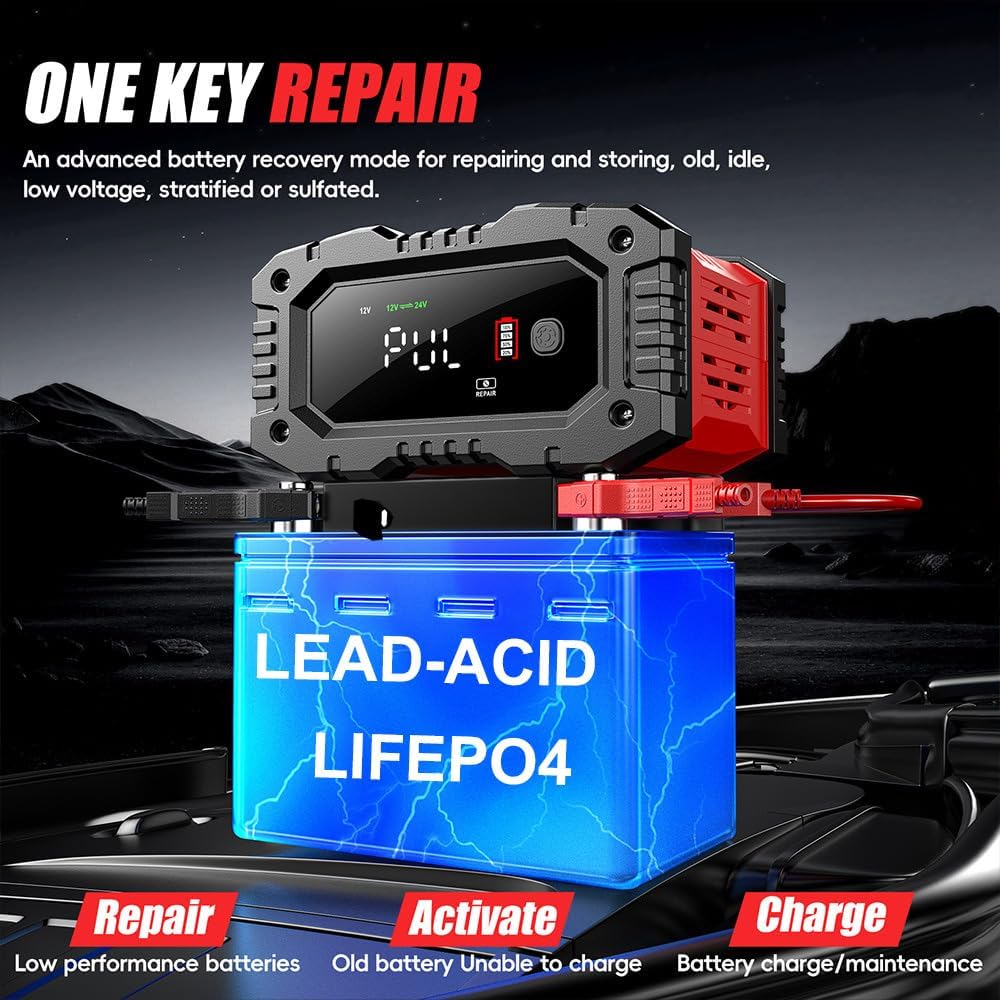
Figure 6: The 'One Key Repair' function for battery recovery.
5.4. Temperature Compensation
The charger automatically detects the ambient temperature and adjusts the charging voltage accordingly. This feature prevents over-charging in hot conditions and under-charging in cold conditions, ensuring optimal and safe charging performance in various environments (Summer Mode / Winter Mode).

Figure 7: Automatic temperature detection and compensation for optimized charging.
5.5. LED Digital Display
The large LCD provides real-time information about the charging process and battery status:
- Charge Voltage and Current: Displays the current voltage and amperage.
- Inside Temperature: Shows the ambient temperature detected by the charger.
- Power Percentage: Indicates the estimated charge level of the battery.
- Battery Full Indicator: Notifies when the battery is fully charged.
- Mode Indicators: Shows the currently selected charging mode (e.g., CAR, AGM, MOTO, REPAIR).
- Winter/Summer Mode: Indicates the active temperature compensation mode.

Figure 8: The LED digital display provides comprehensive charging information.
Once the battery is fully charged, the charger automatically switches to trickle/float mode to prevent overcharging and maintain the battery's charge.
6. Maintenance
- Cleaning: Disconnect the charger from power and the battery before cleaning. Wipe the exterior with a soft, damp cloth. Do not use harsh chemicals or abrasives.
- Cable Storage: Utilize the integrated cable organizers on the sides of the charger to neatly wrap and store the alligator clips and power cords when not in use. This prevents tangling and damage.
- Storage: Store the charger in a cool, dry place away from direct sunlight and moisture.
- Battery Terminals: Periodically inspect battery terminals for corrosion and clean them as needed to ensure good electrical contact.
7. Troubleshooting
| Problem | Possible Cause | Solution |
|---|---|---|
| Charger does not turn on. | No AC power; faulty power outlet; damaged charger. | Check AC power connection and outlet. Try a different outlet. If still no power, contact support. |
| Charger not charging battery. | Incorrect battery connection; battery is completely dead; incorrect mode selected; battery sulfation. | Ensure clamps are correctly connected (+ to +, - to -). Select the appropriate charging mode. If the battery is severely discharged or sulfated, try the REPAIR mode. Note: Charger cannot revive completely dead batteries. |
| Display shows an error or warning. | Reverse polarity; short circuit; over-temperature. | Disconnect from power and battery. Check connections for reverse polarity or short circuits. Allow charger to cool down if it's hot. Reconnect correctly. |
| Charger gets warm during operation. | Normal operation; poor ventilation. | Some warmth is normal. Ensure the charger is in a well-ventilated area. If it becomes excessively hot, disconnect and contact support. |
8. Specifications
| Feature | Detail |
|---|---|
| Brand | Haibro |
| Model Number | HB-20A-LIFEPO4/LEAD-ACID/AGM-CHARGER |
| Input Voltage | 100-240V AC, 50/60Hz |
| Output Voltage | 12V / 24V DC (Automatic Detection) |
| Output Current | 12V 20A Max / 24V 10A Max |
| Battery Types | Lead-Acid (AGM, GEL, SLA, Flooded), LiFePO4 |
| Charging Stages | 7-Stage Automatic Charging |
| Pulse Repair Function | Yes |
| Temperature Compensation | Yes (Summer/Winter Mode) |
| Display | LED Digital Display |
| Protection Features | Overcharge, Over-voltage, Over-temperature, Short Circuit, Reverse Polarity |
| Product Dimensions | 16.5D x 19.2W x 10.4H centimeters |
| Item Weight | 1.04 kg |
| Connector Type | Alligator Clips |
| Certifications | CE, FCC, RoHS, UKCA |
9. Warranty and Support
Haibro guarantees customer satisfaction with this 20-Amp battery charger. The product comes with a one-year warranty for defective products, offering free replacements within this period.
For any issues, questions, or support needs, please contact our expert support team. They are available 24/7 to assist you.
Contact Information: Refer to the product packaging or the official Haibro website for the most current support contact details.


