
1. Introduction
Thank you for choosing the SONGMICS LED Jewelry Cabinet. This manual provides essential information for the safe and efficient use of your new jewelry armoire. Please read these instructions carefully before assembly and operation, and retain them for future reference.
Key Features:
- Full-Length Mirror with Adjustable LED Lights: Features dimmable LED lights with 3 shades (3000K Warm Light, 4000K Natural Light, 6000K Cool Light) and a smart memory function, controlled by touch buttons.
- Extensive Storage Capacity: Includes 108 earring slots, 36 stud earring holes, 36 necklace hooks, 3 bracelet rods, 78 ring slots, 1 PVC bag, 5 interior shelves, and 3 rear storage shelves.
- Built-In Mini Vanity Table: A flip-over shelf combined with an interior mirror and LED lights for convenient makeup application and accessorizing.
- Reliable and Secure Design: Constructed from quality MDF for sturdiness, with soft velvet lining to protect jewelry. Includes a lock with 2 keys for security.
- Easy Assembly: The main cabinet comes pre-assembled; only the base and rear shelves require setup.
2. Package Contents
- 1 x Full-Length Mirror Jewelry Cabinet
- 1 x Accessory Kit (containing screws, tools, etc.)
- 1 x Instructions Manual
3. Safety Information
- Ensure the cabinet is placed on a flat, stable surface to prevent tipping.
- Keep children away from the product during assembly.
- Do not overload shelves or compartments to maintain stability.
- Keep keys out of reach of children.
- Avoid exposing the product to direct sunlight or high humidity.
- Use only the provided power adapter for the LED lights.
4. Assembly Instructions
The main jewelry cabinet body comes pre-assembled. Only the base and the rear storage shelves require assembly. Please follow the steps below:
Step 1: Attach the Base
- Carefully lay the main cabinet body on a soft, clean surface to prevent scratches.
- Align the pre-drilled holes on the base with the corresponding holes at the bottom of the cabinet.
- Secure the base using the screws provided in the accessory kit. Ensure all screws are tightened firmly.
Step 2: Install Rear Storage Shelves
- Identify the three rear shelves and their corresponding attachment points on the back of the cabinet frame.
- Attach each shelf using the provided screws. Ensure they are level and securely fastened.
Once assembly is complete, carefully stand the cabinet upright in your desired location. Connect the power adapter for the LED lights to a suitable electrical outlet.
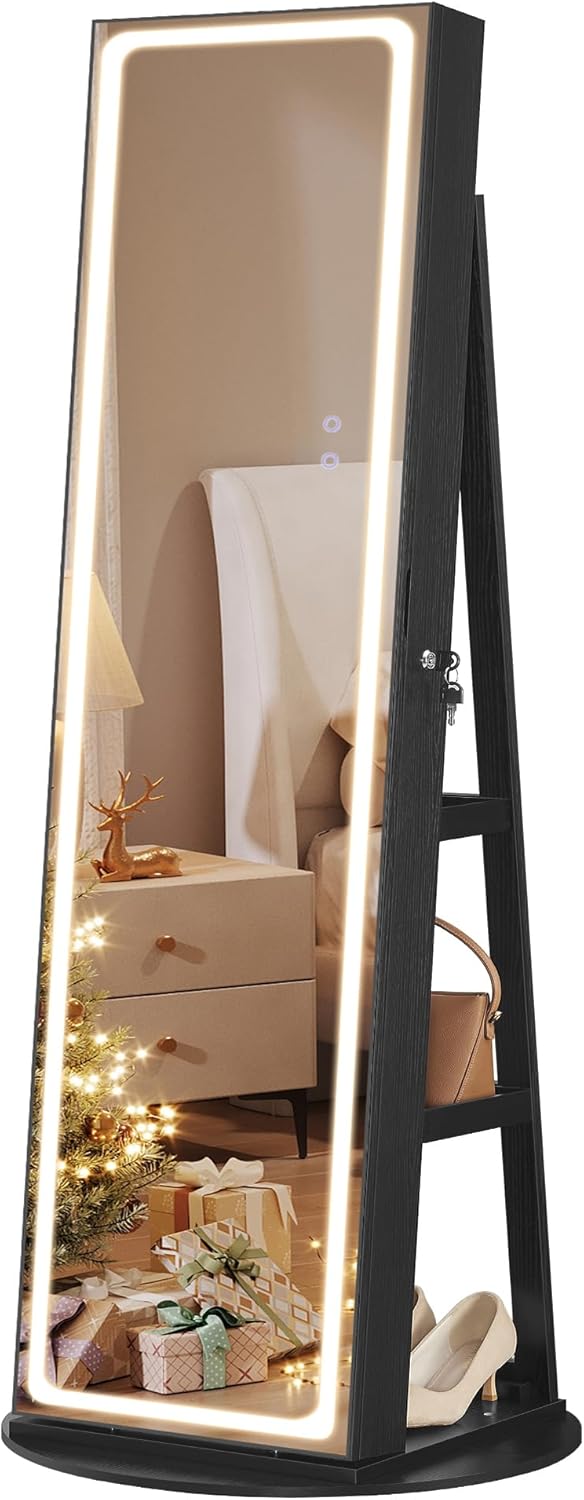
Image: Front view of the assembled SONGMICS LED Jewelry Cabinet with lights illuminated.
5. Operating Instructions
5.1. LED Mirror Lights Operation
The full-length mirror features integrated LED lights with touch controls for adjustable brightness and color temperature.
- Power On/Off: Tap the lower touch button (marked with a power icon) to turn the lights on or off.
- Adjust Brightness: Touch and hold the lower touch button to dim or brighten the lights. Release when the desired brightness is achieved.
- Change Light Shade: Tap the upper touch button (marked with a 'C' or color icon) to cycle through the three available light shades: 3000K (Warm Light), 4000K (Natural Light), and 6000K (Cool Light).
- Memory Function: The mirror will remember your last used brightness and shade settings when powered off and on.

Image: Close-up view of the intuitive touch controls on the LED mirror for power, brightness, and light shade adjustment.
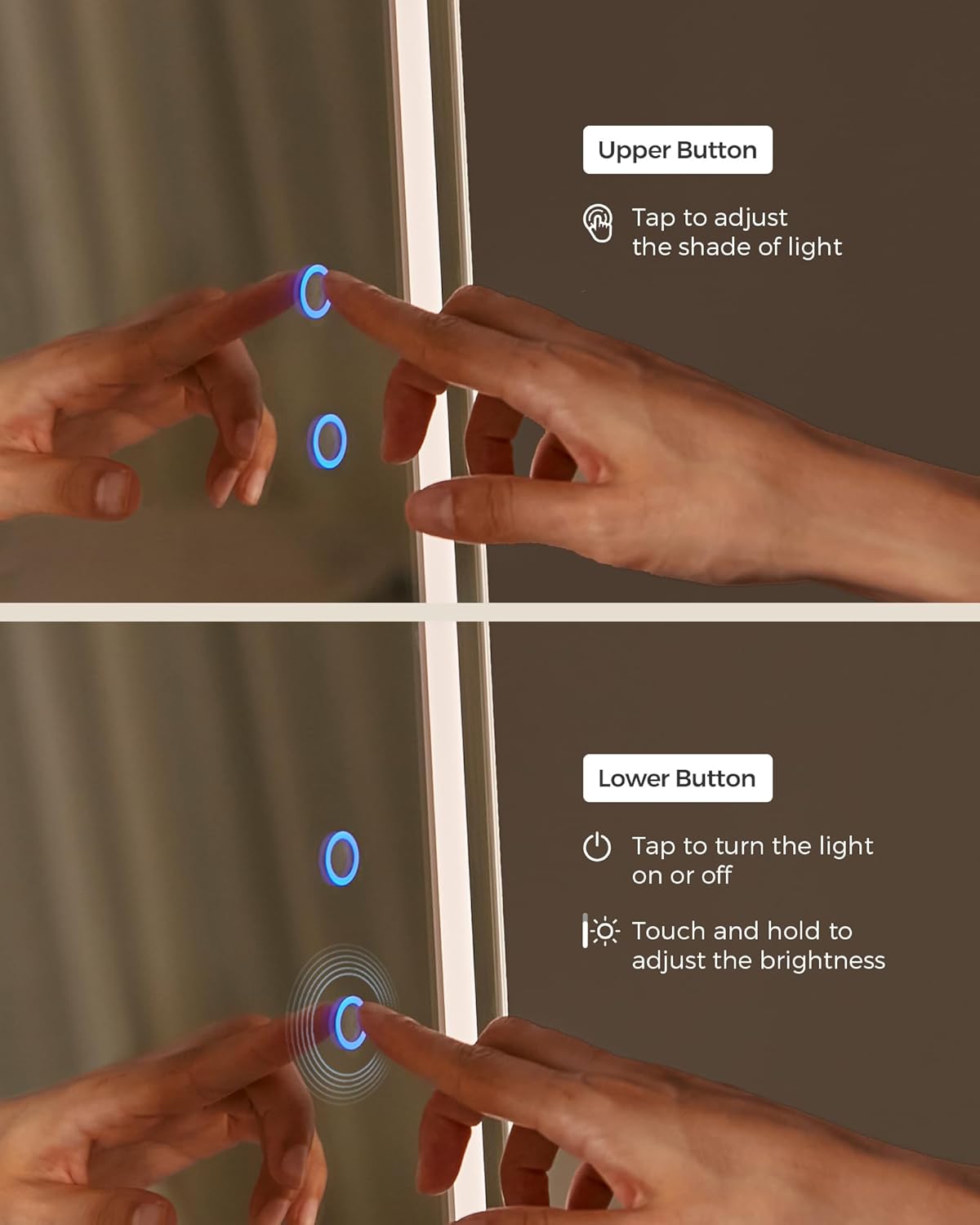
Image: Visual representation of the three adjustable LED light shades (Warm, Natural, Cool) available on the mirror.
5.2. Locking Mechanism
The jewelry cabinet is equipped with a lock and two keys to secure your valuables.
- To Lock: Insert one of the provided keys into the lock on the side of the cabinet door and turn it clockwise until the door is securely fastened.
- To Unlock: Insert the key and turn it counter-clockwise.
- Keep spare keys in a safe place.

Image: Detail of the lock and accompanying keys for securing the jewelry cabinet.
5.3. Interior Vanity Table
Open the cabinet door to reveal a mini vanity area. The flip-over shelf can be extended to provide a surface for makeup or accessories, complemented by the interior mirror and LED lights.

Image: A user applying makeup using the built-in mini vanity table and interior LED lights.
6. Storage Organization
The cabinet offers a variety of compartments designed for efficient organization of your jewelry and cosmetics.

Image: The 3-in-1 design of the jewelry cabinet, showcasing the full-length mirror, the open jewelry storage, and the rear shelves.
6.1. Interior Storage
- Earring Slots: 108 slots for various earring types.
- Stud Earring Holes: 36 dedicated holes for stud earrings.
- Necklace Hooks: 36 hooks to prevent necklaces from tangling.
- Bracelet Rods: 3 rods for organizing bracelets.
- Ring Slots: 78 slots to keep rings secure and visible.
- PVC Bag: 1 clear PVC bag for additional small items.
- Interior Shelves: 5 shelves for cosmetics, perfumes, and other accessories.
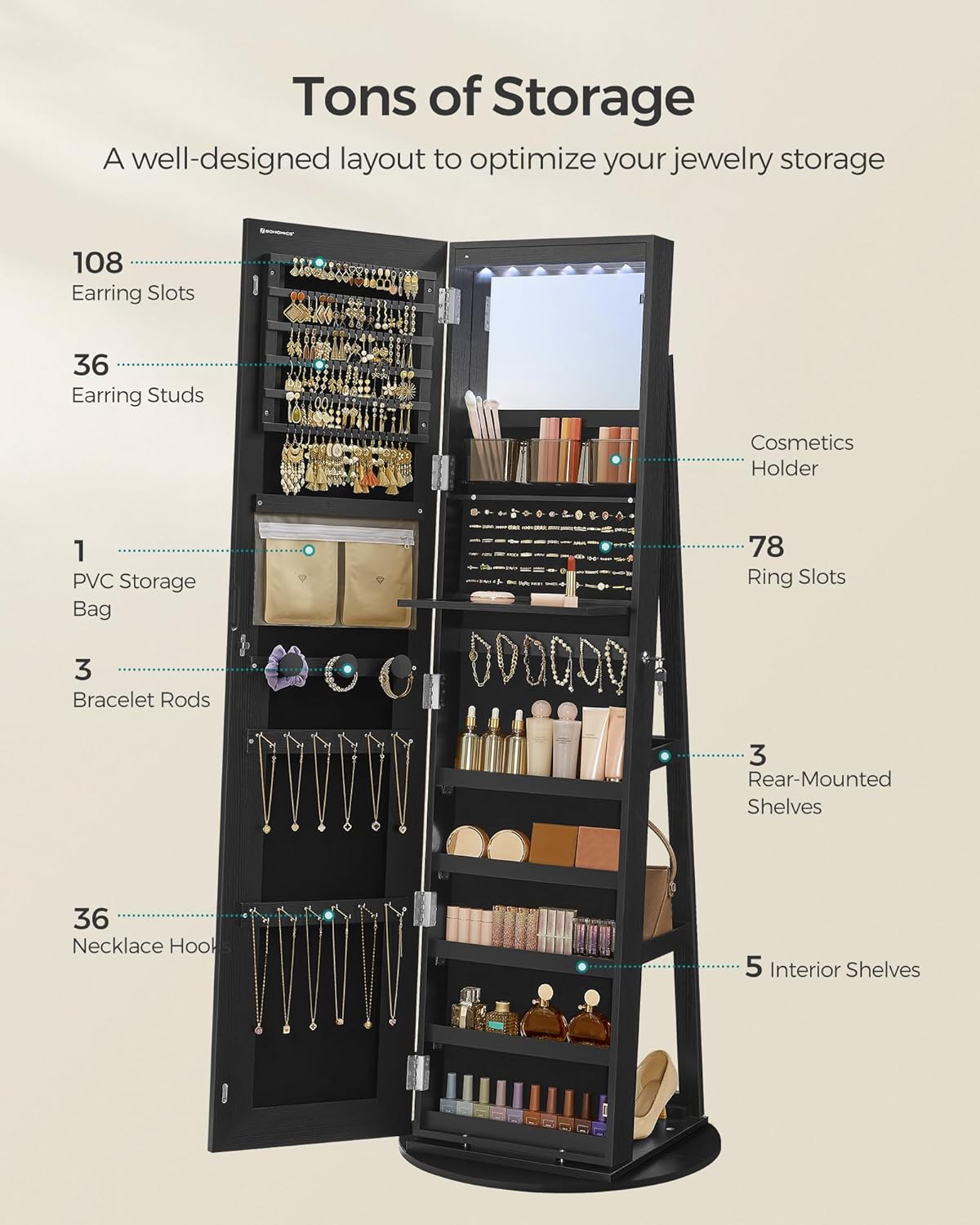
Image: A comprehensive view of the interior storage, highlighting earring slots, necklace hooks, ring slots, and shelves.
6.2. Rear Storage Shelves
The back of the cabinet features three additional shelves, ideal for storing larger items such as handbags, shoes, or folded clothing.

Image: The back of the jewelry cabinet, illustrating the three convenient storage shelves.
7. Maintenance and Care
- Cleaning the Mirror: Use a soft, lint-free cloth and a glass cleaner to wipe the mirror surface. Avoid abrasive cleaners.
- Cleaning the Cabinet: Wipe the wooden surfaces with a soft, damp cloth. For stubborn marks, use a mild wood cleaner.
- Velvet Lining: Gently vacuum or use a lint roller to clean the velvet interior. Do not use wet cloths or harsh chemicals.
- LED Lights: The LED lights are designed for long-term use and do not require replacement. If issues occur, refer to the troubleshooting section.
- General Care: Periodically check all screws and connections to ensure they remain tight. Avoid placing hot or wet items directly on the cabinet surface.
8. Troubleshooting
| Issue | Possible Cause | Solution |
|---|---|---|
| LED lights not turning on. | Power adapter not connected or faulty; outlet issue. | Ensure the power adapter is securely plugged into both the mirror and a working electrical outlet. Test the outlet with another device. |
| Lights are too dim or too bright. | Brightness setting needs adjustment. | Touch and hold the lower touch button on the mirror to adjust the brightness to your preference. |
| Cabinet feels unstable. | Loose screws in the base or frame; uneven floor. | Check and tighten all assembly screws. Ensure the cabinet is on a level surface. If necessary, use shims under the base. |
| Door not closing properly. | Hinges misaligned or damaged; obstruction. | Check hinges for alignment and tighten screws if loose. Ensure no items inside are obstructing the door's closure. |
9. Specifications
| Feature | Detail |
|---|---|
| Brand | SONGMICS |
| Model Number | UJJC008B01 |
| Color | Ink Black |
| Material | MDF (Medium Density Fiberboard), PS, Velvet, Glass, Steel |
| Product Dimensions | 21.6"D x 21.6"W x 62.6"H (55 cm D x 55 cm W x 159 cm H) |
| Item Weight | 48.2 Pounds (21.86 kg) |
| Special Feature | Adjustable LED Lights, Large Capacity, Lockable |
| Mounting Type | Freestanding |
| Number of Compartments | 2 (main cabinet, rear shelves) |
| UPC | 194343062600 |

Image: Detailed dimensions of the SONGMICS LED Jewelry Cabinet.
10. Official Product Video
Watch this official product video for a visual overview of the SONGMICS LED Jewelry Cabinet's features and functionality.
Video: An overview of the SONGMICS LED Jewelry Cabinet, demonstrating its full-length mirror, adjustable lights, and various storage options.
11. Warranty and Support
For any questions, concerns, or support needs regarding your SONGMICS LED Jewelry Cabinet, please contact SONGMICS customer service. Refer to your purchase documentation or the retailer's website for specific warranty details and contact information.
You can typically find customer support information on the SONGMICS Store on Amazon or through your original point of purchase.