
Introduction
This manual provides essential instructions for the safe and efficient operation of your SHARP SMC1585KB Convection Countertop Microwave Oven. Please read all instructions thoroughly before using the appliance and retain this manual for future reference.

Front view of the SHARP SMC1585KB Convection Countertop Microwave Oven in black.
Important Safety Instructions
When using electrical appliances, basic safety precautions should be followed, including the following:
- Read all instructions before using the appliance.
- Do not operate any appliance with a damaged cord or plug, or after the appliance malfunctions or has been damaged in any manner.
- Do not cover or block any openings on the appliance.
- Do not use this appliance near water.
- Do not immerse cord or plug in water.
- Close supervision is necessary when any appliance is used by or near children.
- Only use utensils suitable for microwave ovens.
- Do not heat liquids or other foods in closed containers as they are liable to explode.
- Maintain the oven and door seals in a clean condition.
- Do not attempt to operate this oven with the door open as this can result in harmful exposure to microwave energy.
- This appliance is equipped with a Child-Resistant Door Lock feature.

Instructions for using and deactivating the Child-Resistant Door Lock feature.
Child-Resistant Door Lock
The SHARP SMC1585KB is equipped with a Child-Resistant Door Lock.
- To Open Microwave During or After Use:
- Press "0/UNLOCK" first.
- Push the door button to open the door.
- To Deactivate Child-Resistant Door Lock:
- Press "HELP/SETTING".
- Next, press "6".
- Press "STOP/CLEAR".
To re-activate the child safety lock, repeat the above steps.
Setup and Installation
Unpacking
- Remove all packing materials from inside the oven cavity and from the oven door.
- Check the oven for any damage, such as dents or a misaligned door. Do not operate the oven if it is damaged.
- Ensure all accessories are present: turntable, roller ring.
Placement
- Place the oven on a flat, stable surface that can support its weight and the heaviest food item likely to be cooked in it.
- Ensure adequate ventilation: leave at least 4 inches (10 cm) of space around the sides, back, and top of the oven for proper airflow.
- Do not place the oven near heat sources or in areas with high humidity.

The microwave oven placed on a kitchen countertop, demonstrating proper clearance.
Turntable Installation
- Place the roller ring in the center of the oven cavity floor.
- Place the ceramic turntable plate securely on top of the roller ring. Ensure it is properly seated in the center hub.

Interior view showing the ceramic turntable plate and roller ring correctly positioned.
Electrical Connection
- Plug the oven into a properly grounded 3-prong outlet. Do not use an adapter or extension cord.
- Ensure the voltage and frequency match the specifications of your appliance (120 Volts AC, 60 Hz).
Operating Instructions
Your SHARP SMC1585KB microwave oven offers various cooking modes. Familiarize yourself with the control panel for optimal use.
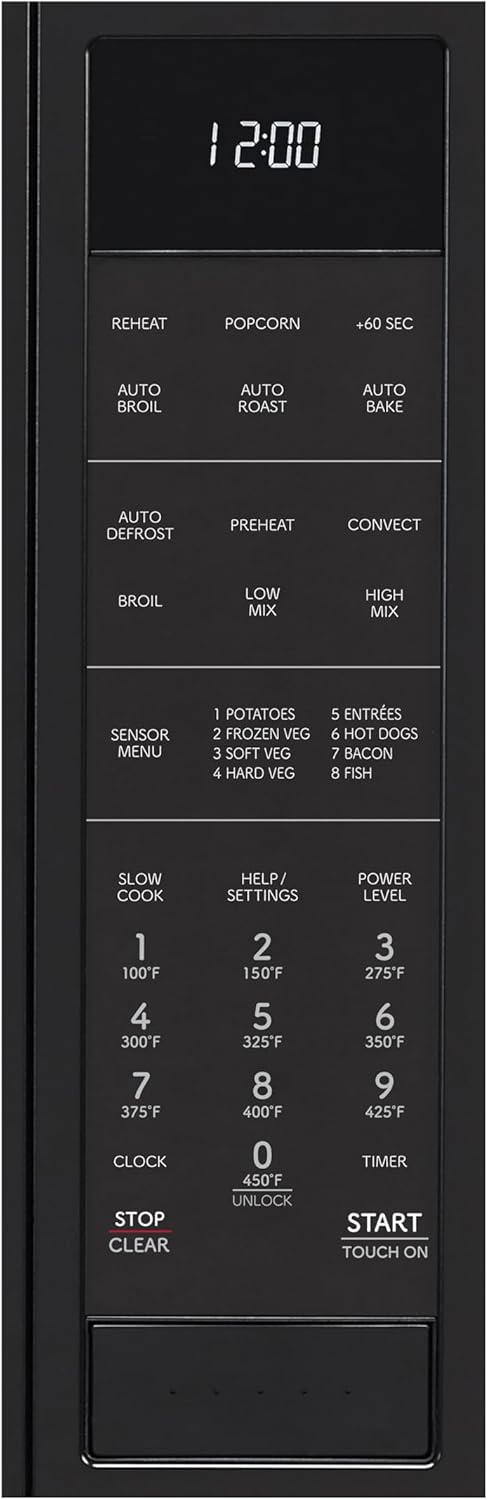
Detailed view of the microwave oven's control panel with various function buttons.
Setting the Clock
- Press the "CLOCK" button.
- Enter the current time using the number pad.
- Press "CLOCK" again to confirm.
Microwave Cooking
- Place food in a microwave-safe dish on the turntable.
- Close the oven door.
- Enter the desired cooking time using the number pad.
- Press "POWER LEVEL" and select a power level (1-10) if not using full power (default is 10).
- Press "START/TOUCH ON".
The oven offers 11 cooking power levels for precise control.

Visual representation of the 11 cooking power levels available on the microwave oven.
Convection Cooking
Convection cooking circulates heated air for roasting, baking, and browning.

Simulated image of a chicken roasting inside the convection microwave oven, illustrating hot air circulation.
- Preheat: Press "PREHEAT", enter desired temperature, then press "START/TOUCH ON".
- Convect: Press "CONVECT", enter desired temperature and cooking time, then press "START/TOUCH ON".
- Auto Broil, Auto Roast, Auto Bake: These functions provide pre-programmed settings for common convection tasks. Refer to the full manual for specific instructions on each.
Mix Cooking (Low Mix / High Mix)
The Mix cooking modes combine convection heat with microwave energy for versatile cooking.
- Low Mix: Use for dishes requiring gentle cooking with browning.
- High Mix: Use for faster cooking with browning, suitable for items like casseroles.
- Consult the full user manual for specific temperature and time settings for various foods.
Sensor Cooking
Sensor cooking automatically adjusts cooking time for optimal results by detecting humidity levels.

A bowl of pasta with peas, representing a dish suitable for sensor cooking.
- Press "SENSOR MENU".
- Select the desired food category (e.g., 1 for Potatoes, 2 for Frozen Veg).
- Press "START/TOUCH ON". The oven will automatically determine the cooking time.
Available Sensor Menu options include: Potatoes, Frozen Veg, Soft Veg, Hard Veg, Entrees, Hot Dogs, Bacon, Fish.
Auto Defrost
The Auto Defrost feature provides quick and accurate thawing for various food types.
- Press "AUTO DEFROST".
- Enter the weight of the food.
- Press "START/TOUCH ON".
Express Cook (+60 Seconds)
For quick heating, press the "+60 SEC" button to start cooking immediately at full power for 60 seconds. Each additional press adds 60 seconds.
Care and Maintenance
Cleaning the Oven Interior
- Always unplug the oven before cleaning.
- Wipe the interior with a damp cloth after each use. For stubborn stains, use a mild detergent.
- The stainless steel interior is designed for easy cleaning.
- Do not use abrasive cleaners or scouring pads.
Cleaning the Turntable and Roller Ring
- The ceramic turntable plate is dishwasher-safe for convenient cleaning.
- Wash the roller ring in warm, soapy water.
- Ensure both are dry before placing them back in the oven.

The ceramic turntable plate is dishwasher-safe for easy cleaning.
Cleaning the Exterior
- Wipe the exterior with a soft, damp cloth.
- Avoid spraying cleaners directly onto the control panel. Apply cleaner to a cloth first.
Troubleshooting Guide
Before contacting customer service, please refer to the following common issues and solutions:
| Problem | Possible Cause | Solution |
|---|---|---|
| Oven does not start |
|
|
| Food not heating |
|
|
| Turntable not rotating |
|
|
| Oven light not working |
|
|
Product Specifications
| Feature | Specification |
|---|---|
| Model Number | SMC1585KB |
| Capacity | 1.5 Cubic Feet |
| Wattage | 900 watts |
| Voltage | 120 Volts (AC) |
| Product Dimensions (D x W x H) | 19 x 24.6 x 14.9 inches |
| Item Weight | 62.9 pounds |
| Installation Type | Countertop |
| Material | Stainless Steel (interior) |
| Included Components | Roller Ring, Ceramic Turntable Plate |
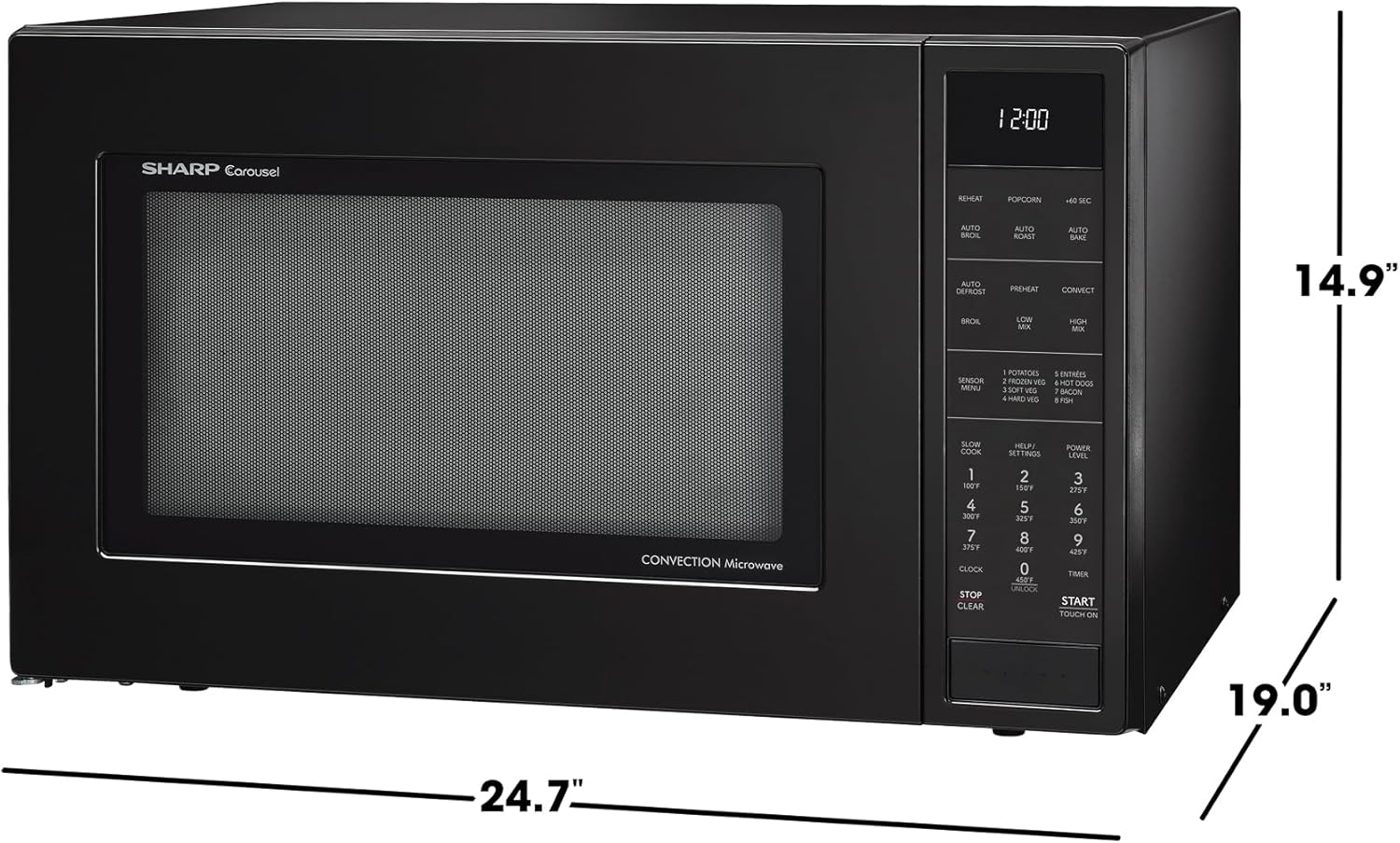
Diagram showing the dimensions (depth, width, height) of the microwave oven.
Optional Accessories
Optional built-in trim kits are available for a more integrated look. These are sold separately.

Image displaying optional 27-inch (RK94S27F) and 30-inch (RK94S30F) built-in trim kits.
Warranty and Support
For warranty information, please refer to the warranty card included with your product or visit the official Sharp website.
For technical support, service, or to order replacement parts, please contact Sharp Customer Service. Contact details can typically be found on the manufacturer's website or in the documentation provided with your appliance.
Online Resources: You may find additional support and FAQs on the Sharp Brand Store on Amazon or the official Sharp website.


