
DAMONDY DAM-20222287
Instruction Manual for DAMONDY BLU G34 Phone Case
Model: DAM-20222287
Product Overview
The DAMONDY Phone Case for BLU G34 is designed to provide comprehensive protection and enhanced functionality for your device. Crafted from high-quality, soft TPU rubber, this slim case offers shockproof protection against daily wear and tear, including scratches and dings. It features an integrated 360-degree rotating ring holder that doubles as a kickstand for hands-free viewing and also supports magnetic car mounts.
This case is specifically engineered to fit the BLU G34 model, ensuring precise cutouts for all buttons and ports, allowing full access without needing to remove the case.
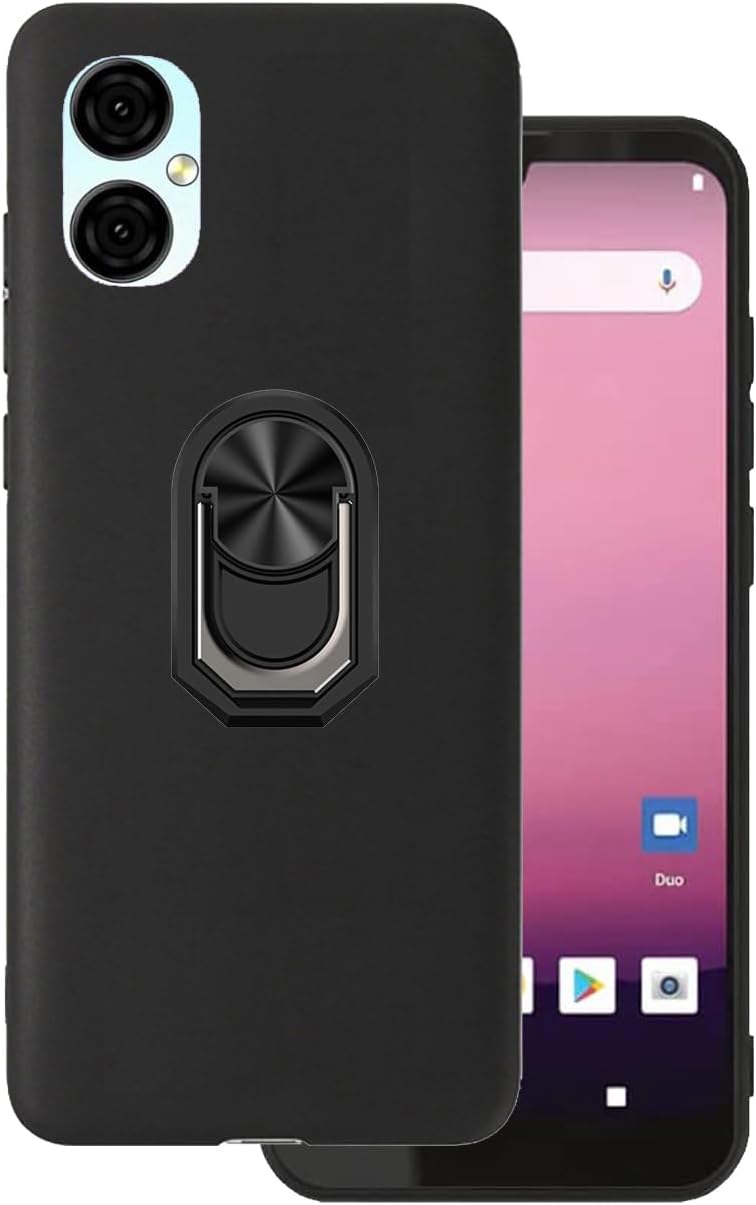
Image: The DAMONDY BLU G34 phone case in black, showcasing its sleek design and integrated ring holder. The image displays the case both on and off a BLU G34 smartphone, highlighting its precise fit and aesthetic.
Key Features
- Compatibility: Specifically designed for the BLU G34, ensuring a perfect fit and full access to all phone functions.
- Shockproof Protection: Made from soft TPU material that absorbs impact, protecting your phone from drops, scratches, and daily damage.
- Integrated Ring Holder: A 360-degree rotating ring that provides a secure grip, prevents accidental drops, and functions as a convenient kickstand for media viewing.
- Magnetic Car Mount Support: The ring holder is designed to be compatible with magnetic car mounts, allowing for easy and secure phone placement in your vehicle.
- Precise Cutouts: Ensures unhindered access to all ports, buttons, speakers, and the camera without removing the case.
- Slim and Lightweight Design: Adds minimal bulk to your phone while offering robust protection.

Image: Illustration demonstrating the shock-absorbing capabilities of the case. The phone case is shown on a BLU G34 phone, with cracks radiating from beneath, symbolizing protection against impacts and drops.

Image: A visual representation of the soft and flexible nature of the TPU material used in the case's construction, highlighting its ease of installation and removal, and its ability to fit the phone well.

Image: A hand holding the phone case, emphasizing its smooth texture and anti-fingerprint properties. This image illustrates how the case feels in hand and its resistance to smudges and sweat.
Setup and Installation
- Prepare Your Device: Ensure your BLU G34 phone is clean and free of dust or debris before installing the case.
- Align the Case: Gently align the phone with the case, starting with one side.
- Snap into Place: Press the phone firmly into the case, ensuring all corners and edges are securely seated. The flexible TPU material allows for easy installation.
- Check Fit: Verify that all buttons (power, volume) and ports (charging, headphone jack) are accessible and function correctly through the case's precise cutouts.
Operating Instructions
Using the Ring Holder / Kickstand:
- Secure Grip: Insert your finger through the ring to achieve a more secure and comfortable grip on your phone, reducing the risk of accidental drops.
- Kickstand Function: Pull out the ring and rotate it to your desired angle. Place your phone on a flat surface to use it as a kickstand for hands-free viewing of videos, video calls, or browsing. The 360-degree rotation allows for both portrait and landscape orientations.
Using with Magnetic Car Mount:
- The metal plate integrated into the ring holder is designed to attach directly to magnetic car mounts (sold separately).
- Simply place the back of your phone case onto a compatible magnetic car mount. The strong magnetic connection will hold your phone securely in place while driving.

Image: The phone case securely attached to a magnetic car mount inside a vehicle. This image demonstrates the magnetic car mount compatibility feature, showing the phone held firmly in place for navigation or hands-free use.
Maintenance and Care
- Cleaning: To clean your DAMONDY phone case, gently wipe it with a soft, damp cloth. For stubborn stains, a mild soap solution can be used. Avoid harsh chemicals or abrasive cleaners, as these may damage the material.
- Storage: When not in use, store the case in a cool, dry place away from direct sunlight to prevent material degradation.
- Inspection: Periodically inspect the case for any signs of wear or damage, especially around the ring holder and edges, to ensure continued protection.
Troubleshooting
| Problem | Possible Cause | Solution |
|---|---|---|
| Case does not fit BLU G34. | Incorrect phone model. | Ensure your phone is a BLU G34. This case is not compatible with other models. |
| Ring holder feels loose or wobbly. | Normal wear and tear or manufacturing variation. | While some slight play may occur over time, if the ring becomes excessively loose and impacts functionality, please contact customer support. |
| Phone does not stick to magnetic car mount. | Weak magnetic mount or improper alignment. | Ensure your magnetic car mount is strong enough and that the phone case is properly aligned with the magnet. The case's integrated metal plate is designed for standard magnetic mounts. |
Specifications
| Brand | DAMONDY |
| Model Number | DAM-20222287 |
| Compatible Phone Models | BLU G34 |
| Material | Thermoplastic Polyurethane (TPU) |
| Color | Black |
| Form Factor | Ring, Basic Case |
| Item Weight | 0.32 ounces (approx. 9 grams) |
| Package Dimensions | 7 x 3 x 0.5 inches |
| Special Features | Shockproof, Kickstand, Magnetic Car Mount Compatible, Anti-fingerprint, Slim Fit |
Warranty and Support
DAMONDY is committed to providing high-quality products and excellent customer service. If you encounter any issues with your phone case or have questions regarding its use, please do not hesitate to contact our support team. We strive to offer efficient and premium service to all our customers.
For support, please refer to the contact information provided with your purchase or visit the official DAMONDY website.
Ask a question about this manual
Ask about setup, troubleshooting, compatibility, parts, safety, or missing instructions. Manuals+ will review the question and use this page’s manual context to help answer it.