
HG Power APB25D
HG Power Upgraded 10 Inch Shutter Exhaust Fan User Manual
Model: APB25D | Brand: HG Power
1. Introduction
This manual provides comprehensive instructions for the installation, operation, and maintenance of your HG Power Upgraded 10 Inch Shutter Exhaust Fan. Designed for efficient air circulation, this fan is suitable for various environments such as sheds, garages, greenhouses, and attics. Please read this manual thoroughly before use to ensure safe and optimal performance of your fan.

Figure 1: HG Power 10 Inch Shutter Exhaust Fan with Speed Controller. This image shows the complete fan unit, including the integrated shutters and the external speed controller.
2. Important Safety Instructions
- Always disconnect power before servicing or cleaning the fan.
- Ensure the fan is securely mounted to a stable surface to prevent vibration or falling.
- Do not operate the fan with a damaged cord or plug.
- Keep hands, hair, and loose clothing away from moving parts during operation.
- This appliance is not intended for use by persons (including children) with reduced physical, sensory or mental capabilities, or lack of experience and knowledge, unless they have been given supervision or instruction concerning use of the appliance by a person responsible for their safety.
- Do not use this fan in areas where flammable liquids or gases are stored.
- The fan is designed for outdoor usage, but ensure electrical connections are protected from direct water exposure.
3. Package Contents
Verify that all items listed below are included in your package:
- HG Power 10 Inch Shutter Exhaust Fan Unit
- Speed Controller (integrated with power cord)
- Metal Mesh Screen (not pre-installed)
- User Manual (this document)
- Gloves (for installation)
- Power Cord (8 feet long, 100-120V US plug)
4. Setup and Installation
Follow these steps for proper installation of your exhaust fan:
- Choose a Location: Select a suitable wall or opening for installation. Ensure the area is structurally sound to support the fan's weight and vibrations. The fan is designed for wall-mounted applications in areas like garages, sheds, or greenhouses.
- Prepare the Opening: The fan requires an opening of approximately 10.6 inches x 10.6 inches (Louver Size). Ensure the opening is clean and free of obstructions.
- Mount the Fan: Position the fan unit in the prepared opening. Secure the fan to the wall using appropriate fasteners (not included) through the pre-drilled mounting holes. Ensure the fan is level and firmly attached.
- Install Mesh Screen (Optional): The metal mesh screen is not pre-installed. If desired, attach the mesh screen to the fan unit using the provided hardware. This screen helps prevent debris from entering your space and enhances safety.
- Connect Power: Plug the 8-foot power cord into a standard 100-120V US power outlet. The speed controller is integrated into the power cord.

Figure 2: Installation overview, highlighting the 8-foot power cable for flexible placement.
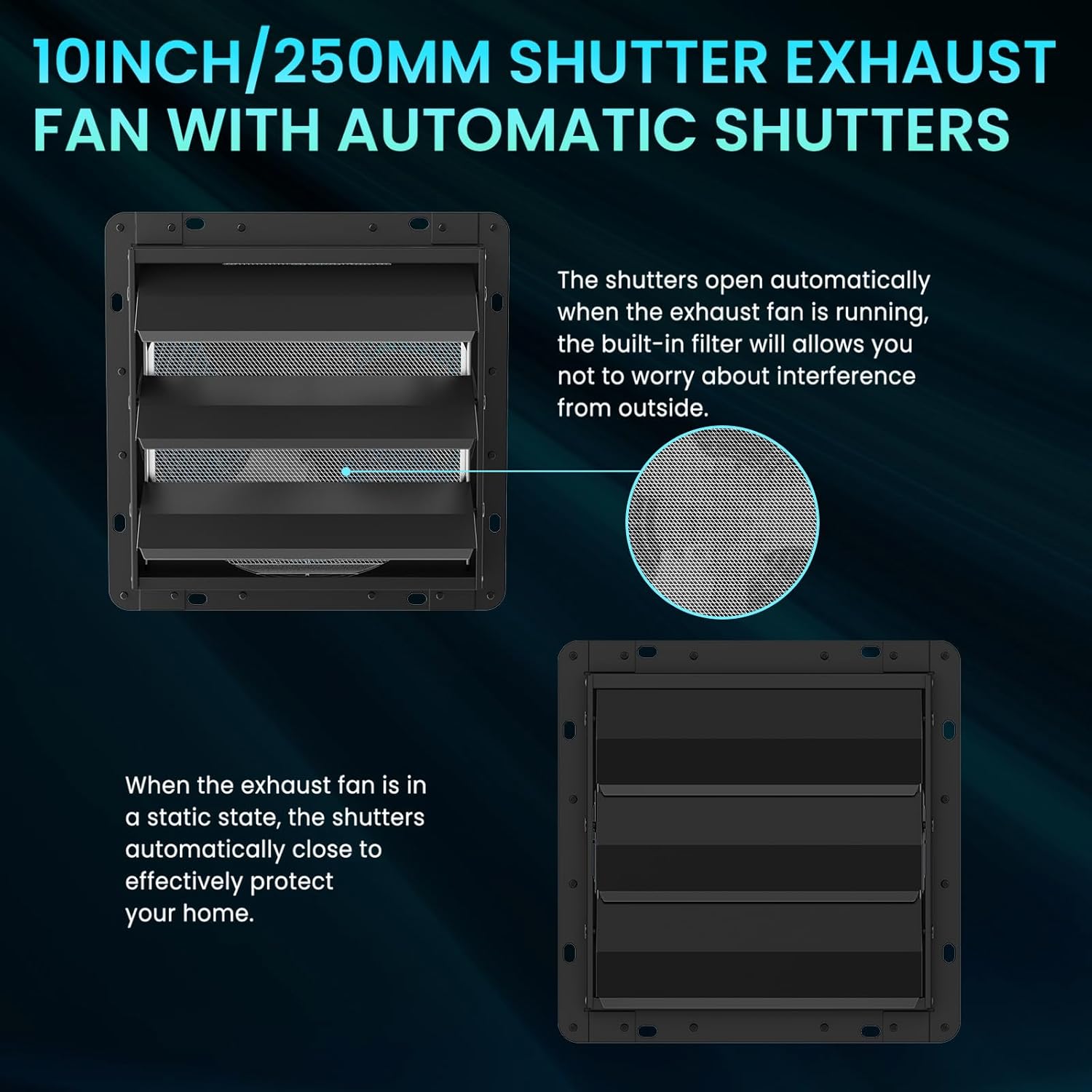
Figure 3: The fan features automatic shutters that open when the fan is running and close when it is off, providing protection against weather and foreign objects.
5. Operation
Operating your HG Power exhaust fan is straightforward:
- Power On/Off: Use the ON/OFF switch located on the power cord to turn the fan on or off.
- Adjusting Speed: The fan comes with an infinity speed controller. Rotate the knob on the controller to adjust the fan speed from 0% (off) to 100% (maximum speed) according to your ventilation needs.
- Automatic Shutters: The fan is equipped with automatic shutters. When the fan is operating, the shutters will open to allow airflow. When the fan is turned off, the shutters will automatically close to prevent rain, dust, and debris from entering.

Figure 4: The infinity speed controller allows precise adjustment of airflow from 0% to 100%.
Product Overview Video
Video 1: This video provides a visual overview of the HG Power Upgraded Shutter Exhaust Fan, demonstrating its features, components, and operational aspects.
6. Maintenance
Regular maintenance ensures the longevity and efficiency of your fan:
- Cleaning: Periodically clean the fan blades, protective grilles, and mesh screen to prevent dust and debris buildup, which can reduce airflow and efficiency. Use a soft cloth and mild detergent if necessary. Ensure the fan is unplugged before cleaning.
- Shutter Inspection: Check the automatic shutters regularly to ensure they open and close smoothly. Clear any obstructions that might prevent proper operation.
- Motor Care: The upgraded motor is designed for a longer lifespan and requires minimal maintenance. Avoid exposing the motor to excessive moisture or extreme temperatures.

Figure 5: Exploded view showing key components like the fully sealed motor, large fan blades, and mesh screen, which should be kept clean for optimal performance.
7. Troubleshooting
If you encounter issues with your fan, refer to the following common problems and solutions:
| Problem | Possible Cause | Solution |
|---|---|---|
| Fan does not turn on. | No power, faulty switch, or motor issue. | Check power outlet and connections. Ensure the ON/OFF switch is in the 'ON' position. If issues persist, contact support. |
| Reduced airflow. | Blocked grilles/mesh, dirty blades, or low speed setting. | Clean the grilles, mesh screen, and fan blades. Increase the speed using the controller. |
| Unusual noise or vibration. | Loose mounting, foreign object in fan, or motor issue. | Ensure the fan is securely mounted. Disconnect power and check for any foreign objects. If the noise persists, contact support. |
| Shutters not opening/closing properly. | Obstruction, damaged mechanism, or strong external drafts. | Check for and remove any obstructions around the shutters. Ensure the fan is powered on for shutters to open. In very windy conditions, strong gusts might cause shutters to flutter; this is normal. |
8. Specifications
| Feature | Detail |
|---|---|
| Model Name | Exhaust Fan |
| Model Number | APB25D |
| Size | 10 inch New Version with Speed Controller |
| Product Dimensions | 6.69"D x 12.36"W x 12.36"H |
| Item Weight | 8.78 pounds |
| Power Source | AC |
| Voltage | 110 Volts |
| Wattage | 42 Watts |
| Air Flow Capacity | 647 CFM (1100 m³/h) |
| Speed | 1400 RPM (Max) |
| Noise Level | 52 dB |
| Blade Material | Aluminium |
| Indoor/Outdoor Usage | Outdoor |
| Special Feature | Water Resistant, Speed Control, Mesh Screen |

Figure 6: Technical specifications and dimensions for the HG Power 10 Inch Shutter Exhaust Fan.
9. Warranty and Support
For warranty information or technical support, please refer to the contact details provided on the product packaging or visit the official HG Power website. Keep your purchase receipt as proof of purchase for any warranty claims.
HG Power Customer Service:
- Website: Visit HG Power Store on Amazon
- For specific support, please consult the contact information provided with your product packaging.
Ask a question about this manual
Ask about setup, troubleshooting, compatibility, parts, safety, or missing instructions. Manuals+ will review the question and use this page’s manual context to help answer it.