
Apdoe AP-16
Apdoe AP-16 16 Egg Incubator User Manual
Model: AP-16 | Brand: Apdoe
Introduction
This manual provides detailed instructions for the safe and effective operation of your Apdoe AP-16 16 Egg Incubator. This device is designed to facilitate the hatching of various poultry eggs, including chicken, duck, quail, and goose eggs, by maintaining optimal temperature and humidity conditions with automatic egg turning and candling features.
Product Components
Verify that all the following components are included in your package:
- Egg Incubator Unit
- Foam Box (for temperature stability)
- Hatching Calendar
- User Manual (this document)
- Water Bottle and Hose (for automatic water refill)
- Spray Bottle (for humidification)

Image: Apdoe AP-16 Incubator with its included accessories, demonstrating the complete package for setup.
Setup Instructions
Follow these steps to prepare your incubator for operation:
- Place the Eggs: Carefully arrange the eggs on the adjustable egg tray. The tray is designed to accommodate various egg sizes. Ensure eggs are placed securely.

Image: Step-by-step guide showing eggs being placed into the incubator's egg tray.
- Close the Lid: Securely place the transparent lid onto the incubator base, ensuring a proper fit to maintain internal conditions.

Image: Illustration of the incubator lid being closed over the egg tray.
- Connect the Water Bottle: Attach the provided water bottle and hose to the external water refill port. This system automatically maintains optimal water levels without opening the incubator.

Image: Diagram showing the external water bottle connected to the incubator for humidity control.
- Set the Temperature: Plug in the incubator. Use the control panel to set the desired incubation temperature. Refer to the hatching calendar for recommended temperatures for specific egg types. The incubator features a digital display for temperature, humidity, and incubation days.

Image: Close-up of the incubator's control panel displaying temperature, humidity, and incubation days.
Operating Instructions
Temperature and Humidity Control
The incubator provides precise digital temperature control and monitoring. An alarm function will notify you if the temperature deviates from the set range. The external automatic water supply bottle ensures consistent humidity. In cold or humid conditions, only add water to the inner ring of the water tray. If humidity remains too high, temporarily remove the water bottle to reduce it.

Image: The incubator's user-friendly interface displaying current temperature, humidity, and incubation day count.
Automatic Egg Turning
The incubator automatically turns eggs every 2 hours to ensure uniform heat distribution and optimal embryo development. This feature promotes a higher hatch rate.
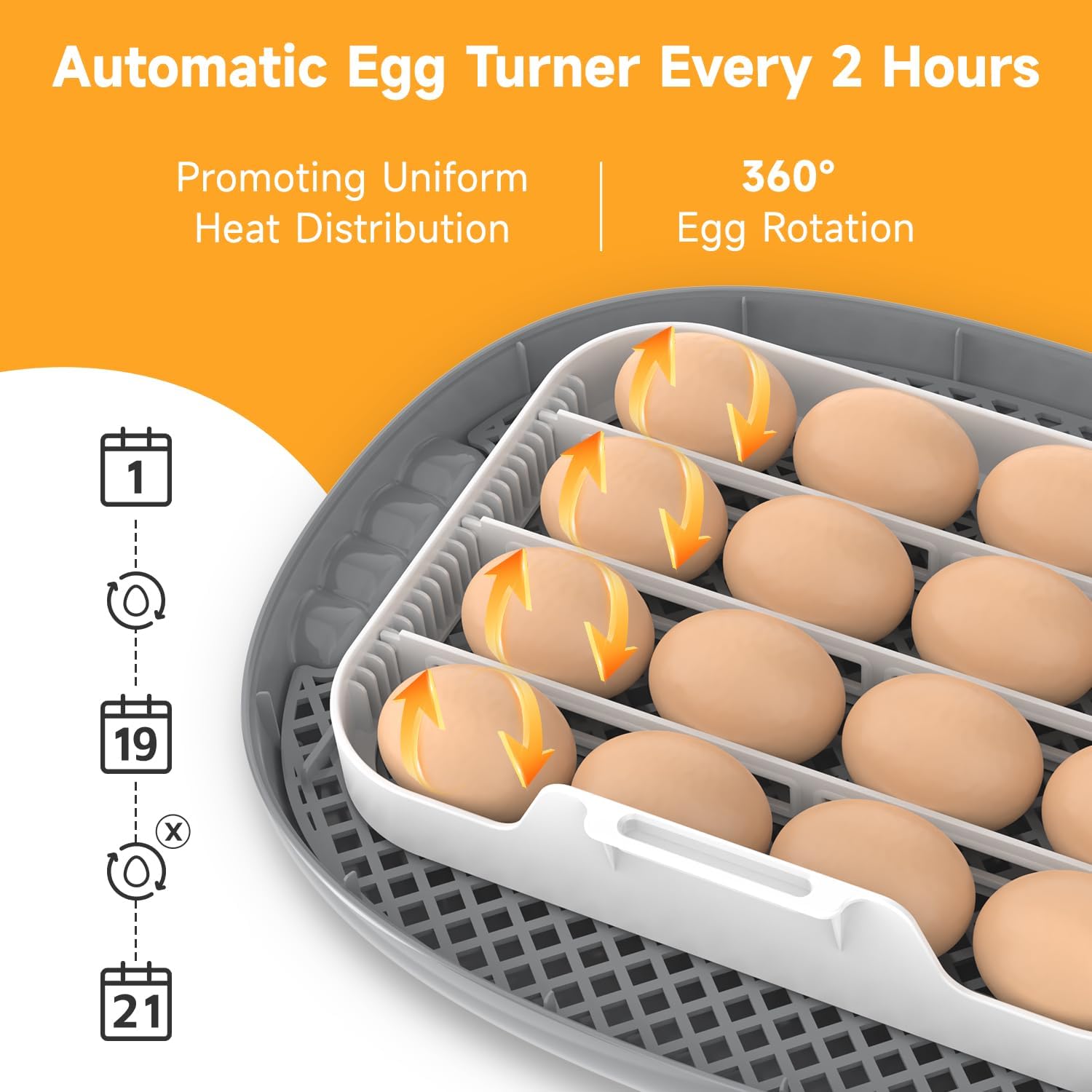
Image: Visual representation of the automatic egg turning process, indicating 360-degree rotation every 2 hours.
Built-in Egg Candler
Use the built-in egg candler to monitor embryo development without needing additional equipment. Regularly check eggs for viability.
- Days 5-6: Assess fertilization. Remove unfertilized or non-viable eggs.
- Days 11-12: Evaluate embryo development progress.
- Days 16-17: Observe embryo size and overall development.
Remove any eggs identified as unfertilized, containing dead embryos, having tiny cracks, or showing moving bubbles, as these will not hatch and can contaminate the incubator.
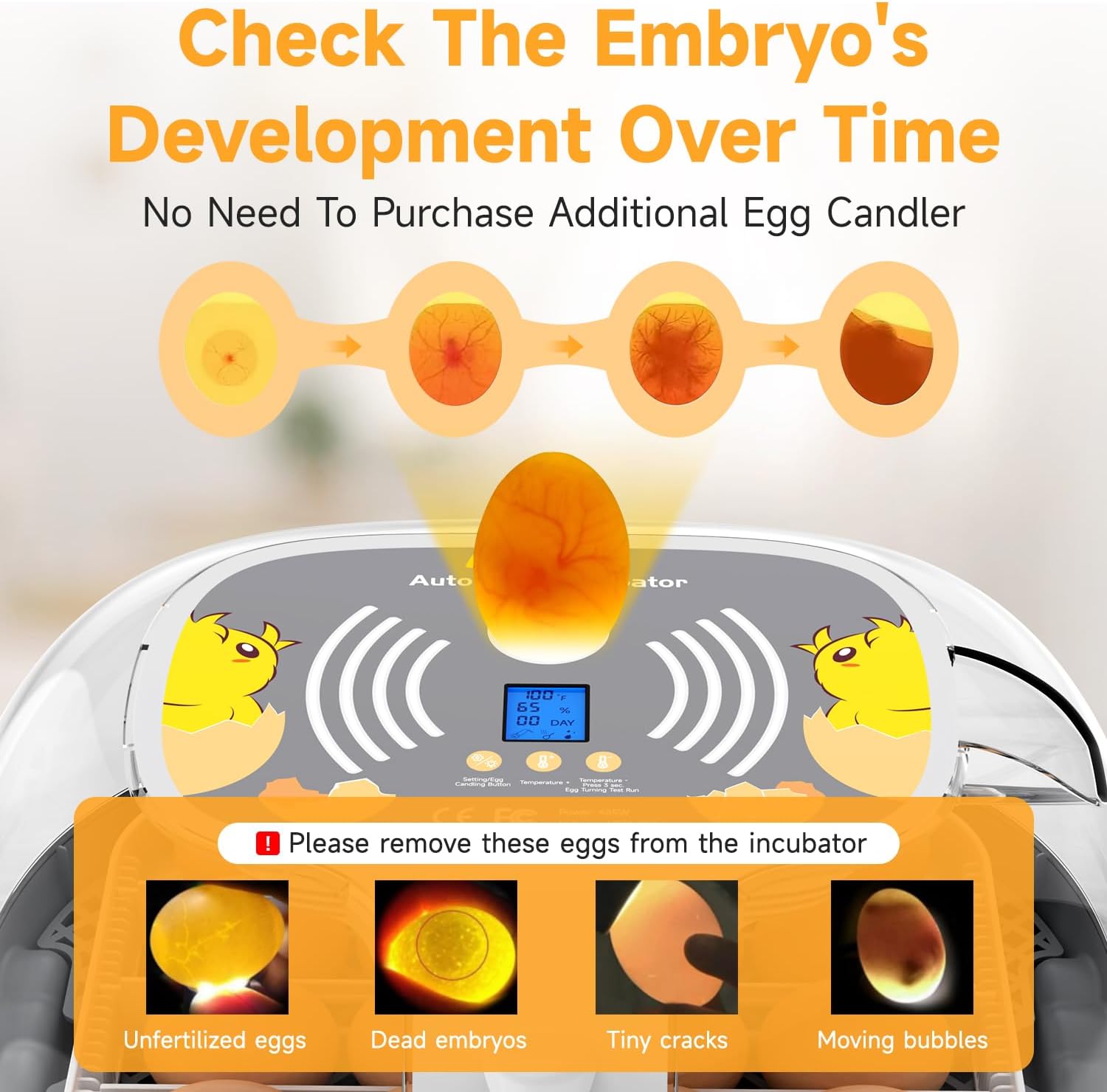
Image: A visual guide for egg candling, demonstrating how to identify viable and non-viable eggs at different stages.
Hatch Day Preparation
Approximately 3 days before the expected hatch date (refer to your hatching calendar), remove the egg turning tray to stop the eggs from rotating. This allows the chicks to position themselves for hatching.

Image: Instruction showing the removal of the egg turning tray from the incubator.
On hatch day, you may use the spray bottle to lightly humidify the eggshells, which can assist chicks in breaking through the shell.

Image: A hand using a spray bottle to humidify eggs within the incubator.
Air Circulation System
The incubator features an advanced airflow system designed to eliminate hot or cold spots, ensuring a consistent temperature and humidity environment for optimal embryo development.
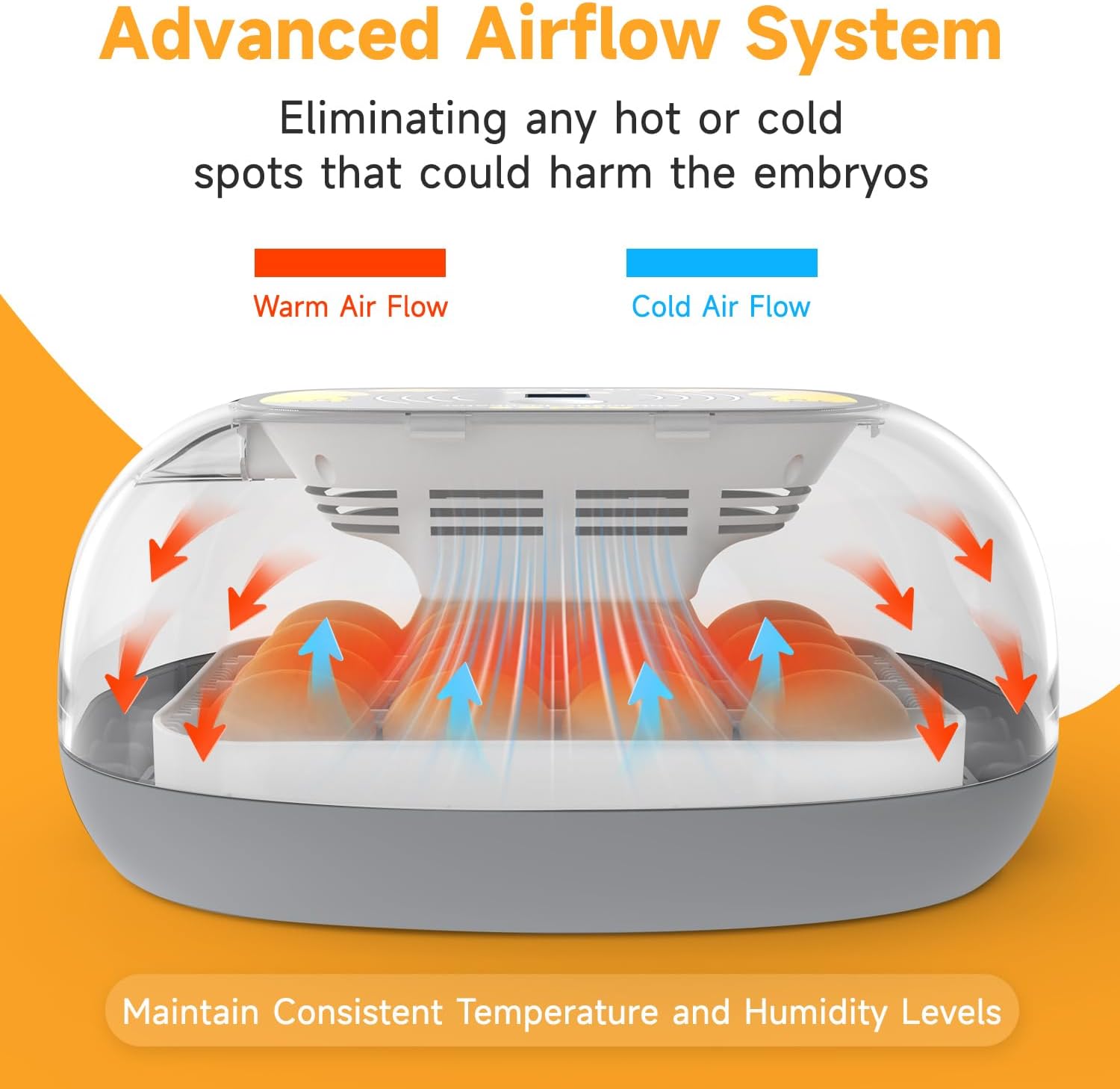
Image: A cutaway diagram of the incubator showing the internal air circulation, with arrows indicating warm and cold airflow patterns.
Egg Capacity and Types
The adjustable egg tray can hold up to 16 standard chicken eggs. It is suitable for various egg types, with typical incubation periods as follows:
- Chicken: 21 Days
- Duck: 28 Days
- Quail: 18 Days
- Goose: 30 Days

Image: The incubator tray filled with different sizes of eggs, alongside a guide for incubation periods for various poultry.
Maintenance and Cleaning
The incubator features a detachable design for easy cleaning:
- Remove the egg trays and wash them in a sink with mild soap and water.
- Wipe the machine cover and circuit components with a damp cloth. Avoid getting water directly on electrical parts.
- Important: Do not place the egg tray in a dishwasher, as this may cause deformation.
Troubleshooting
If you encounter issues with your incubator, consider the following:
- Inconsistent Temperature Readings: It is recommended to use a secondary thermometer to verify the incubator's temperature readings for accuracy. Adjust settings as needed based on verification.
- Humidity Control Challenges: Humidity levels can be sensitive. Ensure the external water bottle is correctly connected and filled. In very cold or humid environments, adjust water levels carefully, potentially removing the bottle temporarily if humidity is too high.
- Automatic Egg Turner Not Functioning: Check that the egg turning mechanism is properly assembled and connected. Ensure no obstructions are preventing movement.
- Unusual Noises: If the incubator makes a buzzing sound, ensure all components are securely in place and there are no loose parts. If the sound persists or is accompanied by other malfunctions, discontinue use and contact support.
Specifications
| Feature | Detail |
|---|---|
| Item Weight | 4.38 pounds |
| Manufacturer | Apdoe |
| Model Number | AP-16 |
| Item Package Dimensions (L x W x H) | 14.65 x 13.23 x 7.56 inches |
| Item Dimensions (L x W x H) | 13 x 10.6 x 5.7 inches |
| Target Audience | Birds, Chick, Chicken, Duck, Quail |
| Special Feature | LED Display: Humidity, Temperature and Hatch Day |
| Style | 16 Eggs |
| Specific Uses | Incubators for hatching eggs |
Warranty and Support
The Apdoe AP-16 Egg Incubator comes with a 5-year limited warranty. Additionally, a 30-day money-back guarantee is offered, along with lifetime technical support to ensure a satisfactory incubation experience.
For technical assistance or warranty claims, please refer to the contact information provided with your purchase documentation or visit the official Apdoe support website.
Related Documents - AP-16
 |
Auveach Household Intelligent Incubator Operating Manual (16-Egg Capacity) This operating manual provides detailed instructions for the Auveach 16-egg household intelligent incubator. It covers egg preparation, incubator setup, operation, temperature and humidity control, egg turning, troubleshooting, and specific incubation parameters for chicken, duck, goose, and pigeon eggs. |
 |
M16 Egg Incubator User Manual: Setup, Operation, and Hatching Guide Comprehensive user manual for the M16 Egg Incubator, designed to hatch up to 16 eggs. This guide provides detailed instructions on setup, controller functions, assembly, temperature setting, egg candling, cleaning, and essential incubation tips for successful hatching. |
 |
Tehno MS Automatic Incubator Installation and User Manual Comprehensive guide for installing and operating Tehno MS automatic incubators, covering models MS-64, MS-6, MS-16, MS-36, MS-56, MS-98, MS-120, MS-176, ECO PROFI-36, and ECO PROFI-70. Includes setup, operation, parameter settings, and additional information. |
 |
Manuel d'instructions Borotto LUMIA 8/16 : Incubateur d'œufs Guide complet des instructions pour l'incubateur d'œufs Borotto LUMIA 8 et LUMIA 16. Apprenez l'utilisation, l'entretien et les meilleures pratiques pour une éclosion réussie. |
 |
Aruba Instant AP 基本操作ガイド Aruba Instant APデバイスの基本操作、設定、メンテナンス方法を解説する包括的なガイド。初期設定からSSID設定、ファームウェアアップデートまでを網羅。 |
 |
HPE Aruba Networking Instant Operating System 8.12.0.3 Release Notes This document provides release notes for HPE Aruba Networking Instant Operating System version 8.12.0.3, detailing new features, supported platforms, resolved issues, and upgrade procedures. |