
Zingbabu AQ0009
Zingbabu USB Aquarium Light User Manual
Model: AQ0009
Brand: Zingbabu
Introduction
The Zingbabu USB Aquarium Light is designed to provide optimal lighting for your aquatic environment. Featuring full spectrum LEDs, adjustable brightness, and a built-in timer, this light supports the healthy growth of aquatic plants and enhances the visual appeal of your fish tank. Its adjustable extendable bracket ensures compatibility with various aquarium sizes.

Image: The Zingbabu USB Aquarium Light, showing the main light bar with integrated LED beads and the inline USB controller with various buttons.
Product Features
- Full Spectrum LED Lighting: Equipped with 10W 5730 LED beads, including 30 white (6500K), 10 blue (450-455nm), 4 red (620-625nm), 2 green (520-525nm), and 2 pink (620-625nm) LEDs. This combination provides a full spectrum close to natural light, promoting plant growth and vibrant fish coloration.
- Three Color Light Modes:
- Full Spectrum Mode: All LEDs are active, providing comprehensive light for aquatic plants.
- Growth Mode: White and blue LEDs are active, suitable for general plant growth.
- Moonlight Mode: Only blue LEDs are active, creating a serene nighttime ambiance and enhancing fish appearance.

Image: Visual representation of the three available lighting modes: Night Mode (blue light), Growth Mode (white and blue light), and Full Spectrum Mode (all colors active).
- Six-Level Brightness Adjustment: Customize light intensity with 6 levels: 10%, 20%, 40%, 60%, 80%, and 100%. This allows fine-tuning the illumination to suit specific aquatic needs.
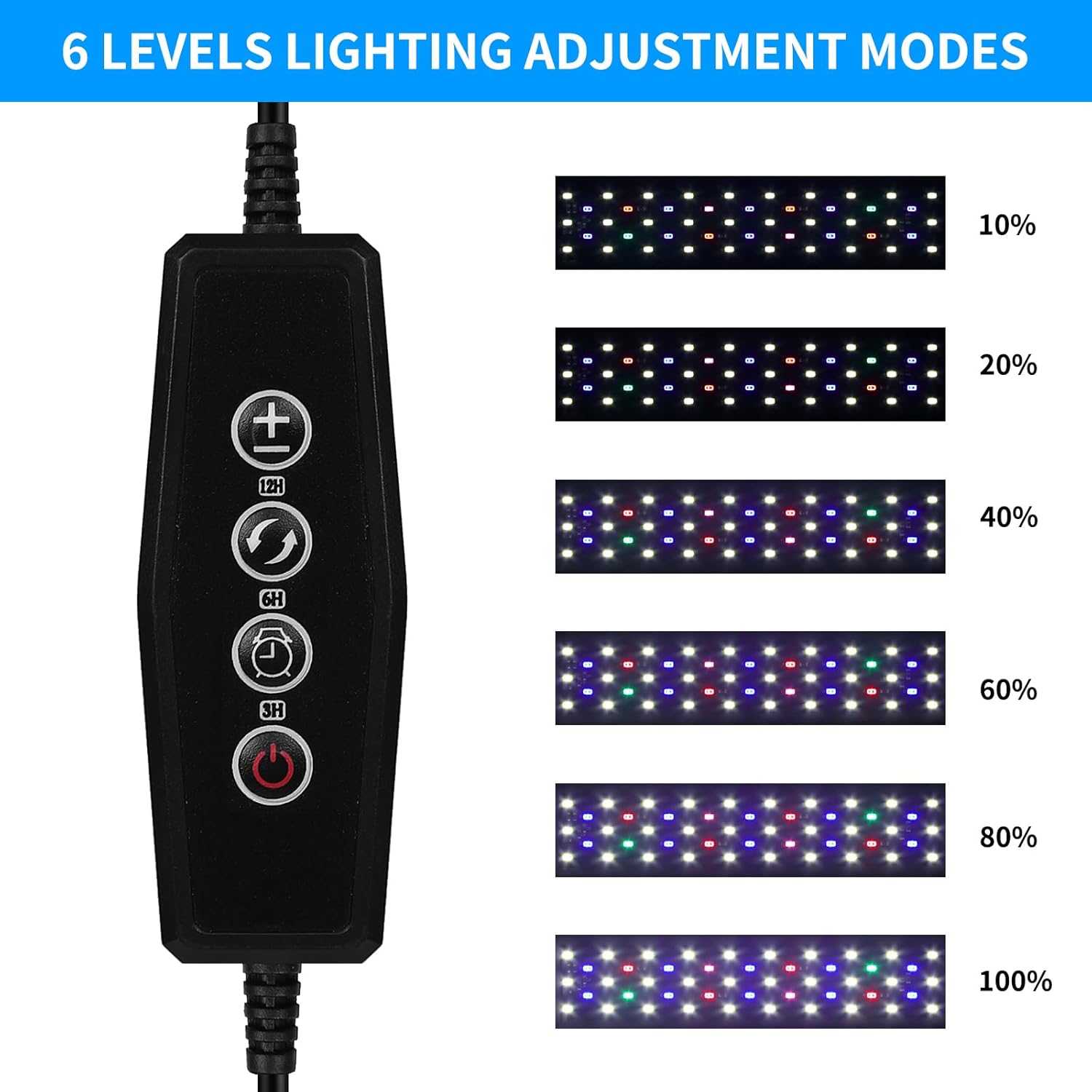
Image: A visual guide illustrating the six distinct brightness levels, from 10% to 100% intensity.
- Integrated Timer Function: Features 3-period cycle modes (3H/6H/12H) for automated lighting schedules.
- Durable Construction & Adjustable Stand: Constructed from high-density ABS for efficient heat dissipation and durability. The adjustable bracket accommodates aquariums ranging from 12 to 20 inches (30-60 cm) in length.
Package Contents
- 1 x Zingbabu USB Aquarium Light (Model: AQ0009)
Note: A USB power adapter is not included and must be supplied by the user.
Setup Instructions
- Unpack: Carefully remove the aquarium light and all components from the packaging.
- Adjust Bracket: Extend the adjustable brackets on both ends of the light bar to fit the length of your aquarium. The light is designed for aquariums between 12 and 20 inches (30-60 cm).

Image: Detail of the extendable bracket, illustrating its adjustability for different tank sizes.
- Position Light: Place the light securely on the rim of your aquarium, ensuring it is stable and centered over the tank.
- Connect Power: Insert the USB plug into a compatible USB power source. This can be a USB charger, a USB power bank, a USB power socket, or a notebook computer's USB port.
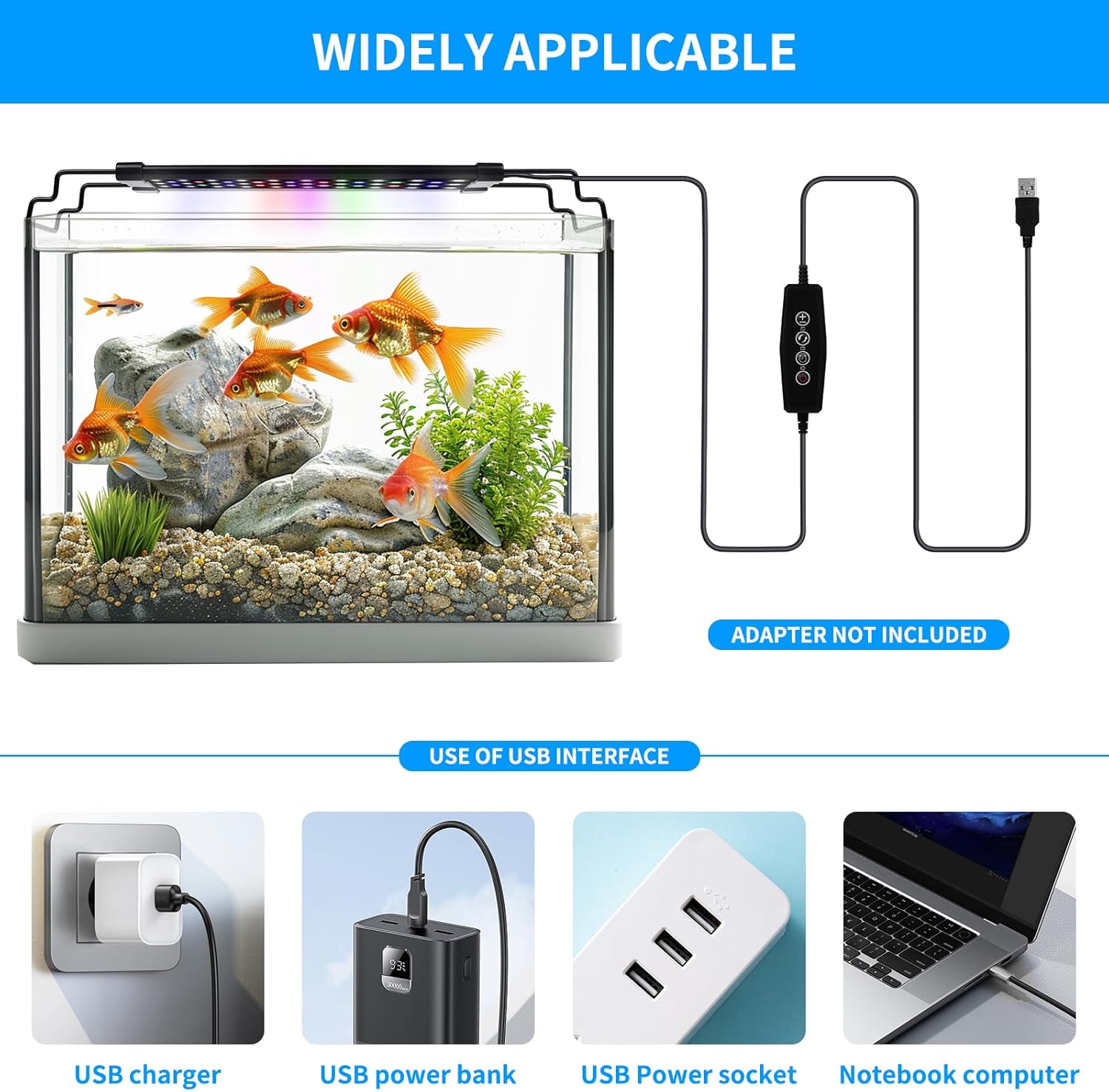
Image: Examples of compatible USB power sources for the aquarium light, including wall chargers, power banks, and computer USB ports.
- Initial Power On: Once connected, the light should power on. If not, press the power button on the inline controller.
Operating Instructions
The Zingbabu USB Aquarium Light is controlled via an inline remote with several buttons:

Image: Detailed view of the inline control panel, highlighting buttons for brightness, color mode, and timer functions.
- Power Button (Red Circle): Press to turn the light ON or OFF.
- Brightness Adjustment Button (+/-):
Press the + button to increase brightness through 6 levels (10%, 20%, 40%, 60%, 80%, 100%).
Press the - button to decrease brightness.
- Color Light Modes Switch Button (Sun/Moon Icon):
Press this button to cycle through the three available light modes:
- Full Spectrum Mode: All LED colors (white, blue, red, green, pink) are active.
- Growth Mode: White and blue LEDs are active.
- Moonlight Mode: Only blue LEDs are active.
- Timer Setting Button (Clock Icon):
This button allows you to set an automatic lighting cycle. Press the button repeatedly to select the desired duration:
- First press: 3H (3 hours on, 21 hours off cycle)
- Second press: 6H (6 hours on, 18 hours off cycle)
- Third press: 12H (12 hours on, 12 hours off cycle)
To cancel the timer, unplug the power. The light will revert to its default setting (always on when powered).
Maintenance
- Regular Cleaning: Periodically wipe the light bar and LED surface with a soft, damp cloth to remove water spots, algae, or dust. Ensure the light is unplugged before cleaning.
- Avoid Submersion: This light is designed to sit on top of the aquarium and is not waterproof for submersion. Do not immerse the light unit or its controller in water.
- Cable Inspection: Regularly check the power cable and USB connector for any signs of damage. If damage is found, discontinue use immediately.
- Heat Dissipation: Ensure the light's heat dissipation fins are not obstructed to maintain optimal performance and longevity.

Image: Detail of the light's heat dissipation fins, designed to ensure efficient cooling.
Troubleshooting
| Problem | Possible Cause | Solution |
|---|---|---|
| Light does not turn on. | No power, loose connection, faulty USB adapter. |
|
| Light is too dim or too bright. | Brightness setting is incorrect. | Use the + or - buttons on the controller to adjust brightness to the desired level. |
| Timer function is not working as expected. | Incorrect timer setting, power interruption. |
|
| Light color is not desired. | Incorrect color mode selected. | Press the Color Light Modes Switch button to cycle through Full Spectrum, Growth, and Moonlight modes until the desired color is achieved. |
Specifications
| Model Name: | AQ0009 |
| Brand: | Zingbabu |
| Power Source: | Corded Electric (USB) |
| Wattage: | 10 Watts |
| Voltage: | 5 Volts |
| Light Source Type: | LED (5730 beads) |
| Number of Light Sources: | 56 (30 White, 10 Blue, 4 Red, 2 Green, 2 Pink) |
| Color Temperature: | 6500 Kelvin (White LEDs) |
| Material: | Acrylonitrile Butadiene Styrene (ABS) |
| Product Dimensions: | 10.24 x 3.35 x 0.79 inches (26 x 8.5 x 2 cm) |
| Item Weight: | 15.2 ounces (431 Grams) |
| Adjustable Range: | Fits 12-20 inch (30-60 cm) aquariums |
| Special Features: | Adjustable Height, Color Changing, Dimmable, Full Spectrum, Plug In, Timer |
Warranty and Support
For warranty information and technical support, please refer to the seller's policies on the platform where the product was purchased or contact Zingbabu customer service directly through their official channels. Keep your purchase receipt as proof of purchase for any warranty claims.
For further assistance, you may visit the Zingbabu Store on Amazon.
Ask a question about this manual
Ask about setup, troubleshooting, compatibility, parts, safety, or missing instructions. Manuals+ will review the question and use this page’s manual context to help answer it.