
SUNBA 405-ECO V2-P
SUNBA 405-ECO V2-P 5MP IP PoE+ PTZ Camera Outdoor User Manual
Model: 405-ECO V2-P
1. Introduction
This manual provides detailed instructions for the installation, operation, and maintenance of your SUNBA 405-ECO V2-P 5MP IP PoE+ PTZ Camera. Please read this manual thoroughly before using the product to ensure correct setup and optimal performance. This camera is designed for outdoor surveillance, featuring 5MP resolution, 20x optical zoom, two-way audio, 2.4G WiFi connectivity, and advanced motion detection capabilities.
2. Product Overview
2.1 Package Contents
Verify that all items are present in the package:
- SUNBA 405-ECO V2-P PTZ Camera
- Wall Bracket
- 12V2A Power Adapter
- User Manual (this document)
2.2 Camera Components
Familiarize yourself with the main components of the camera:

Image: SUNBA 405-ECO V2-P Camera Components. This image displays the camera from a side-front angle, highlighting its various parts such as the wall bracket for mounting, the integrated WiFi antenna for wireless connectivity, a built-in microphone for audio input, long-range and low-range infrared LEDs for night vision, a light sensor for automatic mode switching, an RJ45 network port for wired connection, and a DC12V female port for power input.
2.3 Key Features
- 5MP High Resolution: Captures clear and detailed images.
- 20x Optical Zoom: Allows for detailed viewing of distant objects without loss of quality.
- Pan-Tilt-Zoom (PTZ) Functionality: 360° endless horizontal rotation and 90° vertical tilt for comprehensive coverage.
- Dual Power Options: Supports Power over Ethernet Plus (PoE+ 802.3at) or 12V DC power adapter.
- 2.4G WiFi Connectivity: Flexible network connection options.
- Two-Way Audio: Built-in microphone and speaker for interactive communication.
- Advanced Night Vision: Up to 328ft (100m) range with infrared LEDs.
- Motion & Human-Shape Detection: Intelligent alerts and recording.
- IP66 Weatherproof Rating: Suitable for outdoor use in various weather conditions.
- Expandable Storage: Built-in TF card slot supports up to 256GB for local recording.
3. Setup and Installation
3.1 Mounting the Camera
The camera is designed for wall mounting. Use the provided wall bracket and hardware to securely attach the camera to a stable surface. Ensure the mounting location provides an unobstructed view and is within range of your network and power source.

Image: SUNBA 405-ECO V2-P PTZ Camera. This image shows the camera mounted on its wall bracket, illustrating a typical installation scenario for outdoor surveillance.
3.2 Power Connection
The camera offers two power options:
- Power over Ethernet Plus (PoE+): Connect an Ethernet cable from a PoE+ 802.3at compliant switch or injector (not included) to the camera's RJ45 network port. This provides both power and data through a single cable.
- DC Power Adapter: Use the included 12V2A DC power adapter. Connect the adapter to the camera's DC12V female port and plug it into a standard power outlet.

Image: PoE+ Connection Diagram. This diagram illustrates how the camera can be powered and connected to the network using a single Ethernet cable via a PoE+ switch or injector, simplifying installation.
3.3 Network Connection
The camera supports both wired Ethernet and 2.4G WiFi connections.
- Wired Connection: Connect an Ethernet cable from your router or network switch to the camera's RJ45 network port. The camera supports DHCP for automatic IP address assignment.
- WiFi Connection (2.4G only):
- Download and install the XMEye app on your smartphone or the Sunba Lite VMS software on your PC/Mac.
- Connect the camera temporarily via Ethernet to your router.
- Open the XMEye app or VMS software, find the camera, and navigate to Device Configuration > Network Setup > WiFi.
- Scan for your 2.4G WiFi SSID, select it, and enter the network password. Ensure DHCP is enabled.
- Once configured, you can disconnect the Ethernet cable and mount the camera in its desired WiFi-connected location. Ensure a strong WiFi signal at the installation point.

Image: 2.4G WiFi Connection Diagram. This diagram shows the camera connecting wirelessly to a router via 2.4G WiFi, allowing remote access from a computer or smartphone.
4. Operating Instructions
4.1 Accessing the Camera
You can access and control your SUNBA camera using the following methods:
- XMEye App (Smartphone): Download from your device's app store. Allows live view, playback, PTZ control, preset management, and motion detection snapshot viewing.
- VMS Client Software (PC/Mac): Complementary software provided by Sunba. Compatible with third-party software like Blue Iris, QNAP, and Security Spy.
4.2 Pan-Tilt-Zoom (PTZ) Control
The camera offers extensive PTZ capabilities:
- Pan: 360° endless horizontal rotation.
- Tilt: 90° vertical tilt (from 0° to 90° downward, with 5° upward capability).
- Zoom: 20x optical zoom for clear magnification. The camera features auto-focus.

Image: 20x Optical Zoom Demonstration. This image shows a comparison between 1x and 20x zoom, illustrating the camera's ability to magnify distant objects with clarity.
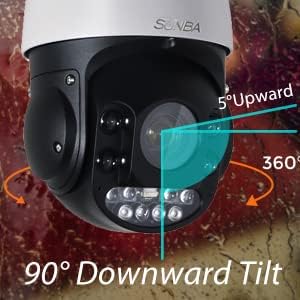
Image: Pan and Tilt Range. This diagram visually represents the camera's 360° horizontal pan and 90° downward tilt capabilities, including a 5° upward tilt.
4.3 Presets and Patrol
You can configure specific camera positions as presets and set up automatic patrol routes:
- Setting Presets: Use the XMEye app or VMS software to move the camera to a desired position, then save it as a preset. You can set and delete multiple presets.
- Calling Presets: Quickly move the camera to a saved preset position.
- Automatic Patrol: Configure the camera to automatically cycle through a series of preset positions, providing 24/7 surveillance coverage.

Image: 24/7 Automatic Patrol. This diagram shows the camera moving between three preset points (Preset1, Preset2, Preset3) to cover a wide area, demonstrating its automatic patrol function.
4.4 Motion and Human-Shape Detection
The camera features intelligent detection capabilities:
- Motion Detection: Configurable zones and sensitivity to detect movement.
- Human-Shape Detection: Advanced algorithms to specifically identify human figures, reducing false alarms.
- Alerts: Receive push notifications to your smartphone and view snapshots stored in the cloud server upon detection.
4.5 Two-Way Audio
Utilize the built-in microphone and speaker for two-way communication through the XMEye app or VMS software.
4.6 Recording and Storage
The camera supports local storage and efficient video compression:
- TF Card Slot: Insert a TF (microSD) card (up to 256GB, not included) for continuous or event-triggered recording.
- H.265 HEVC Compression: Reduces bandwidth and storage requirements by up to 50% compared to H.264, compatible with Blue Iris, VMS Client, or Sunba H.265 NVRs.
5. Maintenance
- Cleaning: Regularly clean the camera lens and housing with a soft, damp cloth. Avoid abrasive cleaners.
- Firmware Updates: Check the official SUNBA website or app for available firmware updates to ensure optimal performance and security.
- Cable Inspection: Periodically inspect all cables for wear or damage, especially in outdoor installations.
6. Troubleshooting
| Problem | Possible Cause | Solution |
|---|---|---|
| Camera not powering on. | No power supply; faulty adapter/PoE injector; damaged cable. | Check power connections. Ensure PoE+ injector/switch is active and compliant. Test with a different power source if possible. |
| Cannot connect to WiFi. | Incorrect WiFi password; 5GHz network selected (camera supports 2.4G only); weak WiFi signal; DHCP issue. | Ensure correct 2.4G WiFi network and password. Temporarily connect via Ethernet and configure WiFi through VMS software or XMEye app. Verify strong WiFi signal at camera location. Ensure DHCP is enabled on your router. |
| PTZ controls are unresponsive or have high latency. | Network congestion; weak network connection; software/firmware issue. | Check network stability and bandwidth. Ensure a strong and stable connection (wired is preferred for critical PTZ control). Restart the camera and viewing software. Check for firmware updates. |
| Night vision range is poor. | Environmental factors (e.g., reflective surfaces); IR LEDs obstructed or dirty; camera placement. | Ensure the camera lens and IR LEDs are clean. Avoid placing the camera where IR light can reflect off nearby surfaces. Adjust camera angle if necessary. |
| Auto-focus issues. | Environmental conditions; software glitch. | Ensure the lens is clean. Restart the camera. If the issue persists, contact support. |
7. Specifications
| Feature | Detail |
|---|---|
| Model Name | 405-ECO V2-P |
| Resolution | 5MP (2560x1920) |
| Image Sensor | 1/2.8" Progressive Scan CMOS |
| Optical Zoom | 20x |
| Pan Range | 360° Endless |
| Tilt Range | 0° to 90° Downward (with 5° Upward) |
| Night Vision Range | Up to 328ft (100m) |
| Connectivity | Ethernet (PoE+ 802.3at), 2.4G Wi-Fi |
| Audio | Two-Way Audio (Built-in Mic) |
| Video Compression | H.265 HEVC |
| Storage | TF Card Slot (supports up to 256GB) |
| Weatherproof Rating | IP66 |
| Power Supply | PoE+ (802.3at) or DC12V/2A |
| Dimensions (L x W x H) | 8 x 12.2 x 7.5 inches |
| Weight | 5.68 pounds |
| Included Components | Camera, Wall Bracket, 12V2A Power Adapter, Manual |
8. Warranty and Support
Your SUNBA 405-ECO V2-P camera is covered by a 2-year US manufacturer's warranty. Additionally, a 30-day return policy is in effect. For technical assistance, troubleshooting, or warranty claims, please contact SUNBA customer support. Refer to the official SUNBA website for contact information and the most up-to-date support resources.
Note: Timely support can often resolve issues quickly. As noted by other users, SUNBA support is responsive and helpful.