
INK-EEZE Model 1
INK-EEZE Model 1 9D Electric Rotary Shaver 6-in-1 Grooming Kit Instruction Manual
Model: Model 1 | Brand: INK-EEZE
1. Important Safety Information
Please read all instructions carefully before using the device. Keep this manual for future reference.
- Ensure the device is properly charged before use.
- Do not use the shaver near water or while charging.
- Clean the shaver regularly to prevent bacterial growth.
- Be cautious when handling the blades to avoid cuts or skin irritation.
- Keep out of reach of children.
2. Package Contents
The INK-EEZE Model 1 6-in-1 Grooming Kit includes the following items:
- 1 x 9D Electric Rotary Shaver Main Unit
- 1 x Head Shaver Attachment (pre-installed)
- 1 x Sideburns Knife Attachment
- 1 x Nose & Ear Trimmer Attachment
- 1 x Body Trimmer Attachment
- 1 x Facial Cleaning Brush Attachment
- 1 x Soft Face Sponge Attachment
- 3 x Limit Combs (3mm, 5mm, 7mm)
- 1 x USB Charging Cable
- 1 x Cleaning Brush
- 1 x User Manual
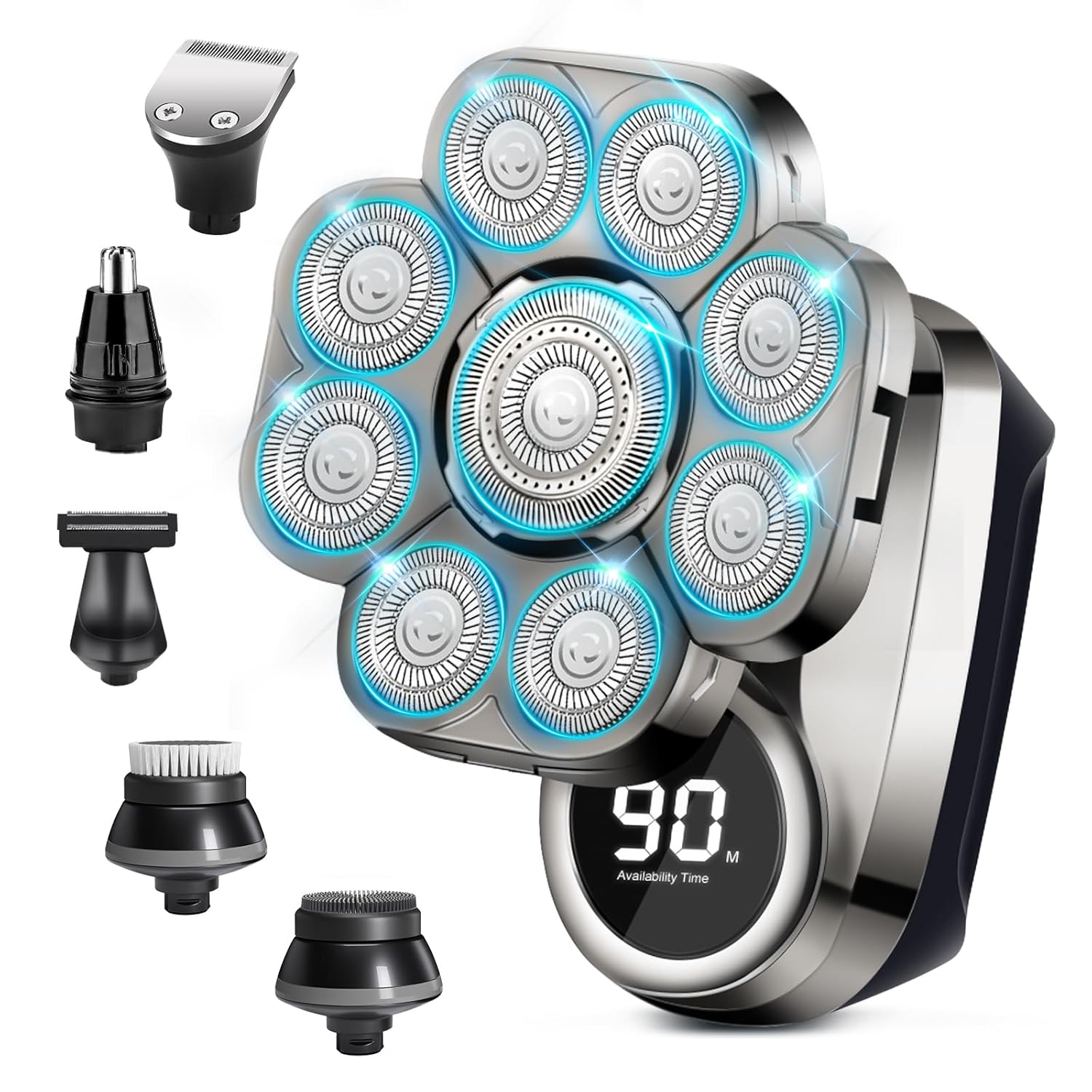
Image: INK-EEZE 9D Electric Rotary Shaver main unit with all six interchangeable attachments displayed around it, including the head shaver, sideburns knife, nose/ear trimmer, body trimmer, facial cleaning brush, and soft face sponge. The main unit shows an LED display.

Image: This image illustrates the 6-in-1 Multifunctional Shaver Grooming Kit. It shows a man using the head shaver, and separate images of each attachment: Sideburns Knife, Head Shaver, Body Trimmer, Nose & Ear Trimmer, Facial Cleaning Brush, and Soft Face Sponge.
Video: This video demonstrates the contents of the multifunctional head shaver package, including the main shaver unit, various interchangeable heads (head shaver, sideburns trimmer, nose/ear trimmer, body trimmer, facial brush, soft sponge), limit combs, cleaning brush, and charging cable.
3. Setup
3.1 Charging the Device
- Before first use, fully charge the shaver.
- Connect the USB charging cable to the shaver and a compatible USB power source (e.g., laptop, adapter, power bank, car charger).
- A full charge takes approximately 2 hours and provides up to 90 minutes of shaving time.
- The LED display on the shaver will indicate the charging status and remaining battery life.

Image: This image details the rechargeable battery and LED display features. It shows the shaver's LED screen displaying '90 M' for availability time, and various charging methods like laptop, adapter, power bank, and car charger. It also mentions double-ring blade, lock function, and waterproof feature.
3.2 Attaching and Detaching Heads
- To attach a head: Align the desired attachment with the main unit and gently push until it clicks into place.
- To detach a head: Grip the attachment firmly and pull it away from the main unit.
Video: This video tutorial demonstrates how to replace the attachments of the 6-in-1 electric shaver, showing the process of detaching one head and attaching another.

Image: This image demonstrates how to open the shaver blades for cleaning and how to replace attachments. It shows a sequence of steps for opening the multi-head shaver and for attaching different grooming heads to the main unit.
4. Operating Instructions
4.1 General Shaving
- Ensure the desired attachment is securely in place.
- Press and hold the power button to turn the shaver on. The LED display will show the remaining battery time.
- Gently move the shaver in circular motions over the skin. The 9D floating heads are designed to adapt to facial and head contours for a close shave.
- The shaver supports both wet and dry shaving. For a wet shave, apply shaving cream or gel. For a dry shave, use directly on dry skin.
- After use, press the power button to turn off the shaver.

Image: This close-up image of the upgraded 9D floating shaving head highlights its 360-degree floating shaving capability and double-ring veneer knife net design. An inset image compares the upgraded 9-head design with an original 5-head design.

Image: This image demonstrates the wet and dry shaving capabilities of the shaver. One panel shows a man performing a wet shave with foam, and another shows a man performing a dry shave. The image also highlights the IP67 waterproof rating.
Video: This video showcases the versatility and effectiveness of the 9D electric head shaver for men, demonstrating its use for shaving a bald head and highlighting its various features.
4.2 Using Specific Attachments
- Sideburns Knife: Use for precise trimming of sideburns and shaping beard lines. Attach the appropriate limit comb for desired length.
- Nose & Ear Trimmer: Carefully insert the trimmer into the nostril or ear canal to remove unwanted hair.
- Body Trimmer: Use for grooming hair on other parts of the body.
- Facial Cleaning Brush: Apply facial cleanser to your face or the brush, then gently move the brush in circular motions to cleanse the skin.
- Soft Face Sponge: Use for gentle exfoliation or applying skincare products.
5. Maintenance and Cleaning
Regular cleaning ensures optimal performance and hygiene of your shaver.
5.1 Cleaning the Shaver Heads
- After each use, turn off the shaver.
- Open the shaver head by gently flipping up the individual blade covers.
- Use the provided cleaning brush to remove any trapped hair.
- Rinse the shaver head under running water. Since the shaver is IP67 waterproof, it can be rinsed directly.
- Allow the shaver head to air dry completely before closing the covers and storing.
Video: This video tutorial demonstrates how to open the blades of the electric shaver for thorough cleaning, highlighting the mechanism for accessing the internal components.
5.2 General Care
- Store the shaver in a cool, dry place when not in use.
- Avoid dropping the shaver or subjecting it to strong impacts.
- Do not attempt to disassemble or repair the main unit yourself. Contact customer support if issues arise.
6. Specifications
| Product Dimensions | 1 x 1 x 1 inches |
| Item Weight | 10.58 ounces |
| Model Number | 1 |
| Batteries | 1 AA battery required (rechargeable, included) |
| UPC | 739750152447 |
| Manufacturer | INK-EEZE |
| Recommended Uses | Head, Face, Body |
| Special Feature | Battery Indicator, IP67 Waterproof, LED Display, 9D Floating Heads |
| Power Source | Battery Powered (USB Rechargeable) |
7. Troubleshooting
No specific troubleshooting information is provided in the product details. If you encounter issues, please ensure the device is fully charged and clean. Refer to the 'Maintenance and Cleaning' section for proper care. If problems persist, contact customer support.
8. Warranty and Support
No specific warranty or support contact information is provided in the product details. For inquiries or assistance, please refer to the seller's contact information or the platform where the product was purchased.