
Introduction
This manual provides instructions for the Generic replacement infrared remote control. This remote is designed to be compatible with specific DYON Smart 4K UHD LCD LED HDTV TV models: Enter 32 PRO, Enter 32 PRO-V2, and Enter 32 PRO-X. Please ensure your original remote control matches the appearance of this replacement remote for optimal compatibility and functionality. This replacement remote may not offer all functions identical to your original remote.

Figure 1: Front view of the replacement remote control, showing all buttons.
Setup
Battery Installation
The remote control requires two (2) AAA batteries (not included) for operation. Follow these steps to install the batteries:
- Locate the battery compartment cover on the back of the remote control.
- Press down on the tab and slide the cover downwards to remove it.
- Insert two AAA batteries, ensuring the positive (+) and negative (-) terminals align correctly with the markings inside the compartment.
- Slide the battery compartment cover back into place until it clicks securely.
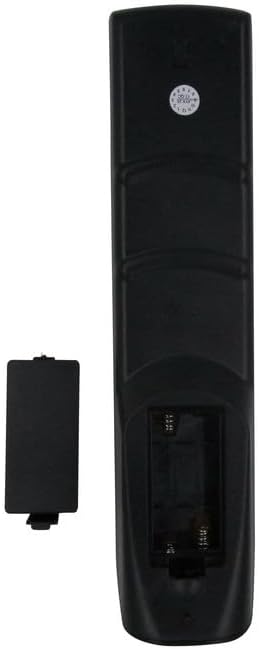
Figure 2: Rear view of the remote control with the battery cover removed, showing the battery compartment.
After installing the batteries, the remote control is ready for use. No programming is typically required for this infrared replacement remote.
Operating Instructions
Point the remote control directly at the infrared receiver on your television. Ensure there are no obstructions between the remote and the TV.
Key Functions Overview
- Power Button (Red): Turns the TV on or off.
- Number Buttons (0-9): Directly select channels.
- CH +/-: Changes channels up or down.
- VOL +/-: Adjusts the volume level.
- Mute: Mutes or unmutes the TV sound.
- Source/Input: Selects the input source (e.g., HDMI 1, AV).
- Menu: Accesses the TV's main menu.
- Navigation Buttons (Up, Down, Left, Right, Enter): Navigate through menus and confirm selections.
- Exit: Exits the current menu or screen.
- Color Buttons (Red, Green, Yellow, Blue): Used for specific functions within certain TV menus or applications.
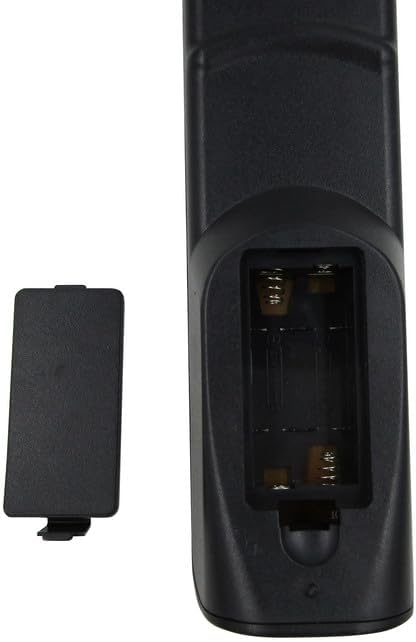
Figure 3: Angled view of the remote control, providing a clearer perspective of the button layout.
Maintenance
Cleaning
To clean the remote control, use a soft, dry cloth. For stubborn dirt, lightly dampen the cloth with water or a mild, non-abrasive cleaner. Do not use harsh chemicals or immerse the remote in liquid.
Battery Care
- Replace batteries when the remote's performance diminishes or it stops responding.
- Remove batteries if the remote control will not be used for an extended period to prevent leakage.
- Dispose of used batteries according to local regulations.
Troubleshooting
Remote Control Not Responding
- Check Batteries: Ensure batteries are correctly installed with the correct polarity (+/-) and are not depleted. Replace with fresh AAA batteries if necessary.
- Line of Sight: Make sure there are no objects blocking the path between the remote control and the TV's infrared sensor.
- Distance: Operate the remote within its effective range (up to 8 meters).
- TV Power: Confirm the TV is powered on and not in standby mode.
Partial Functionality
As a replacement remote, some advanced or specific functions of your original TV remote may not be fully supported. This is common with universal or replacement remotes. Refer to your TV's original manual for functions not covered by this replacement remote.
Specifications
| Feature | Description |
|---|---|
| Brand | Generic |
| Model Number | Easytry22263 |
| Compatible Devices | DYON Enter 32 PRO, Enter 32 PRO-V2, Enter 32 PRO-X Smart 4K UHD LCD LED HDTV TVs |
| Connectivity Technology | Infrared |
| Maximum Range | 8 Meters |
| Number of Batteries Required | 2 AAA batteries (not included) |
| Color | Black |
| Special Feature | Ergonomic, Replacement |
Warranty Information
This product comes with a 90-day warranty. Hassle-free returns are available within this period. Please retain your proof of purchase for any warranty claims.
Support
For any questions, concerns, or if your specific TV model is not explicitly listed but you believe it should be compatible, please contact the seller directly. It is recommended to verify compatibility before purchase if you are unsure.
Seller: Easytry123