
1. Introduction
Thank you for choosing the PRORETAILER DA41-00538A PCB Assembly. This manual provides essential information for the safe and correct installation, operation, and maintenance of this replacement part. This PCB assembly is designed to be compatible with specific Samsung refrigerator models, serving as a crucial component for controlling various functions of the appliance. Please read this manual thoroughly before proceeding with any installation or service.
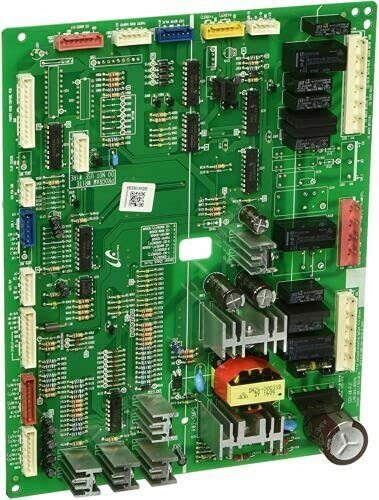
Figure 1: The PRORETAILER DA41-00538A PCB Assembly. This image displays the main control board, featuring various electronic components, connectors, and a heat sink, typical of a refrigerator's main power and control unit.
2. Safety Information
WARNING: Electrical shock hazard. Always disconnect power to the appliance before servicing. Failure to do so can result in serious injury or death.
- This PCB assembly should only be installed by a qualified technician.
- Wear appropriate personal protective equipment (PPE), including insulated gloves and safety glasses.
- Ensure all connections are secure and correctly oriented before restoring power.
- Do not attempt to modify the PCB assembly.
- Keep the PCB assembly dry and away from moisture.
3. Setup and Installation
This section outlines the general steps for replacing a DA41-00538A PCB Assembly. Specific steps may vary depending on your Samsung refrigerator model. Refer to your appliance's service manual for detailed instructions.
3.1. Tools Required
- Screwdriver set (Phillips and flathead)
- Needle-nose pliers
- Multimeter (for testing, optional)
- Insulated gloves
3.2. Installation Steps
- Disconnect Power: Unplug the refrigerator from the wall outlet or turn off the circuit breaker supplying power to the appliance.
- Access the PCB Compartment: Locate the control board compartment, typically at the back of the refrigerator or behind a control panel. Remove any screws or covers to gain access.
- Document Connections: Before disconnecting any wires, take clear photos or make a diagram of all wire connections to the existing PCB. This is crucial for correct reassembly.
- Disconnect Wires: Carefully disconnect all wire harnesses and connectors from the old PCB. Note that some connectors may have locking tabs.
- Remove Old PCB: Unscrew or unclip the old PCB from its mounting brackets.
- Install New PCB: Position the new PRORETAILER DA41-00538A PCB Assembly into the compartment and secure it with the original screws or clips.
- Reconnect Wires: Using your photos or diagram, carefully reconnect all wire harnesses and connectors to the new PCB. Ensure each connection is firm and correctly seated.
- Secure Covers: Replace any covers or panels removed earlier.
- Restore Power: Plug the refrigerator back into the wall outlet or turn on the circuit breaker.
- Test Functionality: Verify that the refrigerator powers on and functions correctly. Monitor for any unusual behavior.
4. Operating Information
The DA41-00538A PCB Assembly is a core electronic control unit for your Samsung refrigerator. It manages various critical functions, including temperature regulation, defrost cycles, fan operation, and display interface communication. As an internal component, it does not have direct user-operable controls. Its proper functioning is essential for the overall performance of the refrigerator. Once installed, the refrigerator's normal operation will resume, controlled by this PCB.
5. Maintenance
The PRORETAILER DA41-00538A PCB Assembly is designed to be maintenance-free under normal operating conditions.
- Cleaning: If the PCB compartment becomes dusty, ensure the refrigerator is unplugged before carefully using a soft, dry brush or compressed air to remove dust. Do not use liquids or cleaning agents.
- Moisture: Prevent any moisture from entering the PCB compartment. Water damage can lead to component failure.
- No User-Serviceable Parts: The PCB assembly contains no user-serviceable parts. Any internal issues require replacement of the entire unit by a qualified technician.
6. Troubleshooting
If your refrigerator exhibits issues after replacing the PCB, consider the following common troubleshooting steps. Always disconnect power before inspecting internal components.
| Problem | Possible Cause | Solution |
|---|---|---|
| Refrigerator does not power on. | Loose power connection, faulty outlet, incorrect wiring. | Check power cord, test outlet, re-verify all PCB connections. |
| Refrigerator not cooling properly. | Sensor issue, compressor not engaging, fan malfunction. | Ensure all sensors and fan connections are secure. If issues persist, professional diagnosis is recommended. |
| Display panel not working or showing errors. | Loose display cable, display panel fault, PCB communication error. | Check display cable connection to the PCB. Consult your refrigerator's service manual for error codes. |
| Unusual noises from the refrigerator. | Fan obstruction, compressor issue, loose components. | This is less likely to be directly caused by a new PCB unless a component was dislodged during installation. Inspect fans and surrounding areas. |
If troubleshooting steps do not resolve the issue, it is recommended to contact a qualified appliance repair technician for further assistance.
7. Specifications
- Model Number: DA41-00538A
- Part Type: PCB Assembly (Printed Circuit Board Assembly)
- Compatibility: Designed for specific Samsung refrigerator models (verify compatibility with your appliance's service manual).
- Brand: PRORETAILER
- ASIN: B0CNSNBYMQ
- Date First Available: November 22, 2023
8. Warranty and Support
PRORETAILER products are manufactured to high-quality standards. For information regarding the warranty period and terms for your DA41-00538A PCB Assembly, please refer to the product packaging or contact your point of purchase.
For technical support or inquiries, please contact the PRORETAILER customer service department through the retailer where the product was purchased. Please have your product model number (DA41-00538A) and purchase details ready when contacting support.


