
Introduction
This manual provides essential information for the safe and effective operation of your KUJOBUY Raptor H650 Sea Land Air RC Airplane. Please read these instructions thoroughly before operating the aircraft to ensure proper setup, control, and maintenance.
The Raptor H650 is a versatile remote-controlled aircraft designed for operation on sea, land, and air. It features a compact 19-inch wingspan, 2.4GHz 6-channel remote control, and Smart Balance EPP technology for enhanced stability, making it suitable for beginners.

Image: The KUJOBUY Raptor H650 RC Airplane in red, alongside its black 2.4GHz 6-channel remote control.
Safety Information
Important Safety Guidelines:
- For beginners, it is recommended to operate the aircraft within a range of 100 meters until familiar with the controls to prevent loss of control.
- Observe the charging indicator: a red light indicates charging, and the light turning off signifies a full charge.
- Always ensure the battery connector is inserted correctly. Reversing the battery connector can cause damage.
- Operate the aircraft in open areas, away from people, animals, buildings, and power lines.
- Do not operate in strong winds or adverse weather conditions.
- Adult supervision is recommended for users under the age of 15.
Components Overview
Familiarize yourself with the main components of your Raptor H650 aircraft:

Image: An exploded diagram showing the various parts of the red Raptor H650 RC Airplane, including the fuselage, wings, tails, motor, and nose cone.
- Fuselage: The main body of the aircraft.
- Right Main Wing & Left Main Wing: Provide lift for flight.
- Vertical Tail & Horizontal Tail: Control direction and stability.
- Brushless Motor: Powers the propeller.
- Propeller: Generates thrust.
- Canopy: Covers the internal electronics.
- Silicone Soft Nose: Provides protection during impacts.
- Fiber Rod: Reinforces the structure.
- Reinforcing Sticker: Additional structural support.
- LED Light Strips: For visibility.
Setup
The KUJOBUY Raptor H650 is designed as a Ready-to-Fly (RTF) model, meaning it requires minimal assembly before operation. The aircraft comes with one Lithium Polymer battery included.
Battery Charging
Before first use, fully charge the included Lithium Polymer battery. Connect the battery to the charger according to the instructions provided with the charger. The charging indicator will be red during charging and turn off when fully charged. Ensure the battery connector is correctly oriented to avoid damage.
Initial Assembly/Preparation
While largely pre-assembled, ensure all components such as wings and tail sections are securely attached. If any components require adhesive for secure fitting, use an EPP-safe glue (not included) to prevent material degradation. Verify that the propeller is securely fastened.
Operating Instructions
Remote Control Functions
The 2.4GHz 6-channel remote control provides precise command over your aircraft. Refer to the diagram below for an overview of the control functions:

Image: A detailed diagram illustrating the functions of the H650 remote control, including throttle, fine-tuning, light control, and stunt buttons.
- Power: Turns the remote control on/off.
- Light Indication: Shows remote control status.
- Short Press to Control the Light: Toggles the aircraft's LED lights.
- Hold 2 Seconds to Reverse the Function: Reverses control input direction.
- Increase/Turn off Throttle: Controls the motor speed and altitude.
- Up/Down Fine-Tuning: Adjusts vertical trim for stable flight.
- Turn Left/Right/Up/Down: Controls the aircraft's movement.
- Left/Right Fine-Tuning: Adjusts horizontal trim for stable flight.
- Roll Stunt: Press Stunt Switch + Turn Left/Turn Right.
- Inverted Flying Stunt: Press Stunt Switch + Light Control Switch simultaneously.
- Enter Manual Mode: Press 5 times.
Fine-Tuning Usage: If the aircraft drifts to the left, push the right fine-tuning button repeatedly until it flies straight. Similarly, if it drifts right, use the left fine-tuning button. Always perform fine-tuning adjustments at a sufficient altitude to prevent accidental crashes.
Flight Environments (Sea, Land, Air)
The Raptor H650 is designed for versatile operation across different environments:
- Air Operation: Launch the aircraft by hand or from a flat surface. Use the throttle and directional controls for flight. The Smart Balance EPP technology assists in maintaining stability.
- Sea Operation: The aircraft's design allows it to glide and take off from water surfaces. Ensure the area is clear of obstacles.
- Land Operation: The durable EPP material allows for ground maneuvers and take-offs from smooth surfaces.

Image: The red KUJOBUY Raptor H650 RC Airplane soaring through a clear blue sky above clouds.

Image: The KUJOBUY Raptor H650 RC Airplane gliding on the surface of a lake, demonstrating its seaplane capabilities.
Remote Control Range
The 2.4GHz remote control system provides stable and sensitive control. In an open environment without signal interference, the remote control distance can reach approximately 3300 feet (1000 meters). It is recommended for novices to stay within a closer range.
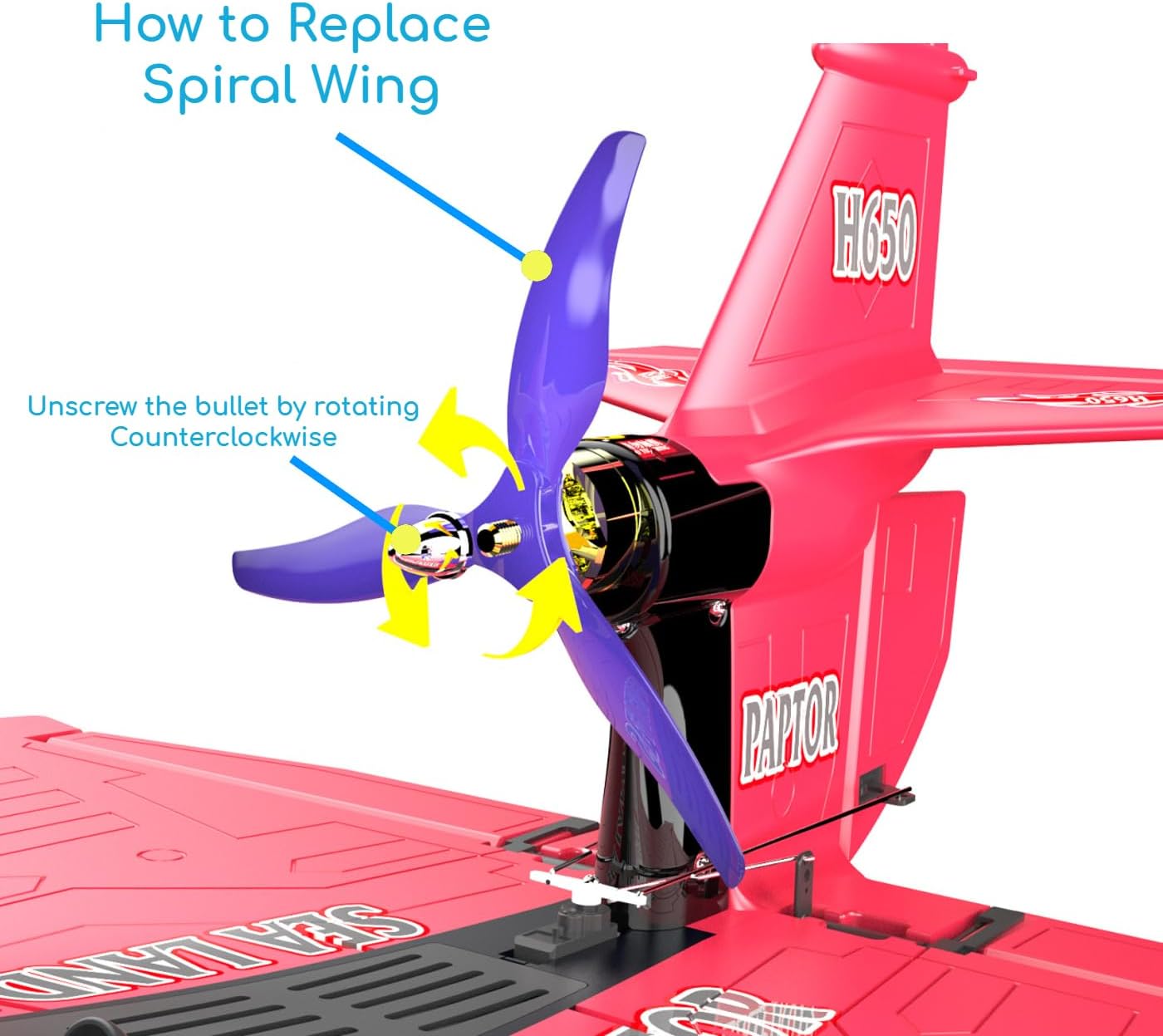
Image: A diagram highlighting the 2.4GHz remote control system and its approximate range of 3300 feet.
Official Product Video
Video: This video demonstrates the KUJOBUY Raptor H650 RC Airplane in action, showcasing its flight capabilities and ability to operate on water surfaces.
Maintenance
Propeller Replacement
If the propeller is damaged, it can be replaced. Follow these steps:
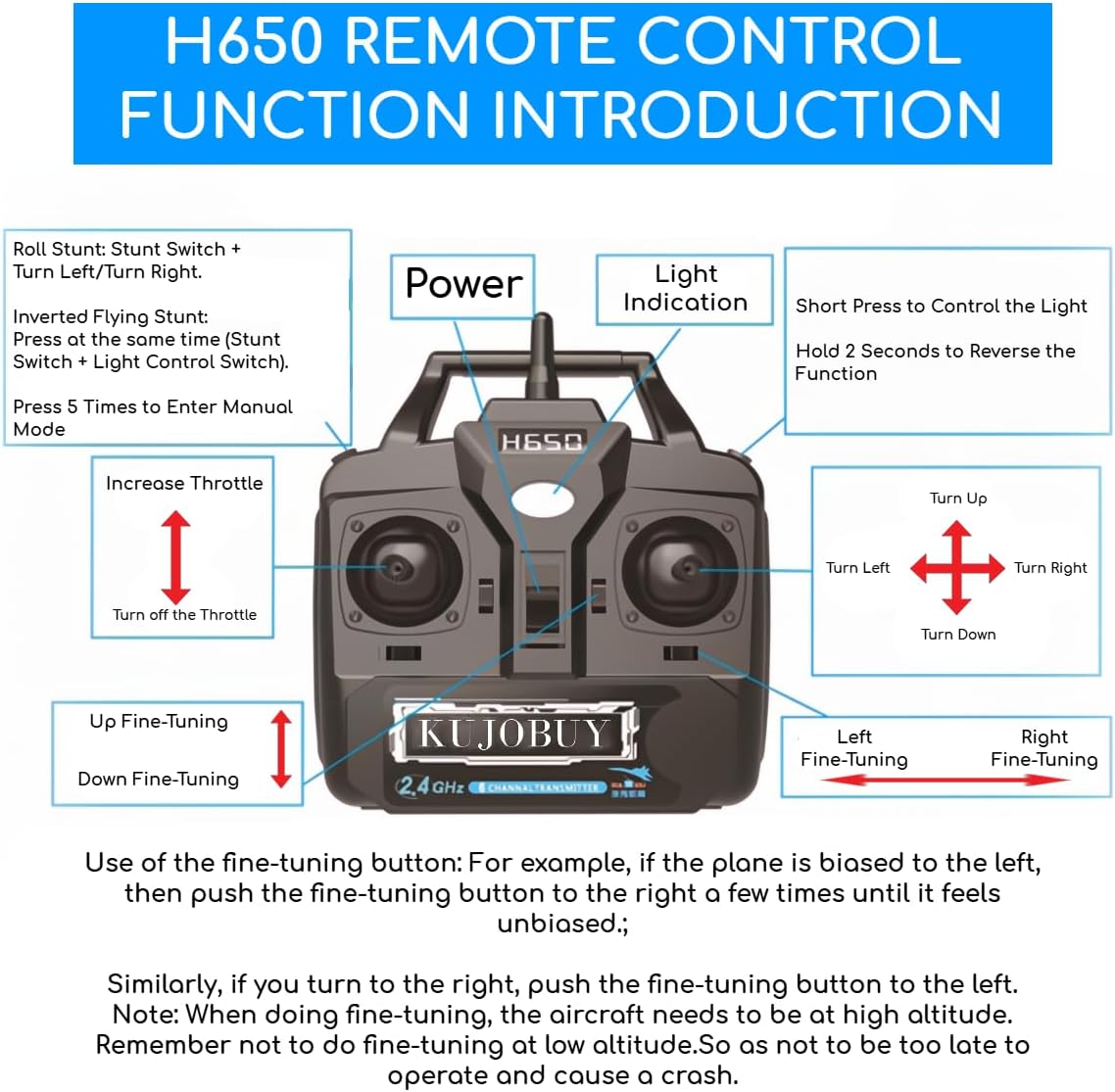
Image: A diagram illustrating how to unscrew the propeller (referred to as 'spiral wing') by rotating counter-clockwise for replacement.
- Gently hold the aircraft to stabilize it.
- Unscrew the propeller by rotating it counter-clockwise.
- Remove the old propeller.
- Align the new propeller and screw it on clockwise until secure. Do not overtighten.
General Care
- Clean the aircraft with a soft, dry cloth after use.
- Store the aircraft and remote control in a cool, dry place away from direct sunlight.
- Regularly inspect all parts for damage or wear. Replace damaged components promptly.
Troubleshooting
If you encounter issues with your Raptor H650, consider the following:
- Aircraft not responding: Check if both the aircraft and remote control are powered on and their batteries are sufficiently charged. Ensure they are properly paired.
- Unstable flight: Perform fine-tuning adjustments as described in the Operating Instructions. Ensure all wings and tail components are securely attached.
- Reduced range: Ensure you are operating in an open area free from signal interference. Check remote control battery levels.
- Damage during operation: The EPP material is durable but not indestructible. For minor repairs, use an appropriate EPP-safe adhesive. Ensure any repaired parts are fully cured before resuming operation.
Specifications
| Feature | Detail |
|---|---|
| Model Number | KB1983620 H650 |
| Wingspan | 19 inches |
| Product Dimensions | 25.5 x 19 x 9 inches |
| Item Weight | 2 pounds |
| Remote Control | 2.4GHz 6-Channel |
| Battery | 1 Lithium Polymer battery (included) |
| Material | EPP Foam |
| Recommended Age | 15 years and up |

Image: The KUJOBUY Raptor H650 RC Airplane with its dimensions labeled: 25.6 inches length and 19.3 inches wingspan.
Support
For further assistance or inquiries regarding your KUJOBUY Raptor H650 RC Airplane, please refer to the manufacturer's official support channels or contact your retailer. Keep your purchase receipt for warranty purposes.