
NIUTA WQ89STq1rer
NIUTA Wireless Earbuds User Manual
Model: WQ89STq1rer
1. Introduction
Thank you for choosing the NIUTA Wireless Earbuds. This manual provides detailed instructions on how to set up, operate, and maintain your earbuds to ensure optimal performance and longevity. Please read this manual thoroughly before using the product.
2. What's in the Box
- NIUTA Wireless Earbuds (Left and Right)
- Charging Case
- USB-C Charging Cable
- Multiple Sizes of Eartips (4 sizes provided)
- User Manual (this document)
3. Product Overview
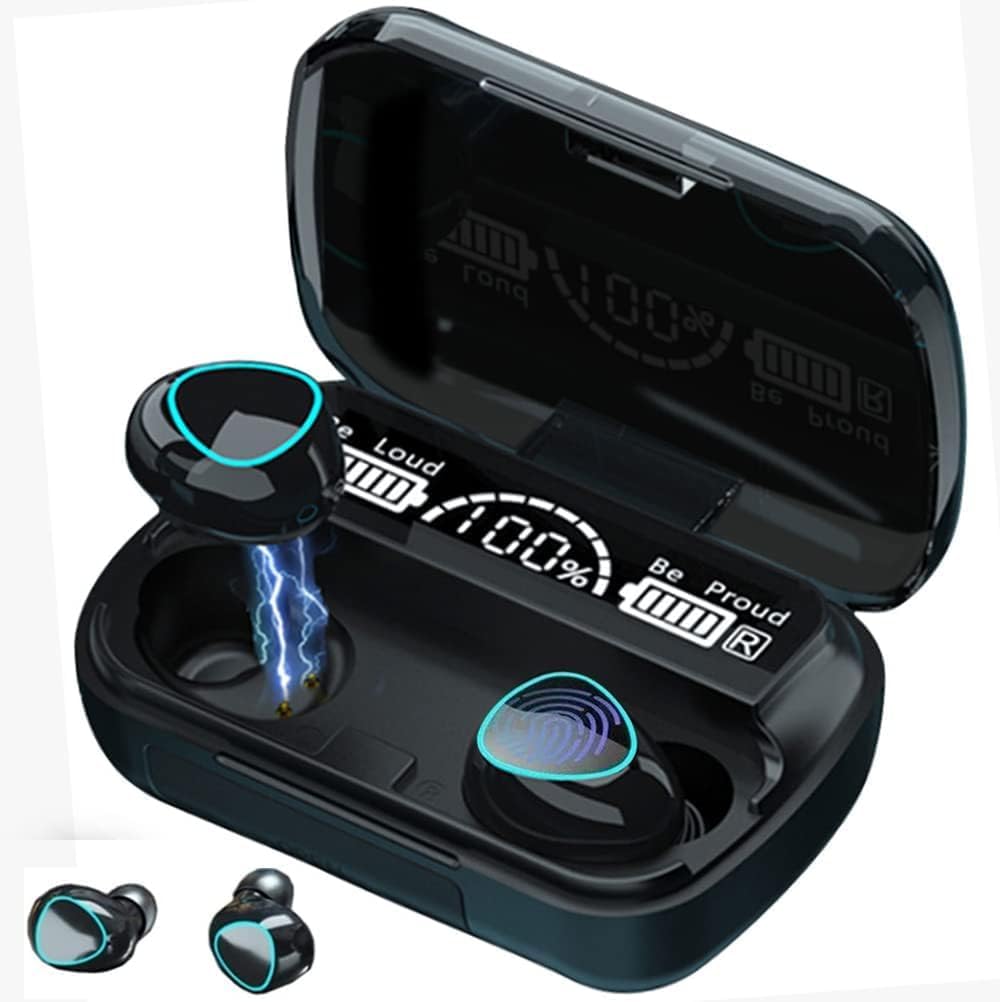
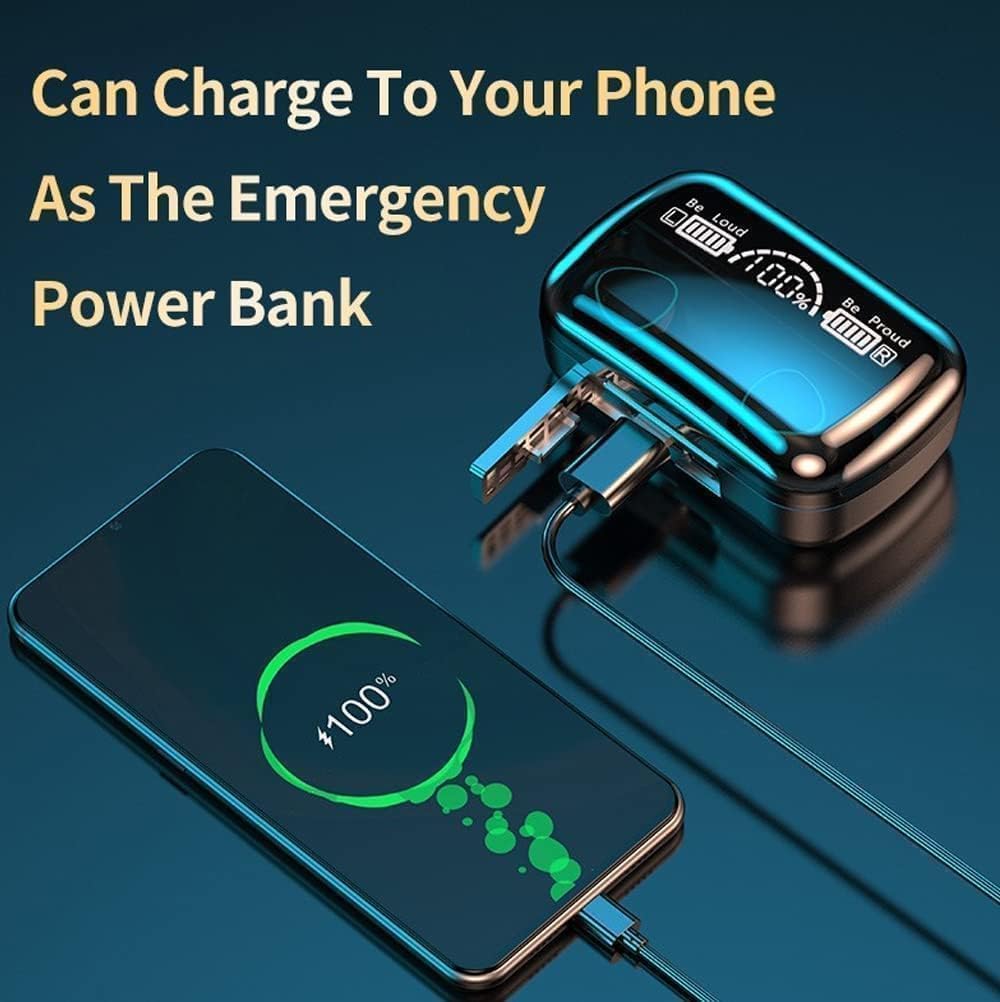
The NIUTA Wireless Earbuds feature a compact design with an intelligent charging case that also functions as a portable power bank. The case includes an LED digital display for battery status.

4. Setup
4.1 Charging the Earbuds and Case
Before first use, ensure both the charging case and earbuds are fully charged.
- Place the earbuds into the charging case. Ensure they are correctly seated; the LED indicators on the earbuds will light up to confirm charging.
- Connect the charging case to a USB power source using the provided USB-C cable. The LED digital display on the case will show the charging progress.
- A full charge for the case takes approximately 2 hours. The earbuds will charge automatically when placed in the powered case.

4.2 Pairing with Your Device
The earbuds support one-step reconnection after the initial pairing.
- Ensure the earbuds are charged and inside the charging case.
- Open the lid of the charging case. The earbuds will automatically power on and enter pairing mode.
- On your device (smartphone, tablet, laptop), go to Bluetooth settings and turn on Bluetooth.
- Search for available devices. Select "NIUTA Earbuds" (or similar name) from the list.
- Once connected, you will hear a confirmation tone, and the earbuds will be ready for use.
- For subsequent uses, simply open the charging case lid, and the earbuds will automatically reconnect to the last paired device.
5. Operating Instructions
5.1 Touch Controls
The earbuds feature intuitive touch controls for managing audio playback and calls.


| Action | Left Earbud (L) | Right Earbud (R) |
|---|---|---|
| Play/Pause | Single Tap | Single Tap |
| Next Song | N/A | Double Tap |
| Previous Song | Double Tap | N/A |
| Volume Up | N/A | Triple Tap |
| Volume Down | Triple Tap | N/A |
| Answer/End Call | Single Tap | Single Tap |
| Reject Call | Press and Hold (2s) | Press and Hold (2s) |
| Activate Voice Assistant | Press and Hold (3s) | Press and Hold (3s) |
5.2 Power Bank Function
The charging case can serve as an emergency power bank for your mobile devices.
- Locate the USB-A output port on the charging case.
- Connect your mobile phone or other electronic device to this port using an appropriate USB cable.
- The charging case will begin to charge your device. Monitor the LED display for the case's remaining battery level.
6. Maintenance
- Cleaning: Regularly clean the earbuds and charging case with a soft, dry, lint-free cloth. Do not use harsh chemicals or abrasive materials.
- Eartips: Remove and clean the eartips periodically with water and mild soap, then dry thoroughly before reattaching.
- Storage: When not in use, store the earbuds in their charging case to protect them and keep them charged. Store in a cool, dry place away from extreme temperatures.
- Battery Care: To prolong battery life, avoid fully discharging the earbuds and case frequently. Charge them regularly, even if not in constant use.
- Water Resistance: The earbuds are IPX7 waterproof, meaning they can withstand immersion in water up to 1 meter for 30 minutes. However, the charging case is not waterproof. Avoid exposing the charging case to liquids.
7. Troubleshooting
If you encounter issues with your NIUTA Wireless Earbuds, please refer to the following common problems and solutions:
| Problem | Possible Cause | Solution |
|---|---|---|
| Earbuds not charging | Poor contact with charging pins; Case battery low; Faulty cable/adapter. | Ensure earbuds are correctly seated in the case. Clean charging pins on earbuds and case. Charge the case fully. Try a different USB-C cable and power adapter. |
| Cannot pair with device | Earbuds not in pairing mode; Bluetooth off on device; Interference; Already paired to another device. | Open case lid to activate pairing mode. Ensure Bluetooth is enabled on your device. Turn off Bluetooth on other nearby devices. Forget "NIUTA Earbuds" in your device's Bluetooth settings and try pairing again. |
| No sound or low volume | Volume too low on device/earbuds; Earbuds not connected; Dirty eartips/earbud mesh. | Increase volume on both your device and the earbuds. Reconnect the earbuds. Clean the earbud mesh and eartips. |
| Intermittent connection/skipping | Too far from device; Obstacles between device and earbuds; Bluetooth interference. | Keep earbuds within 10 meters (33 feet) of your device. Avoid physical obstructions. Move away from other strong wireless signals. |
| Only one earbud working | One earbud not charged; Pairing issue; Earbuds not synced. | Ensure both earbuds are charged. Place both earbuds back in the case, close the lid, wait a few seconds, then open again to re-sync. If issue persists, try resetting the earbuds (refer to manufacturer's website if specific reset steps are not in manual). |
8. Specifications
| Feature | Detail |
|---|---|
| Model Name | WQ89STwe |
| Item Model Number | WQ89STq1rer |
| Connectivity Technology | Wireless (Bluetooth) |
| Bluetooth Version | 5.3 |
| Bluetooth Range | 10 Meters (33 feet) |
| Battery Life (Earbuds) | 6-8 hours per charge |
| Total Playtime with Case | Up to 132 hours (alternating use) / 136 hours (total) |
| Charging Case Battery Capacity | 1800mAh |
| Charging Time (Case) | 2 Hours |
| Water Resistance Level | IPX7 Waterproof (Earbuds only) |
| Control Type | Touch Control, Voice Control |
| Frequency Range | 20 Hz - 20,000 Hz |
| Earbud Weight | 6g (per earbud) |
| Case Weight | 50 Grams |
| Material | Plastic |
| Color | Black |
| UPC | 737494188739 |
9. Warranty and Support
NIUTA products are designed and manufactured to the highest quality standards. For information regarding warranty coverage, technical support, or customer service, please refer to the contact information provided with your purchase or visit the official NIUTA website. Please retain your proof of purchase for warranty claims.
For further assistance, you may also refer to the NIUTA store on Amazon: NIUTA Amazon Store
no relevant documents