1. Introduction
This manual provides essential information for the safe and effective operation of your KUJOBUY Raptor H650 Sea Land Air RC Airplane. Please read it thoroughly before use and retain it for future reference.
Key Features:
- Compact Design: 19-inch wingspan for stability and agility.
- Effortless Control: 2.4GHz 6CH remote control for precise operation.
- Smart Balance Technology: Equipped with Smart Balance EPP for flight stability, suitable for beginners.
- Versatile Performance: Designed for operation in sea, on land, and in air environments.
- Ready-to-Fly (RTF): No assembly required; the aircraft is ready for immediate use.
What's in the Box:
- 1 x Raptor H650 RC Airplane
- 1 x 2.4GHz 6CH Remote Control
- 1 x Lithium Polymer Battery (included)
- 1 x USB Charging Cable
- Spare Propeller(s)
- Instruction Manual

Image 1.1: The KUJOBUY Raptor H650 RC Airplane, showcasing its dimensions and the included remote control.
2. Safety Guidelines
Operating an RC aircraft requires caution. Adhere to the following safety guidelines to prevent injury or damage:
- Age Recommendation: This product is recommended for users aged 14 years and up.
- Flight Environment: Fly in open areas, away from people, animals, buildings, and power lines. Avoid flying in strong winds or adverse weather conditions.
- Beginner Flying Range: For beginners, it is recommended to fly within a hundred-meter range until familiar with the controls to prevent loss of the aircraft.
- Battery Safety: Always ensure correct battery connector polarity during installation. Incorrect connection can cause damage or fire. Use only the provided charging cable and battery.
- Propeller Safety: Keep hands and face clear of the propeller when the aircraft is powered on. The propeller can cause injury.
- Water Operation: While designed for water, ensure the environment is clear of obstacles and other watercraft.
- Supervision: Younger users should always be supervised by an experienced adult.
3. Components Overview
Familiarize yourself with the various parts of your Raptor H650 RC Airplane:
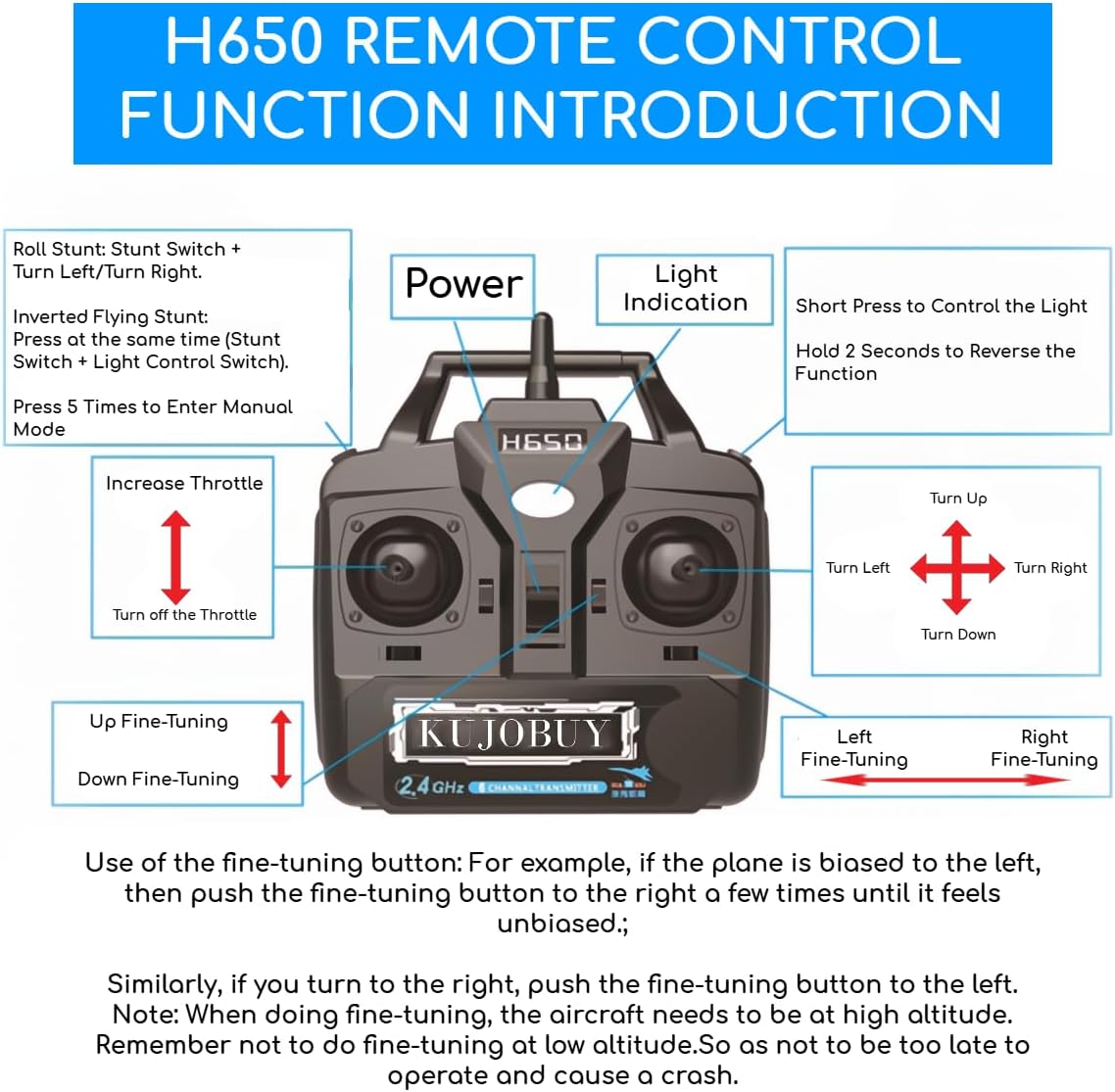
Image 3.1: Exploded view showing the main components of the Raptor H650, including the fuselage, wings, tail, motor, and nose cone.
- Fuselage: The main body of the aircraft.
- Main Wings (Left & Right): Provide lift for flight.
- Vertical Tail: Provides directional stability.
- Horizontal Tail: Provides pitch stability.
- Brushless Motor: Powers the propeller.
- Propeller: Generates thrust.
- Silicone Soft Nose: Protects the front of the aircraft.
- Canopy: Covers the internal electronics.
- Fiber Rod: Reinforces the structure.
- LED Light Strips: For visibility and aesthetics.
4. Remote Control Functions
The 2.4GHz 6-channel remote control allows for precise command of your Raptor H650. Familiarize yourself with its layout and functions:

Image 4.1: Detailed diagram of the H650 remote control, indicating the purpose of each button and joystick.
- Power Button: Turns the remote control on/off.
- Light Indication: Shows power status or other indicators.
- Increase/Decrease Throttle: Controls the motor speed and altitude.
- Turn Up/Down/Left/Right: Controls the aircraft's direction.
- Left/Right Fine-Tuning: Adjusts the aircraft's horizontal trim.
- Up/Down Fine-Tuning: Adjusts the aircraft's vertical trim.
- Stunt Switch: Activates stunt maneuvers (e.g., roll stunt).
- Light Control Switch: Toggles the aircraft's lights.
- Reverse Function: Hold for 2 seconds to reverse certain functions.
- Manual Mode: Press the stunt switch 5 times to enter manual mode.
5. Setup and Assembly
The Raptor H650 is a Ready-to-Fly (RTF) model, meaning minimal assembly is required before its first flight.
5.1 Battery Installation
- Locate the battery compartment on the aircraft.
- Carefully connect the Lithium Polymer battery to the aircraft's power connector. Ensure the polarity is correct to avoid damage.
- Securely place the battery inside the compartment and close the cover.
5.2 Initial Checks
- Ensure the aircraft's battery is fully charged. A red light on the charger indicates charging, and the light turning off indicates a full charge.
- Check that all control surfaces (wings, tail) are securely attached.
- Verify that the propeller is free from obstructions and securely fastened.
- Turn on the remote control, then turn on the aircraft. Allow them to bind automatically.
6. Operating the Aircraft
The Raptor H650 offers versatile operation across air, land, and sea. Always start with basic controls in a safe, open environment.
6.1 Basic Flight Controls
- Take-off: Gently increase throttle to gain speed and lift.
- Ascend/Descend: Use the throttle stick to control altitude.
- Turn Left/Right: Use the directional stick to steer the aircraft.
- Landing: Gradually reduce throttle and guide the aircraft to a gentle descent.
6.2 Smart Balance Technology
The integrated Smart Balance EPP technology assists in maintaining flight stability, making it easier for beginners to control the aircraft. This system automatically corrects minor deviations to keep the plane level.
6.3 Fine-Tuning
If the aircraft consistently drifts in one direction during flight, use the fine-tuning buttons on the remote control to adjust its trim:
- If the plane biases to the left, push the right fine-tuning button a few times until it flies straight.
- If the plane biases to the right, push the left fine-tuning button a few times until it flies straight.
- Similarly, use the up/down fine-tuning for vertical adjustments.
Important: Perform fine-tuning adjustments at a high altitude to allow sufficient time for correction. Avoid making fine-tuning adjustments at low altitudes to prevent accidental crashes.
6.4 Sea, Land, and Air Operation
The Raptor H650 is designed for multi-environment use:
- Air: Standard flight operations.
- Land: Can take off and land on smooth surfaces.
- Sea: Capable of operating on water surfaces, taking off and landing from water.

Image 6.1: The Raptor H650 performing aerial maneuvers.

Image 6.2: The Raptor H650 gliding across a water surface.
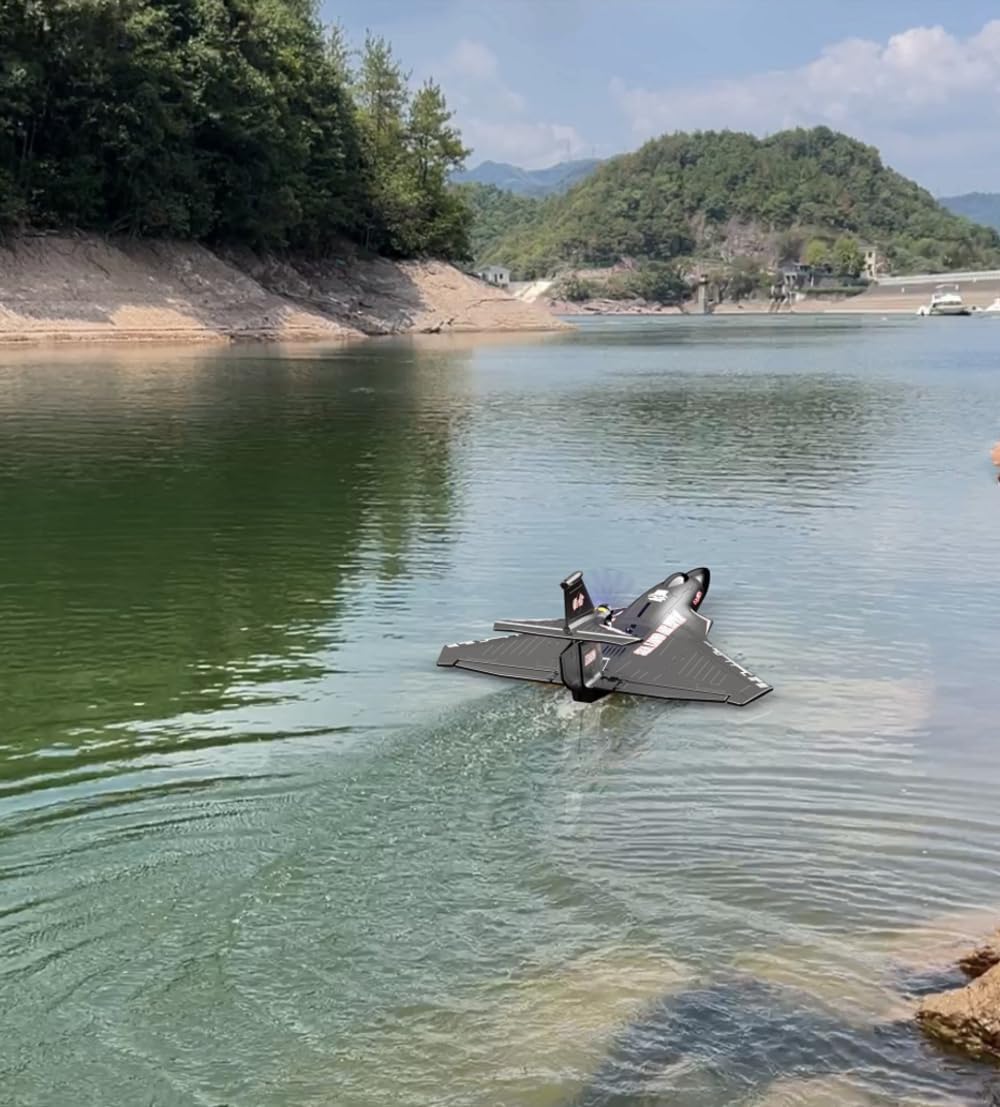
Image 6.3: The Raptor H650 ready for takeoff or landing on a paved surface.
6.5 Operational Videos
Video 6.4: Demonstration of the Raptor H650's flight capabilities and basic controls.
Video 6.5: Extended footage showcasing the Raptor H650's versatility across different environments.
Video 6.6: Comprehensive guide to operating the Raptor H650, including advanced maneuvers.
7. Maintenance
Regular maintenance ensures the longevity and optimal performance of your Raptor H650.
7.1 Propeller Replacement
If the propeller is damaged, replace it as follows:
- Ensure the aircraft is powered off.
- Unscrew the propeller bullet by rotating it counter-clockwise.
- Remove the old propeller.
- Install the new propeller, ensuring it is oriented correctly.
- Screw the propeller bullet back on by rotating it clockwise until secure.
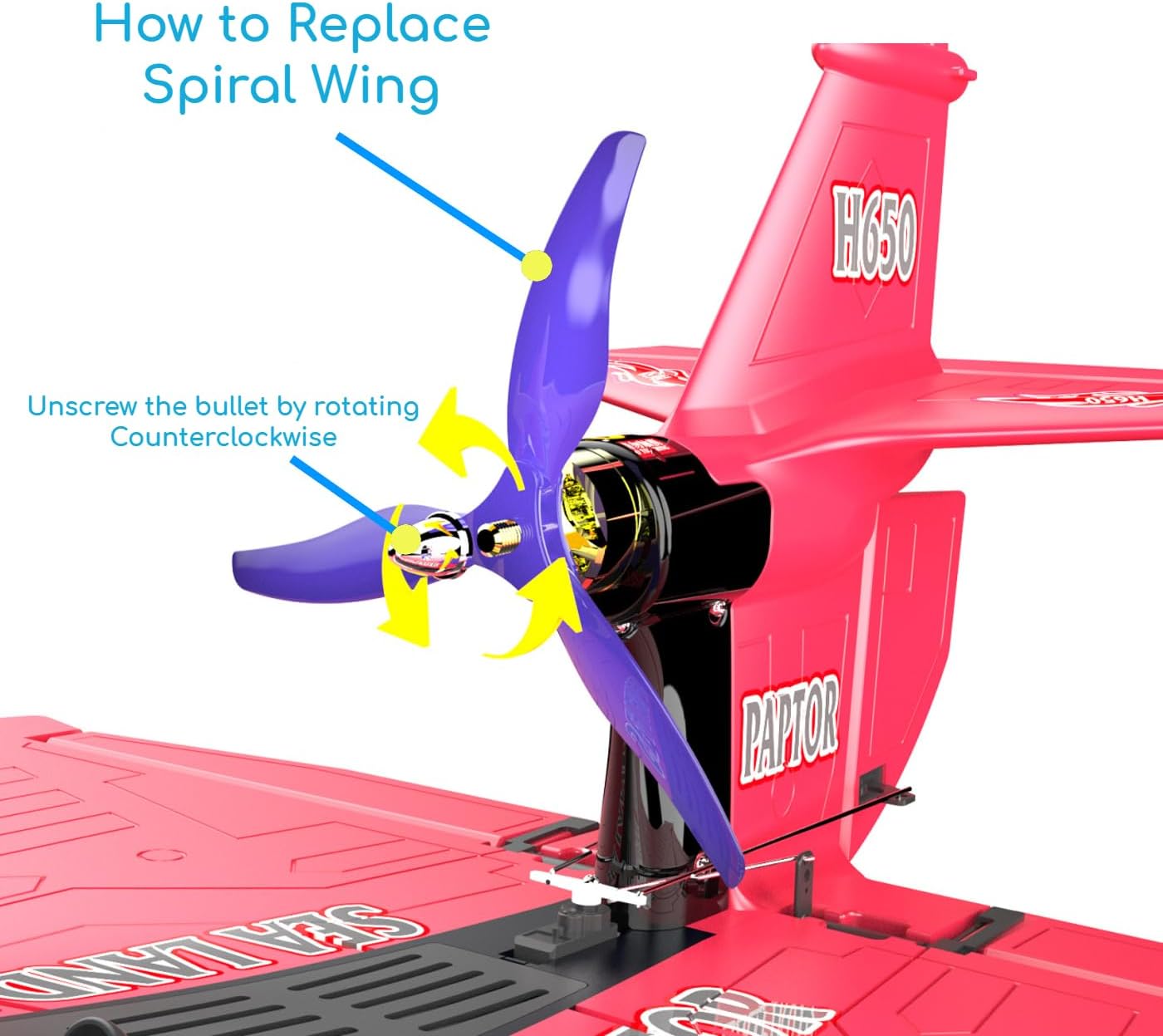
Image 7.1: Visual guide for replacing the propeller on the Raptor H650.
7.2 Battery Care and Charging
- Always use the provided USB charging cable.
- Do not overcharge or completely discharge the battery.
- Store the battery in a cool, dry place when not in use.
- Disconnect the battery from the aircraft after each use.
7.3 General Cleaning
Wipe the aircraft with a soft, dry cloth after use to remove dirt or moisture, especially after water operations.
8. Troubleshooting
This section addresses common issues you might encounter with your Raptor H650.
| Problem | Possible Cause | Solution |
|---|
| Aircraft does not respond to remote control. | Low battery in aircraft or remote; not properly bound. | Charge batteries; ensure both aircraft and remote are powered on and bound correctly. |
| Aircraft drifts during flight. | Trim settings incorrect; uneven weight distribution. | Use fine-tuning buttons on the remote control to adjust trim. Check for any foreign objects affecting balance. |
| Propeller not spinning or spinning weakly. | Damaged propeller; motor issue; low battery. | Replace propeller; ensure battery is charged; contact support if motor issue persists. |
| Short flight time. | Battery not fully charged; aging battery. | Ensure battery is fully charged before use. Consider replacing the battery if it's old. |
9. Specifications
Detailed technical specifications for the KUJOBUY Raptor H650 RC Airplane:
| Feature | Detail |
|---|
| Product Dimensions | 25.5 x 19 x 9 inches |
| Item Weight | 1.84 pounds |
| Item Model Number | H650 |
| Manufacturer Recommended Age | 14 years and up |
| Batteries | 1 Lithium Polymer battery required (included) |
| Manufacturer | KUJOBUY |
10. Warranty and Support
For warranty information, please refer to the documentation provided at the time of purchase or contact your retailer. Specific warranty terms may vary.
Customer Support:
If you encounter any issues or have questions regarding your KUJOBUY Raptor H650, please contact KUJOBUY customer support through their official channels or your point of purchase for assistance.
