
YILUBAO RGB-5000
YILUBAO RGB-5000 Laser Module Instruction Manual
Model: RGB-5000
1. Introduction
This manual provides essential information for the safe and effective operation of your YILUBAO RGB-5000 Laser Module. Please read this manual thoroughly before installation and use, and retain it for future reference. This high-power laser module is designed for stage lighting and similar applications, featuring integrated temperature control and driver circuitry for compact and stable performance.
2. Safety Precautions
WARNING: This product emits high-power laser radiation. Direct exposure to the laser beam can cause severe eye injury or skin damage. Always follow these safety guidelines:
- Never look directly into the laser beam or its reflection.
- Always wear appropriate laser safety goggles when operating or working near the laser module.
- Ensure the laser is pointed away from people, animals, and reflective surfaces.
- Operate the device in a controlled environment where unauthorized access can be prevented.
- Disconnect power before performing any maintenance or adjustments.
- Do not attempt to modify or disassemble the laser module. Refer all servicing to qualified personnel.
- Keep out of reach of children.
3. Technical Specifications
| Parameter | Value |
|---|---|
| Product Name | RGB-5000 |
| Wavelengths | R: 638nm-1000mW, G: 520nm-1000mW, B: 445nm-3000mW |
| Spot Mode | Circular Spot |
| Divergence Angle | ≤ 2mrad |
| Modulation Mode | TTL Modulation |
| Input Stability | ± 5% |
| Input Voltage | 12V DC |
| Rated Power Consumption | 65W |
| Suggested Operating Temperature | -10°C to 40°C (14°F to 104°F) |
| Conductor Length | 250mm |
| External Heat Dissipation | Not required (integrated) |
| Service Life | 10,000 hours |
| Dimensions (L x W x H) | 55mm x 71mm x 37mm |
| Weight | 420g |
Key Features:
- Thin and clear light spot with small divergence angle and good collimation.
- Compact and integrated design: Temperature control, driver, and laser are fully integrated.
- Reliable stability: Tested for high/low temperature storage and vibration impact.
- Continuous operation: Capable of stable 24-hour continuous operation within -10°C to 70°C.
4. Product Components
The YILUBAO RGB-5000 Laser Module consists of the laser head and a separate control board, connected by integrated wiring.

Figure 1: YILUBAO RGB-5000 Laser Module showing the laser head connected to the control board via multiple colored wires. The control board features various electronic components and connectors.
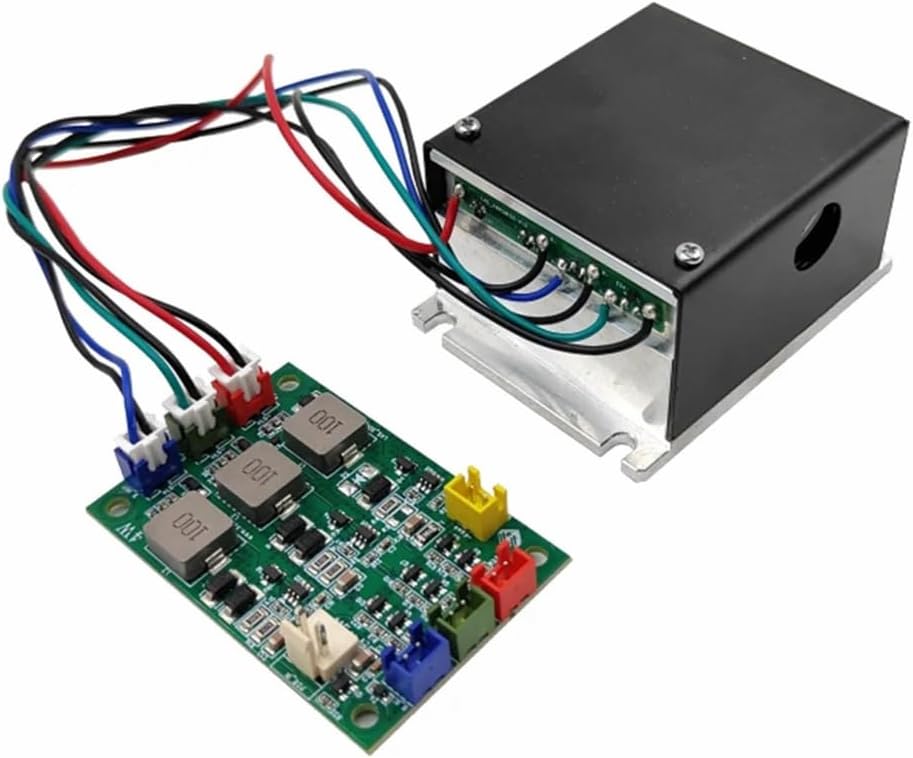
Figure 2: Another view of the YILUBAO RGB-5000 Laser Module, highlighting the connection points between the laser head and the control board. The laser head is a black rectangular unit, and the control board is green with integrated circuits.
5. Setup and Installation
The YILUBAO RGB-5000 Laser Module is designed for straightforward integration. Ensure all safety precautions are understood and followed before proceeding.
5.1 Power Connection
- Power Supply: Connect a stable 12V DC power supply to the designated input terminals on the control board. Ensure the polarity is correct. The module requires a rated power consumption of 65W.
- Conductor Length: The module comes with a 250mm conductor length for connections. Plan your installation accordingly.
5.2 Signal Connection (TTL Modulation)
The module supports TTL modulation for controlling laser output. Connect your TTL signal source to the appropriate input pins on the control board. Refer to the wiring diagram (if provided separately by manufacturer) for specific pin assignments for Red, Green, and Blue laser control.
5.3 Mounting
Securely mount the laser module and its control board in a stable position. Ensure adequate air circulation around the module, although external heat dissipation is not explicitly required due to its integrated design. Avoid mounting in areas subject to excessive vibration or extreme temperatures outside the suggested operating range (-10°C to 40°C).
6. Operating Instructions
Once properly installed and connected, the YILUBAO RGB-5000 Laser Module can be operated as follows:
- Power On: Apply 12V DC power to the module. The integrated driver will initialize the laser.
- Laser Control: Use your TTL modulation source to control the intensity and color of the laser output. The module features individual control for Red (638nm), Green (520nm), and Blue (445nm) lasers, allowing for a wide range of color mixing.
- Beam Characteristics: The module produces a circular spot with a divergence angle of ≤ 2mrad, ensuring a thin and clear light spot suitable for various applications.
- Continuous Operation: The module is designed for continuous operation for up to 24 hours within its specified temperature range.
Important: Always ensure laser safety protocols are in place during operation. Never leave the laser unattended when active.
7. Maintenance
The YILUBAO RGB-5000 Laser Module is designed for a long service life of 10,000 hours with minimal maintenance. However, regular checks can help ensure optimal performance and longevity.
- Cleaning: Periodically inspect the laser output aperture for dust or debris. Gently clean with a lint-free cloth and optical cleaning solution if necessary. Avoid touching the optical surfaces directly.
- Connections: Ensure all electrical connections remain secure and free from corrosion.
- Environmental Conditions: Operate the module within the specified temperature range (-10°C to 40°C) and avoid high humidity environments.
- Inspection: Visually inspect the module for any signs of physical damage or overheating.
Note: Do not attempt to open the laser module housing. There are no user-serviceable parts inside.
8. Troubleshooting
If you encounter issues with your YILUBAO RGB-5000 Laser Module, refer to the following common problems and solutions:
| Problem | Possible Cause | Solution |
|---|---|---|
| No laser output | No power supply Incorrect voltage/polarity Faulty signal connection Module failure | Verify 12V DC power supply is connected and active. Check power supply voltage and ensure correct polarity. Inspect TTL signal connections for proper wiring. If all connections are correct, contact support. |
| Weak or inconsistent laser output | Unstable power supply Dirty optical aperture Signal issues | Ensure power supply stability (± 5% input stability required). Clean the laser output aperture carefully. Check the stability and integrity of the TTL modulation signal. |
| Incorrect color output | Incorrect TTL signal wiring Faulty control signal | Verify the wiring for individual R, G, B TTL signals. Test the control signal source. |
| Module overheating | Operating outside temperature range Insufficient air circulation | Ensure ambient temperature is within -10°C to 40°C. Verify the module is not enclosed in a way that restricts airflow. |
If the problem persists after attempting these solutions, please contact YILUBAO customer support for further assistance.
9. Warranty and Support
For warranty information and technical support, please refer to the documentation provided with your purchase or visit the official YILUBAO website. Keep your purchase receipt as proof of purchase for warranty claims.
Contact Information:
- Brand: YILUBAO
- Manufacturer: YILUBAO
- For the latest support information, please visit the YILUBAO Store on Amazon.
Ask a question about this manual
Ask about setup, troubleshooting, compatibility, parts, safety, or missing instructions. Manuals+ will review the question and use this page’s manual context to help answer it.