
1. Introduction
This manual provides essential instructions for the safe and efficient installation, operation, and maintenance of your wriboard Upgraded 50A 10 Circuit Transfer Switch Kit. Please read this manual thoroughly before installation and use, and retain it for future reference. This transfer switch kit is designed to safely connect a portable generator to your home's electrical system, allowing you to power essential circuits during outages.
2. Safety Information
WARNING: Electrical shock hazard. Installation and service must be performed by a qualified electrician in accordance with all national and local electrical codes. Failure to follow these instructions can result in serious injury or death.
- Always disconnect power before working on the transfer switch or associated wiring.
- Ensure the generator is properly grounded.
- Never operate the generator indoors or in enclosed spaces due to carbon monoxide risk.
- Verify all connections are secure and correct before restoring power.
- This unit is ETL Listed, meeting recognized safety standards.
3. Product Overview and Features
The wriboard 50A 10 Circuit Transfer Switch Kit is a pre-wired system designed for ease of installation and reliable performance. It includes 10 switches and circuit breakers to manage power distribution from a generator to selected circuits in your home.
Key Features:
- ETL Listed: Meets safety and performance standards.
- 10 Circuits: Provides power to up to 10 essential circuits.
- Pre-Wired Design: Simplifies installation with clear and tidy wiring.
- SS2-50P Power Input Box: Allows direct connection of an external generator through the wall.
- Dual Digital Display Power Meters: Monitors electricity consumption (voltmeter, ammeter, power meter, watt-hour meter).
- Durable Construction: Heavy-duty galvanized steel with NEMA 3R housing and IP67 waterproof rating for indoor and outdoor use in various weather conditions.
Digital Display Power Meter
The kit includes two digital display power meters that provide real-time monitoring of electrical parameters. These meters feature a direct digital display, storage, memory, and reset functions, allowing you to track electricity usage without opening the main enclosure.
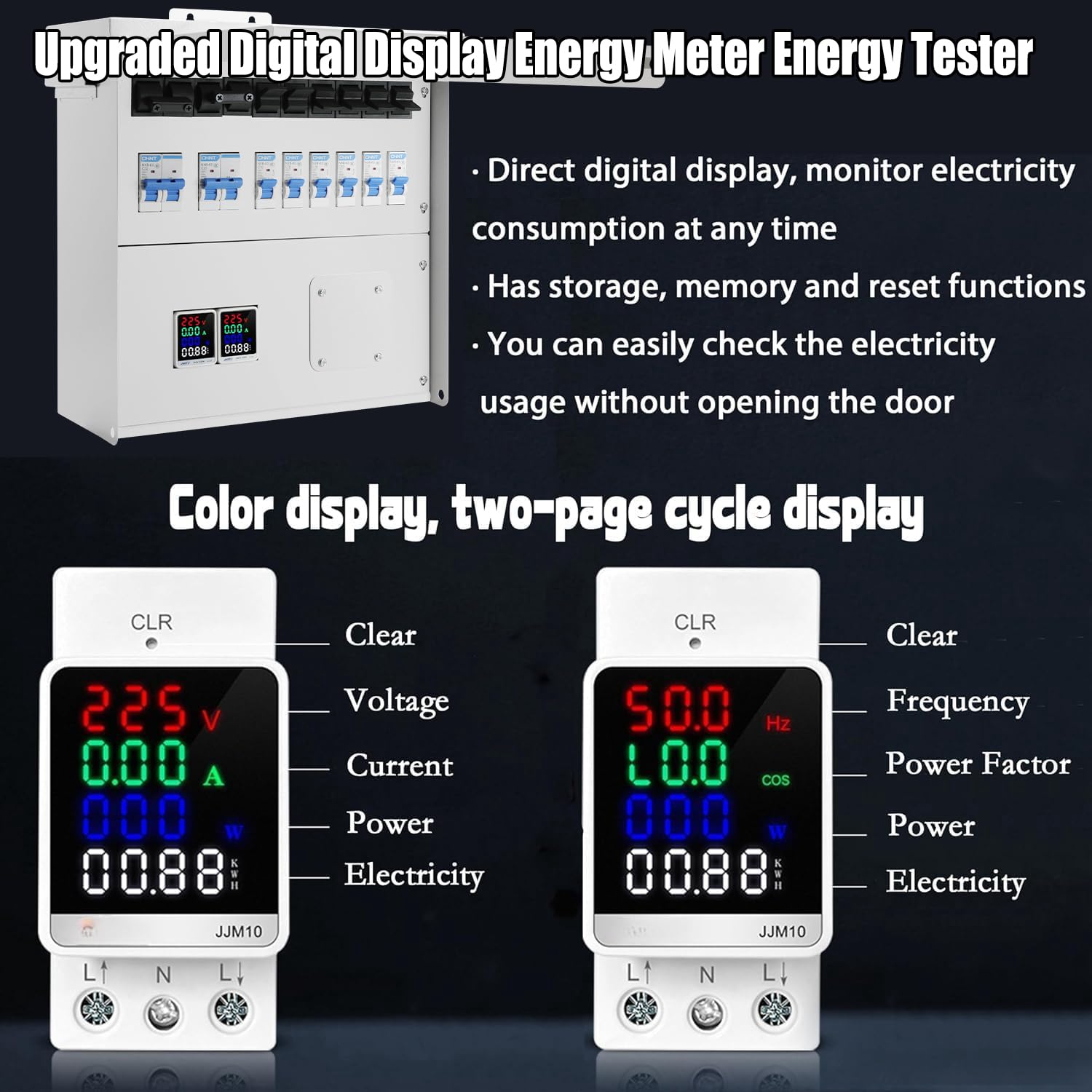
Image: Detailed view of the digital display power meters. The left meter shows Voltage (V), Current (A), Power (W), and Electricity (kWh). The right meter shows Frequency (Hz), Power Factor (cos), Power (W), and Electricity (kWh). Both displays include a 'CLR' button for clearing readings.
4. Setup and Installation
Installation of the wriboard transfer switch kit should be performed by a qualified electrician. The kit is pre-wired to simplify the process.
Installation Steps:
- Mounting the Transfer Switch: Select a suitable indoor location for the transfer switch panel, typically near your main electrical panel. Ensure adequate clearance for wiring and access. Securely mount the panel to a wall using appropriate fasteners.
- Mounting the Power Inlet Box: Choose an outdoor location for the SS2-50P power inlet box, preferably near where the generator will be operated. This box transmits power from the external generator directly through the wall to the indoor transfer switch. Ensure the location is accessible and protected from direct impact.
- Wiring Connections:
- Connect the pre-wired circuits from the transfer switch to the corresponding circuits in your main electrical panel.
- Connect the power inlet box to the transfer switch using appropriate conduit and wiring, following local electrical codes.
- Ensure all ground and neutral connections are correctly made.
- Generator Connection: The generator connects directly to the SS2-50P power inlet box using a compatible generator cord.

Image: Illustration of a generator connected to the transfer switch kit, distributing power to essential household appliances such as a water heater, lighting, refrigerator, and oven.

Image: This image shows the transfer switch kit used in combination with the power inlet box. An outdoor generator is connected to the power inlet box, which then transmits power directly through the wall to the indoor transfer switch.

Image: A generator connected directly to the power input box, which is mounted on the exterior of a building, ready to supply power.
5. Operating Instructions
Follow these steps to safely operate your transfer switch kit during a power outage:
- Prepare Generator: Ensure your generator is fueled, in good working condition, and placed in a well-ventilated outdoor area away from windows and doors.
- Connect Generator: Plug the generator power cord into the SS2-50P power inlet box.
- Start Generator: Start your generator according to its manufacturer's instructions. Allow it to warm up for a few minutes.
- Transfer Power: Inside the transfer switch panel, move the individual circuit switches from the 'LINE' (utility) position to the 'GEN' (generator) position for the circuits you wish to power. Do not overload the generator.
- Monitor Usage: Use the digital display power meters to monitor voltage, current, and power consumption to ensure the generator is not overloaded.
- Shut Down: When utility power is restored, reverse the process: move circuit switches from 'GEN' to 'LINE', then shut down the generator, and finally disconnect the generator cord.
6. Maintenance
Regular maintenance ensures the longevity and safe operation of your transfer switch kit.
- Periodic Inspection: Annually inspect all wiring connections for tightness and signs of corrosion or damage.
- Cleanliness: Keep the transfer switch enclosure and power inlet box clean and free of debris. Use a dry cloth for cleaning. Do not use abrasive cleaners or solvents.
- Environmental Protection: The NEMA 3R housing and IP67 waterproof rating provide protection against rain, sleet, snow, and external ice formation, making it suitable for outdoor use in various weather conditions.

Image: The power inlet box and enclosure are shown in rainy conditions, emphasizing their NEMA 3R enclosure and IP67 waterproof rating, confirming suitability for use in any weather.
7. Troubleshooting
If you encounter issues with your transfer switch kit, refer to the following common problems and solutions:
| Problem | Possible Cause | Solution |
|---|---|---|
| No power to circuits when on 'GEN' | Generator not running, generator circuit breaker tripped, transfer switch circuit breaker tripped, faulty connection. | Check generator fuel/oil, reset generator breaker, reset transfer switch breaker, inspect wiring (qualified electrician). |
| Digital display not showing readings | No power to the meter, meter malfunction. | Ensure power is supplied to the transfer switch. If problem persists, contact support. |
| Overload indication on digital display | Too many appliances connected to the generator. | Disconnect non-essential appliances. Ensure total load does not exceed generator capacity. |
8. Specifications
| Feature | Specification |
|---|---|
| Model Number | syt-23-11-21-01 |
| Product Dimensions | 34.8 x 16 x 57.4 cm |
| Weight | 8.5 kg |
| Brand | wriboard |
| Material | Metal (Heavy-duty galvanized steel) |
| Number of Circuits | 10 |
| Phase Type | Single Phase |
| Waterproof Rating | IP67 |
| Enclosure Rating | NEMA 3R |
| Power Input | SS2-50P |
9. Warranty and Support
For warranty information or technical support, please contact the manufacturer, wriboard, directly. Refer to the product packaging or the seller's website for specific contact details and warranty terms.