
CARPSDZY 8670
Instruction Manual for CARPSDZY 8670 Top Cover Housing with Scan Lens and Cable
For Honeywell 8670 Ring Barcode Scanner
1. Product Overview
This manual provides detailed instructions for the installation, operation, and maintenance of the CARPSDZY 8670 Top Cover Housing with Scan Lens and Coiled Cable, designed as a replacement part for the Honeywell 8670 Ring Barcode Scanner.
The product is engineered to restore the functionality and durability of your Honeywell 8670 scanner, featuring a robust housing, a high-transparency scan lens, and a reliable coiled cable for stable data transmission.
Key Features:
- Perfectly Compatible: Specifically designed for the Honeywell 8670 ring barcode scanner, ensuring a precise fit and full functionality.
- Sturdy Top Cover: Constructed from high-quality hard plastic to resist scratches and bumps, extending the scanner's lifespan and protecting it from drops.
- High-Quality Scan Lens: Made from high-transparency material with excellent penetration for fast and efficient scanning, improving work efficiency.
- High-Safety Coiled Cable: Ensures stable and smooth data transmission. The coiled design allows for comfortable expansion and contraction during use, enhancing safety and user experience.

Figure 1: Complete assembly of the CARPSDZY 8670 Top Cover Housing, Scan Lens, and Coiled Cable.
2. Specifications
| Attribute | Value |
|---|---|
| Brand | CARPSDZY |
| Compatible Devices | Honeywell 8670 Ring Barcode Scanner |
| Material (Top Cover) | High-quality Hard Plastic |
| Material (Scan Lens) | High-quality Glass |
| Cable Type | Coiled Cable |
| Item Weight | 0.634 ounces |
| Package Dimensions | 3.78 x 2.17 x 1.26 inches |
| ASIN | B0CNQYVTS9 |
3. Setup and Installation
This product is a replacement part. Installation requires careful handling and may involve disassembling the existing Honeywell 8670 ring barcode scanner. It is recommended that this procedure be performed by individuals familiar with electronic device repair or by following detailed repair guides specific to the Honeywell 8670 scanner.
Required Tools (Not Included):
- Small Phillips head screwdriver
- Prying tool (plastic spudger recommended)
- Anti-static wrist strap (recommended)
Installation Steps:
- Power Off and Disconnect: Ensure the Honeywell 8670 scanner is completely powered off and disconnected from any power source or host device before beginning.
- Access Internal Components: Carefully open the existing scanner housing. This typically involves removing screws and gently prying open the casing. Refer to a specific service manual or repair guide for the Honeywell 8670 for precise instructions on opening the device.
- Disconnect Old Components: Locate the existing top cover, scan lens, and cable assembly. Carefully disconnect the cable connector from the scanner's circuit board. Note the orientation of the connector.
- Remove Old Housing: Detach the old top cover and scan lens assembly from the scanner's main body.
- Install New Housing and Lens: Position the new CARPSDZY top cover housing and scan lens onto the scanner's main body. Ensure it aligns correctly with mounting points.
- Connect New Cable: Carefully connect the new coiled cable's connector to the corresponding port on the scanner's circuit board. Ensure the connection is secure and correctly oriented.
- Secure Housing: Close the scanner housing, ensuring all internal components are properly seated and no cables are pinched. Reinsert and tighten any screws removed earlier.
- Initial Test: After reassembly, connect the scanner to a host device and power it on. Perform a test scan to verify proper functionality of the new scan lens and cable.

Figure 2: View of the top cover housing from the underside, showing the internal cable connection point.

Figure 3: Side profile of the replacement part, highlighting the coiled cable and housing.

Figure 4: Top view of the replacement part, showing the scan lens and the coiled cable extending from the housing.
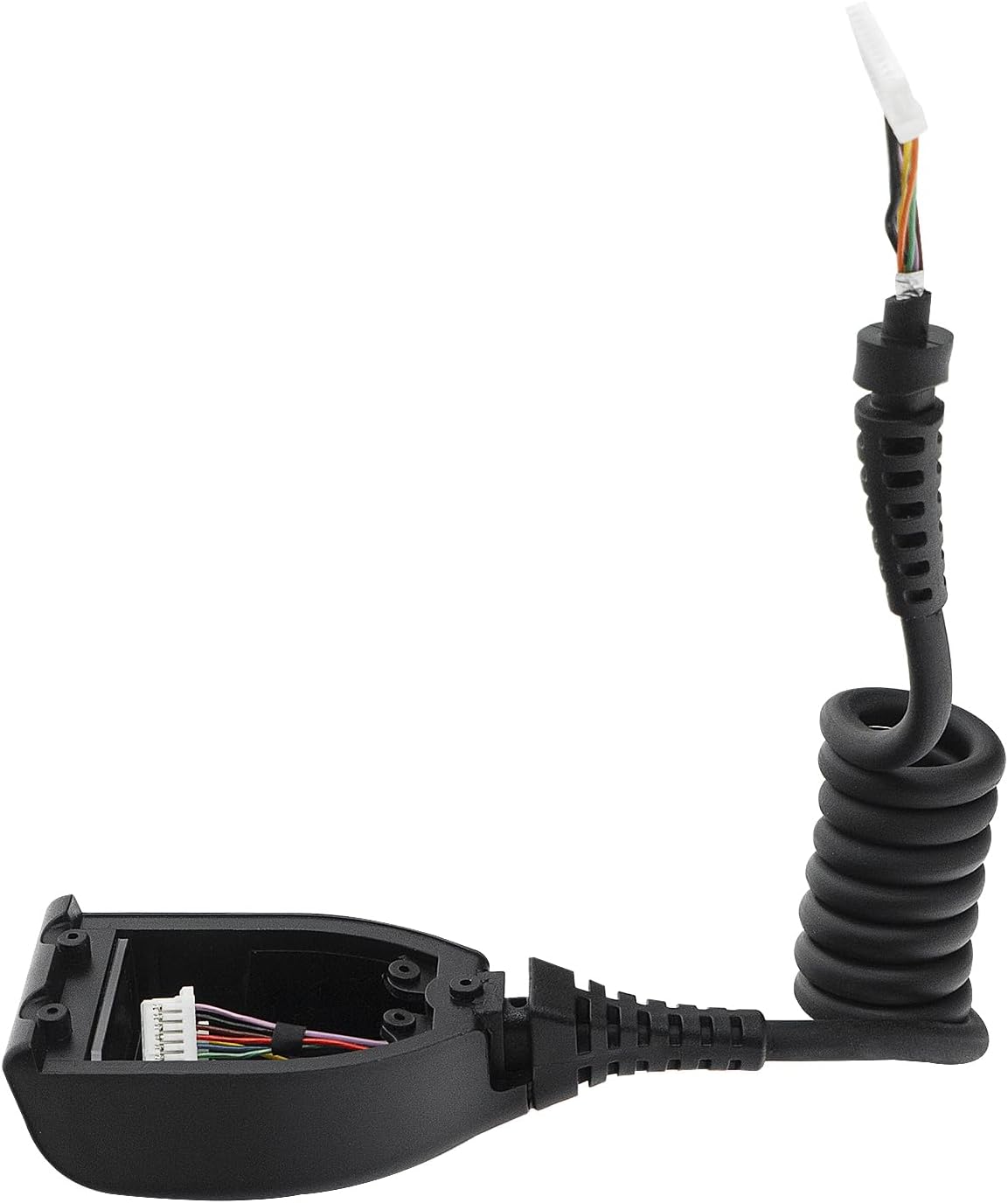
Figure 5: Bottom view of the housing, displaying a warning label related to laser safety.

Figure 6: An angled view showing the separated housing and the cable with its connector, illustrating how they fit together.
4. Operating Instructions (Post-Installation)
Once the CARPSDZY 8670 Top Cover Housing with Scan Lens and Cable is successfully installed, the operation of your Honeywell 8670 Ring Barcode Scanner should return to its intended functionality. This section outlines general operational considerations related to the newly installed components.
Ensuring Optimal Performance:
- Scan Lens Clarity: The new scan lens is designed for high transparency. Ensure it remains clean and free of smudges or debris for optimal scanning performance.
- Cable Functionality: The coiled cable provides flexibility. Ensure it is not excessively stretched or tangled during use to maintain stable data transmission and prevent damage.
- Secure Connection: Verify that the cable connection to the scanner's internal board remains secure. A loose connection can lead to intermittent scanning issues.
- Environmental Considerations: Operate the scanner within the environmental specifications recommended by Honeywell for the 8670 model. Extreme temperatures or humidity can affect the performance and longevity of all components, including the new replacement parts.
5. Maintenance
Proper maintenance of the CARPSDZY 8670 replacement parts will ensure their longevity and the continued optimal performance of your Honeywell 8670 Ring Barcode Scanner.
Cleaning and Care:
- Scan Lens:
- Gently wipe the scan lens with a soft, lint-free cloth.
- For stubborn smudges, lightly dampen the cloth with a mild, non-abrasive glass cleaner or isopropyl alcohol. Avoid spraying liquids directly onto the lens or housing.
- Do not use abrasive materials or harsh chemicals, as these can scratch or damage the lens surface.
- Housing:
- Clean the plastic housing with a soft, damp cloth.
- Avoid using solvents or strong cleaning agents that could degrade the plastic.
- Cable:
- Inspect the coiled cable periodically for any signs of wear, fraying, or damage.
- Avoid sharp bends or excessive pulling on the cable, especially near the connectors.
Storage:
When not in use, store the scanner in a clean, dry environment, away from direct sunlight and extreme temperatures, to protect all components, including the replacement parts.
6. Troubleshooting
This section addresses common issues that may arise after installing the CARPSDZY 8670 Top Cover Housing with Scan Lens and Cable. If you encounter problems not listed here, please refer to the "Warranty and Support" section for assistance.
| Problem | Possible Cause | Solution |
|---|---|---|
| Scanner not powering on after installation. | Cable not properly connected internally. | Carefully re-open the housing and ensure the cable connector is fully seated and correctly oriented on the circuit board. |
| Scanner powers on but does not scan. |
|
|
| Intermittent scanning or data transmission issues. |
|
|
| Physical damage to the new housing or lens. | Impact or improper handling. | While the housing is sturdy, severe impacts can cause damage. Avoid dropping the scanner. Replacement of the damaged part may be necessary. |
7. Warranty and Support
CARPSDZY is committed to providing high-quality products and excellent customer service. We conduct 100% quality inspection and perfect packaging before shipping to ensure you receive a product in optimal condition.
Customer Support:
If you have any questions regarding the CARPSDZY 8670 Top Cover Housing with Scan Lens and Cable, or if you encounter any issues during installation or use, please do not hesitate to contact us. We aim to provide a satisfactory solution within 24 hours of your inquiry.
Please refer to your purchase documentation or the seller's contact information on the platform where you purchased the product for specific contact methods.
Ask a question about this manual
Ask about setup, troubleshooting, compatibility, parts, safety, or missing instructions. Manuals+ will review the question and use this page’s manual context to help answer it.