
Introduction
This instruction manual provides essential information for the safe and effective installation, operation, and maintenance of your SwarKing BP4K replacement battery for the Xiaomi Poco X5 Pro 5G. Please read this manual thoroughly before proceeding with the battery replacement to ensure proper function and safety.
Safety Information
Lithium-ion batteries require careful handling. Adhere to the following safety guidelines:
- Warning: It is dangerous to disassemble the battery yourself. Do not attempt to open the battery casing.
- Use only approved charging adapters.
- Do not disassemble, puncture, crush, tear, or burn the battery. Improper handling can lead to fire, explosion, or other hazards.
- Keep the battery away from extreme temperatures, direct sunlight, and liquids.
- Dispose of old batteries responsibly according to local regulations.
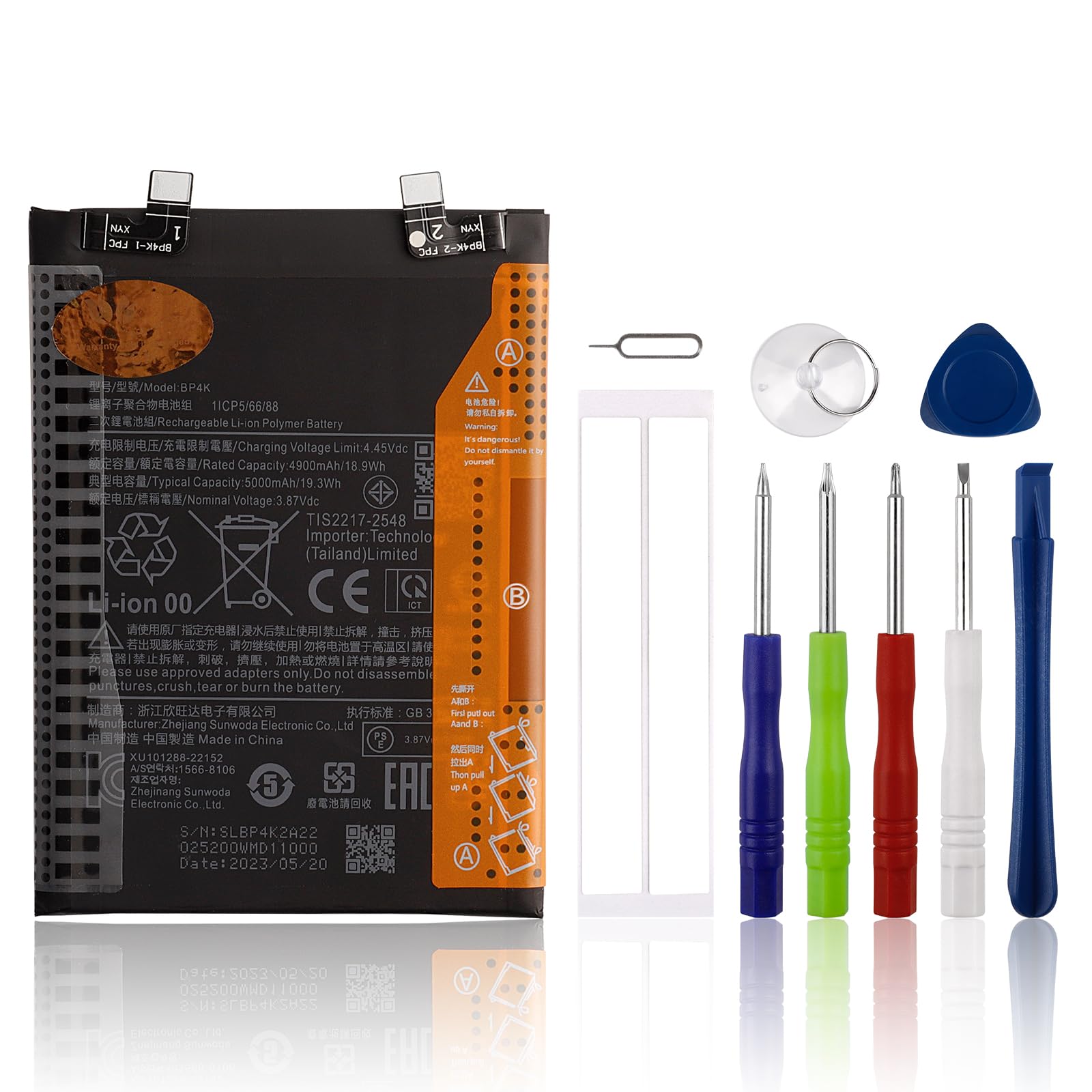
Package Contents
Verify that your package contains the following items:
- 1 x SwarKing Grade A+ Replacement Battery (Model: BP4K)
- 1 x Set of Tool Kit for battery replacement

Setup and Installation
Replacing a phone battery requires technical skill and proper tools. It is recommended to proceed with caution or seek professional assistance if you are unsure.
- Verify Compatibility: Before starting, ensure the model number on your phone's original battery matches BP4K. This replacement battery is specifically compatible with the Xiaomi Poco X5 Pro 5G.
- Gather Tools: Use the provided tool kit for disassembly and reassembly.
- Consult Video Guides: This package does not include printed installation instructions. It is highly recommended to watch professional video guides on platforms like YouTube for detailed, step-by-step instructions specific to replacing the battery in the Xiaomi Poco X5 Pro 5G. Search for "Xiaomi Poco X5 Pro 5G battery replacement BP4K".
- Power Off Device: Ensure your phone is completely powered off before beginning any disassembly.
- Careful Disassembly: Follow the video guide carefully to open your phone and disconnect the old battery. Pay close attention to ribbon cables and connectors.
- Install New Battery: Connect the new SwarKing BP4K battery, ensuring the connectors are properly seated. The battery is designed to be the same size as your original for easy installation.
- Reassemble Device: Carefully reassemble your phone, ensuring all components are correctly placed and secured.

Operating and Initial Use
After successful installation, follow these steps for optimal battery performance:
- First Charge: Fully charge the new battery before its first use.
- Battery Calibration: A new Li-ion battery will achieve its best performance after 2 to 30 complete charge and discharge cycles. This process helps calibrate the battery's charge indicator.
- Regular Charging: Avoid letting the battery completely drain to 0% frequently. Charge your phone when the battery level is low.
Maintenance
To prolong the life and performance of your SwarKing BP4K battery:
- Avoid Extreme Temperatures: Do not expose your phone to very high or very low temperatures, as this can degrade battery health.
- Use Original or Certified Chargers: Always use the original charger or a certified third-party charger compatible with your device.
- Store Properly: If storing the phone for an extended period, ensure the battery is charged to around 50% and store it in a cool, dry place.
Troubleshooting
If you encounter issues after replacing your battery, consider the following:
- Phone Not Turning On: Double-check all internal connections, especially the battery connector. Ensure the battery has some charge.
- Battery Drains Quickly: Perform several charge/discharge cycles to calibrate the battery. Check for background apps consuming excessive power.
- Phone Shuts Down Unexpectedly: This could indicate a loose connection or a faulty battery. Re-open the phone to check connections.
- Charging Issues: Ensure your charging cable and adapter are functioning correctly. Check the phone's charging port for debris.

Specifications
| Part Number | BP4K |
| Battery Type | Lithium Polymer |
| Typical Capacity | 5000 mAh / 19.3 Wh |
| Rated Capacity | 4900 mAh / 18.9 Wh |
| Nominal Voltage | 3.87 Vdc |
| Charging Voltage Limit | 4.45 Vdc |
| Reusability | Rechargeable |
| Battery Weight | Approximately 100 Grams |
Warranty and Support
SwarKing is committed to customer satisfaction. If you experience any quality-related issues with your replacement battery, please contact us for support.
- Quality Assurance: Each battery undergoes strict quality control standards and is certified with UL, CE, and RoHS.
- Customer Service: For any concerns, we aim to provide a reasonable solution, including replacement or a full refund, if you are not 100% satisfied during the warranty period. We will respond to inquiries within 51 hours.
- Return Policy: A 30-day return policy is available for this product.