
Beko CF200EWN
Beko CF200EWN Horizontal Static Freezer
User Manual
Product Overview
The Beko CF200EWN is a horizontal static chest freezer designed for efficient and reliable frozen food storage. With a net volume of 198 liters, it offers ample space for your freezing needs. This appliance features electronic controls for precise temperature management and comes in a clean white finish, making it a practical addition to any home.

Figure 1: Front view of the Beko CF200EWN Horizontal Static Freezer. This image shows the overall design of the freezer, highlighting its compact and functional form factor.
Key Features:
- Horizontal Freezer: Optimal design for chest-style frozen storage.
- E-Class Energy Efficiency: Designed for energy-conscious operation.
- Static Cooling System: Reliable and consistent freezing performance.
- 198 Liters Net Volume: Generous storage capacity for various food items.
- Electronic Control: Easy and precise temperature adjustments.
- White Finish: A classic and versatile aesthetic.
- Compact Dimensions: Measuring 84.5 cm (H) x 90.5 cm (W) x 54.5 cm (D), suitable for various spaces.
Setup and Installation
1. Unpacking
Carefully remove all packaging materials, including protective films and tapes. Inspect the freezer for any signs of damage during transit. If damage is found, do not proceed with installation and contact your retailer immediately.
2. Placement
- Place the freezer on a firm, level surface to ensure stability and proper operation.
- Ensure adequate ventilation around the appliance. Leave at least 10 cm of space on the sides and back, and 30 cm above the unit for proper air circulation.
- Avoid placing the freezer in direct sunlight or near heat sources such as ovens, radiators, or stoves, as this can affect its cooling efficiency and energy consumption.
- The appliance is designed for indoor use only.

Figure 2: Front angle view of the Beko CF200EWN Horizontal Static Freezer. This perspective helps visualize the overall size and design for placement considerations.
3. Initial Cleaning
Before first use, clean the interior of the freezer with a solution of mild detergent and warm water. Wipe dry thoroughly with a soft cloth. Do not use abrasive cleaners or solvents.
4. Power Connection
Plug the freezer into a dedicated grounded electrical outlet. Allow the appliance to stand for at least 2-4 hours before plugging it in to allow the refrigerant to settle. This helps prevent damage to the cooling system.
Operating Instructions
Control Panel Overview

Figure 3: Detailed view of the electronic control panel on the Beko CF200EWN freezer. It features indicators for MIN, NORMAL, MAX, SUPER modes, a RUNNING light, and buttons for SET and OFF/3'S.
The electronic control panel allows you to manage the freezer's temperature settings and monitor its status.
- Temperature Indicators (MIN, NORMAL, MAX, SUPER): These lights indicate the current temperature setting.
- MIN: Least cold setting.
- NORMAL: Standard operating temperature for general use.
- MAX: Colder setting for faster freezing or warmer ambient conditions.
- SUPER: Activates the Super Freeze function for rapid freezing of fresh food.
- RUNNING Indicator: This light illuminates when the compressor is actively running to cool the freezer.
- SET Button: Press this button to cycle through the temperature settings (MIN, NORMAL, MAX, SUPER).
- OFF/3'S Button: Press and hold this button for approximately 3 seconds to turn the freezer off or on.
Setting the Temperature
- Ensure the freezer is plugged in and powered on.
- Press the SET button repeatedly to select your desired temperature mode. The corresponding indicator light (MIN, NORMAL, MAX, SUPER) will illuminate.
- For general storage, the NORMAL setting is recommended.
- Use the SUPER setting when adding a large quantity of fresh food to be frozen. This function rapidly lowers the temperature to freeze food quickly, preserving its quality. The SUPER function typically deactivates automatically after a certain period (e.g., 24-48 hours) or can be manually deselected by pressing SET again.
Powering On/Off
To turn the freezer ON or OFF, press and hold the OFF/3'S button for approximately 3 seconds. The display lights will indicate the power status.
Maintenance
Cleaning the Freezer
- Always unplug the freezer before cleaning.
- Clean the interior and exterior surfaces regularly with a soft cloth and a mild, non-abrasive detergent solution.
- Pay attention to the door seal; clean it with warm water to ensure it remains flexible and seals properly.
- Do not use harsh chemicals, abrasive cleaners, or sharp objects, as these can damage the surfaces.
- Clean the condenser coils at the back or bottom of the freezer (if accessible) periodically to ensure efficient operation. Use a soft brush or vacuum cleaner to remove dust and debris.
Defrosting
This is a static freezer, meaning ice will accumulate on the interior walls over time. Defrost the freezer when the ice layer reaches a thickness of about 0.5 cm to 1 cm to maintain efficiency and storage capacity.
- Unplug the freezer from the power outlet.
- Remove all food items and store them in another freezer or cooler to keep them frozen.
- Leave the lid open to allow the ice to melt naturally. You can place towels at the bottom to absorb melting water.
- Do not use sharp objects or heating devices (e.g., hair dryers) to speed up the defrosting process, as this can damage the freezer.
- Once all ice has melted, clean and dry the interior thoroughly before plugging the freezer back in and returning food items.

Figure 4: Top view of the Beko CF200EWN freezer with its lid open, showing the interior space. This view is useful for understanding the capacity and for defrosting procedures.
Troubleshooting
Before contacting service, please check the following common issues and their potential solutions:
| Problem | Possible Cause | Solution |
|---|---|---|
| Freezer does not operate. | No power supply; power cord not plugged in; circuit breaker tripped. | Check power outlet and plug; reset circuit breaker. |
| Freezer is not cold enough. | Temperature setting too high; door not closed properly; excessive ice build-up; poor ventilation. | Adjust temperature setting to a colder mode (e.g., MAX or SUPER); ensure door is fully closed; defrost the freezer; ensure adequate space around the unit. |
| Excessive noise. | Freezer not level; objects vibrating against the unit; normal compressor operation. | Adjust leveling feet; ensure no objects are touching the freezer; some noise from the compressor and refrigerant is normal. |
| Water on the floor. | Drain plug not properly sealed during defrosting; excessive humidity. | Ensure drain plug is securely in place; wipe up any spills immediately. |
If the problem persists after checking these points, please contact authorized service personnel.
Specifications
| Feature | Detail |
|---|---|
| Brand | Beko |
| Model Number | CF200EWN |
| Type | Horizontal Static Freezer |
| Net Volume | 198 Liters |
| Energy Efficiency Class | E |
| Control Type | Electronic |
| Color | White |
| Product Dimensions (H x W x D) | 84.5 x 90.5 x 54.5 cm |
| Item Weight | 31 kg |
| Door Material Type | Stainless Steel |
| Door Direction | Top |
| Voltage | 220 VAC |
| Installation Type | Freestanding |

Figure 5: Energy efficiency label for the Beko CF200EWN freezer, indicating its E-class rating and annual energy consumption.
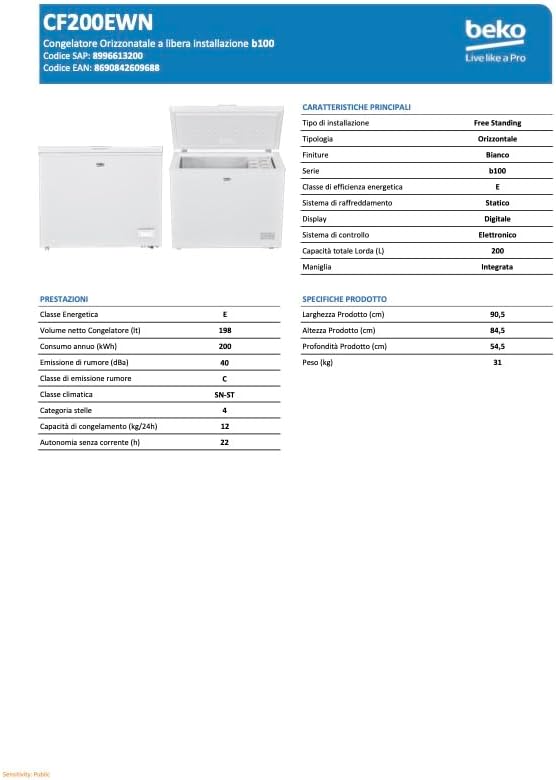
Figure 6: Technical specifications sheet for the Beko CF200EWN freezer, providing detailed product characteristics and performance data.
Warranty and Support
This Beko appliance comes with a manufacturer's warranty. Please refer to the warranty card included with your product for specific terms and conditions, including warranty period and coverage details. Keep your proof of purchase for warranty claims.
For technical support, service requests, or to order spare parts, please contact Beko customer service. Contact information can typically be found on the Beko official website or in the documentation provided with your appliance.
When contacting support, please have your product model number (CF200EWN) and serial number ready. The serial number is usually located on a label inside the freezer compartment or on the back of the unit.
Related Documents - CF200EWN
 |
Beko Chest Freezer CF100EWN, CF200EWN, CF316EWN - User Manual and Safety Guide Comprehensive instruction manual for Beko Chest Freezers (CF100EWN, CF200EWN, CF316EWN), covering safety information, installation, daily use, troubleshooting, and disposal. Learn how to operate and maintain your Beko freezer efficiently and safely. |
 |
Beko Chest Freezer Instruction Manual - Models CF100EWN to CF380EIWN User manual and safety instructions for Beko Chest Freezer models CF100EWN, CF200EWN, CF200CWN, CF200DWN, CF316EWN, CF316EIWN, CF380EWN, and CF380EIWN. Includes installation, operation, maintenance, and troubleshooting. |
 |
BEKO Chest Freezer User Manual Comprehensive user manual for BEKO chest freezers, covering installation, operation, maintenance, troubleshooting, and safety guidelines. Includes recycling information. |
 |
BEKO HSA47530N Chest Freezer: User Manual and Operating Instructions This user manual provides comprehensive instructions for the BEKO HSA47530N Chest Freezer, covering setup, operation, maintenance, safety, and troubleshooting. Learn how to use and care for your BEKO chest freezer. |
 |
Beko HSM29540 Chest Freezer - Instruction Manual Official instruction manual for the Beko HSM29540 chest freezer. Includes setup, operation, maintenance, safety advice, and troubleshooting in multiple languages. |
 |
Beko 3106 G Chest Freezer User Manual and Instructions Comprehensive instruction manual for the Beko 3106 G chest freezer, covering setup, operation, maintenance, safety, troubleshooting, and recycling information. Includes details on energy efficiency and product specifications. |
Ask a question about this manual
Ask about setup, troubleshooting, compatibility, parts, safety, or missing instructions. Manuals+ will review the question and use this page’s manual context to help answer it.