1. Introduction
This document provides instructions for the use and maintenance of your replacement remote control for Akai Smart 4K UHD LCD LED HDTVs. This remote is designed as a direct replacement for the original remote controls of the specified Akai TV models. Please note that while it is a functional replacement, some advanced or specific functions present on your original remote may not be fully replicated.
Compatible Akai TV Models:
- AKTV3228-SMART
- AKTV4029SMART
- AKTV4328H
- AKTV433-SMART
- AKTV5539H-UHD-SMART
- AKTV2214T
- AKTV405T
If your specific Akai TV model is not listed above, this replacement remote may not be fully compatible. It is crucial to verify compatibility before use.
2. Setup
2.1. Battery Installation
The remote control requires 1 AAA battery (not included) for operation. Follow these steps to install the batteries:
- Locate the battery compartment on the back of the remote control.
- Slide the battery compartment cover downwards or press the latch and lift to open.
- Insert 1 AAA battery, ensuring the positive (+) and negative (-) terminals align correctly with the markings inside the compartment.
- Replace the battery compartment cover by sliding it back into place until it clicks securely.

Figure 2.1: Rear view of the remote control with the battery cover removed, illustrating the battery compartment where 1 AAA battery should be inserted.
2.2. Initial Use
This replacement remote control is an infrared (IR) device and typically does not require programming. Once batteries are correctly installed, point the remote directly at your Akai TV and press the Power button to test its functionality. Ensure there are no obstructions between the remote and the TV's IR receiver.
3. Operating Instructions
The remote control features standard buttons for navigating your Akai TV. Below is a general overview of common button functions. Please refer to your Akai TV's original manual for specific functions or advanced features.
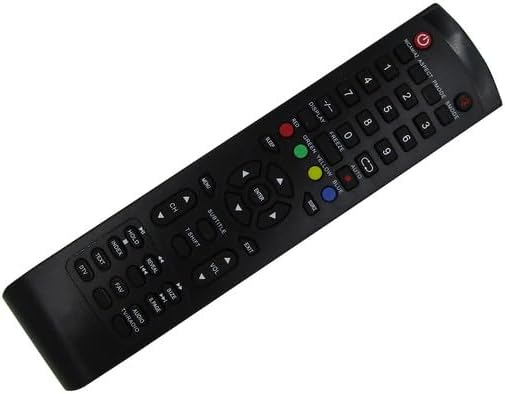
Figure 3.1: Front view of the replacement remote control, displaying the layout of all buttons.
3.1. Key Functions Overview
- Power Button (●): Turns the TV on or off.
- Number Buttons (0-9): Directly select channels.
- Volume Up/Down (VOL +/-): Adjusts the TV's volume level.
- Channel Up/Down (CH +/-): Changes the TV channel.
- Menu: Accesses the TV's main menu.
- Navigation Buttons (Up, Down, Left, Right, Enter): Used to navigate through menus and confirm selections.
- Exit: Exits the current menu or on-screen display.
- Source/Input: Switches between different input sources (HDMI, AV, etc.).
- Color Buttons (Red, Green, Yellow, Blue): Used for specific functions within certain menus or applications, as indicated on the TV screen.
- Subtitle: Toggles subtitles on/off.
- Text: Accesses teletext (if supported by TV and broadcast).
- DTV: Switches to digital TV mode.
- Audio/TV/Radio: Switches between audio modes or TV/Radio channels.
- Display: Shows current channel information.
- Freeze: Freezes the current image on screen.
- Aspect: Adjusts the screen aspect ratio.
- P.MODE: Changes picture mode.
- S.MODE: Changes sound mode.
Important Note: As a replacement remote, not all buttons or functions may operate identically to your original remote, or some specific smart TV features might require the original remote or on-screen navigation. The functionality of certain buttons may depend on your specific Akai TV model and its firmware.
4. Maintenance
4.1. Battery Replacement
When the remote control's range decreases or buttons become unresponsive, it is likely time to replace the battery. Follow the battery installation steps outlined in Section 2.1. Always replace with a fresh 1 AAA battery.
4.2. Cleaning
To clean the remote control, gently wipe its surface with a soft, dry cloth. For stubborn dirt, slightly dampen the cloth with water or a mild, non-abrasive cleaner. Avoid using harsh chemicals, solvents, or abrasive materials, as these can damage the remote's finish or internal components.
4.3. Storage
Store the remote control in a cool, dry place away from direct sunlight, extreme temperatures, and high humidity. If the remote will not be used for an extended period, it is recommended to remove the battery to prevent leakage and potential damage.
5. Troubleshooting
| Problem | Possible Cause | Solution |
|---|---|---|
| Remote control is not working. |
|
|
| Some buttons do not function. |
|
|
| Remote works intermittently. |
|
|
If troubleshooting steps do not resolve the issue, please refer to the Warranty & Support section for further assistance.
6. Specifications
| Feature | Detail |
|---|---|
| Product Type | Replacement Remote Control |
| Compatibility | Akai AKTV3228-SMART, AKTV4029SMART, AKTV4328H, AKTV433-SMART, AKTV5539H-UHD-SMART, AKTV2214T, AKTV405T Smart 4K UHD LCD LED HDTV TV models |
| Power Source | 1 x AAA Battery (not included) |
| Color | Black |
| Max Number of Supported Devices | 1 (Television) |
| Communication | Infrared (IR) |
7. Warranty & Support
This product is typically covered by a 30-day refund/replacement policy from the date of purchase. For any issues, questions, or support needs regarding this replacement remote control, please contact the seller directly through the platform where the purchase was made.
Please provide your order number and a detailed description of the issue when contacting support to ensure a prompt resolution.


