
Garvee SF712A
Garvee 33" Space Heater User Manual
Model: SF712A
1. Product Overview
The Garvee 33-inch Space Heater is a powerful 1500W PTC ceramic tower heater designed to provide efficient and widespread warmth for large rooms up to 200 sq ft. It features a captivating 3D flame effect, 90-degree oscillation for even heat distribution, and convenient remote control operation. This heater is equipped with multiple safety features and an adjustable thermostat to ensure comfort and energy efficiency.

Image 1.1: The Garvee 33-inch space heater, showcasing its sleek design, 90-degree oscillation capability, and included remote control for convenient operation.
2. Important Safety Information
Please read all safety warnings and instructions carefully before using this appliance to prevent fire, electric shock, injury, or property damage. Keep this manual for future reference.
- Tip-Over Protection: The heater is equipped with a built-in tip-over switch that automatically shuts off the unit if it tilts over 50 degrees or is lifted from the ground. This feature enhances safety, especially in homes with children or pets.
- Overheating Protection: An internal safety device automatically shuts off the heater in case of overheating. If this occurs, unplug the heater, wait 30 minutes for it to cool down, and then plug it back in.
- Cool-Touch Exterior: The exterior of the heater remains cool to the touch during operation, ensuring safe handling even after extended use.
- Always plug the heater directly into a wall outlet. Never use with an extension cord or relocatable power tap.
- Do not block air intakes or exhaust openings. Maintain at least 3 feet (0.9 meters) clearance from walls, furniture, and curtains.
- Do not use in bathrooms, laundry areas, or similar indoor locations where water may be present.
- Unplug the heater when not in use.

Image 2.1: Illustration of the heater's dual protection system, including automatic shut-off for tip-over and overheating scenarios, ensuring user safety.

Image 2.2: The heater's tip-over protection feature, showing the unit automatically turning off when tilted, providing peace of mind in households with pets or children.
3. Product Components
Familiarize yourself with the main parts of your Garvee Space Heater:
- Control Panel: Located on the top of the heater, with an LED display for temperature and settings.
- Air Outlet: Front grille where warm air is expelled.
- Air Intake: Rear grille for air circulation.
- 3D Flame Effect Window: Lower front section displaying the simulated flame.
- Base: Stable support for the tower heater.
- Remote Control: For convenient operation from a distance.
- Hidden Handle: Integrated handle for easy portability.
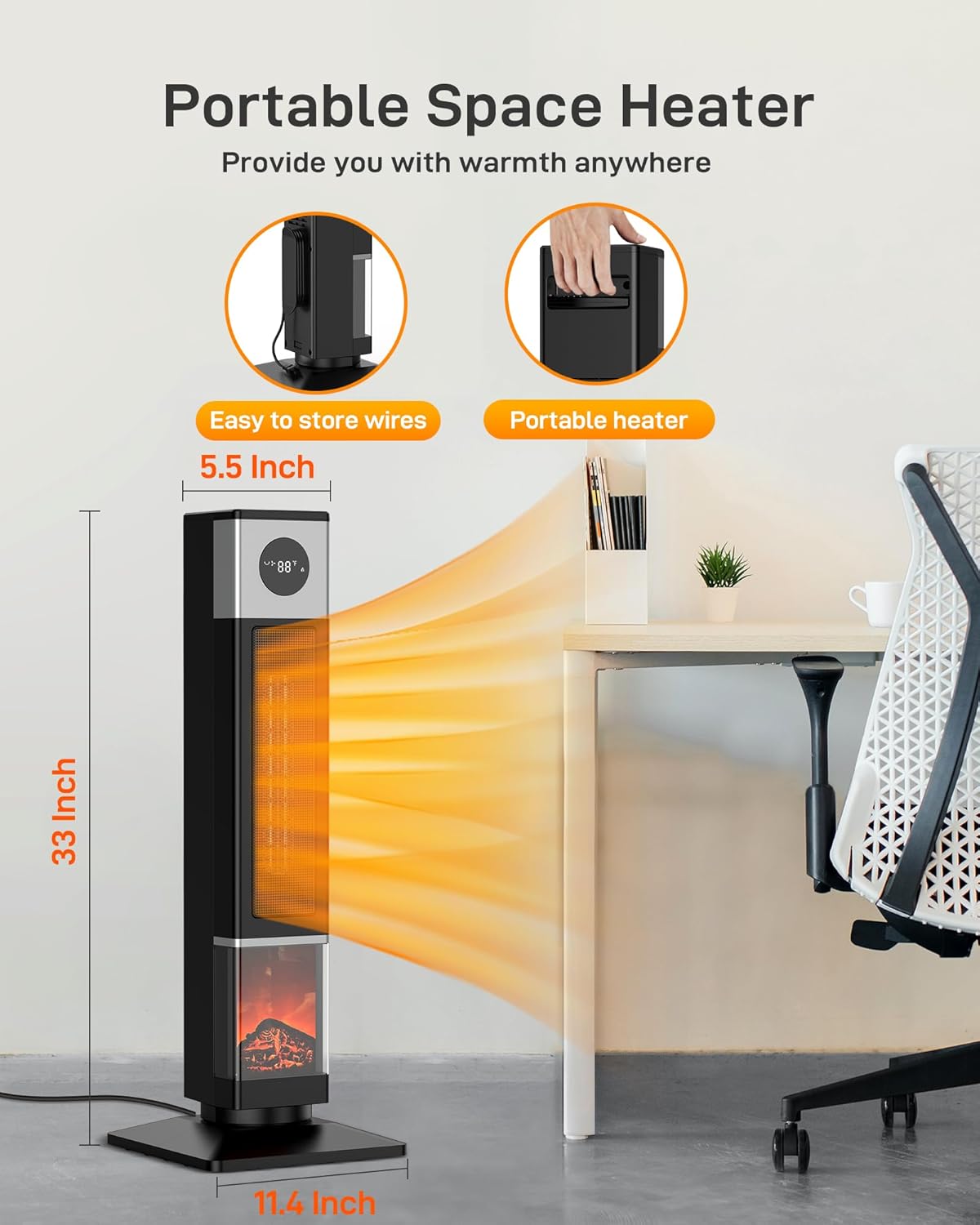
Image 3.1: The portable design of the Garvee space heater, highlighting its compact dimensions (33 inches tall) and the convenient hidden handle for easy transport.

Image 3.2: A close-up view of the integrated hidden handle, designed for comfortable and secure carrying of the heater.
4. Setup
Setting up your Garvee Space Heater is quick and easy:
- Unpack: Carefully remove the heater from its packaging. Retain packaging for storage if needed.
- Placement: Place the heater on a firm, level surface. Ensure there is at least 3 feet (0.9 meters) of clearance from any walls, furniture, curtains, or other objects to allow for proper airflow.
- Power Connection: Plug the power cord directly into a 120V AC, 60Hz wall outlet. Do not use extension cords, power strips, or surge protectors.
- Remote Control Battery: Insert the required batteries into the remote control (if not pre-installed).
5. Operating Instructions
Your Garvee Space Heater can be operated using the touch control panel on the unit or the included remote control.
Power On/Off
- Press the Power button (⏻) on the control panel or remote to turn the heater on or off.
Mode Selection
Press the Mode button (M) to cycle through the following modes:
- High Heat (1500W): Provides maximum heating power for rapid warming of large spaces.
- Low Heat (1000W): Offers a lower heat output for sustained warmth and energy saving.
- ECO Mode: The heater automatically adjusts its power output (1500W/1000W) to maintain the set temperature, optimizing energy consumption.
- Fan Only: Circulates air without heat, useful for general air circulation.

Image 5.1: The heater operating in ECO mode, demonstrating its ability to maintain warmth efficiently while reducing energy consumption, suitable for family environments.
Adjusting Temperature (Thermostat)
- In heating modes, use the Temperature Up (+) and Temperature Down (-) buttons to set your desired temperature between 50°F and 95°F (10°C and 35°C). The LED display will show the set temperature.
Oscillation Function
- Press the Oscillation button (⟳) to activate the 90-degree oscillation feature, which helps distribute heat evenly across a wider area. Press again to stop oscillation.

Image 5.2: The heater's 90-degree wide-angle oscillation feature, ensuring balanced heat distribution throughout the room for optimal comfort.
Timer Function
- Press the Timer button (◷) to set an auto-off timer from 1 to 12 hours in 1-hour increments. The heater will automatically turn off after the set time.

Image 5.3: A close-up of the heater's digital display, indicating the 12-hour timer function which can be set in 1-hour increments for scheduled operation.
3D Flame Effect
- The 3D flame effect can be turned on or off independently using the dedicated button on the control panel or remote. This feature provides an ambient glow and can serve as a night light.

Image 5.4: A detailed view of the realistic 3D flame effect, providing a cozy visual ambiance and functioning as a gentle night light.
6. Maintenance
Proper maintenance ensures the longevity and efficient operation of your Garvee Space Heater.
- Cleaning:
- Always unplug the heater and allow it to cool completely before cleaning.
- Use a soft, damp cloth to wipe the exterior surfaces. Do not use abrasive cleaners or solvents.
- Use a vacuum cleaner with a brush attachment to clean the air intake and exhaust grilles to remove dust and lint.
- Never immerse the heater in water or any other liquid.
- Storage:
- If storing the heater for an extended period, clean it thoroughly.
- Store the heater in its original packaging in a cool, dry place.
- Ensure the power cord is neatly wrapped and secured to prevent damage.
7. Troubleshooting
If you experience issues with your Garvee Space Heater, please refer to the following common problems and solutions:
| Problem | Possible Cause | Solution |
|---|---|---|
| Heater does not turn on. |
|
|
| Heater produces no heat. |
|
|
| Oscillation not working. |
|
|
| Remote control not working. |
|
|
If the problem persists after trying these solutions, please contact Garvee customer support.
8. Specifications
| Feature | Detail |
|---|---|
| Brand | Garvee |
| Model Number | SF712A |
| Type | PTC Ceramic Tower Heater |
| Heat Output | 1500W (High), 1000W (Low) |
| Voltage | 120V |
| Oscillation | 90 degrees |
| Heating Coverage | Up to 200 sq ft |
| Adjustable Thermostat | 50°F - 95°F |
| Timer | 1-12 hours |
| Special Features | 3D Flame Effect, Remote Control, Tip-Over Protection, Overheat Protection, Digital Display |
| Product Dimensions | 10.23"D x 9.44"W x 33.07"H |
| Item Weight | 10.98 pounds |
| UPC | 196336884794 |

Image 8.1: A visual comparison illustrating the 33-inch height of the Garvee heater, providing context for its size and coverage capabilities.

Image 8.2: Examples of the Garvee heater's versatility, showing its effective use in different indoor environments such as bedrooms, living rooms, and garages.
9. Warranty and Support
For any inquiries, technical support, or warranty claims, please contact Garvee customer service. We aim to provide a satisfactory response within 12 hours.
Please refer to your purchase documentation for specific warranty terms and conditions.
Contact Information:
- Refer to the contact details provided with your product packaging or on the official Garvee website.
Ask a question about this manual
Ask about setup, troubleshooting, compatibility, parts, safety, or missing instructions. Manuals+ will review the question and use this page’s manual context to help answer it.