
1. Safety Instructions
Please read all instructions carefully before installation and use. Retain this manual for future reference.
- Always disconnect power at the main circuit breaker before installing, cleaning, or servicing the fan.
- Installation should be performed by a qualified electrician in accordance with all local and national electrical codes.
- Ensure the mounting structure can support the weight of the fan.
- Do not bend the fan blades when installing or cleaning.
- Avoid placing objects in the path of the fan blades.
- Use only the remote control provided with the fan.
2. Package Contents
Carefully unpack all components and ensure all items are present before beginning installation. The package includes the fan light unit, remote control, and an accessories package.
Video: Unboxing the Dalouguan Ceiling Fan
This video demonstrates the unboxing process and shows the various components included in the package, such as the main fan unit, decorative light panels, remote control, and hardware.

Image: Dalouguan Ceiling Fan Components
A visual representation of the fan's components, including the main body, individual light panels, the remote control, and various screws and connectors for assembly.
3. Setup and Installation
Most functional parts are pre-assembled. Please refer to the included English instructions for detailed steps. Ensure power is off before starting.
Video: Dalouguan Ceiling Fan Installation Guide
This video provides a step-by-step guide on how to install the Dalouguan ceiling fan, including mounting the base, connecting wiring, and attaching the light panels.
3.1 Assembly Steps
- Prepare the Mounting Plate: Secure the mounting plate to the ceiling junction box.
- Connect Wiring: Connect the household electrical wires to the fan's wiring according to the wiring diagram in the manual. Ensure all connections are secure.
- Attach Fan Body: Mount the main fan body to the secured mounting plate.
- Install Light Panels: Attach the decorative light panels to the fan body. Ensure they are firmly in place.
- Install Fan Blades: Secure the transparent fan blades to the central motor unit.
- Final Checks: Double-check all connections and ensure the fan is securely mounted before restoring power.
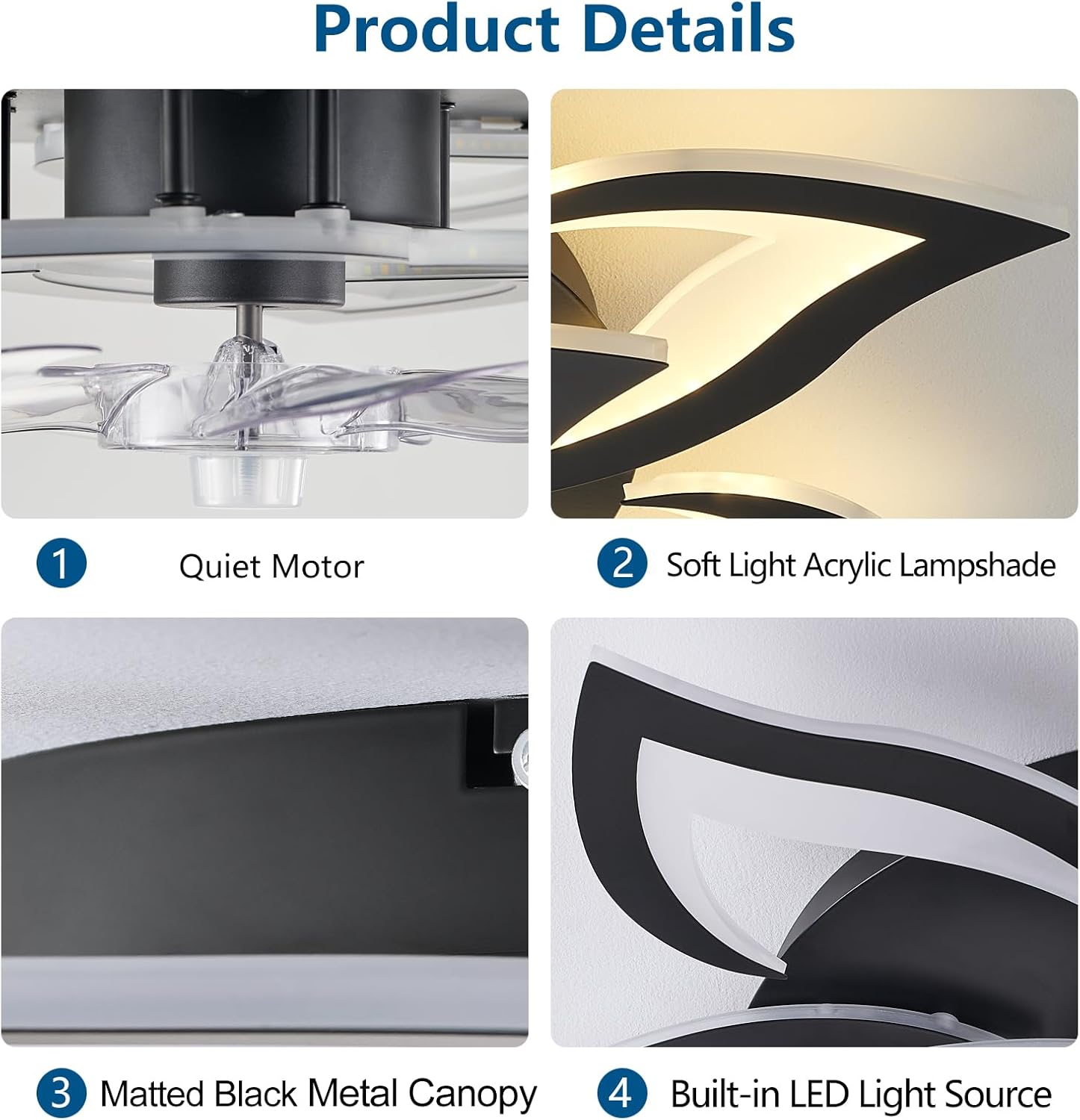
Image: Product Details for Installation
This image highlights key components like the quiet motor, soft light acrylic lampshade, matted black metal canopy, and the built-in LED light source, which are important during assembly.
4. Operating Instructions
The Dalouguan ceiling fan is controlled via the included remote. Ensure batteries are installed in the remote (not included).
Video: Modern Ceiling Fan with Lights Remote Control Demonstration
This video showcases the various functions of the ceiling fan, including changing light colors, adjusting brightness, and controlling fan speeds using the remote.
4.1 Remote Control Functions

Image: Remote Control Layout and Functions
A detailed image of the remote control, illustrating buttons for power, fan speed selection (1-6), light on/off, color temperature adjustment (K+/K-), brightness control, and 1-hour/2-hour timer settings.
- Power Button: Turns the fan and light on/off.
- Fan Speed (1-6): Select from 6 wind speeds, from low (1) to high (6).
- Light Switch: Toggles the light on/off independently of the fan.
- Color Temperature (K+/K-): Adjusts the light color between white (6000K), neutral (4000K), and warm (3000K) light.
- Brightness Adjustment: Dims or brightens the light from 5% to 100%.
- Timing Function (1H/2H): Sets the fan to automatically turn off after 1 or 2 hours.
- Forward/Reverse: Controls the direction of the fan for summer (cooling airflow) or winter (better air circulation).
4.2 Light Features
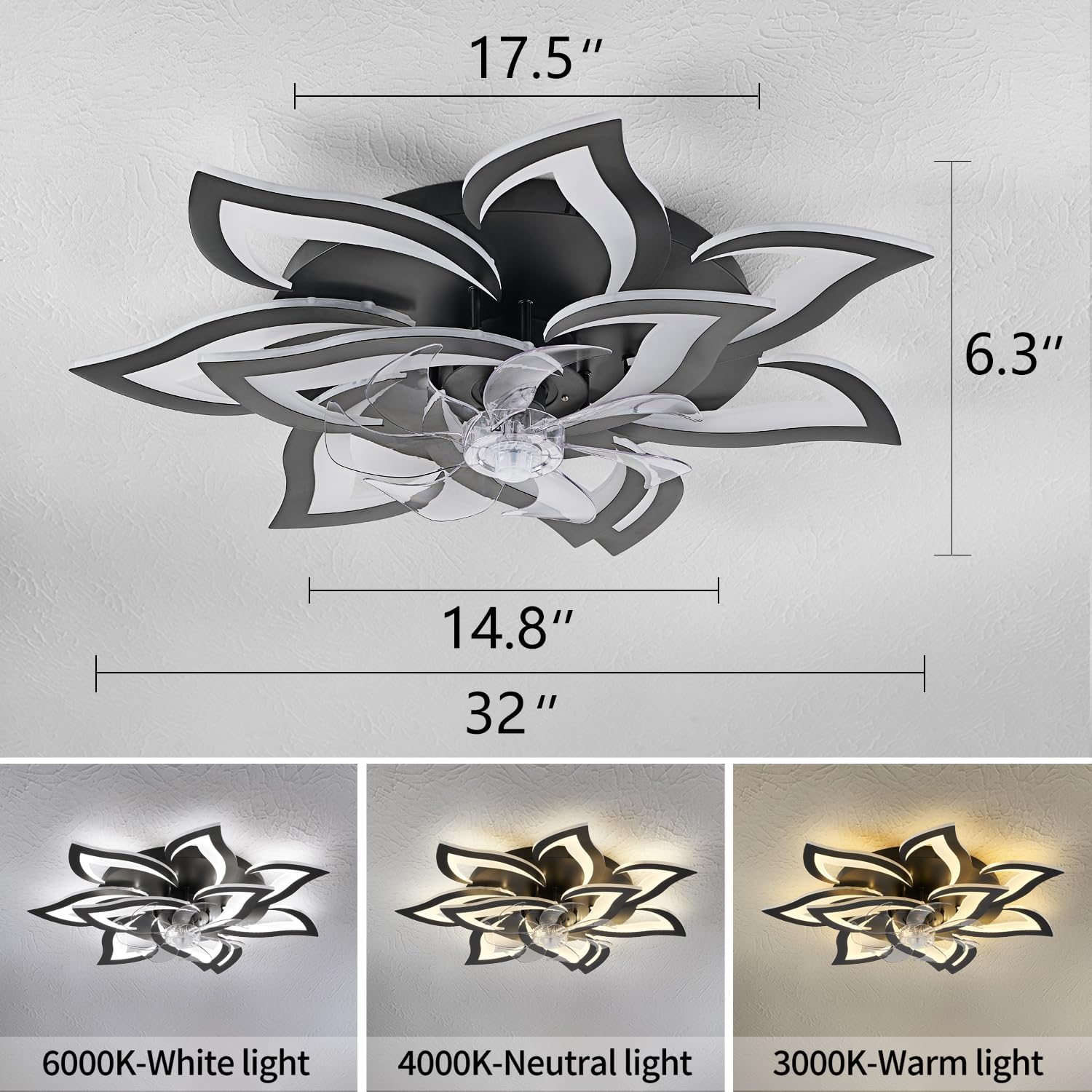
Image: Three Light Color Modes
This image displays the fan's ability to switch between three distinct light color temperatures: cool white (6000K), neutral white (4000K), and warm white (3000K).
- 3-Color Modes: Easily switch between white light, warm light, and neutral light to suit your preference.
- Dimmable Light: Adjust brightness from 5% to 100%.
- Memory Function: The fan remembers the last color temperature and brightness setting when turned off and on again via the remote control.
Video: 6 Speeds and 3 Light Colors Demonstration
This video illustrates the fan's six-speed settings and the three adjustable light color modes, showing how they can be changed to create different ambiances.
4.3 Reversible Motor

Image: Reversible Motor Function
This image visually explains the reversible motor feature, indicating how it provides cooling airflow during summer and improves air circulation in winter.
The fan features a silent pure copper reversible motor. This allows for both forward and reverse functions:
- Forward Mode: Creates a downward airflow, ideal for cooling during warmer months.
- Reverse Mode: Creates an upward airflow, circulating warm air trapped near the ceiling during colder months.
5. Maintenance
Regular maintenance ensures optimal performance and longevity of your Dalouguan ceiling fan.
- Cleaning: The semi-open design allows for easy cleaning of the fan blades. Use a soft, damp cloth to wipe down the fan and light panels. Do not use abrasive cleaners.
- Dusting: Periodically dust the fan and light fixture to prevent buildup that could affect performance or light output.
- Tighten Screws: Check all screws and connections periodically to ensure they are secure.
- No Lubrication Needed: The motor is permanently lubricated and does not require additional oiling.
6. Troubleshooting
If you experience issues with your fan, please consult the following common troubleshooting steps:
- Fan Not Operating: Check if the power is on at the circuit breaker. Ensure all wiring connections are secure. Verify remote control batteries are functional and correctly inserted.
- Light Not Working: Check power supply. Ensure the light switch on the remote is activated. If the light is dim, try increasing the brightness.
- Excessive Wobbling: Ensure the fan is securely mounted to the ceiling. Check that all screws on the light panels and fan blades are tightened.
- Remote Not Responding: Replace remote batteries. Ensure there are no obstructions between the remote and the fan.
- Noise: Ensure all screws are tight. Check for any loose parts or obstructions.
If problems persist after following these steps, please contact customer support.
7. Specifications
| Feature | Detail |
|---|---|
| Brand | Dalouguan |
| Model Name | DLG-FSD51 |
| Color | 32"-Reversible-Black |
| Product Dimensions | 32"D x 32"W x 6.3"H |
| Electric Fan Design | Ceiling Fan |
| Power Source | Corded Electric |
| Mounting Type | Flush Mount |
| Special Features | 3-Color Modes, 6 Wind Speed, Bladeless, Geometric Design, Remote Control |
| Controller Type | Remote Control |
| Number of Speeds | 6 |
| Noise Level | 30 Decibels |
| Wattage | 72 watts |
| Voltage | 110 Volts |
| Light Type | LED |
| Material | Acrylic, Metal |
| Blade Material | Plastic |
| Item Weight | 9 Pounds |
8. Warranty and Support
This Dalouguan ceiling fan comes with a 1-year warranty from the date of purchase, covering manufacturing defects.
For technical support, troubleshooting assistance, or warranty claims, please contact Dalouguan customer service through the retailer where the product was purchased or visit the official Dalouguan website for contact information.
Please have your model number (DLG-FSD51) and proof of purchase ready when contacting support.