
Introduction
This manual provides detailed instructions for the assembly, operation, and maintenance of your Gustonhon King Size Wood Platform Bed Frame. This bed frame features a sturdy wooden construction, a headboard with integrated LED lighting, two USB charging ports, and two standard plug outlets. It is designed for use without a box spring and offers ample under-bed storage space.

Figure 6: Assembled King Size Bed Frame. A complete view of the Gustonhon King Size Wood Platform Bed Frame, highlighting its design and integrated headboard features.
Safety Information
- Read All Instructions: Before assembly and use, carefully read and understand all instructions provided in this manual.
- Adult Assembly Required: Assembly should be performed by at least two adults.
- Weight Capacity: Do not exceed the maximum weight capacity of 1200 pounds.
- Proper Tools: Use only the tools specified in the assembly instructions.
- Secure Connections: Ensure all bolts, screws, and fasteners are securely tightened before use. Periodically check and re-tighten as necessary.
- Level Surface: Assemble and place the bed frame on a flat, level surface to prevent instability.
- Electrical Safety: When using the integrated charging station, ensure power cords are not pinched or damaged. Do not overload the outlets. Disconnect power before cleaning or maintenance.
- Children Safety: Keep small parts away from children during assembly. Do not allow children to play on or under the bed frame unsupervised.
- No Jumping: Do not jump on the bed frame.
Package Contents
Verify that all components are present before beginning assembly. If any parts are missing or damaged, contact customer support.
- Headboard with integrated LED lights, USB ports, and power outlets
- Side Rails (2)
- Footboard
- Center Support Beam(s)
- Wooden Slats (10 pieces)
- Support Legs (8 pieces)
- Hardware Pack (screws, bolts, washers, Allen wrench)
- Installation Manual (this document)
Assembly Instructions
This bed frame is designed for easy assembly with clearly labeled parts. It is recommended that two adults perform the assembly.
- Unpack and Identify Parts: Carefully unpack all components and lay them out on a clean, soft surface (e.g., a carpet or blanket) to prevent scratches. Identify each part using the provided labels and the parts list.
- Attach Side Rails to Headboard: Connect the side rails to the headboard using the specified bolts and an Allen wrench. Do not fully tighten bolts until all major components are assembled.
- Attach Side Rails to Footboard: Connect the other end of the side rails to the footboard. Ensure proper alignment.
- Install Center Support Beam(s): Secure the center support beam(s) to the designated points on the headboard and footboard, or to the side rails, as per the diagrams.
- Attach Support Legs: Install the 8 support legs to the center support beam(s) and/or side rails. These provide additional stability.
- Place Wooden Slats: Evenly space and secure the 10 wooden slats across the bed frame. Ensure they are firmly attached to prevent movement and provide adequate mattress support.
- Final Tightening: Once all components are in place and aligned, fully tighten all bolts and screws. Do not overtighten.
- Connect Power: Plug the power cord from the headboard into a wall outlet.
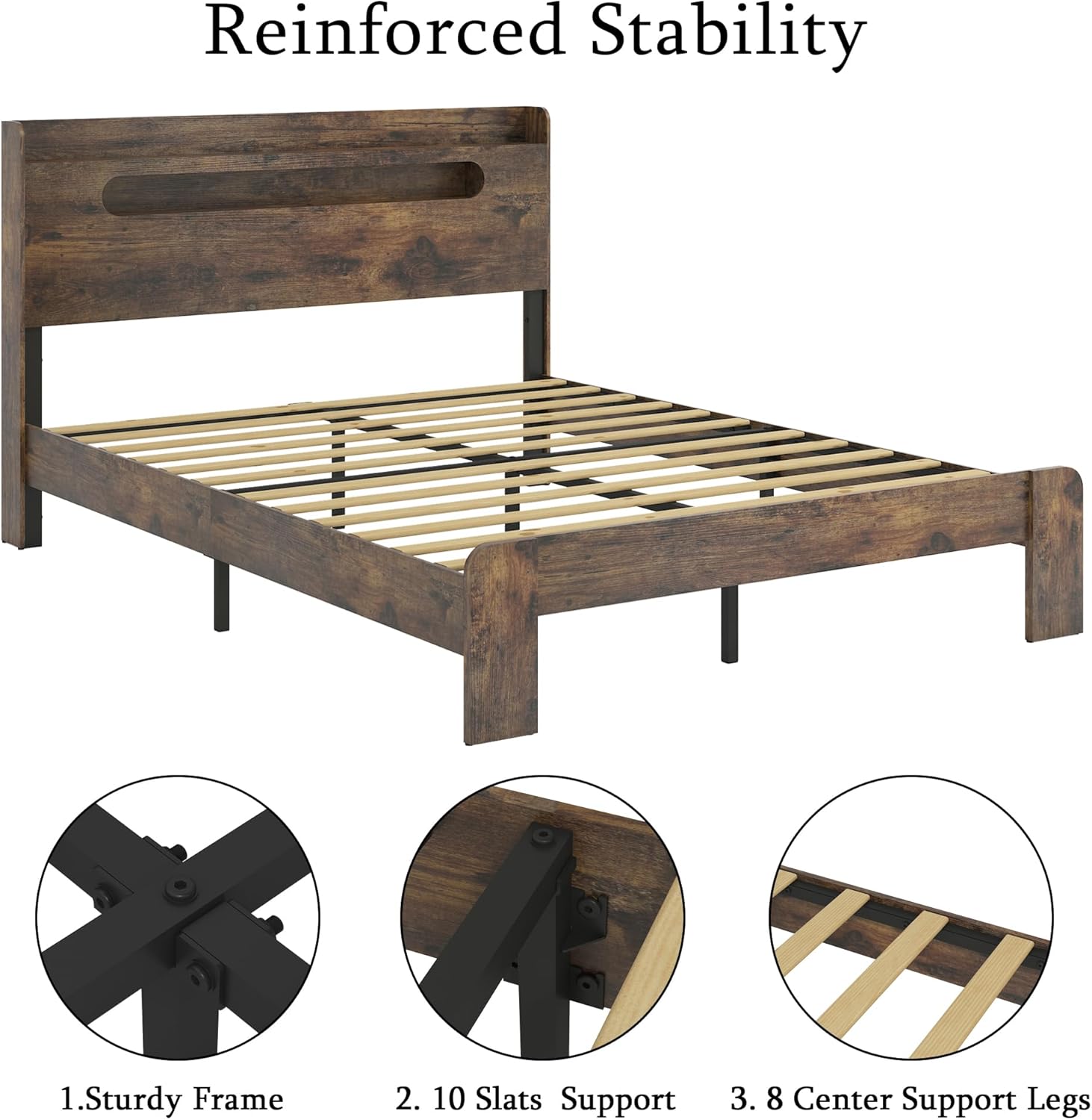
Figure 1: Reinforced Stability Components. This image shows the sturdy frame connections, the 10 wooden slats for mattress support, and the 8 center support legs that contribute to the bed frame's stability.

Figure 2: Wide and Thick Leg Design. A close-up of the bed frame's robust leg design, indicating solid wood construction for durability.
Operating Instructions
Using the Storage Headboard and Charging Station
The integrated headboard provides convenient storage space, LED lighting, and a charging station.
- LED Lights: The headboard features built-in LED lights. Locate the switch, typically on the headboard itself, to turn the lights on or off.
- USB Charging Ports: Two USB ports are available for charging mobile devices. Connect your device's USB cable to one of the ports.
- Standard Power Outlets: Two standard plug outlets are provided for powering other electronic devices.
- Power Connection: Ensure the bed frame's main power cord is securely plugged into a functional wall outlet for the LED lights and charging station to operate.

Figure 3: Headboard with Charging Station and LED Light. This image displays the functional headboard with its integrated LED lighting, USB charging ports, and space for small items.
Maintenance
- Cleaning: Wipe the bed frame with a soft, damp cloth. Avoid harsh chemicals or abrasive cleaners that may damage the finish.
- Dusting: Regularly dust the headboard and frame to prevent buildup.
- Check Connections: Periodically inspect all bolts and screws to ensure they remain tight. Re-tighten if necessary to maintain stability and prevent squeaking.
- Electrical Components: Ensure the power cord and electrical components of the charging station are free from damage. Do not attempt to repair electrical components yourself.
Troubleshooting
- Squeaking Noises:
- Ensure all assembly bolts and screws are fully tightened.
- Check that the wooden slats are properly seated and secured.
- Verify the bed frame is on a level surface.
- LED Lights Not Working:
- Check if the power cord is securely plugged into a functional wall outlet.
- Ensure the LED light switch on the headboard is in the "on" position.
- Inspect the power cord for any visible damage.
- USB Ports/Outlets Not Charging:
- Confirm the bed frame's power cord is plugged in and the wall outlet is active.
- Test with a different device or charging cable to rule out device-specific issues.
- Avoid overloading the outlets.
- Assembly Difficulties:
- Refer back to the assembly instructions and diagrams.
- Ensure all parts are correctly oriented before tightening.
- If a part seems stuck, do not force it. Recheck the instructions.
Specifications
| Feature | Detail |
|---|---|
| Brand | Gustonhon |
| Model Number | All wooden platform bed frame |
| Size | King |
| Product Dimensions (L x W x H) | 85.12"L x 75.98"W x 40.94"H |
| Assembled Length | 86.69 inches |
| Assembled Width | 78.34 inches |
| Assembled Height | 40.16 inches |
| Item Weight | 76 pounds |
| Maximum Weight Capacity | 1200 Pounds |
| Material | Engineered Wood, Metal |
| Color | Dark Brown |
| Headboard Features | Storage shelf, LED Light, 2 USB Charging Ports, 2 Standard Plug Outlets |
| Under-Bed Clearance | 6.3" - 8.5" |
| Box Spring Required | No |
| Assembly Required | Yes |
| UPC | 756158225733 |

Figure 4: Product Dimensions. This diagram provides detailed measurements for the King size bed frame, including overall length, width, height, and under-bed clearance.
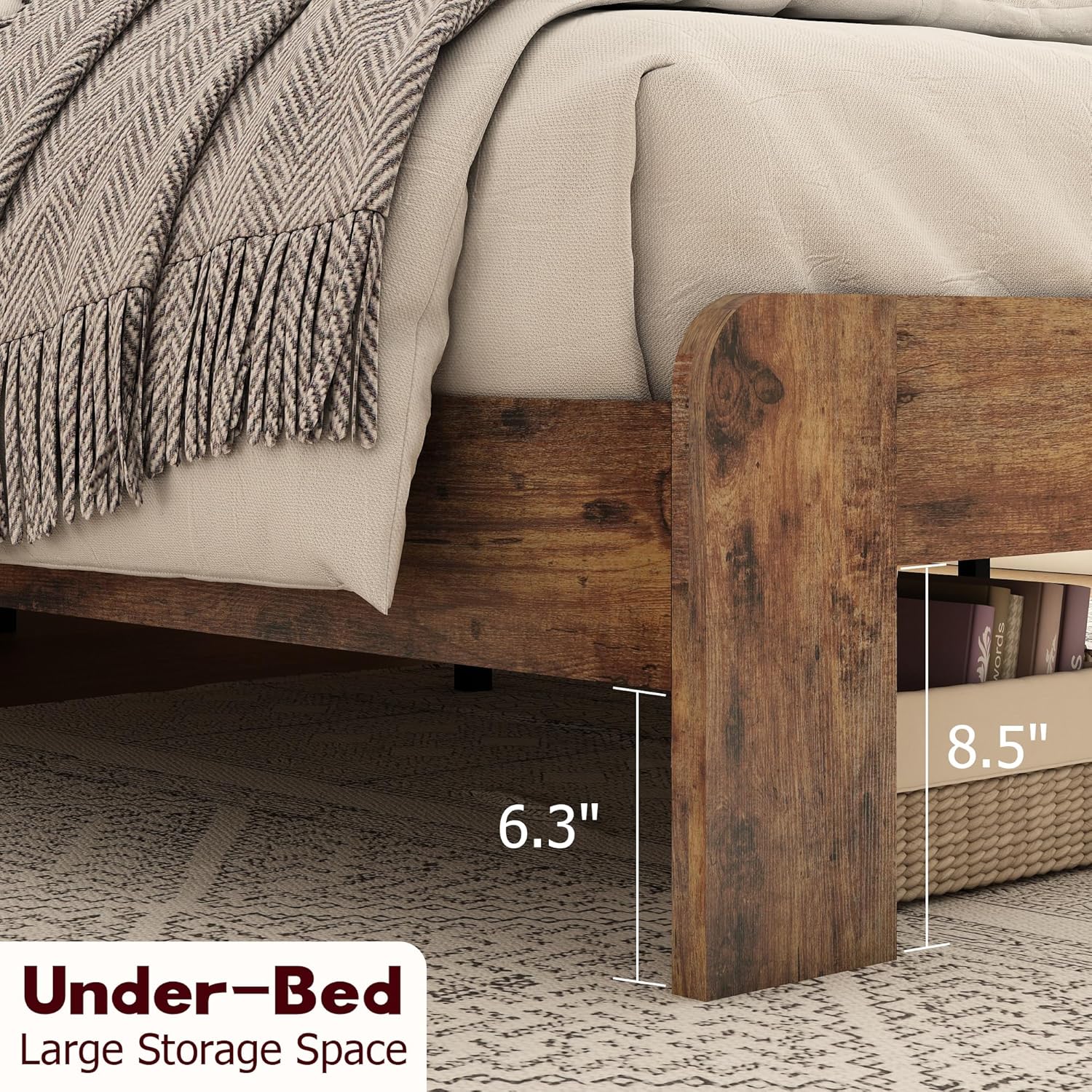
Figure 5: Under-Bed Storage Space. This image illustrates the available space beneath the bed frame, ranging from 6.3 to 8.5 inches, suitable for additional storage.
Warranty Information
Specific warranty details are not provided in this manual. Please refer to your purchase documentation or contact the retailer/manufacturer for information regarding warranty coverage and terms.
Customer Support
For assistance with assembly, missing parts, or any other inquiries, please contact Gustonhon customer support through your original point of purchase or the contact information provided with your order.