1. Product Overview
The Malibu ML200RT is a 200-watt low voltage safety transformer designed to convert standard 120-volt AC household current to a safe 12-volt AC power supply. This unit is specifically engineered for outdoor garden lights and pool/spa lighting systems. It features an integrated 24-hour plug-in timer module, allowing for automated daily on/off programming of your lighting system. The transformer is housed in a durable, weather-resistant black plastic casing and includes two trippers for timer customization, along with a 2-foot power cord.
Key Features:
- 200-Watt Power Output: Provides ample power for various low voltage lighting setups.
- Programmable Timer: Includes a 24-hour plug-in timer module with two sets of trippers for precise on/off scheduling.
- Voltage Conversion: Safely converts 120-volt AC to 12-volt AC power.
- Manual Override: Features a switch for manual control, bypassing the timer settings when needed.
- Weather-Resistant Housing: Durable black plastic housing protects internal components from outdoor elements.
2. Safety Information
WARNING: Failure to follow these instructions could result in electric shock, fire, or serious injury.
- Read all instructions thoroughly before installing or operating this transformer.
- This transformer is designed for outdoor use only. Do not install indoors.
- Always connect the transformer to a Ground Fault Circuit Interrupter (GFCI) protected outlet.
- Do not immerse the transformer in water or place it in areas where it may be submerged.
- Ensure the transformer is mounted securely to a wall or other stable surface using appropriate hardware.
- Disconnect power at the circuit breaker or unplug the transformer from the outlet before performing any installation, maintenance, or troubleshooting.
- Do not overload the transformer. Ensure the total wattage of connected lights does not exceed 200 watts.
- Keep children and pets away from the transformer during operation.
- Do not attempt to open or repair the transformer. Refer all servicing to qualified personnel.
3. Package Contents
Upon opening the package, verify that all components are present and undamaged:
- Malibu ML200RT Low Voltage Lighting Transformer / Power Pack
- Two (2) sets of trippers for timer programming
4. Setup and Installation
4.1 Choosing a Location:
Select a suitable outdoor location for mounting the transformer. The location should be:
- Near a 120V AC GFCI-protected outdoor electrical outlet.
- In a relatively sheltered area to minimize direct exposure to extreme weather, though the unit is weather-resistant.
- Within reach of your low voltage lighting cables.
- At least 1 foot (30 cm) above ground level.
4.2 Mounting the Transformer:
The ML200RT is designed for wall mounting. Use appropriate screws and anchors (not included) suitable for your mounting surface (e.g., wood, masonry). Ensure the transformer is securely fastened and level.

Figure 1: Side view of the ML200RT transformer, illustrating its weather-resistant black housing suitable for wall mounting.
4.3 Connecting Low Voltage Cables:
After mounting, connect your low voltage landscape lighting cables to the transformer's output terminals. Ensure all connections are tight and secure to prevent power loss or short circuits. Refer to your lighting fixture's instructions for specific wiring requirements.
5. Operating Instructions
5.1 Setting the 24-Hour Timer:
The ML200RT features a mechanical 24-hour timer dial. To set the timer:
- Open the Cover: Lift the protective cover on the front of the transformer to access the timer dial.
- Set Current Time: Rotate the inner dial clockwise until the current time aligns with the "TIME OF DAY" arrow. Ensure you distinguish between AM and PM hours (e.g., 3 PM is 15 on the dial).
- Insert ON/OFF Trippers: The transformer comes with two sets of trippers (pins). Insert the "ON" tripper (typically green or a specific color) into the dial at the desired time you want your lights to turn on. Insert the "OFF" tripper (typically red or another specific color) at the desired time for your lights to turn off. You can set multiple ON/OFF cycles per day using additional trippers if needed.
- Close the Cover: Once settings are complete, close the protective cover to shield the timer from elements.
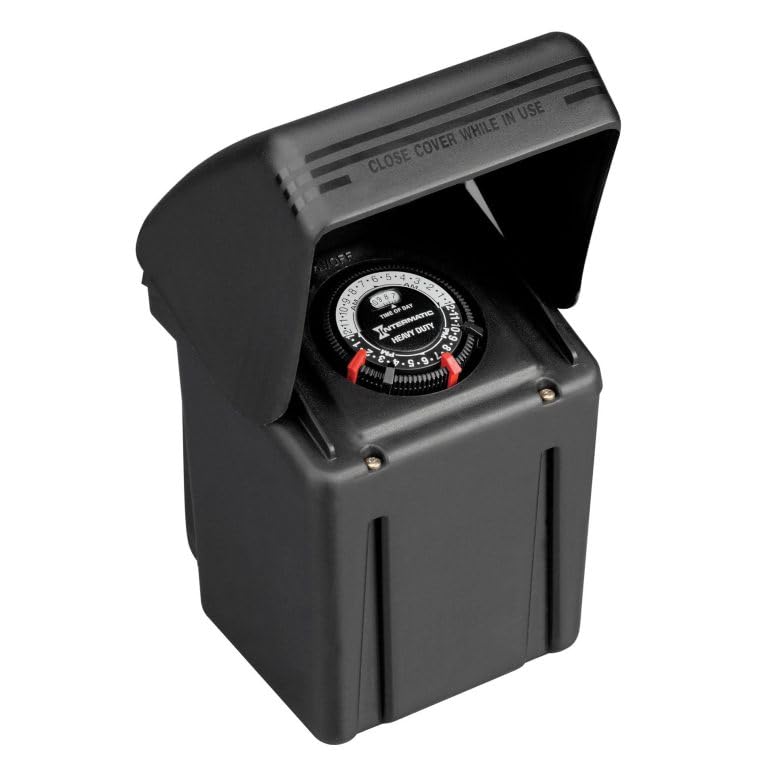
Figure 2: The ML200RT with its cover open, showing the central timer dial and the slots for inserting ON/OFF trippers.

Figure 3: A detailed view of the timer dial, highlighting the time markings and the mechanism for tripper insertion.
5.2 Using the Manual Override Switch:
The transformer includes a manual override switch, typically located near the timer dial. This switch allows you to turn the lights on or off independently of the programmed timer settings. Use this feature for temporary control without altering your daily schedule.
6. Maintenance
Regular maintenance helps ensure the longevity and optimal performance of your Malibu ML200RT transformer.
- Cleaning: Periodically wipe the exterior of the transformer with a damp cloth to remove dirt and debris. Do not use abrasive cleaners or solvents.
- Inspection: Annually inspect the power cord, low voltage cables, and connections for any signs of damage, fraying, or corrosion. Replace damaged components immediately.
- Ventilation: Ensure that the transformer's ventilation openings are not blocked by leaves, dirt, or other obstructions to prevent overheating.
- Winterization: In areas with harsh winters, consider unplugging and storing the transformer indoors during the coldest months to extend its lifespan, although it is designed to be weather-resistant.
7. Troubleshooting
If you encounter issues with your ML200RT transformer, refer to the following common problems and solutions:
| Problem | Possible Cause | Solution |
|---|---|---|
| Lights are not turning on. |
|
|
| Lights are always on or always off. |
|
|
| Transformer hums loudly. |
|
|
8. Specifications
| Attribute | Detail |
|---|---|
| Model Number | ML200RT |
| Power Output | 200 Watts |
| Input Voltage | 120V AC |
| Output Voltage | 12V AC |
| Power Source | Corded Electric |
| Mounting Type | Wall Mount |
| Item Weight | 7 Pounds |
| Certifications | UL Listed |
| Manufacturer | Malibu |
9. Warranty and Support
For warranty information, technical support, or to inquire about replacement parts, please contact the manufacturer, Malibu, directly. Refer to the product packaging or the manufacturer's official website for the most current contact details and warranty terms.


